
Swann SWNVK-500KH2-AU
Manual del usuario del sistema de seguridad NVR con Wi-Fi Swann NVW-800
Model: SWNVK-500KH2-AU
1. Introducción
The Swann NVW-800 4-channel Wi-Fi NVR security system with two NVW-500CAM 1080p Wi-Fi IP cameras offers a robust solution for monitoring your home or business. This kit includes a 1TB hard drive for local storage and features advanced capabilities such as True Detect heat and motion detection, color night vision, and remote viewing via the Swann Security App. This manual will guide you through the installation, operation, and maintenance of your new security system.

Figure 1: Swann NVW-800 NVR with two NVW-500CAM Wi-Fi Cameras.
2. Configuración
2.1 Desempaquetado y componentes
Before beginning installation, ensure all components are present. The kit typically includes the NVW-800 NVR, two NVW-500CAM Wi-Fi cameras, power adapters for the NVR and cameras, an Ethernet cable, a USB mouse, mounting screws and plugs, and security stickers.

Figure 2: Included components of the Swann NVW-800 security system.
2.2 cámara encimaview
Familiarize yourself with the camera's features before mounting.
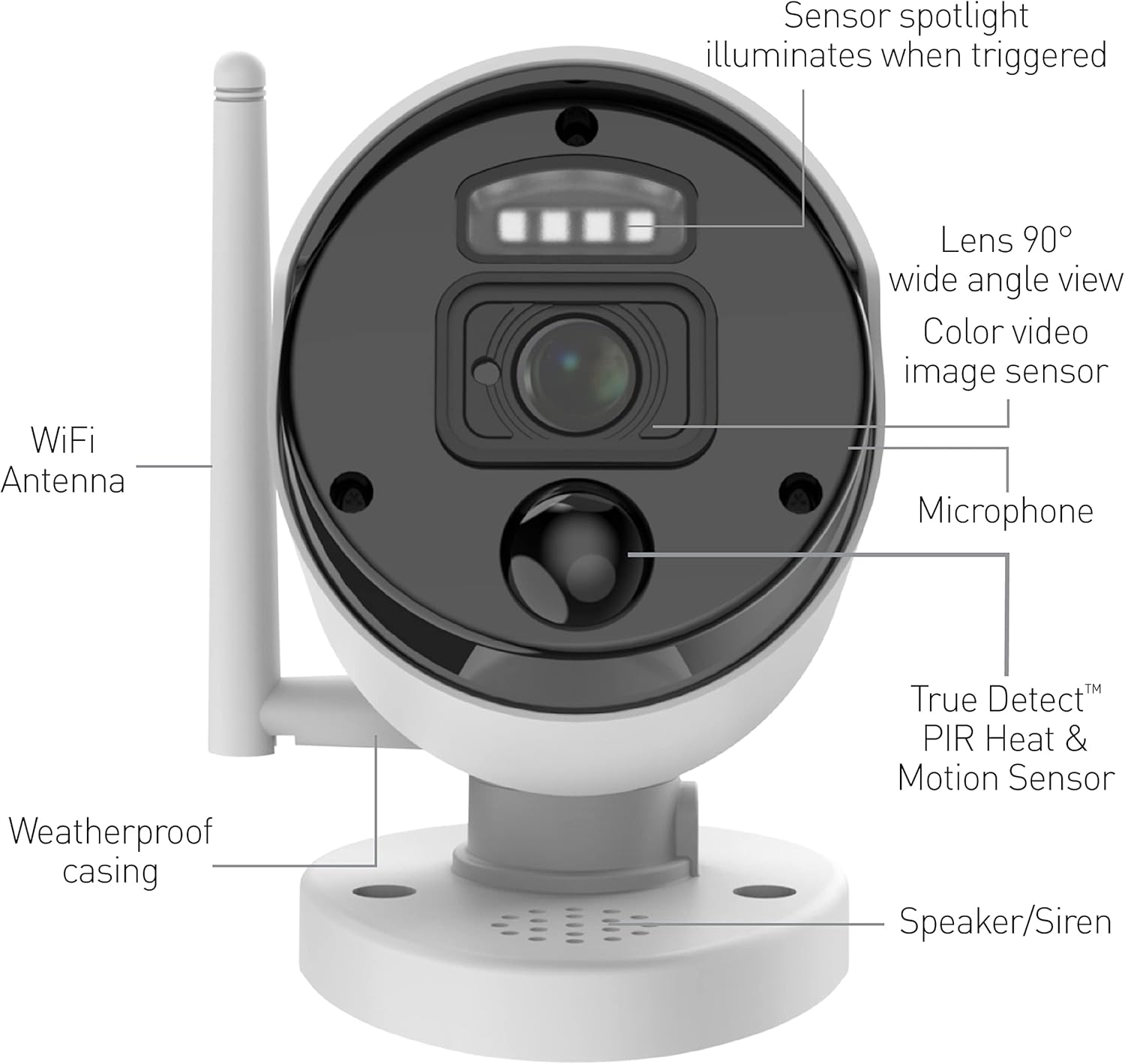
Figure 3: NVW-500CAM Camera Components: Sensor spotlight, 90° wide angle lens, color video image sensor, microphone, True Detect™ PIR Heat & Motion Sensor, weatherproof casing, WiFi Antenna, and Speaker/Siren.
2.3 Instalación inalámbrica
The cameras connect wirelessly to the NVR, simplifying installation. Simply plug the cameras into power outlets within range of the NVR. The NVR itself connects to your network via an Ethernet cable.
Video 1: Official Swann overview of the 1080P HD Wi-Fi NVR Security System, demonstrating easy wireless setup and key features.
The system utilizes SwannNet™ Wi-Fi Connection technology to ensure a reliable wireless connection between the cameras and the NVR, optimizing signal strength for consistent video transmission.
2.4 Montaje de las cámaras
The cameras are designed for both indoor and outdoor use, featuring an IP66 weatherproof rating. Choose a mounting location that provides the desired viewing angle and is within Wi-Fi range of the NVR. Use the provided screws and wall plugs to securely mount the cameras.
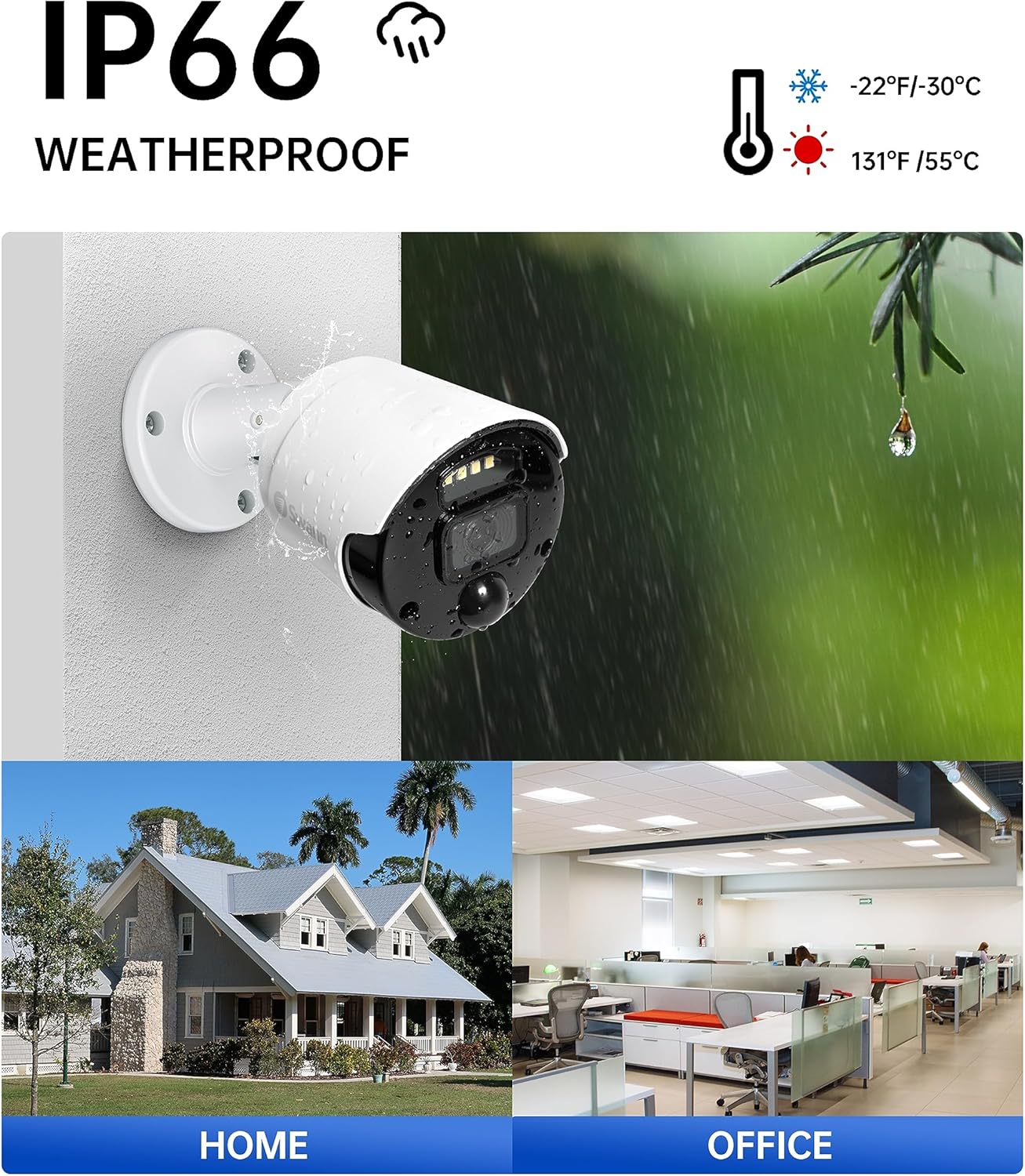
Figure 4: The NVW-500CAM camera is IP66 weatherproof, suitable for various environments including home and office, and can withstand temperatures from -22°F/-30°C to 131°F/55°C.
3. Operar el sistema
3.1 Remoto Viewing with Swann Security App
Download the Swann Security App to your smartphone (iOS or Android) to view live or recorded video from anywhere in the world. The app provides push notifications for motion alerts, allowing you to stay informed about activity.

Figure 5: The Swann Security App offers live streaming, push notifications, and customizable controls for complete security management.
3.2 Capacidades de visión nocturna
The NVW-500CAM cameras feature two types of night vision:
- Night2Day™ Color Night Vision: With built-in spotlights, the cameras can provide color video at night up to 32ft (10m), illuminating the area for clearer identification.
- Visión nocturna infrarroja: For total darkness, the cameras can switch to infrared mode, providing black and white video up to 100ft (30m) without the need for visible light.

Figure 6: 'Turn Night Into Day' feature demonstrating color night vision with the spotlight on versus standard black and white night vision.
3.3 True Detect™ Heat & Motion Detection
Swann's True Detect™ technology uses PIR (Passive Infrared) sensors to detect heat from large objects like people and cars, minimizing false alarms triggered by wind, rain, or small animals. When motion and heat are detected, the system records and sends push notifications to your smartphone.

Figure 7: True Detect™ PIR Heat & Motion Detection accurately identifies people and cars, reducing false alerts.
3.4 Two-Way Audio and Sirens
The cameras are equipped with a built-in microphone and speaker, enabling two-way audio communication. You can listen to what's happening and speak back through the camera using the Swann Security App. The integrated siren can be activated remotely to deter intruders.
3.5 Voice Control (Speak to See)
Integrate your Swann system with Hey Google or Alexa devices for hands-free voice control. You can use voice commands to view camera feeds on compatible smart TVs or displays.
4. Mantenimiento
4.1 Grabación y almacenamiento
The NVR comes with a pre-installed 1TB hard drive, providing up to 365 days of local recording without subscription fees. For off-site backup, you can link your system to a Dropbox account, making it easy to retain important video evidence.
4.2 Limpieza y cuidado
Regularly inspect and clean your cameras and NVR to ensure optimal performance. Use a soft, damp cloth to wipe down the camera lenses and housing. Avoid using harsh chemicals or abrasive materials. Ensure the NVR is kept in a well-ventilated area, free from dust and moisture.
5. Solución de problemas
If you encounter issues with your Swann security system, consider the following common troubleshooting steps:
- Sin cámaras de vídeo/fuera de línea: Check power connections for both the NVR and cameras. Verify Wi-Fi signal strength and ensure the NVR is connected to your network. Restart the NVR and cameras.
- Mala calidad de vídeo: Ensure camera lenses are clean. Check for obstructions in the camera's field of view. Verify Wi-Fi signal strength to the cameras.
- Alertas de movimiento falso: Adjust the sensitivity settings for motion detection in the Swann Security App. Utilize the True Detect™ feature to filter out non-heat-generating movements.
- Problemas de conectividad de aplicaciones: Ensure your smartphone has a stable internet connection. Update the Swann Security App to the latest version. Restart your smartphone.
For more detailed troubleshooting guides and support, please visit the official Swann support websitio.
6. Especificaciones
| Característica | Especificación |
|---|---|
| Marca | Cisne |
| Número de modelo | SWNVK-500KH2-AU |
| Tecnología de conectividad | Inalámbrico |
| Resolución de captura de video | 1080p Full HD |
| Características especiales | Wireless, Night Vision (Color & Infrared), Motion Detection, Two-Way Audio |
| Número de canales | 4 (NVR supports up to 8) |
| Capacidad de almacenamiento de memoria | Disco duro de 1 TB (preinstalado) |
| Fuente de poder | Eléctrico con cable |
| Dimensiones del artículo (largo x ancho x alto) | 5.7 x 2.8 x 2.8 pulgadas (cámara) |
| Compatibilidad del sistema operativo | iOS, Android |
| Clasificación a prueba de intemperie | IP66 |
7. Garantía y soporte
This Swann product comes with a 1-Year Limited Warranty. For detailed warranty information, product registration, and technical support, please visit the official Swann websitio o contacte con su servicio de atención al cliente. También puede encontrar recursos adicionales y preguntas frecuentes en Swann Store on Amazon.
Documentos relacionados - SWNVK-500KH2-AU
 |
Tabla de compatibilidad de cámaras y grabadoras Swann - Abril de 2025 Tabla completa de compatibilidad de cámaras de seguridad Swann, incluyendo modelos HD analógicos, NVR HD digitales, NVR HD Wi-Fi y HaLow Wi-Fi, con diversos sistemas DVR, NVR con cable y NVR Wi-Fi. Esta guía, actualizada en abril de 2025, detalla qué cámaras y accesorios Swann son compatibles con modelos específicos de DVR y NVR Swann, incluyendo información sobre las actualizaciones de firmware necesarias. |
 |
Swann AllSecure4K, AllSecure600/650 Wireless Security Kit Instruction Manual Comprehensive instruction manual for Swann's AllSecure4K, AllSecure600, and AllSecure650 Wireless Security Kits, covering setup, configuration, operation, and troubleshooting. |
 |
Manual de instrucciones de la cámara de seguridad NVR con Wi-Fi Swann NVW-800CAMT Manual de instrucciones de la cámara de seguridad NVR Wi-Fi Swann, modelo NVW-800CAMT. Ofrece información sobre la introducción, la conexión, el emparejamiento y el montaje de la cámara, además de declaraciones de la FCC y la IC, e información sobre la garantía. |
 |
Guía de inicio rápido de la grabadora de vídeo en red inalámbrica Swann NVW-800 Esta guía proporciona instrucciones paso a paso para configurar su grabadora de video en red inalámbrica Swann NVW-800, incluida la selección de idioma, la configuración de la contraseña, la conexión Wi-Fi, la configuración del correo electrónico y la sincronización de la hora. |
 |
Guía de instalación del hardware del NVR Swann Guía paso a paso para la instalación del hardware de los sistemas de seguridad NVR Swann, que abarca conexiones, puertos, LED y configuración inicial. Incluye información sobre seguridad y cumplimiento de la FCC. |
 |
Manual de instrucciones de la cámara de seguridad Swann Wi-Fi a batería Manual de instrucciones de la cámara de seguridad Swann Wi-Fi con batería, que detalla la configuración, la carga, el emparejamiento, el montaje y consejos de ubicación para un rendimiento óptimo. Incluye video HD 2K, batería, foco, sirena y audio bidireccional. |
Ask a question about this manual
Ask about setup, troubleshooting, compatibility, parts, safety, or missing instructions. Manuals+ will review the question and use this page’s manual context to help answer it.