
Bmax B2 Plus
Manual de instrucciones de la mini PC Bmax B2 Plus
Model: B2 Plus (N4120)
1. Introducción
This manual provides essential information for setting up, operating, and maintaining your Bmax B2 Plus Mini PC. Please read it thoroughly before using the device to ensure optimal performance and longevity.

Image: Bmax B2 Plus Mini PC showcasing its compact size (4.9 x 4.4 x 1.7 inches) and core specifications including Intel Gemini Lake N4120 processor, Intel UHD Graphics 600, Windows 10 Pro, 8GB DDR4 RAM, and 128GB SSD.
2. Contenido del paquete
Verifique que todos los artículos estén presentes en el paquete:
- Bmax B2 Plus Mini PC
- Cable de alimentación
- Adaptador de corriente
- Cable HDMI
- Soporte metalico
- Tornillos
- Guía del usuario
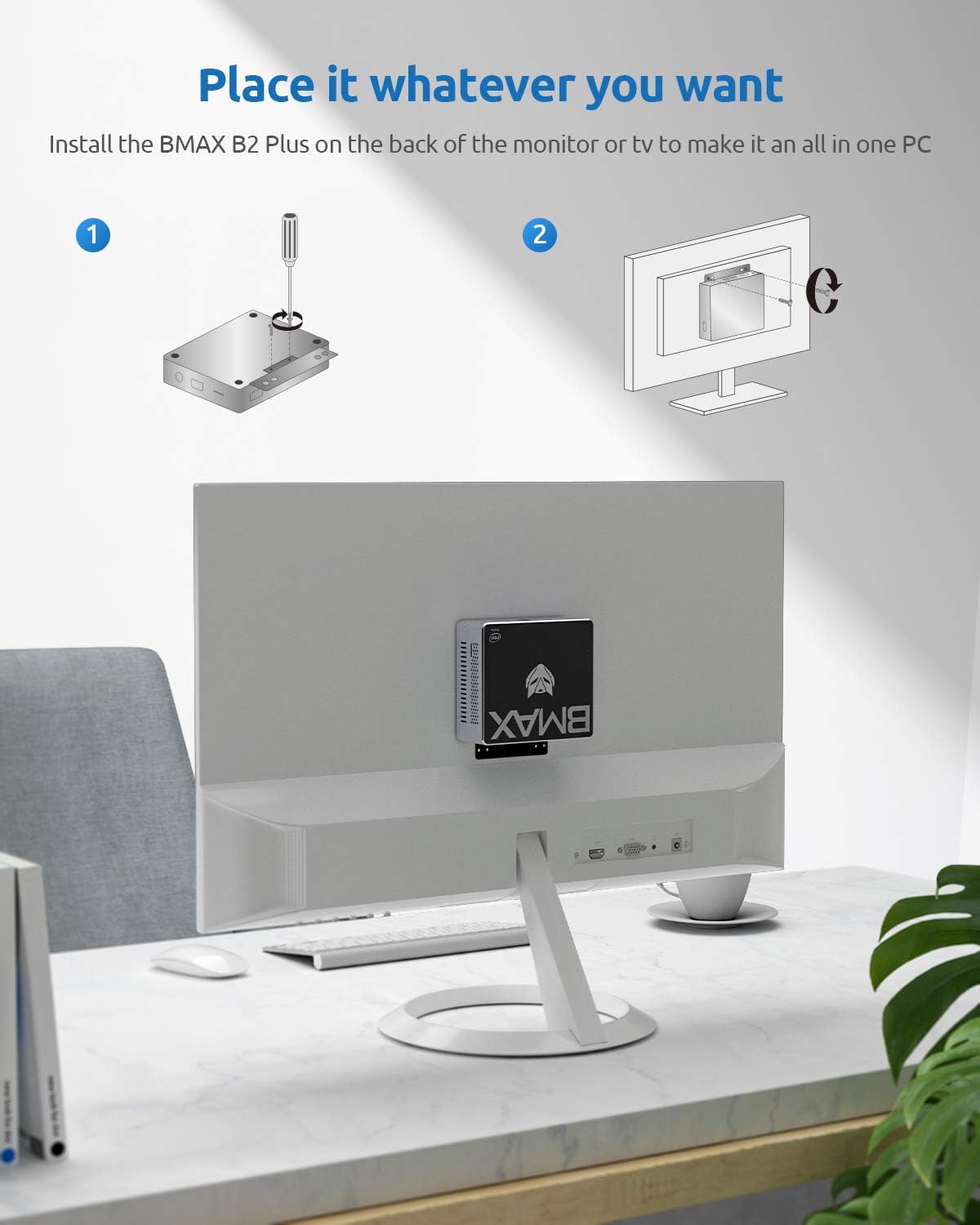
Image: All components included in the Bmax B2 Plus Mini PC package, including the mini PC, power adapter, HDMI cable, metal bracket, screws, and user guide.
Video: An unboxing video demonstrating the contents of the Bmax B2 Plus Mini PC package.
3. Producto terminadoview
Front and Rear Ports
The Bmax B2 Plus Mini PC features a variety of ports for connectivity:
- Frente: 2x USB 3.0, 1x USB Type-C, 1x 3.5mm Headset Jack, Power Button, Reset Hole
- Trasero: 2x HDMI, 2x USB 2.0, 1x Gigabit Ethernet, 1x DC Power Input

Image: A detailed diagram illustrating the location and type of ports on the front and rear of the Bmax B2 Plus Mini PC.
4. Configuración
4.1 Configuración inicial de Windows 10
Upon first boot, you will be guided through the Windows 10 setup process. Follow the on-screen prompts to select your language, region, keyboard layout, and create a user account.
Video: A guide on the initial Windows 10 setup process, including language selection and account creation.
4.2 Conexión a una fuente de alimentación
Connect the provided power adapter to the DC power input port on the rear of the Mini PC, then plug it into a wall outlet.
4.3 Connecting Displays (Triple Display Support)
The Bmax B2 Plus supports up to three displays simultaneously via its two HDMI ports and one Type-C port. This allows for extended desktop environments, enhancing productivity.

Image: Illustration of the Bmax B2 Plus Mini PC connected to three monitors, demonstrating its triple display capability for various uses like work, home theater, and education.
Video: A demonstration of how to set up and operate the Bmax B2 Plus Mini PC with a three-screen display configuration.
4.4 Mounting the Mini PC
The Bmax B2 Plus can be mounted on the back of a monitor or TV using the included metal bracket and screws, creating an all-in-one PC setup.

Image: Step-by-step illustration of installing the Bmax B2 Plus Mini PC onto the back of a monitor using a VESA mount.
5. Operando
The Bmax B2 Plus Mini PC is powered by an N4120 4-Core processor and 8GB LPDDR4 RAM, providing efficient performance for daily tasks such as web browsing, office applications, and home learning. Its compact design and effective heat dissipation ensure quiet operation.
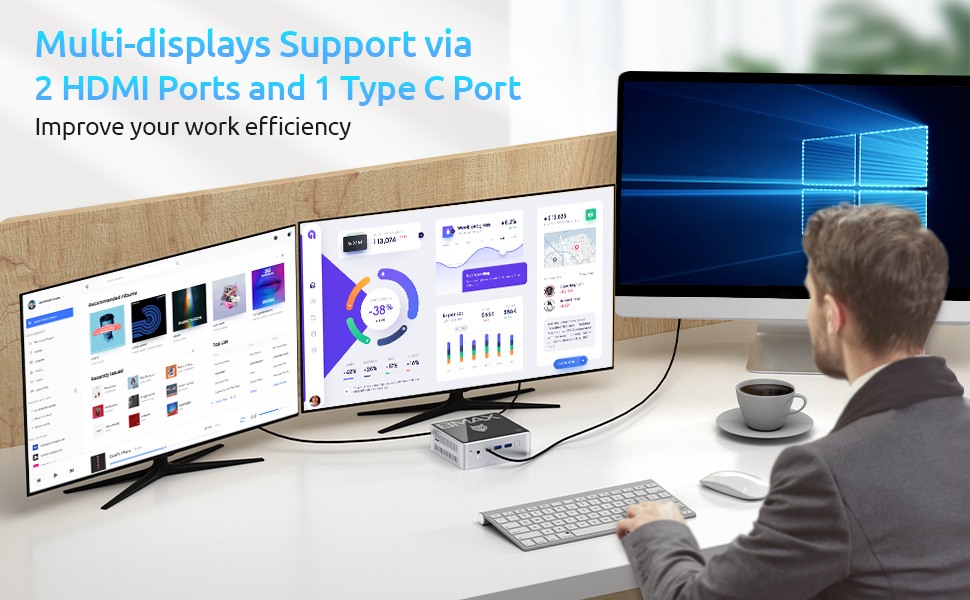
Image: The Bmax B2 Plus Mini PC demonstrating its capability to handle various office and creative software applications.
6. Mantenimiento
6.1 Expansión del almacenamiento
The Mini PC offers flexible storage expansion options. It includes an empty expansion bay for adding an M.2 NVMe 2280 SSD (up to 4TB) or a 2.5-inch HDD/SSD. You can also expand storage using a Micro SD card (up to 512GB).

Image: A visual guide demonstrating how to expand storage in the Bmax B2 Plus Mini PC by installing an M.2 SATA/NVMe 2280 SSD or a 2.5-inch HDD.
Video: A step-by-step guide on how to install an SSD on the Bmax B2 Plus Mini PC.
6.2 Reinstalling Windows 10
If you need to reinstall Windows 10 on your Mini PC, follow the instructions in the video below. This process typically involves creating a bootable USB drive with the Windows installation media.
Video: A detailed tutorial on how to reinstall Windows 10 on the Bmax Mini PC.
7. Solución de problemas
If you encounter any issues with your Bmax B2 Plus Mini PC, consider the following general troubleshooting steps:
- Sin energía: Asegúrese de que el adaptador de corriente esté conectado de forma segura tanto a la mini PC como a una toma de corriente que funcione.
- Sin pantalla: Check all HDMI/Type-C cable connections to your monitor(s). Try a different cable or monitor if possible.
- Rendimiento lento: Close unnecessary applications, check for background updates, or consider upgrading storage (refer to Section 6.1).
- Problemas del sistema operativo: If Windows is not booting correctly or is unstable, a reinstallation might be necessary (refer to Section 6.2).
For further assistance, please contact Bmax customer support.
8. Especificaciones
| Característica | Detalle |
|---|---|
| Procesador | Intel Celeron N4120 (hasta 2.6 GHz) |
| RAM | 8 GB LPDDR4 |
| Almacenamiento | 128 GB SSD (Expandable with M.2 NVMe 2280 SSD up to 4TB or 2.5" HDD/SSD, Micro SD up to 512GB) |
| Gráficos | Intel 9th Gen UHD Graphics 600 |
| Sistema operativo | Windows 10 Pro |
| Salida de pantalla | 2x HDMI 2.0, 1x Type-C (Supports 4K 60Hz, Triple Display) |
| Conectividad | Dual-Band Wi-Fi (802.11ac), Gigabit Ethernet, Bluetooth 4.2 |
| Puertos | 2x USB 3.0, 2x USB 2.0, 1x Type-C, 1x TF (Micro SD) Card Reader, 1x 3.5mm Headset Jack |
| Dimensiones | 4.92 x 4.41 x 1.69 pulgadas |
| Peso | 10.9 onzas |
9. Garantía y soporte
The Bmax B2 Plus Mini PC comes with a 12-month warranty and lifetime technical support. For any product issues or technical assistance, please contact Bmax customer support. They aim to reply within 24 hours on business days.