
Introducción
Welcome to the user manual for your new vivo T3 5G smartphone. This guide provides essential information on setting up, operating, maintaining, and troubleshooting your device. The vivo T3 5G is designed for speed and innovation, featuring a MediaTek Dimensity 7200 chip, a Sony IMX882 OIS sensor for clear photography, a 16.94 cm (6.67 inch) 120 Hz Ultra Vision AMOLED display, dual stereo speakers, and a 5000 mAh battery with 44 W FlashCharge. It supports ultra-stable 4K video and offers seamless multitasking with 8 GB RAM.
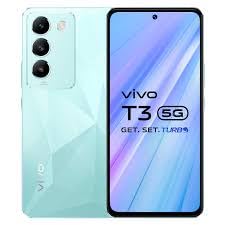
Image: The vivo T3 5G smartphone, showcasing its front display and the unique Crystal Flake design on the rear panel, along with the triple camera module.
¿Qué hay en la caja?
Upon unboxing your vivo T3 5G, please ensure all the following items are present:
- vivo T3 5G Smartphone
- Adaptador (cargador)
- Cable USB (Tipo-C)
- Expulsor de bandeja SIM
- Funda de teléfono
- Protector de pantalla (preaplicado o en caja)
Configuración
1. Instalación de la tarjeta SIM
- Localice la bandeja de la tarjeta SIM en el costado de su teléfono.
- Inserte la herramienta de extracción de la bandeja SIM en el pequeño orificio junto a la bandeja. Presione suavemente hasta que la bandeja salga.
- Place your Nano SIM cards (up to two) into the designated slots on the tray, ensuring the gold contacts face downwards and the cut corner aligns correctly.
- Empuje con cuidado la bandeja SIM nuevamente dentro del teléfono hasta que quede al ras con el costado del dispositivo.
2. Encendido y configuración inicial
- Press and hold the Power button (usually on the right side) until the vivo logo appears on the screen.
- Siga las instrucciones en pantalla para seleccionar su idioma, región y conectarse a una red Wi-Fi.
- Inicia sesión con tu cuenta de Google o crea una nueva para acceder a los servicios de Google y a Play Store.
- Configure su método de bloqueo de pantalla preferido (PIN, patrón, contraseña, huella digital o desbloqueo facial).
- Review y acepte los términos y condiciones para completar la configuración inicial.
Instrucciones de funcionamiento
1. Navegación básica
- Gestos de la pantalla táctil: Swipe up from the bottom to go to the home screen, swipe up and hold for recent apps, swipe from the left or right edge to go back.
- Pantalla de inicio: Customize with widgets and app shortcuts. Long-press an empty area to access customization options.
- Panel de notificación: Deslice hacia abajo desde la parte superior de la pantalla para view notificaciones y configuraciones rápidas.
2. Uso de la cámara
The vivo T3 5G features a 50MP main camera with OIS and a 16MP front camera. To use the camera:
- Abra la aplicación Cámara desde la pantalla de inicio o el cajón de aplicaciones.
- Select your desired mode (Photo, Portrait, Video, Night, etc.) by swiping left or right.
- Toque la pantalla para enfocar un sujeto.
- Presione el botón Obturador para capturar una fotografía o iniciar/detener la grabación de un video.
- Utilize features like Super Night Portrait mode for enhanced low-light photography and ultra-stable 4K video recording.
3. Gestión de la batería
Your device is equipped with a 5000 mAh battery and supports 44 W FlashCharge for rapid charging.
- Cargando: Use the provided adapter and USB cable for optimal charging speed.
- Ahorro de batería: Habilite el modo de ahorro de batería en Configuración para extender la vida útil de la batería cuando sea necesario.
- Mejoramiento: Regularly check battery usage in Settings to identify and manage power-consuming apps.
Mantenimiento
1. Limpieza del dispositivo
- Utilice un paño suave que no suelte pelusa para limpiar suavemente la pantalla y el cuerpo del teléfono.
- Evite utilizar productos químicos agresivos, materiales abrasivos o aerosoles.
- Para manchas difíciles, un poco deampEnjuague el paño con agua o con un limpiador de pantallas específicamente diseñado para dispositivos electrónicos.
2. Actualizaciones de software
Keeping your software up to date ensures optimal performance, security, and access to new features.
- Ir a Ajustes > Actualización del sistema.
- The phone will check for available updates.
- If an update is available, follow the on-screen instructions to download and install it. Ensure your phone has sufficient battery and a stable internet connection.
Solución de problemas
This section addresses common issues you might encounter with your vivo T3 5G.
- El teléfono no responde: Mantenga presionado el botón de encendido durante aproximadamente 10 a 15 segundos para forzar el reinicio.
- Las aplicaciones se bloquean o se congelan: Try clearing the app's cache (Settings > Apps > [App Name] > Storage > Clear cache) or reinstalling the app.
- La batería se agota rápidamente: Check battery usage in Settings to identify problematic apps. Reduce screen brightness, disable unnecessary features (GPS, Bluetooth, Wi-Fi when not in use).
- Problemas de conectividad de red: Toggle Airplane mode on and off. Restart your phone. Check SIM card insertion.
- El sensor de huellas dactilares no funciona: Asegúrate de que tu dedo esté limpio y seco. Vuelve a registrar tus huellas en Ajustes > Seguridad.
Si los problemas persisten, considere realizar un restablecimiento de fábrica (primero haga una copia de seguridad de sus datos) o comunicarse con el servicio de atención al cliente.
Presupuesto
| Característica | Detalle |
|---|---|
| Marca | vivo |
| Nombre del modelo | T3 5G |
| Sistema operativo | Androide 14 |
| Memoria RAM | 8 GB |
| Capacidad de almacenamiento | 128 GB |
| Procesador | MediaTek Dimensity 7200 (2.8 GHz) |
| Tamaño de la pantalla | 16.94 cm (6.67 pulgadas) |
| Tipo de pantalla | AMOLED, 120 Hz Refresh Rate |
| Resolución | 2408 x 1080 píxeles (Full HD+) |
| Cámara trasera | 50MP (OIS) + 2MP |
| Cámara frontal | 16MP |
| Resolución de captura de video | 3840 x 2160 (4K) |
| Capacidad de la batería | 5000 mAh |
| Cargando | 44 W FlashCharge |
| Ranura para tarjeta SIM | Doble SIM (Nano) |
| Tipo de conector | USB tipo C |
| Seguridad biométrica | Reconocimiento de huellas dactilares |
| Dimensiones | 16.6 x 7.6 x 0.8 centímetros |
| Peso | 186 gramos |
| Nivel de resistencia al agua | Resistente al agua |
Información de garantía
Your vivo T3 5G smartphone comes with a manufacturer's warranty:
- Garantía del dispositivo: Garantía del fabricante de 1 año.
- Inbox Accessories Warranty: 6 Months Manufacturer Warranty.
Conserve su comprobante de compra para reclamar la garantía. Esta cubre defectos de fabricación y no cubre daños causados por mal uso, accidentes o reparaciones no autorizadas.
Apoyo
For further assistance, technical support, or warranty claims, please contact vivo customer service.
- Fabricante: Vivo, vivo Mobile India Private Limited
- DIRECCIÓN: TEC-1 and TEC-2 World Trade Centre Plot No TZ-13A Techzone IT Park Noida-201308
- Refer to the official vivo website or your regional support contact information for phone numbers or email support.