
1. Introducción
The WALI Triple Monitor Mount is designed to enhance your workspace by providing a stable and adjustable solution for up to three monitors. This manual provides detailed instructions for assembly, operation, and maintenance to ensure optimal performance and longevity of your monitor mount.
This mount is compatible with LCD and LED flat screen TVs and monitors ranging from 13 to 27 inches. Each arm supports up to 15.4 lbs. It is designed for VESA mounting patterns of 75x75mm or 100x100mm. The mount features a two-stage locking system, compatible with 3.3-inch C-clamps and 3.1-inch grommet bases.
2. Contenido del paquete
Antes de comenzar el montaje, verifique que todos los componentes enumerados a continuación estén presentes y sin daños. Si alguna pieza falta o está dañada, comuníquese con atención al cliente.

Un sobreview of the WALI Triple Monitor Mount, illustrating its design with three adjustable arms extending from a central pole, secured by a desk clamp. Three monitors are shown mounted, demonstrating the product's primary function.
- WALI Triple Monitor Gas Spring Desk Mount (x1)
- Mounting Hardware Kit (includes all necessary screws, brackets, and tools)
- Manual de usuario (x1)
3. Configuración e instalación
3.1. Compatibilidad de pantalla

This image highlights the compatibility specifications of the monitor mount, including a maximum weight capacity of 15.4 lbs per arm, support for VESA 75x75mm and 100x100mm mounting patterns, and compatibility with screens up to 27 inches.
3.2. Attaching VESA Plate to Monitor
Attach the VESA plate to the back of each monitor. Ensure the arrow on the plate points upwards towards the top of the monitor. Use the provided screws (labeled 'F' in the hardware kit) and a screwdriver to secure the plate. Repeat this process for all three monitors.

Un example of a vertical monitor setup using the WALI mount, showcasing its versatility beyond a standard horizontal arrangement. This configuration can be useful for specific professional or personal needs.
3.3. Attaching Mount to Desk
The mount offers two installation options: C-clamp or grommet base. Choose the method that best suits your desk. Securely attach the central pole to your desk using the chosen method. The two-stage locking system ensures a strong and stable connection.
Illustrates the two installation options: C-clamp for desks between 0.39 and 3.3 inches thick, and grommet base for desks between 0.39 and 1.6 inches thick, ensuring secure attachment to various desk types.
3.4. Mounting Monitors
Once the central pole and arms are securely attached to your desk, slide each monitor (with the VESA plate attached) onto the corresponding arm. Ensure the monitor is properly seated before tightening the cap nut for each monitor to secure it in place.

This visual comparison illustrates the benefit of using the WALI monitor mount to free up desk space. The 'clutter-free' side shows monitors elevated by the mount, while the 'in a mess' side depicts traditional monitor stands occupying valuable desk surface.
4. Operación y ajustes
The WALI Triple Monitor Mount offers full adjustability to optimize your viewing experience. The gas spring arms allow for smooth movement and precise positioning.
- Inclinación: Monitors can be tilted +35°/-35° to reduce glare and find the perfect vertical angle.
- Girar: Monitors can swivel +90°/-90°, allowing for easy screen sharing or collaborative work.
- Girar: Monitors can rotate 360°, enabling quick switching between landscape and portrait orientations.
- Ajuste de altura: The maximum height is up to 17.1 inches, and the maximum extension is up to 27.2 inches.
4.1. Ajuste de la tensión del resorte de gas
To adjust the gas spring tension, first press the arm to a horizontal level. Then, turn the gas spring tension screw all the way to '-' until it's fully loosened. Re-tighten it from the loosest setting for your monitor. Turn clockwise for lighter monitors and counter-clockwise for heavier monitors. Please note it may take numerous turns for proper gas spring tension adjustment.

Instructions for adjusting the gas spring tension. Turn counter-clockwise for heavier monitors and clockwise for lighter monitors. It is important to keep the arm level during adjustment and note that numerous turns may be required to achieve the desired tension.

Detallado view of the mount's adjustability, showing that monitors can be rotated 180 degrees, tilted +/- 35 degrees, and swiveled +/- 90 degrees, allowing for optimal viewángulos de inclinación y posicionamiento ergonómico.
4.2. Official Product Video: Gas Spring Tension & Tilt Angle Adjustment
This video demonstrates how to adjust the gas spring tension and tilt angle of the monitor arms. Proper adjustment ensures the monitors remain stable at the desired height and angle.
5. Gestión de cables
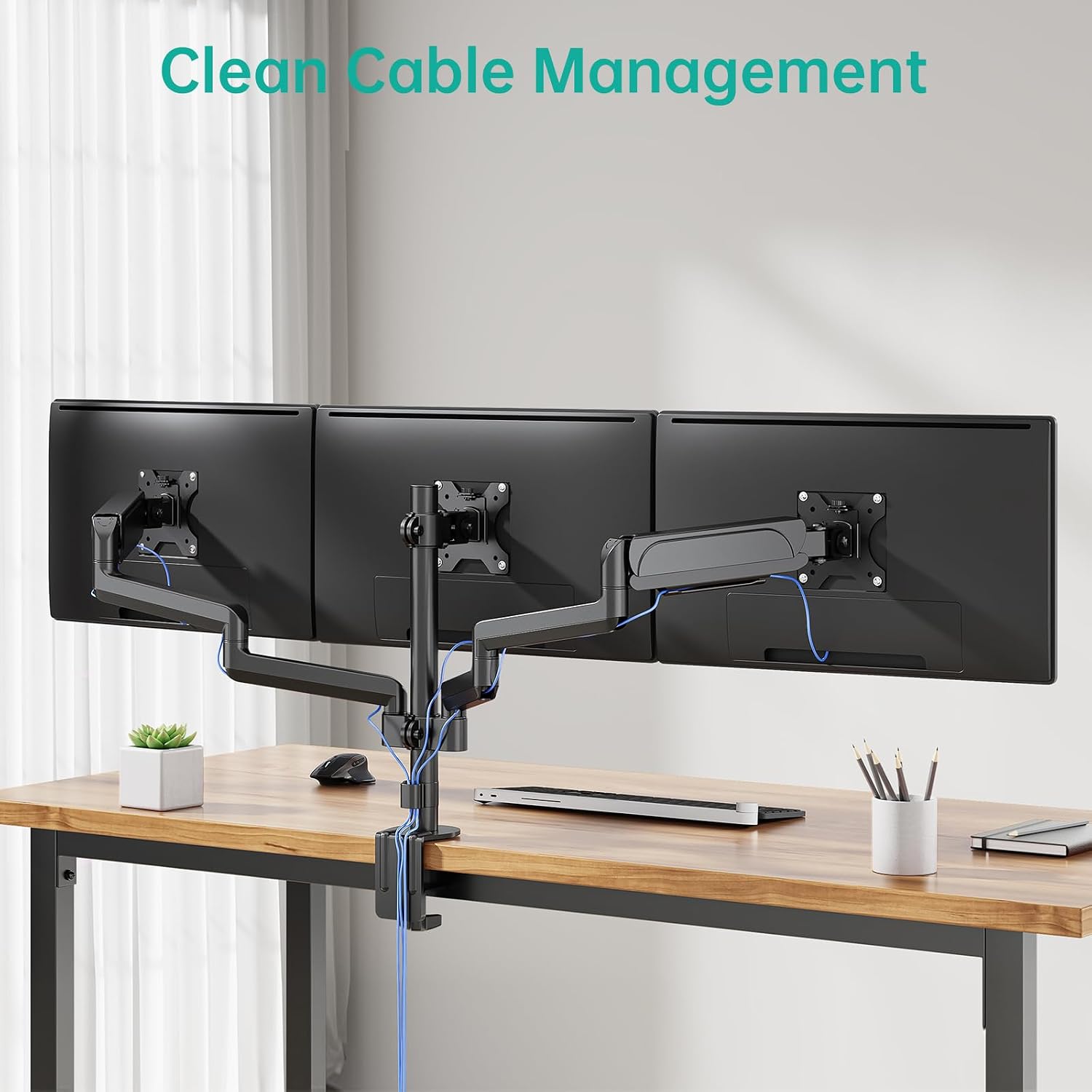
The WALI Triple Monitor Mount includes integrated cable management features to help keep your workspace tidy and organized. Route your monitor cables through the designated clips on the arms and down the central pole.

This image demonstrates the integrated cable management system, allowing users to route monitor cables through the arms and down the central pole, contributing to a tidy and organized workspace.
6. Mantenimiento
To ensure the longevity and smooth operation of your WALI Triple Monitor Mount, regular maintenance is recommended:
- Revise periódicamente todos los tornillos y conexiones para asegurarse de que permanezcan apretados.
- Limpie el soporte con un paño suave.amp Paño para eliminar el polvo y los residuos. Evite los limpiadores abrasivos.
- If the arms become stiff or loose, re-adjust the gas spring tension as described in Section 4.1.
7. Solución de problemas
If you encounter any issues with your WALI Triple Monitor Mount, please refer to the following common troubleshooting tips:
- Monitors sagging or not holding position: Re-adjust the gas spring tension. Ensure the monitors are within the specified weight limit (15.4 lbs per arm).
- El monte se siente inestable: Verificar que el escritorio esté limpioamp or grommet base is securely tightened to the desk. Check all screws on the central pole and arms for tightness.
- Dificultad con el movimiento: Ensure no cables are snagged or obstructing movement. Apply a small amount of silicone lubricant to moving joints if necessary (avoiding tension adjustment points).
Si el problema persiste, comuníquese con el servicio de atención al cliente para obtener más ayuda.
8. Especificaciones
| Marca | WALI |
| Número de modelo | GSDM003 |
| Peso del artículo | 15.75 libras |
| Dimensiones del producto | 19.69 x 13.9 x 5.43 pulgadas |
| Color | Negro |
| Tipo de material | Metal |
| Tipo de montaje | Montaje de mesa |
| Tipo de movimiento | Rotate, Swivel, Tilt, Extend |
| Tamaño máximo compatible | 27 pulgadas |
| Tamaño mínimo compatible | 13 pulgadas |
| Ángulo de inclinación máximo | 45 grados |
| Compatibilidad VESA | 75 x 75 mm, 100 x 100 mm |
9. Garantía y soporte
WALI is committed to providing high-quality products and excellent customer service. Your WALI Triple Monitor Mount comes with a user manual and a mounting hardware kit. For any questions or assistance, our experienced and friendly US-based customer support team is available 7 days a week.
For additional resources, you may also refer to the official User Manual PDF available online.
Thank you for choosing WALI.