
1. Introducción
This manual provides comprehensive instructions for the safe and efficient operation of your RAYSON SD1202 Comb Binding Machine. The SD1202 is a robust binding solution designed for office environments, capable of punching and binding documents up to letter size.
The machine features a durable metal construction, ensuring longevity and consistent performance for various document binding needs.
2. Instrucciones de seguridad
- Lea todas las instrucciones antes de operar la máquina.
- Mantenga las manos y la ropa suelta alejadas de las piezas móviles durante el funcionamiento.
- Do not exceed the specified punching and binding capacities to prevent damage to the machine.
- Asegúrese de que la máquina esté colocada sobre una superficie estable y plana.
- Mantener fuera del alcance de los niños.
3. Producto terminadoview
Familiarize yourself with the components of your binding machine.

Figure 3.1: RAYSON SD1202 Comb Binding Machine, front view. This image displays the overall structure of the binding machine, including the punching handle, paper input slot, and comb opener.
Características principales:
- Capacidad de perforación: Up to 10 sheets of 20lb (80g) paper per punch.
- Capacidad de encuadernación: Up to 200 sheets of 70 gsm (18lb) paper with a 22mm (7/8") comb ring.
- Guía de borde ajustable: For precise punching, adjustable from 3mm to 6mm.
- Horizontal Loading: Ensures accurate and easy paper alignment.
- Construcción duradera: Made with metal components for extended use.
4. Configuración
- Desembalaje: Carefully remove the binding machine from its packaging. Retain all packaging materials for future transport or storage.
- Colocación: Coloque la máquina sobre una superficie firme y nivelada con espacio adecuado para su funcionamiento.
- Instalación del mango: Insert the punching handle into its designated slot and secure it if necessary (refer to specific model instructions for handle attachment).
- Adjust Margin Guide: Locate the margin adjuster on the machine. This allows you to control the distance of the punched holes from the paper's edge. Adjust it to your desired setting (3mm to 6mm).

Figure 4.1: Margin Adjuster on RAYSON SD1202 Binding Machine. This image illustrates how to adjust the margin guide for precise hole punching.
5. Instrucciones de funcionamiento
5.1 Perforación de documentos
- Preparar el documento: Ensure your paper stack is neat and free of staples or clips.
- Adjust Side Margin: Use the side margin adjustment to align papers to the left of the punching area. This ensures consistent hole placement.
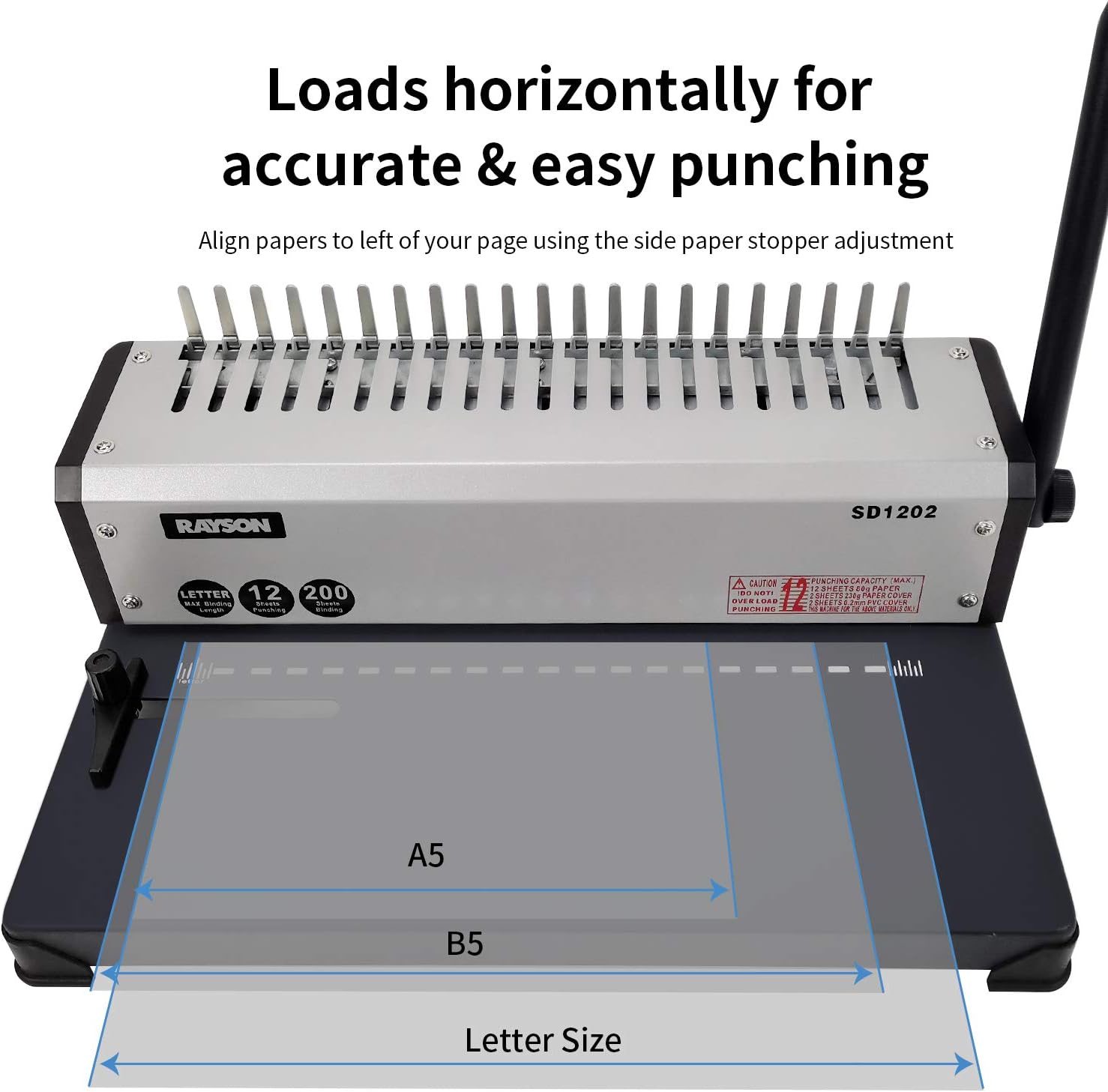
Figure 5.1: Horizontal paper loading for accurate punching on RAYSON SD1202. This image demonstrates how paper is loaded horizontally for precise hole alignment.
- Carga de papel: Insert up to 10 sheets of paper horizontally into the machine's inlet. Do not force paper into the slot.
- Perforar agujeros: Firmly press down the punching handle to create the holes. Release the handle and remove the punched paper.

Figure 5.2: Steps for punching holes with the RAYSON SD1202 binding machine. This image illustrates the process of inserting paper and pressing the handle to punch holes.

Figure 5.3: Close-up of punched paper showing hole pattern. This image provides a detailed view of the rectangular holes punched by the machine.
- Repetir: Continue punching all pages of your document in small batches.
5.2 Documentos vinculantes
- Seleccionar peine: Choose a comb binding ring appropriate for the thickness of your document. The machine supports up to 22mm (7/8") combs for 200 sheets.
- Peine abierto: Place the comb binding ring onto the comb opener fingers of the machine. Pull the binding handle towards you to open the comb rings.
- Cargar páginas: Carefully slide the punched pages onto the open comb rings. Start with the back cover, then the main document pages, and finally the front cover.
- Peine cerrado: Push the binding handle away from you to close the comb rings, securing the document.

Figure 5.4: Operation steps for binding documents with the RAYSON SD1202. This sequence of images demonstrates how to open the comb, load pages, and close the comb to complete the binding process.

Figura 5.5: Example of a finished bound document. This image shows a blue cover and white pages bound together with a black comb binding.
- Eliminar documento: Once the comb is closed, remove your bound document from the machine.
6. Mantenimiento
- Limpieza: Regularly wipe the exterior of the machine with a soft, dry cloth. Do not use abrasive cleaners or solvents.
- Bandeja de residuos: Empty the paper waste tray frequently to prevent jams and ensure optimal punching performance. The waste tray is typically located at the bottom or side of the machine.
- Lubricación: No se requiere lubricación reparable por el usuario.
- Almacenamiento: Guarde la máquina en un entorno limpio y seco cuando no esté en uso.
7. Solución de problemas
| Problema | Posible causa | Solución |
|---|---|---|
| Paper jams during punching. | Too many sheets loaded; paper not aligned correctly. | Reduce the number of sheets per punch; ensure paper is flush against the margin guide. |
| Holes are uneven or incomplete. | Paper not inserted straight; punching capacity exceeded; dull punching dies. | Ensure paper is inserted squarely; reduce sheet count; contact support if dies are dull. |
| Comb rings do not open or close properly. | Binding handle not fully engaged; comb size too small for document. | Ensure the binding handle is moved through its full range of motion; use a larger comb ring. |
| Machine feels unstable during use. | Not on a flat surface; rubber feet missing or worn. | Place on a stable, level surface; check rubber feet for damage. |
8. Especificaciones
| Característica | Detalle |
|---|---|
| Marca | Rayón |
| Número de modelo | SD1202 |
| Capacidad de punzonado | 10 sheets (20lb/80g paper) |
| Capacidad de encuadernación | 200 sheets (70gsm/18lb paper) with 22mm (7/8") comb |
| Tamaño máximo de papel | Letter Size (19 holes) |
| Margen ajustable | De 3 mm a 6 mm |
| Material | Metal |
| Peso del artículo | 10.61 libras |
| Dimensiones del paquete | 16.93 x 12.05 x 7.83 pulgadas |
| Fecha de primera disponibilidad | 6 de junio de 2019 |
9. Garantía y soporte
For warranty information or technical support, please refer to the documentation included with your purchase or visit the official RAYSON webSitio. Conserve su recibo de compra como comprobante de compra.
Manufacturer: RAYSON ELECTRICAL MFG. LTD.