
1. Introducción
The Cooler Master MWE 600 White 230V V2 power supply unit (PSU) provides a reliable and efficient power solution for your computer system. Designed with 80 PLUS White 230V EU efficiency, a DC-to-DC + LLC circuit design, a single +12V rail, active PFC, and a temperature-sensitive HDB fan, this PSU delivers stable and consistent power. This manual will guide you through the installation, operation, maintenance, and troubleshooting of your MWE 600 White 230V V2 PSU.
2. Información de seguridad
Please read and understand all safety instructions before installing or operating this product. Failure to do so may result in personal injury or damage to the product and connected components.
- Vol peligrosotage: Do not open the power supply cover. There are no user-serviceable parts inside. Opening the unit will void the warranty.
- Fuente de energía: Asegúrese de que la fuente de alimentación esté desconectada de la toma de CA antes de realizar la instalación o el mantenimiento.
- Ventilación: Do not block any ventilation openings of the power supply. Ensure adequate airflow around the unit.
- Ambiente: Install the power supply in a dry, well-ventilated area, away from heat sources, moisture, and direct sunlight.
- Toma de tierra: Ensure the power supply and your computer system are properly grounded.
- Compatibilidad: Use only the cables provided with this power supply. Ensure all connections are secure and correctly oriented.
3. Contenido del paquete
Verifique que todos los artículos estén presentes en su paquete:
- Cooler Master MWE 600 White 230V V2 Power Supply Unit
- Cable de alimentación de CA
- Tornillos de montaje
- Manual de usuario (este documento)
4. Producto terminadoview
The MWE 600 White 230V V2 is designed for optimal performance and reliability. Key features include:
- 600 Watts Exceptional Efficiency: Exceeds 80 PLUS 230V EU energy efficiency standards, outperforming generic 80 PLUS Bronze competitors at medium load.
- Silent HDB Fan: The integrated 120mm fan utilizes superior hydro-dynamic bearings (HDB) to minimize noise levels (below 35.5 dBA at 1500 RPM max).
- Entrega de energía estable: Supports Intel's low power states for motherboard protection and features a DC-DC with LLC circuit for efficient 12V to 3V and 5V conversion without energy loss.
- Riel único de +12 V: Ensures all system components receive consistent power from a single, stable source.
- Compact Cabling: Non-modular flat black cables save space and offer flexibility, ideal for smaller cases and maintaining internal airflow.

Figura 4.1: En general view of the Cooler Master MWE 600 White 230V V2 Power Supply Unit.

Figure 4.2: Close-up of the quiet Hydro-Dynamic Bearing (HDB) fan, designed for minimal noise.
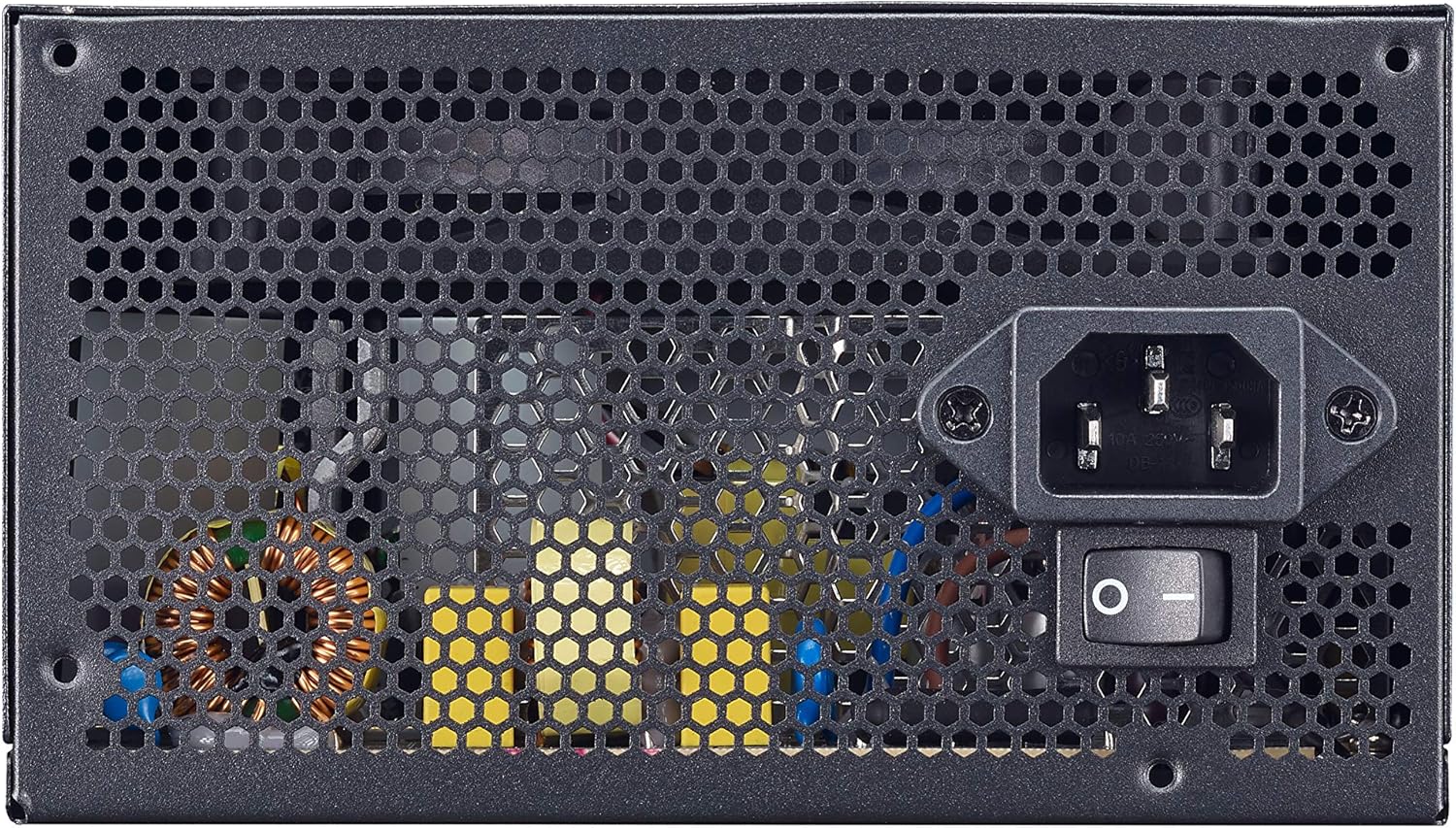
Figure 4.3: Rear panel showing the AC power input and the main power switch.

Figura 4.4: Explosión view illustrating the internal layout and components of the power supply unit.
5. Configuración e instalación
Follow these steps to properly install your Cooler Master MWE 600 White 230V V2 power supply:
- Prepare su sistema: Asegúrese de que su computadora esté completamente apagada y desenchufada del tomacorriente. Abra la carcasa de su computadora.
- Retire la fuente de alimentación antigua (si corresponde): Desconecte todos los cables de su fuente de alimentación anterior y retírela de la carcasa.
- Instalar nueva fuente de alimentación: Carefully place the MWE 600 White 230V V2 into the PSU mounting bay of your computer case. Ensure the fan is oriented correctly (usually facing downwards or upwards, depending on your case design, for optimal airflow). Secure the PSU with the provided mounting screws.
- Conectar la alimentación de la placa base: Connect the 24-pin ATX power cable to your motherboard's 24-pin connector. Ensure it clicks into place.
- Conectar la alimentación de la CPU: Connect the 4+4-pin EPS/ATX 12V cable to your motherboard's CPU power connector.
- Connect Graphics Card Power (PCI-e): If your graphics card requires additional power, connect the appropriate 6+2-pin PCI-e power cables from the PSU to your graphics card.
- Conectar la alimentación SATA/periférica: Connect SATA power cables to your storage drives (HDDs, SSDs) and other peripherals as needed.
- Sistema de organización de cables: Utilize the flat black cables to manage and route them efficiently within your case to improve airflow and aesthetics.
- Cierre la caja y conecte la alimentación de CA: Close your computer case. Connect the AC power cord to the PSU's AC inlet and then plug the other end into a wall outlet.
6. Instrucciones de funcionamiento
Después de una instalación exitosa, operar su fuente de alimentación es sencillo:
- Encendido: Ensure the main power switch on the back of the PSU (Figure 4.3) is in the "I" (On) position. Then, press the power button on your computer case.
- Apagado: To turn off your computer, use the operating system's shutdown procedure. For a complete power cycle, switch the PSU's main power switch to the "O" (Off) position after shutting down the system.
- Funcionamiento normal: The PSU will automatically regulate power delivery to your components. The HDB fan will operate as needed to maintain optimal temperatures, adjusting its speed based on load and temperature.
7. Mantenimiento
El mantenimiento regular ayuda a garantizar la longevidad y el rendimiento óptimo de su fuente de alimentación.
- Limpieza de polvo: Periodically (e.g., every 3-6 months), power off and unplug your computer. Use compressed air to gently clean dust from the PSU's fan grille and ventilation openings. Hold the fan blades to prevent them from spinning rapidly during cleaning, which can damage the bearings.
- Inspección de cables: Revise ocasionalmente todas las conexiones del cable de alimentación para asegurarse de que estén seguras y libres de daños.
- Comprobación ambiental: Ensure the computer's environment remains clean, cool, and dry to prevent dust buildup and overheating.
8. Solución de problemas
Si tiene problemas con su fuente de alimentación, consulte los siguientes pasos comunes de solución de problemas:
- Sin energía:
- Asegúrese de que el cable de alimentación de CA esté enchufado de forma segura tanto a la fuente de alimentación como al tomacorriente de pared.
- Verify the main power switch on the PSU is in the "I" (On) position.
- Pruebe el tomacorriente de pared con otro dispositivo para confirmar que tenga energía.
- Check all internal power connections (24-pin, CPU, PCI-e, SATA) to ensure they are firmly seated.
- Inestabilidad del sistema/apagados aleatorios:
- This could indicate insufficient power or a faulty component. Ensure your system's power requirements do not exceed the PSU's 600W capacity.
- Check for overheating. Ensure the PSU fan and case fans are operating correctly and are free of dust.
- If possible, test the PSU with a different system or a PSU tester.
- Ruido fuerte del ventilador:
- While the HDB fan is designed for quiet operation, excessive noise might indicate dust buildup. Clean the fan as described in the Maintenance section.
- Ensure the PSU is not under extreme load, which can cause the fan to spin faster.
If problems persist after trying these steps, please contact Cooler Master support.
9. Especificaciones
Detailed technical specifications for the Cooler Master MWE 600 White 230V V2 power supply:
| Característica | Valor |
|---|---|
| Marca | Maestro del enfriador |
| Nombre del modelo | MWE White-v2 |
| Número de modelo | MPE-6001-ACABW-UE |
| Color | V2 BLANCO |
| Factor de forma | ATX |
| Potencia de salida | 600 vatios |
| Método de enfriamiento | Air (120mm HDB Fan) |
| Certificación de Eficiencia | 80 PLUS 230V EU White |
| Dimensiones (L x An x Al) | 14 x 15 x 8.6 cm |
| Peso del artículo | 1.5 kilogramos |
| Dispositivos compatibles | Ordenador personal |
| Tipo de conector | SATA (and other standard ATX connectors) |
DC Output Table

Figure 9.1: Detailed DC output specifications for the MWE 600 White 230V V2.
| Salida DC | +5 V | +3.3 V | +12 V | -12 V | +5Vsb |
|---|---|---|---|---|---|
| Corriente (A) | 18A | 18A | 49A | 0.3A | 3A |
| Potencia (W) | 120 W | 120 W | 588 W | 3.6 W | 15 W |
| Potencia total | 600 W | ||||
10. Garantía y soporte
The Cooler Master MWE 600 White 230V V2 power supply comes with a standard limited manufacturer's warranty.
- Periodo de garantía: 3 años desde la fecha de compra.
- Cobertura de la garantía: This warranty covers defects in materials and workmanship under normal use. It does not cover damage resulting from accident, misuse, abuse, improper installation, unauthorized repairs, or modifications.
- Apoyo técnico: For technical assistance, warranty claims, or further information, please visit the official Cooler Master websitio o comuníquese con su servicio de atención al cliente.
Oficial de Cooler Master Websitio: www.coolermaster.es