
1. Introducción
This manual provides detailed instructions for the setup, operation, and maintenance of your Tech 21 SansAmp Richie Kotzen Signature RK5 Fly Rig V2. This multi-effects pedal is designed to offer a comprehensive range of guitar tones and effects in a compact, all-analog unit. Please read this manual thoroughly before using the device to ensure proper function and longevity.
2. Información de seguridad
- Fuente de alimentación: Use only the included 9V DC Universal Power Supply (Model #DC9). Using an incorrect power supply may damage the unit and void the warranty.
- Humedad: No exponga la unidad al agua ni a la humedad excesiva.
- Ventilación: Ensure proper ventilation around the unit. Do not block any openings.
- Limpieza: Desconecte la alimentación antes de limpiar. Utilice un paño seco y suave.
- Servicio: No intente reparar la unidad usted mismo. Encargue cualquier reparación a personal cualificado.
3. Contenido del paquete
Verifique que todos los artículos estén presentes en su paquete:
- Tecnología 21 SansAmp Richie Kotzen Signature RK5 Fly Rig V2 Multi-Effects Pedal
- 9V DC Universal Power Supply (Model #DC9)
- 3 MXR Patch Cables
- Dunlop Pick Pack (variety pack of 12 picks)
4. Configuración
Follow these steps to set up your RK5 Fly Rig V2:
- Conexión de energía: Connect the included 9V DC power supply to the "9V IN" jack on the rear of the unit. Plug the power supply into a suitable AC outlet.
- Entrada del instrumento: Connect your guitar or other instrument to the "IN" jack on the rear of the unit using a standard 1/4-inch instrument cable.
- Conexión de salida:
- Para conectar a una guitarra amplifier, connect the "OUT" 1/4-inch jack to your ampentrada del lificador.
- For direct connection to a mixer, recording interface, or PA system, use the XLR output with a balanced XLR cable. Ensure the ground lift switch is set appropriately to avoid hum.
- For headphone use, press the "Headphone" button next to the 1/4-inch output. This switches the 1/4-inch output into headphone mode.
- Bucle de efectos (opcional): If using external effects, connect the "SEND" jack to the input of your external effect pedal(s) and the output of your external effect pedal(s) to the "RETURN" jack.

Figure 1: Rear panel connections of the RK5 Fly Rig V2, including IN, SEND, RETURN, OUT, and 9V IN jacks.
5. Controles y características
The RK5 Fly Rig V2 features a comprehensive set of controls for shaping your tone. The unit is divided into several sections: SansAmp, OMG Overdrive, Reverb/Delay/Roto, and Boost.
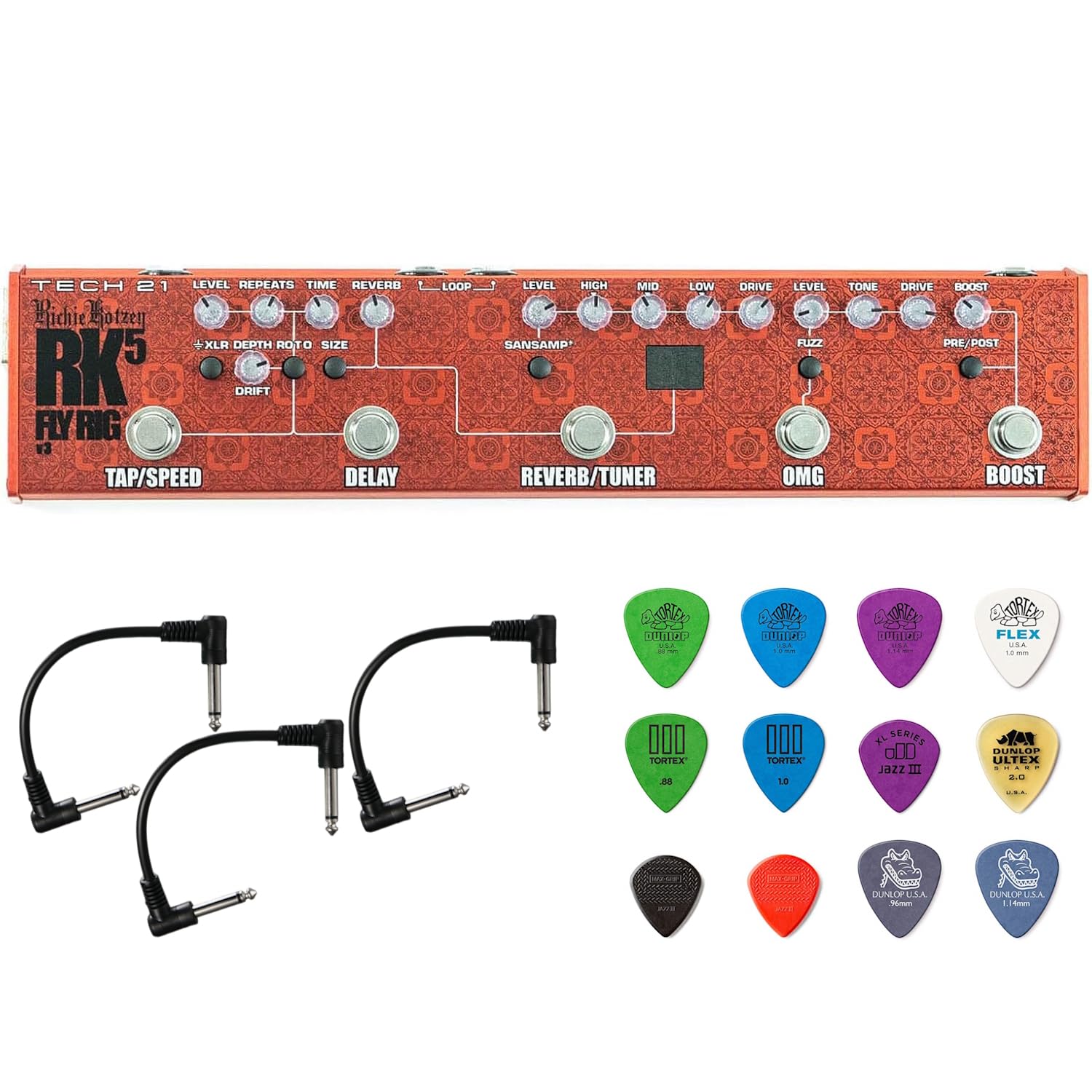
Figura 2: Sobreview of the RK5 Fly Rig V2's top panel controls.
5.1. SinAmp Sección
Los SansAmp section provides the core amplifier emulation, allowing you to run directly into mixers, PA systems, or augment your existing amplifier setup. It includes a 3-band active EQ.
- NIVEL: Controls the overall output volume of the SansAmp sección.
- ALTO: Ajusta las frecuencias agudas.
- MEDIO: Ajusta las frecuencias de rango medio.
- BAJO: Ajusta las frecuencias de graves.
- MANEJAR: Controla la cantidad de ganancia y overdrive.

Figura 3: detallada view de los SansAmp, Reverb/Tuner, and Delay sections.
5.2. Sección OMG Overdrive
Richie Kotzen's signature OMG Overdrive provides a wide range of overdrive tones, from clean boost to aggressive distortion.
- NIVEL: Controls the output volume of the OMG section.
- TONO: Shapes the overall tonal character of the overdrive.
- MANEJAR: Adjusts the amount of overdrive/gain.
- Interruptor FUZZ: Engages a fuzz-style tone, making the overdrive thicker and woolier.
- Interruptor COMP: Activates an old-school, all-analog, FET-based compression, offering a warmer, more transparent, and musical compression.
5.3. Reverb/Delay/Roto Section
This section offers versatile time-based effects.
- REVERBENCIA: A single, continuously-variable control for dialing in the desired amount of reverb.
- DEMORA: Voiced for vintage tape echo sounds.
- TIEMPO: Ajusta el tiempo de retardo.
- REPETICIONES: Controla el número de repeticiones de retardo.
- DERIVA: Adds a random, unpredictable element to the delay modulation.
- ROTO: Changes the Delay function into a rotating speaker effect. When ROTO is active, the Tap Tempo footswitch controls the speed, ramping up from slow to fast. The DRIFT control then manages the distance of the virtual microphone to the rotating speaker, adding a tremolo-like volume modulation at maximum settings.
5.4. Sección de impulso
The Boost section provides additional volume or drive.
- AUMENTAR: Provides up to 12dB of clean boost.
- Interruptor PRE/POST: Determines whether the boost is applied before (Pre) or after (Post) the other effects. Use Pre to beef up drive and distortion, or Post to increase overall volume for solos.

Figura 4: detallada view of the OMG Overdrive and Boost sections.
5.5. Pedales
- TOQUE/VELOCIDAD: Used for setting the tempo of the Delay effect or the speed of the ROTO effect.
- DEMORA: Engages/disengages the Delay/Roto effect.
- REVERBERACIÓN/AFINADOR: Engages/disengages the Reverb effect. Hold to activate the Chromatic Tuner.
- DIOS MÍO: Engages/disengages the OMG Overdrive section.
- AUMENTAR: Engages/disengages the Boost function.
5.6. Otras características
- XLR Output with Ground Lift: Provides a balanced output for direct connection to mixing consoles or PA systems. The ground lift switch helps eliminate hum.
- Botón de auriculares: Switches the 1/4-inch output to headphone mode for silent practice.
- Bucle de efectos: Allows for integration of external effects pedals into the signal chain.
- Phantom Power for RK Killer Wail Wah: The unit is pre-configured to provide phantom power for the Tech 21 Signature RK Killer Wail wah pedal.
6. Instrucciones de funcionamiento
To begin using your RK5 Fly Rig V2:
- Asegúrese de que todas las conexiones sean seguras como se describe en la sección Configuración.
- Enciende tu ampElevador o consola de mezclas.
- Engage the desired effects by pressing their respective footswitches. The LED indicators will illuminate when an effect is active.
- Adjust the knobs within each section to sculpt your desired tone. Experiment with the SansAmp EQ, OMG Overdrive settings, and Delay/Reverb parameters.
- For the Chromatic Tuner, hold down the REVERB/TUNER footswitch. The display will show the note being played.
- To set the tempo for Delay or ROTO, tap the TAP/SPEED footswitch multiple times at your desired rhythm.
7. Mantenimiento
- Limpieza: Utilice un paño suave y seco para limpiar el exterior de la unidad. No utilice limpiadores abrasivos ni disolventes.
- Almacenamiento: Store the unit in a dry, cool place away from direct sunlight when not in use.
- Cuidado de cables: Revise periódicamente todos los cables para detectar daños. Reemplace inmediatamente cualquier cable desgastado o dañado.

Figura 5: Example of an MXR patch cable included in the bundle.
8. Solución de problemas
| Problema | Posible causa | Solución |
|---|---|---|
| Sin energía/La unidad no se enciende | Incorrect power supply; Power cable not connected; Outlet not working | Ensure correct 9V DC power supply is used and properly connected. Check power outlet. |
| No hay salida de sonido | Conexiones de cable incorrectas; Amplifier off; Volume knobs set to zero; Headphone mode active | Verify all instrument and output cables are correctly connected. Check amplifier power and volume. Ensure relevant LEVEL knobs on the RK5 are not at zero. If using an amplifier, ensure Headphone mode is off. |
| zumbido o ruido | Ground loop; Faulty cables; Nearby interference | If using XLR output, try engaging the Ground Lift switch. Replace any suspected faulty cables. Move unit away from other electronic devices. |
| Efecto no atractivo | Footswitch not pressed firmly; Internal issue | Ensure footswitch is pressed completely. If problem persists, contact customer support. |
9. Especificaciones
- Modelo: RK5 Fly Rig V2
- Dimensiones: 12.5 pulgadas (largo) x 2.5 pulgadas (ancho) x 1.25 pulgadas (alto)
- Peso: 20.7 onzas
- Fuerza: 9V DC, 150mA (Model #DC9 Universal Power Supply included)
- Impedancia de entrada: 1/4-inch 1megOhm
- Impedancia de salida: 1/4-inch low impedance
- Efectos de salida de audio: Delay, Reverb, Fuzz, Overdrive, Boost, Rotary Speaker Mode
- Formato de señal: Cosa análoga
- Alojamiento: Rugged, all-metal
10. Garantía y soporte
Para obtener información sobre la garantía y soporte técnico, consulte el sitio web oficial de Tech 21. webSitio web o contacte a su distribuidor autorizado. Conserve el recibo de compra como comprobante.