
1. Introducción
This manual provides essential information for the safe and effective operation of your Retevis RT55 Marine Radio. Please read this manual thoroughly before using the device to ensure proper functionality and to prevent damage. The Retevis RT55 is a portable VHF marine transceiver designed for maritime communication, featuring IP67 waterproofing, floating capability, and vibration drainage.

Image 1.1: Retevis RT55 Marine Radio demonstrating its floating capability.
2. Contenido del paquete
Verifique que todos los artículos enumerados a continuación estén incluidos en su paquete. Si falta algún artículo o está dañado, comuníquese con su vendedor.
- 1 x Retevis RT55 Marine Radio
- 1 x antena
- 1 batería de iones de litio de 1200 mAh.
- 1 x adaptador de corriente
- 1 x Charging Cradle
- 1 x Clip para cinturón
- 1 x Cordón
- 4 x Tornillos
- 1 x Manual de usuario (este documento)

Image 2.1: All components included in the Retevis RT55 package.
3. Producto terminadoview
Familiarícese con los componentes y controles de la radio.
3.1. Componentes de radio

Image 3.1: Front panel of the Retevis RT55 Marine Radio with key controls labeled.
- Antena: Para transmitir y recibir señales.
- Pantalla LCD: Muestra el número de canal, el estado de la batería y otros indicadores operativos.
- CH 16 Button: Quickly switches to Channel 16 (emergency channel).
- Botón CH: Se utiliza para la selección de canales.
- TAG/FAV Button: Alterna entre tagged/favorite channels.
- MUTE/VOL Button: Adjusts volume or mutes audio.
- MONI/SQL Button: Activates monitor function or adjusts squelch level.
- DUAL/SCAN Button: Activates dual watch or scan function.
- LOCK/H/L Button: Locks the keypad or switches between high/low power output.
- Flechas arriba/abajo: Navegar por los menús y cambiar de canal.
- Botón PTT (pulsar para hablar): Ubicado en el lateral, utilizado para transmitir.
4. Configuración
4.1. Instalación de la batería
- Asegúrese de que la radio esté apagada.
- Alinee el paquete de baterías con el compartimiento de baterías en la parte posterior de la radio.
- Empuje suavemente la batería en su lugar hasta que haga clic de forma segura.

Image 4.1: The 1200mAh Lithium-ion battery pack for the RT55.
4.2. Fijación de la antena
- Enrosque la antena en el conector de la parte superior de la radio en sentido horario hasta que quede apretada con los dedos. No la apriete demasiado.
4.3. Carga de la batería
Antes del primer uso, cargue completamente la batería. Una carga completa suele tardar varias horas.
- Conecte el adaptador de corriente a la base de carga.
- Conecte el adaptador de corriente a una toma de CA estándar.
- Place the radio (with battery installed) into the charging cradle. Ensure proper contact between the radio and the cradle's charging terminals.
- The charging indicator on the cradle will illuminate (e.g., red for charging, green for fully charged).
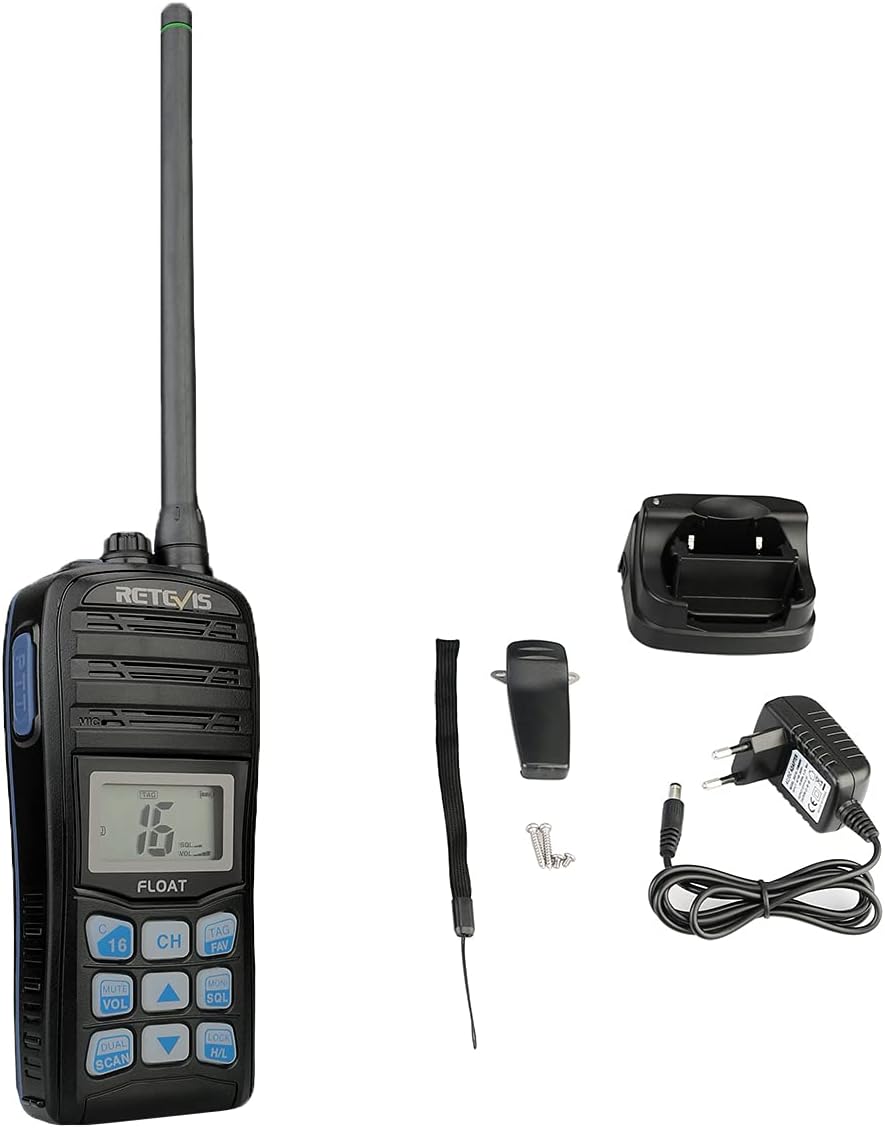
Image 4.2: The Retevis RT55 radio placed in its charging cradle.
5. Instrucciones de funcionamiento
5.1. Encendido y apagado
- Para encender, mantenga presionada la tecla FUERZA button (often integrated with the LOCK/H/L button or a dedicated button) until the display illuminates.
- Para apagar, mantenga pulsado el FUERZA botón nuevamente hasta que la pantalla se apague.
5.2. Ajuste del volumen
- Presione el MUDO/VOL botón.
- Utilice el Flecha arriba / abajo Botones para aumentar o disminuir el nivel de volumen.
- Prensa MUDO/VOL nuevamente para confirmar o esperar a que la configuración se guarde automáticamente.
5.3. Selección del canal
The RT55 supports 88 international marine channels.
- Presione el CH botón.
- Utilice el Flecha arriba / abajo Botones para seleccionar el canal deseado.
- Prensa CH nuevamente para confirmar o esperar a que la configuración se guarde automáticamente.
- To quickly access the emergency channel, press the dedicated CH 16 botón.
5.4. Función de silenciamiento
El silenciador elimina el ruido de fondo cuando no se recibe ninguna señal.
- Presione el MONI/SQL botón.
- Utilice el Flecha arriba / abajo buttons to adjust the squelch level (typically 0-9, where 0 is open squelch and 9 is maximum squelch).
- Prensa MONI/SQL De nuevo para confirmar.
5.5. Vigilancia dual/Triple vigilancia
This feature allows monitoring multiple channels simultaneously.
- Reloj dual: Monitors the current working channel and Channel 16.
- Tri-vigilancia: Monitors the current working channel, Channel 16, and a designated call channel (e.g., Channel 9).
- Presione el DUAL/SCAN button to activate or cycle through these modes.

Image 5.1: Visual representation of Dual-Watch and Tri-Watch channel monitoring.
5.6. Weather Channels
The RT55 can receive weather alerts on dedicated weather channels.
- Consult your local regulations for available weather channels.
- Access weather channels via the TAG/FAV button or a dedicated menu option.

Image 5.2: The radio displaying weather alert functionality.
5.7. Floating and Vibration Drainage
The RT55 is designed to float if dropped in water and features a vibration drainage function to clear water from the speaker.
- If the radio falls into water, it will float to the surface.
- To activate vibration drainage, typically press and hold a specific button (e.g., MONI/SQL or a dedicated drainage button) for a few seconds. The radio will emit a vibrating sound to expel water.

Image 5.3: The RT55 radio floating in water, highlighting its IP67 waterproof rating.

Image 5.4: The radio demonstrating its vibration drainage feature.
Video 5.1: Demonstration of the Retevis RT55's waterproofing, floating, and vibration drainage functions.
6. Mantenimiento
- Limpieza: Limpie el exterior de la radio con un paño suave.amp paño. No utilice productos químicos agresivos ni limpiadores abrasivos.
- Almacenamiento: Guarde la radio en un lugar fresco y seco cuando no la use. Retire la batería si la va a guardar por un tiempo prolongado.
- Cuidado de la batería: Avoid fully discharging the battery frequently. Recharge before the battery is completely depleted to prolong its lifespan.
7. Solución de problemas
| Problema | Posible causa | Solución |
|---|---|---|
| La radio no se enciende | La batería está baja o no está instalada correctamente. | Cargue la batería o vuelva a instalarla correctamente. |
| No reception or poor audio quality | Antenna loose or damaged; Squelch level too high; Out of range. | Check antenna connection; Adjust squelch level; Move closer to other radios or a repeater. |
| no se puede transmitir | Battery low; Incorrect channel selected; Keypad locked. | Charge battery; Select appropriate channel; Unlock keypad. |
| Water in speaker after submersion | Normal after water exposure. | Activate the vibration drainage function. |
8. Especificaciones
| Característica | Detalle |
|---|---|
| Marca | Retevis |
| Número de modelo | RT55 |
| Color | Noir (Negro) |
| Número de canales | 88 |
| Rango de frecuencia | VHF |
| Alcance máximo | 4 Kilómetros |
| Nivel de resistencia al agua | IP67 (impermeable) |
| Características especiales | Float, Monitor Function, IP67 Waterproof, Call Channel Programming, Automatic Backlight, Vibration Drainage |
| Tipo de batería | 1 batería de iones de litio de 1200 mAh (incluida) |
| Volumentage | 7.4 voltios |
| Dimensiones del producto (Pr. x An. x Al.) | 4.1P x 6.5l x 14H centímetros |
| Peso del artículo | 288 gramos |
| Nivel de ruido | 40 decibelios |
| Dispositivos compatibles | Other two-way radios with the same band or channel, compatible accessories (headsets, earphones, external antennas) |
| Rango de temperatura | -20℃ ~ +55℃ |
| País natal | Porcelana |
9. Garantía y soporte
Retevis offers the following warranty and support for the RT55 Marine Radio:
- Periodo de garantía: 2 años para el cuerpo de la radio, 1 año para los accesorios.
- Política de devoluciones: 30 days for no-reason returns.
- Servicio post-garantía: Maintenance service is available beyond the warranty period. Buyers are responsible for associated costs.
For further assistance or technical support, please refer to the official Retevis websitio o póngase en contacto con su distribuidor local.