
APC SMT1500
APC Smart-UPS 1500VA UPS Battery Backup (SMT1500) User Manual
Modelo: SMT1500
1. Introducción
This manual provides essential information for the safe and efficient operation of your APC Smart-UPS 1500VA UPS Battery Backup, model SMT1500. This Uninterruptible Power Supply (UPS) is designed to provide reliable power protection for your electronic equipment, safeguarding against power outages, surges, and fluctuations. It features a pure sine wave output for compatibility with sensitive electronics and active PFC power supplies.
2. Información de seguridad
Lea y comprenda todas las instrucciones de seguridad antes de instalar, operar o realizar mantenimiento al SAI. El incumplimiento de estas instrucciones puede provocar daños al equipo, lesiones personales o la muerte.
- Seguridad eléctrica: El UPS contiene baterías internas y puede presentar un riesgo de descarga eléctrica incluso cuando está desconectado de la fuente de alimentación de CA.
- Advertencia de peso: This unit is heavy. Always use proper lifting techniques and ensure adequate support when moving or installing. The item weighs approximately 60 pounds.
- Seguridad de la batería: Do not dispose of batteries in a fire. Batteries may explode. Do not open or mutilate batteries. Released electrolyte is harmful to the skin and eyes. It may be toxic.
- Ventilación: Asegúrese de que haya una ventilación adecuada alrededor del SAI. No obstruya las aberturas de ventilación.
- Uso exclusivo en interiores: This UPS is intended for indoor use only. Do not install the UPS where there is excessive dust, humidity, or extreme temperatures.
For detailed safety guidelines, refer to the official APC safety documentation.
3. Producto terminadoview
The APC Smart-UPS 1500VA (SMT1500) is a high-performance Uninterruptible Power Supply designed to protect your valuable electronics from power disturbances. Key features include:
- 1500VA / 1000W capacity for robust power backup.
- Pure Sine Wave output for compatibility with sensitive equipment.
- 8 battery backup and surge protector outlets.
- LCD display for real-time status and configuration.
- Network-grade power conditioning and Automatic VoltagReglamento electrónico (AVR).
- Network manageable via serial, USB, or optional Ethernet.
3.1 Panel frontal

Figura 3.1: Frente view of the APC Smart-UPS 1500VA, showing the LCD display and control buttons.
The front panel features an LCD display that provides critical information about the UPS status, battery charge, load, and various operational parameters. Control buttons allow for navigation through menus and configuration adjustments.
3.2 Panel trasero
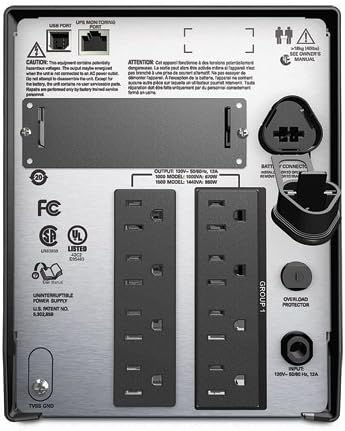
Figura 3.2: Posterior view of the APC Smart-UPS 1500VA, displaying the 8 outlets, USB port, and network management port.
The rear panel includes 8 outlets for connecting your devices, a USB port for communication with a computer, and a slot for an optional network management card. It also has the main power input and a ground screw.

Figura 3.3: Posterior view of the APC Smart-UPS 1500VA with the power cord connected, illustrating the input and output connections.
This image further illustrates the rear panel, specifically showing the attached power cord for the UPS input, and the arrangement of the output receptacles.
4. Configuración
Follow these steps to set up your APC Smart-UPS:
- Deshacer: Desembale con cuidado el UPS e inspecciónelo para detectar posibles daños durante el envío.
- Posicionamiento: Place the UPS on a flat, stable surface in a well-ventilated area, away from direct sunlight, excessive heat, or moisture.
- Conecte la batería: The UPS battery may be disconnected for shipping. Refer to the battery connection instructions, typically found on the unit or in a quick-start guide. Ensure the battery is securely connected.
- Conectar a la alimentación de CA: Plug the UPS power cord into a grounded 120V AC outlet. The UPS will begin charging its battery. Allow the battery to charge for at least 24 hours before initial use to ensure full runtime capability.
- Conectar equipo: Plug your critical electronic equipment (computers, monitors, network devices) into the "Battery Backup + Surge Protection" outlets on the rear of the UPS. For non-critical devices that only require surge protection, use the "Surge Only" outlets if available.
- Conectar cables de comunicación: Connect the supplied USB cable from the UPS to your computer for power management software communication. An optional network management card can be installed for network monitoring.
- Encendido: Presione el botón de encendido en el panel frontal para encender el UPS.
5. Funcionamiento del SAI
5.1 Encendido / Apagado
- Para encender: Press and hold the power button on the front panel until the LCD illuminates.
- Para apagar: Press and hold the power button until the LCD indicates "Power Off" or the unit shuts down.
5.2 Navegación por la pantalla LCD
The LCD display provides real-time information and allows for configuration. Use the navigation buttons (up, down, enter, escape) to browse through menus and adjust settings such as output voltage, sensitivity, and alarm options.
5.3 PowerChute Software
For advanced management and graceful shutdown of connected computers during extended power outages, install APC PowerChute software. This software can be downloaded from the official APC website. It provides monitoring, configuration, and event logging capabilities.
6. Mantenimiento
6.1 Reemplazo de batería
The UPS battery is a sealed lead-acid, AGM type and has a typical lifespan of 3-5 years, depending on usage and environmental conditions. When the battery needs replacement, the UPS will typically indicate this on the LCD or through an audible alarm. Only replace the battery with an APC-approved replacement battery cartridge (RBC).
- Always power off the UPS and disconnect it from the AC power source before attempting battery replacement.
- Follow the specific battery replacement instructions provided with your replacement battery or on the APC support websitio.
- Recycle old batteries responsibly.
6.2 Limpieza
Clean the exterior of the UPS with a soft, dry cloth. Do not use liquid cleaners or aerosol cleaners. Ensure ventilation openings are free from dust and debris.
7. Solución de problemas
This section provides solutions to common issues you may encounter with your APC Smart-UPS. For more complex problems, contact APC technical support.
| Problema | Posible causa | Solución |
|---|---|---|
| El UPS no se enciende. | Battery not connected; UPS not plugged into AC; Low battery charge. | Ensure battery is fully connected. Plug UPS into a live AC outlet. Allow battery to charge for 24 hours. |
| El UPS emite un pitido continuo. | Con batería; Condición de sobrecarga; Batería baja. | Check AC input. Reduce connected load. Allow battery to charge. |
| "Overload" message on LCD. | Demasiados dispositivos conectados. | Disconnect non-essential equipment until the overload warning clears. |
| "Replace Battery" message. | La batería ha llegado al final de su vida útil. | Order and install a new APC replacement battery cartridge (RBC). |
8. Especificaciones
| Característica | Detalle |
|---|---|
| Modelo | SMT1500 |
| Capacidad | 1500VA / 1000W |
| Vol de entradatage | 120 voltios |
| Forma de onda de salida | De onda sinusoidal pura |
| Puntos de venta | 8 (Battery Backup & Surge Protection) |
| Tipo de batería | Plomo-ácido, AGM |
| Dimensiones del producto (alto x ancho x profundidad) | 8.62 x 6.73 x 17.28 pulgadas |
| Peso del artículo | 60 libras |
| Color | Negro |
| Material | Metal (Steel or Aluminum) |
9. Garantía y soporte
9.1 Garantía renovada de Amazon
This product is part of the Amazon Renewed program. It has been professionally inspected and tested to work and look like new by Amazon-qualified suppliers. If not satisfied with the purchase, renewed products are eligible for replacement or refund under the Amazon Renewed Guarantee. Please refer to the Amazon Renewed Guarantee terms and conditions for full details.
9.2 Soporte técnico
For technical assistance, product registration, or further information, please visit the official APC website or contact APC customer support. Have your product model number (SMT1500) and serial number ready when contacting support.
Documentos relacionados - SMT1500
 |
Manual del usuario de APC Smart-UPS: SAI de torre 1000 VA/1500 VA, 750XL/1000XL Manual de usuario completo para los modelos APC Smart-UPS Tower, que cubre la instalación, el funcionamiento, la configuración, la resolución de problemas y la información reglamentaria para sistemas de alimentación ininterrumpida. |
 |
APC Smart-UPS Tower Uninterruptible Power Supply User Manual User manual for APC Smart-UPS Tower models (1000VA/1500VA, 750XL/1000XL) covering installation, operation, configuration, troubleshooting, storage, maintenance, and regulatory information. |
 |
Manual de instalación y funcionamiento del APC Smart-UPS RT Este manual proporciona instrucciones completas para la instalación, el funcionamiento y el mantenimiento de la serie Smart-UPS RT de APC, incluidos los modelos SURT1000 y SURT2000. Abarca precauciones de seguridad, procedimientos de configuración, indicadores de funcionamiento, resolución de problemas e información sobre la garantía de estos sistemas de alimentación ininterrumpida (SAI). |
 |
Manual del usuario del sistema APC Back-UPS BN600G Manual de usuario del sistema de alimentación ininterrumpida (UPS) APC Back-UPS BN600G, que proporciona información de seguridad, especificaciones, instalación, funcionamiento, resolución de problemas y detalles de la garantía. |
 |
Guía de instalación y funcionamiento del APC Back-UPS Pro 900 Esta guía proporciona instrucciones para instalar y operar el APC Back-UPS Pro 900, incluida la configuración, la instalación del software, la conexión de equipos, las funciones operativas como los modos de ahorro de energía y de visualización, la resolución de problemas y las especificaciones. |
 |
APC Back-UPS BR1000G-IN / BR1500G-IN: Manual de instalación y funcionamiento Guía completa para la instalación y el funcionamiento del sistema de alimentación ininterrumpida (UPS) APC Back-UPS BR1000G-IN y BR1500G-IN, que abarca especificaciones, conexiones, características, resolución de problemas y servicio. |
Ask a question about this manual
Ask about setup, troubleshooting, compatibility, parts, safety, or missing instructions. Manuals+ will review the question and use this page’s manual context to help answer it.