
Introducción
This manual provides comprehensive instructions for the HUAYU URC1511 Universal Remote Control. This remote is designed for direct use with Sony, Samsung, and LG LCD/LED Smart TVs, offering a convenient solution to control multiple devices with a single remote. No complex setup is required for these compatible brands.
Configuración
1. Instalación de la batería
El control remoto requiere dos pilas AAA (no incluidas). Siga estos pasos para instalarlas:
- Ubique el compartimiento de la batería en la parte posterior del control remoto.
- Presione la pestaña hacia abajo y deslice la tapa de la batería hacia afuera.
- Inserte dos pilas AAA, asegurándose de que los terminales positivo (+) y negativo (-) coincidan con los diagramas dentro del compartimiento.
- Slide the battery cover back on until it clicks into place.
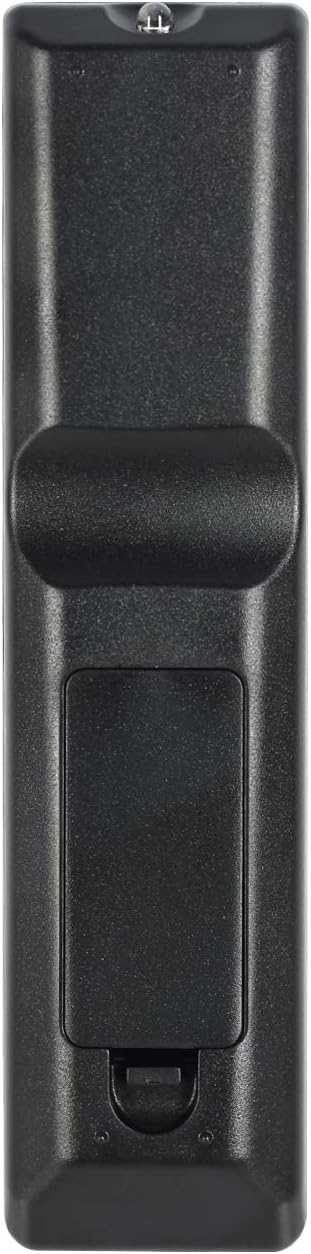
Image: Back of the remote control with battery compartment.
2. Uso inicial
For SAMSUNG, LG, and SONY brand TVs, the HUAYU URC1511 remote control is ready for use immediately after battery installation. No additional programming or setup is required. Simply point the remote at your TV and begin operating it.
Instrucciones de funcionamiento
Disposición y funciones del control remoto
The HUAYU URC1511 remote control features a standard layout with dedicated buttons for various TV functions. Refer to the image below for a visual guide to the button layout.
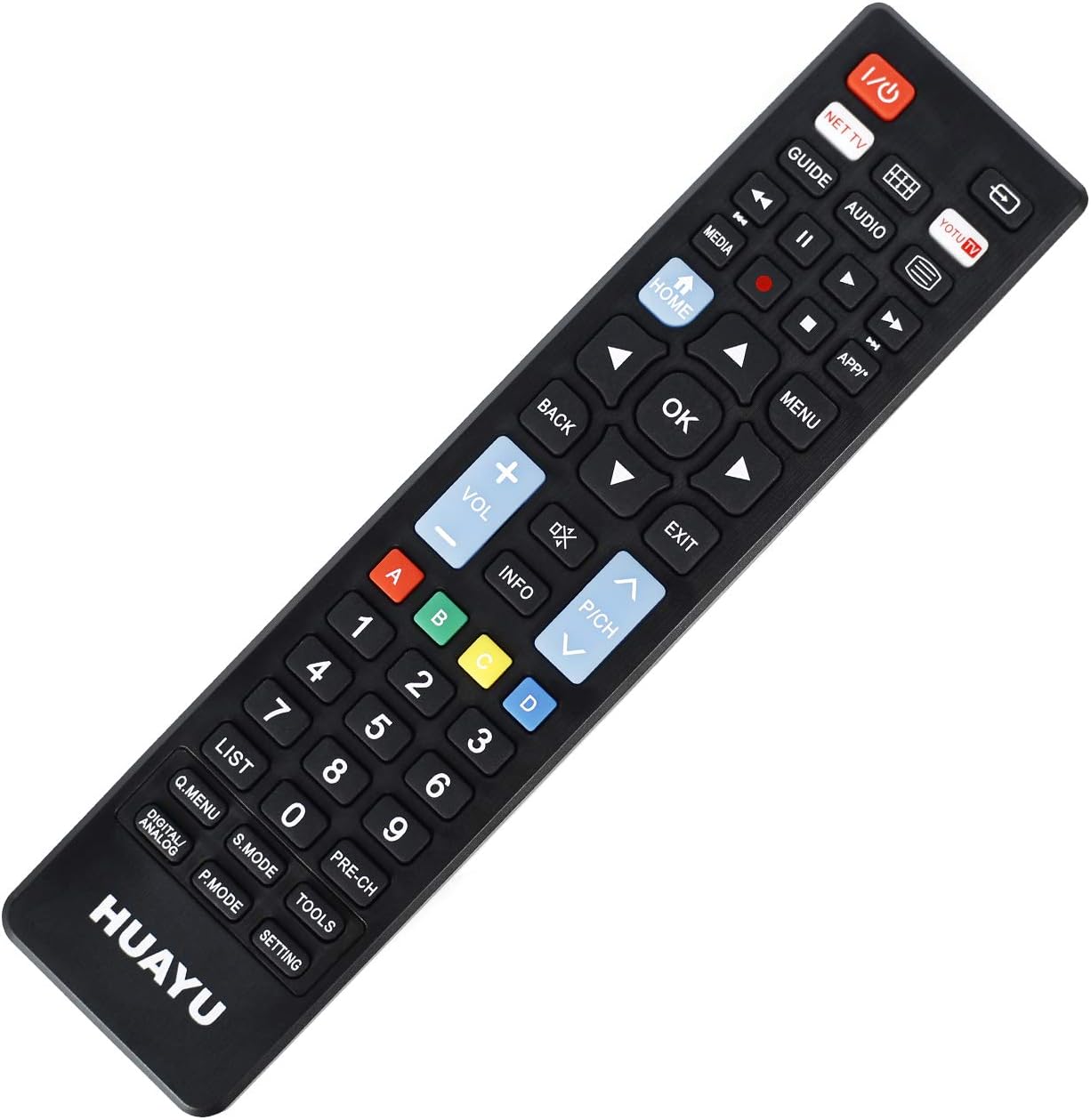
Imagen: Frente view del control remoto con disposición de botones.
Funciones clave:
- Encendido (botón rojo): Enciende o apaga el televisor.
- NET TV / YOTU TV: Dedicated buttons for accessing smart TV applications or specific streaming services.
- Guía: Muestra la guía electrónica de programas.
- Medios de comunicación: Accede a las funciones de reproducción multimedia.
- Hogar: Regresa a la pantalla de inicio principal del televisor o al centro inteligente.
- Atrás: Navega hacia atrás en los menús o aplicaciones.
- OK (Botón central): Confirma selecciones.
- Flechas direccionales (arriba, abajo, izquierda, derecha): Navega por menús y opciones.
- Subir/bajar volumen (+/-): Ajusta el volumen del televisor.
- Channel Up/Down (P/CH +/-): Cambia los canales de televisión.
- Silenciar: Silencia o reactiva el audio del televisor.
- Menú: Abre el menú principal del televisor.
- Salida: Sale del menú o aplicación actual.
- Teclado numérico (0-9): Entrada de canal directo.
- Botones de colores (A, B, C, D): Often used for specific functions within smart TV apps or teletext.
- Lista: Muestra una lista de canales o grabaciones.
- Q.MENU / DIGITAL ANALOG: Quick menu access or toggling between digital/analog inputs.
- S. MODO: Selección del modo de sonido.
- P.MODO: Selección del modo de imagen.
- HERRAMIENTAS: Accesses TV tools or settings.
- PRE-CH: Vuelve al anterior viewcanal ed.
- CONFIGURACIÓN: Abre la configuración de TV.
Compatibilidad
Marcas de TV compatibles
This universal remote control is designed for direct compatibility with the following television brands:
- SAMSUNG
- LG
- SONY
No setup is required for these brands; simply insert batteries and begin use.
Presupuesto
Especificaciones del producto
| Característica | Detalle |
|---|---|
| Número de modelo | URC1511 |
| Distancia operable | Más de 8 metros |
| Requisitos de energía | 3 V CC |
| Tipo de batería | Dos pilas AAA (no incluidas) |
| Dispositivos compatibles | Televisión |
| Número máximo de dispositivos compatibles | 3 (for specific brands) |
| Color | Negro |
| Fabricante | HUAYU |
Cuidado y mantenimiento
- Keep the remote control dry. Avoid exposure to water or high humidity.
- No deje caer ni someta el control remoto a impactos fuertes.
- Limpie el control remoto con un paño suave y seco. No utilice limpiadores abrasivos ni disolventes.
- Si no va a utilizar el control remoto durante un período prolongado, retire las pilas para evitar fugas.
- Avoid exposing the remote control to direct sunlight or extreme temperatures.
Solución de problemas
El control remoto no responde:
- Compruebe las baterías: Asegúrese de que las pilas estén correctamente insertadas con la polaridad correcta (+/-). Reemplace las pilas viejas o agotadas por unas nuevas.
- Línea de visión: Make sure there is a clear line of sight between the remote control and the TV's infrared receiver. Obstructions can block the signal.
- Distancia: Ensure you are within the operable distance (typically within 8 meters).
- Compatibilidad de televisores: Confirm your TV is one of the directly supported brands (SAMSUNG, LG, SONY).
Los botones no funcionan correctamente:
- Control remoto limpio: Dust or debris under buttons can cause issues. Gently clean around the buttons.
- Comprobación de la batería: Las pilas bajas a veces pueden provocar que los botones funcionen de forma intermitente. Reemplace las pilas.
Garantía y atención al cliente
For warranty information or technical support regarding your HUAYU URC1511 Universal Remote Control, please refer to the documentation provided at the point of purchase or contact your retailer. Specific warranty terms may vary.