
1. Introducción
Welcome to the user manual for your AAXA LED Pico Micro Video Projector. This compact and versatile projector is designed for personal media sharing, business presentations, and home cinema experiences. This manual provides detailed instructions on setting up, operating, maintaining, and troubleshooting your device to ensure optimal performance.
Contenido del paquete
Por favor verifique que todos los artículos estén presentes en su paquete:
- Proyector de vídeo LED Pico Micro AAXA
- Cable USB
- AV Cable
- Mini Tripod (optional, may vary by package)
- Adaptador de corriente (no se incluye en la lista explícita, pero se implica para la carga)
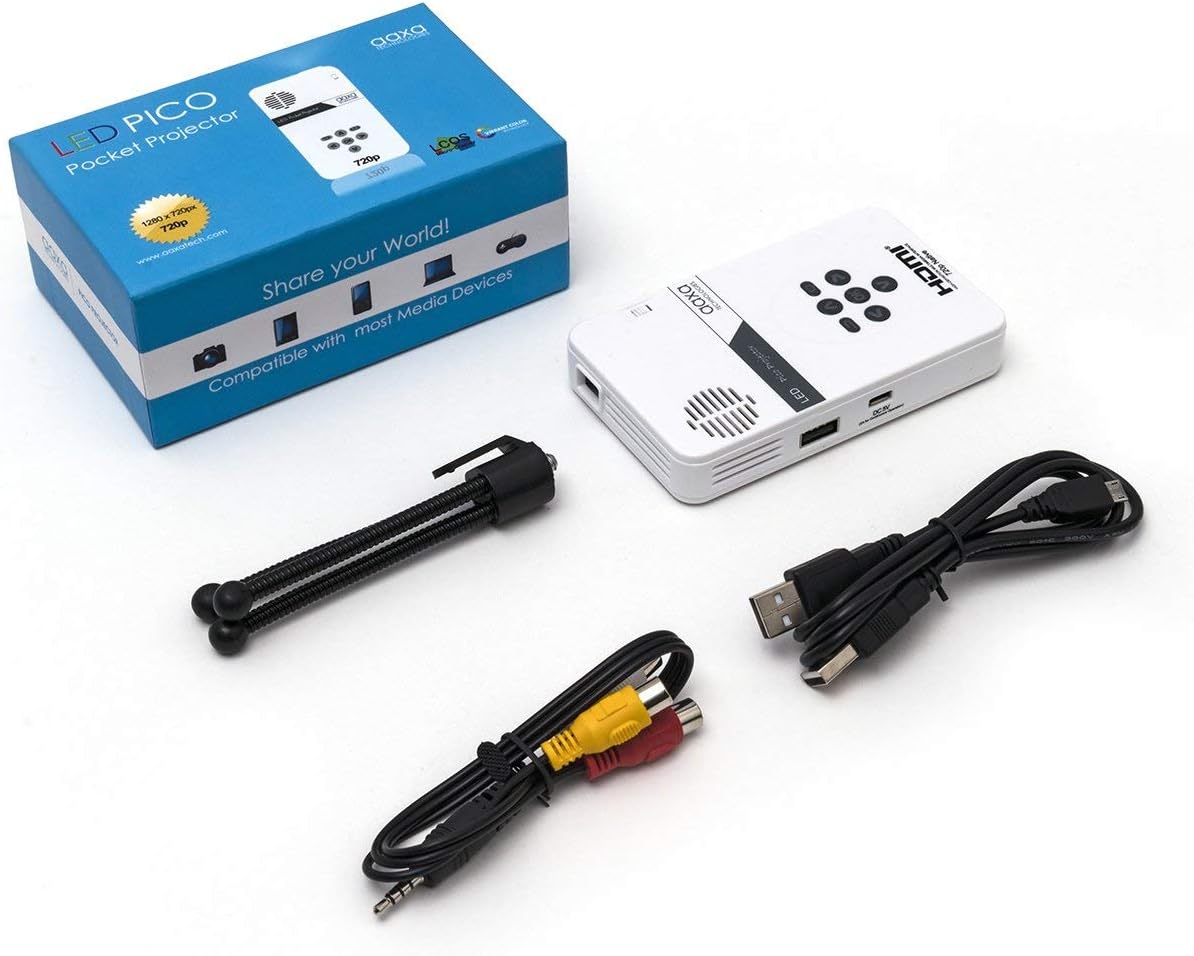
Figure 1: Package contents including the projector, cables, and tripod.
2. Producto terminadoview
The AAXA LED Pico Micro Video Projector is a compact device featuring a user-friendly interface and multiple connectivity options. It is designed for portability and ease of use.
Características principales:
- Ultra Bright 25 Lumens LED light source with 15,000-hour lifespan.
- High Definition 720p (1280x720) native resolution, supporting up to 1080p input.
- Vibrant Color Technology for rich and accurate colors.
- Built-in 80-minute rechargeable Lithium-ion battery.
- Integrated media player and speakers.
- Compact and lightweight design (4.25 x 2.36 x 0.7 inches, 6.3 ounces).
Controles y Puertos:
Familiarize yourself with the various controls and connection ports on your projector:

Figura 2: Arriba view of the projector with navigation buttons (Up, Down, Left, Right, OK, Menu, Back) and speaker grille.
- Botones de navegacion: Se utiliza para navegar por los menús y seleccionar opciones.
- Rejilla del altavoz: For audio output from the built-in speakers.
- Rueda de enfoque: Ubicado en el lateral, se utiliza para ajustar la claridad de la imagen.

Figura 3: Frente view of the projector showing the HDMI, AV, and 3.5mm audio out ports.
- Entrada HDMI: Conéctese a computadoras portátiles, consolas de juegos u otros dispositivos habilitados para HDMI.
- Entrada AV: Para conectar dispositivos más antiguos mediante el cable AV incluido.
- Salida de audio de 3.5 mm: Conecte auriculares o altavoces externos.

Figura 4: Lado view of the projector showing the USB port and DC 5V charging port.
- Puerto USB: Para conectar unidades USB para reproducción multimedia.
- Entrada de 5 V CC: Entrada de energía para cargar la batería interna.

Figura 5: Lado view of the projector showing the TF Card slot.
- Micro SD (TF Card) Slot: Insert a Micro SD card (up to 16GB) for media playback.
3. Configuración
3.1 Encendido/apagado y carga
- Cargando: Connect the supplied micro USB cable to the DC 5V input on the projector and a compatible USB power source. The LED indicator will show charging status.
- Encendido: Press and hold the power button (usually located near the focus wheel or on the top panel) until the projector powers on.
- Apagado: Press and hold the power button again until the projector shuts down.
3.2 Posicionamiento del proyector
Place the projector on a stable, flat surface. For optimal image quality, project onto a smooth, light-colored wall or a dedicated projector screen. The distance from the surface will determine the image size.

Figure 6: The projector can be mounted on a tripod for stable positioning and angle adjustment.
3.3 Ajuste del enfoque
To achieve a clear image, rotate the focus wheel located on the side of the projector until the projected image appears sharp and in focus.
4. Instrucciones de funcionamiento
4.1 Conexión de dispositivos
- HDMI: Connect an HDMI cable from your source device (laptop, game console, etc.) to the HDMI input port on the projector. Select HDMI as the input source in the projector's menu.
- AV: Use the provided AV cable to connect to devices with composite video and audio outputs. Select AV as the input source.
- USB/MicroSD: Insert a USB flash drive into the USB port or a Micro SD card into the TF Card slot. The projector's media player interface will typically appear, allowing you to browse and play files.
4.2 Reproducción de medios
The built-in media player supports various video, music, and picture formats. Use the navigation buttons on the projector to browse files and select content for playback.
4.3 salida de audio
The projector has built-in speakers. For private listening or enhanced audio, connect headphones or external speakers to the 3.5mm Audio Out port.
5. Mantenimiento
- Limpieza: Use a soft, dry cloth to clean the exterior of the projector. For the lens, use a lens cleaning cloth and specialized lens cleaning solution. Do not use abrasive cleaners.
- Almacenamiento: Cuando no esté en uso, guarde el proyector en un lugar fresco y seco, alejado de la luz solar directa y de temperaturas extremas.
- Cuidado de la batería: To prolong battery life, avoid fully discharging the battery frequently. Charge the projector regularly, even if not in active use.
6. Solución de problemas
| Problema | Posible causa | Solución |
|---|---|---|
| No se proyecta ninguna imagen | Projector not powered on; incorrect input source; loose cable connection. | Ensure projector is on and charged. Select correct input source (HDMI, AV, USB/SD). Check all cable connections. |
| La imagen es borrosa | Enfoque no ajustado; proyector demasiado cerca/lejos de la superficie. | Adjust the focus wheel until the image is clear. Adjust the distance of the projector from the projection surface. |
| Sin sonido | Volume too low; external audio device connected; audio format not supported. | Increase volume. Disconnect external audio devices if using internal speakers. Ensure audio format is supported. |
| El proyector se apaga inesperadamente | Batería baja; sobrecalentamiento. | Charge the battery. Ensure proper ventilation and clear any obstructions from vents. |
7. Especificaciones
| Característica | Detalle |
|---|---|
| Marca | Tecnologías AAXA |
| Número de modelo | KP-101-01-cr |
| Resolución de pantalla | 1280 x 720 (Native), Max 1080p Input |
| Brillo | 25 lúmenes |
| Fuente de luz Vida | 15,000 horas (LED) |
| Tecnología de conectividad | HDMI, USB, Micro SD, 3.5mm Aux Out, Composite AV |
| Duración de la batería | Up to 80 minutes (Lithium-Ion) |
| Dimensiones del producto | 4.25 x 2.36 x 0.7 pulgadas |
| Peso del artículo | 6.3 onzas |
| Usos recomendados | Negocios, Educación, Cine en casa |
8. Garantía y soporte
This product is offered as an Amazon Renewed item, which means it has been professionally inspected and tested to work and look like new. Amazon Renewed products are eligible for replacement or refund under the Amazon Renewed Guarantee if you are not satisfied with your purchase.
For further assistance or technical support, please refer to the official AAXA Technologies websitio o comuníquese directamente con su servicio de atención al cliente.