Introducción
Thank you for choosing the MIFA A3 Soundbox Bluetooth Portable Speaker. This manual provides essential information for the safe and efficient use of your device. Please read it thoroughly before operating the speaker and retain it for future reference.
Información de seguridad
- No exponga el altavoz a temperaturas extremas, luz solar directa o humedad alta.
- Evite dejar caer o someter el altavoz a impactos fuertes.
- No desmonte ni intente reparar el altavoz usted mismo. Contacte con personal de servicio técnico cualificado.
- Keep the speaker away from water and liquids, despite its waterproof rating, to prevent damage to charging ports or internal components.
- Utilice únicamente el cable de carga y el adaptador especificados.
Contenido del paquete
Por favor revise el paquete para ver los siguientes artículos:
- MIFA A3 Bluetooth Portable Speaker
- Cable de carga USB
- Cable de audio AUX
- Manual de usuario (este documento)
Producto terminadoview
The MIFA A3 speaker features intuitive touch controls and multiple connectivity options. Familiarize yourself with the speaker's layout:
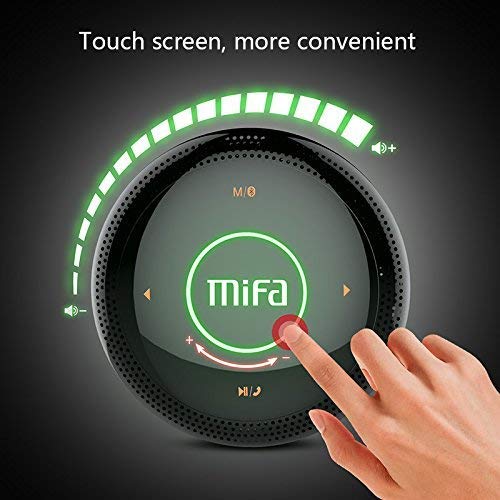
Figura 1: Arriba view of the MIFA A3 speaker, highlighting the touch-sensitive control panel. The panel displays volume indicators, play/pause, and track navigation buttons. A central 'Mifa' logo is also visible.
- Panel de control táctil: Located on the top surface for volume adjustment, playback control, and mode selection.
- Micrófono: Para llamadas manos libres.
- Puerto de carga: Puerto micro USB para carga.
- Entrada auxiliar: Conector de audio de 3.5 mm para conexión por cable.
- Ranura para tarjeta micro SD: Para reproducir música directamente desde una tarjeta de memoria.
Configuración
1. Carga del altavoz
Antes del primer uso, cargue completamente el altavoz. Conecte el cable de carga USB incluido al puerto de carga del altavoz y el otro extremo a un adaptador de corriente USB (no incluido) o al puerto USB de una computadora.
- La luz indicadora de carga se iluminará durante la carga.
- The indicator will turn off or change color once fully charged.
- A full charge provides approximately 8 hours of continuous playtime.
2. Encendido y apagado
- Para encender: Press and hold the Power button (usually integrated into the touch panel or a dedicated button) for 2-3 seconds until you hear an audible prompt or see an indicator light.
- Para apagar: Press and hold the Power button again for 2-3 seconds.
Instrucciones de funcionamiento
1. Emparejamiento Bluetooth
- Ensure the speaker is powered on and in Bluetooth pairing mode (indicated by a flashing blue light or audible prompt).
- En su dispositivo (teléfono inteligente, tableta, PC), habilite Bluetooth y busque los dispositivos disponibles.
- Seleccione "MIFA A3" de la lista de dispositivos.
- Once paired, the speaker will provide an audible confirmation, and the indicator light will become solid blue.
- The speaker will automatically connect to the last-paired device when powered on, if that device's Bluetooth is active and within range.
2. Conexión auxiliar
For devices without Bluetooth, use the provided 3.5mm AUX audio cable:
- Conecte un extremo del cable AUX al puerto de entrada AUX del altavoz.
- Conecte el otro extremo a la toma de auriculares de su dispositivo de audio.
- El altavoz cambiará automáticamente al modo AUX.
3. Reproducción de tarjetas Micro SD
Insert a Micro SD card (up to 32GB, FAT32 format) with music files into the designated slot. The speaker will automatically detect the card and begin playback.
4. Touch Control Operations
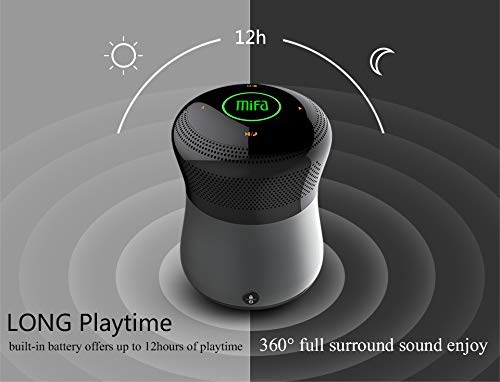
Figura 2: The MIFA A3 speaker shown with an overlay indicating "LONG Playtime" (up to 12 hours) and "360° full surround sound enjoy." This image emphasizes the speaker's battery life and audio dispersion.
- Control de volumen: Slide your finger clockwise on the touch panel to increase volume, counter-clockwise to decrease.
- Reproducir/Pausa: Tap the central Play/Pause icon.
- Pista siguiente: Tap the "Next" arrow icon.
- Pista anterior: Tap the "Previous" arrow icon.
- Cambio de modo: Tap the "M/O" icon to cycle between Bluetooth, AUX, and Micro SD card modes.
- Botón de bloqueo: Press the lock icon to prevent accidental touch inputs.
5. Call Handling (Bluetooth Mode)
- Responder llamada: Tap the Play/Pause icon when a call comes in.
- Finalizar llamada: Tap the Play/Pause icon again.
- Rechazar llamada: Press and hold the Play/Pause icon for 2 seconds.
Mantenimiento
- Limpie el altavoz con un paño suave y seco. No utilice limpiadores abrasivos ni disolventes.
- Guarde el altavoz en un lugar fresco y seco cuando no lo utilice durante períodos prolongados.
- Cargue la batería al menos una vez cada tres meses para mantener su salud.
Solución de problemas
| Problema | Posible solución |
|---|---|
| El altavoz no se enciende. | Asegúrese de que la batería esté cargada. Conéctela a una fuente de alimentación y vuelva a intentarlo. |
| No se puede emparejar a través de Bluetooth. |
|
| No hay sonido. |
|
| Mala calidad de sonido. |
|
Presupuesto
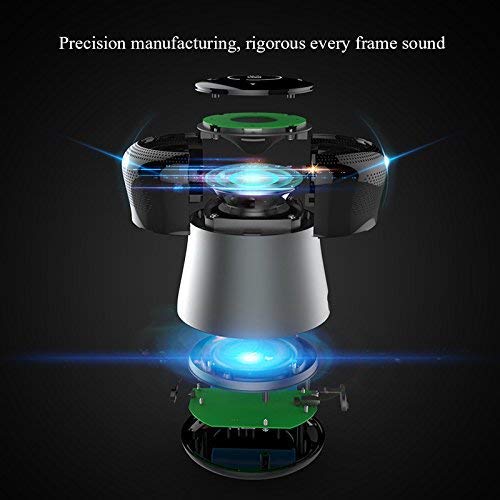
Figura 3: An exploded diagram of the MIFA A3 speaker, illustrating its internal components and structural design, emphasizing precision manufacturing.
| Modelo | MIFA A3 |
| Potencia de salida | 10 W |
| Conectividad | Bluetooth 4.2, AUX, Micro SD Card |
| Batería | Batería de iones de litio de 1800 mAh |
| Recreo | Hasta 8 horas (al 60% del volumen) |
| Tiempo de carga | Aproximadamente 3-4 horas |
| Micrófono | Incorporado para llamadas con manos libres |
| Impermeable | Yes (as per product specifications, but general caution advised for ports) |
| Método de control | Tocar |
| Dispositivos compatibles | Portátil, PC, teléfono inteligente, tableta |
Garantía y soporte
MIFA products are designed to provide reliable performance. For warranty information or technical support, please refer to the warranty card included with your purchase or visit the official MIFA webSitio. Conserve su comprobante de compra para reclamaciones de garantía.
For further assistance, you may contact MIFA customer support through their official channels.