
Philips SRP9263C/27
Manual del usuario del control remoto universal Philips
Model: SRP9263C/27
Introducción
This manual provides comprehensive instructions for setting up, operating, and maintaining your Philips 6-Device Universal Remote Control (Model SRP9263C/27). This remote is designed to consolidate control of up to six audio and video devices, simplifying your home entertainment experience.
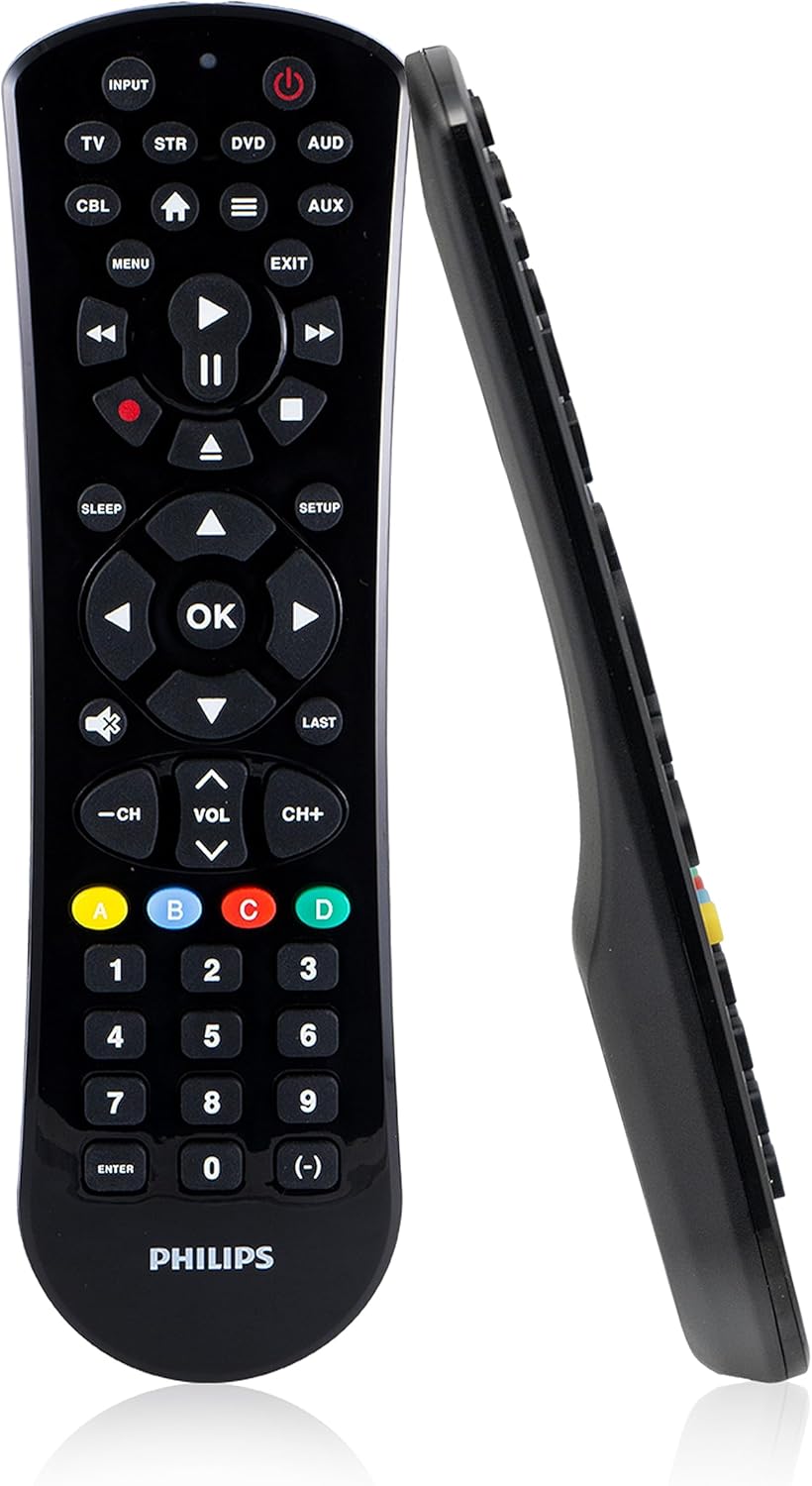
Imagen: Frontal y lateral view of the Philips 6-Device Universal Remote Control.
Configuración
1. Instalación de la batería
Your Philips Universal Remote Control requires two AAA batteries (not included). To install:
- Ubique el compartimiento de la batería en la parte posterior del control remoto.
- Deslice la tapa de la batería hacia abajo para abrirla.
- Inserte dos pilas AAA, asegurándose de que los terminales positivo (+) y negativo (-) estén alineados con los indicadores dentro del compartimiento.
- Deslice la tapa de la batería nuevamente en su lugar hasta que haga clic de forma segura.
2. Programación de su control remoto
The remote can be programmed using either auto code search or direct code entry. It comes preprogrammed for immediate use with Samsung TVs and Roku streaming media boxes (note: not compatible with Roku Streaming Sticks or Amazon Fire TV/Sticks).

Image: Step-by-step visual guide for programming the remote control.
Entrada directa de código:
- Localice la lista de códigos de control remoto incluida con su control remoto.
- Mantenga pulsado el CONFIGURACIÓN en el control remoto hasta que se encienda la luz roja en el control remoto.
- Press and release the device button (e.g., TV, STR, DVD, AUD, CBL, AUX) on the remote that corresponds to the device you want to control.
- Use the number buttons on the remote to enter the first 4-digit remote code from the list for your device's brand.
- Apunte el control remoto al dispositivo y pruebe sus funciones (por ejemplo, Encendido, Volumen).
- Repeat these steps to set up each additional device.
For additional codes or assistance, refer to the official Philips support website or the User Guide PDF provided in the documentation.

Image: The remote can easily program various devices including TVs, soundbars, home theater systems, cable/satellite boxes, DVD/Blu-ray players, and media streaming players.
Operación de su control remoto
Your Philips Universal Remote is designed for intuitive control of up to six devices.
Selección de dispositivo
To control a specific device, press the corresponding device button at the top of the remote (TV, STR, DVD, AUD, CBL, AUX). The remote will then send commands to the selected device.
Características principales:
- Control de audio principal: Adjust the volume of your primary audio device (e.g., soundbar or receiver) regardless of which device is currently selected on the remote. This feature ensures consistent volume control.
- Abrir/Cerrar Blu-ray/DVD: Dedicated buttons allow for direct control of disc tray functions on compatible Blu-ray or DVD players.
- Funciones avanzadas del DVR: Access common DVR controls such as record, play, pause, fast forward, and rewind.
- Simple Menu Navigation: Use the directional pad and OK button for easy navigation within device menus.
- Botón de guión: Provides quick access to sub-channels (e.g., 2.1, 2.2).
- Tecla de acceso rápido de la aplicación de transmisión: A dedicated button to take you directly to your smart TV’s primary media platform or streaming app.

Image: The remote offers 6-device configuration, dedicated DVD/Blu-ray open/close, advanced DVR functions, and a sleek gloss finish.

Image: The remote features a comprehensive code library, working with all major brands and supporting thousands of audio/video components.
Mantenimiento
Reemplazo de batería
When the remote's performance degrades or the indicator light no longer illuminates, it's time to replace the batteries. Follow the battery installation steps in the Setup section.
Limpieza
To clean your remote, use a soft, dry cloth. Do not use abrasive cleaners, solvents, or wet cloths, as these can damage the remote's finish or internal components.
Solución de problemas
- El control remoto no responde:
- Asegúrese de que las pilas AAA nuevas estén instaladas correctamente.
- Apunte el control remoto directamente al sensor IR del dispositivo.
- Verify that the correct device button (TV, STR, DVD, etc.) is selected.
- El dispositivo no responde a los comandos:
- Re-enter the programming code for the device. Try alternative codes listed for your brand in the code list.
- Ensure the remote is not obstructed and there are no strong light sources interfering with the IR signal.
- Remote not compatible with Roku Streaming Stick or Amazon Fire TV/Sticks:
- This remote operates using infrared (IR) signals and is not designed for radio frequency (RF) devices like Roku Streaming Sticks or Amazon Fire TV/Sticks. These devices typically require their own dedicated RF remotes.
- Algunas funciones no funcionan después de la programación:
- Some universal remote codes may not support all original remote functions. Try different codes for your device's brand.
- Refer to the comprehensive User Guide PDF for advanced programming or specific function mapping.
Presupuesto
| Característica | Detalle |
|---|---|
| Número de modelo | SRP9263C/27 |
| Dimensiones del producto | 6 x 8 x 2 pulgadas |
| Peso del artículo | 3.84 onzas |
| Pilas necesarias | 2 pilas AAA (no incluidas) |
| Número máximo de dispositivos compatibles | 6 |
| Dispositivos compatibles | TVs, Blu-ray/DVD players, soundbars, cable and satellite receivers, streaming players (IR-based), Home Theater systems. Compatible with major brands including Sony, Samsung, Hisense, Westinghouse, LG, Toshiba, Sharp, Vizio, Insignia, Philips, TCL, Panasonic, Roku (boxes, not sticks), Apple TV (boxes, not sticks). |
| Color | Negro |
| Fabricante | Compañía de productos Jasco, LLC |

Image: The Philips Universal Remote is available in both 6-device (shown) and 4-device configurations.
Garantía y soporte
For warranty information, product registration, and additional support, please visit the official Philips consumer electronics websitio o del fabricante website (Jasco Products Company, LLC).
You can also refer to the comprehensive User Guide PDF for detailed instructions and troubleshooting tips:
Ask a question about this manual
Ask about setup, troubleshooting, compatibility, parts, safety, or missing instructions. Manuals+ will review the question and use this page’s manual context to help answer it.