
Introducción
Thank you for choosing the Awei B923BL Wireless Magnetic Sports Bluetooth Earphones. This manual provides essential information for setting up, operating, maintaining, and troubleshooting your new earphones. Please read it carefully before use to ensure optimal performance and longevity of your device.
Contenido del paquete
Por favor revise el paquete para ver los siguientes artículos:
- Awei B923BL Wireless Magnetic Sports Bluetooth Earphones
- Cable de carga USB
- Puntas para los oídos de varios tamaños
- Manual de usuario
Producto terminadoview
The Awei B923BL earphones are designed for active lifestyles, featuring a wireless Bluetooth connection and a magnetic design for convenient storage around your neck when not in use. They include an integrated microphone for hands-free calling.

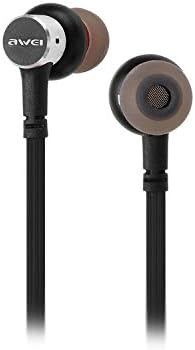
Configuración
1. Carga de los auriculares
Before first use, fully charge your earphones. Connect the provided USB charging cable to the charging port on the earphones and the other end to a USB power source (e.g., computer USB port, wall adapter). The indicator light will show charging status and turn off or change color when fully charged.
2. Emparejamiento Bluetooth
- Asegúrese de que los auriculares estén apagados.
- Press and hold the multi-function button (usually the power button) until the indicator light flashes red and blue alternately, indicating pairing mode.
- En su teléfono móvil o dispositivo con Bluetooth, vaya a la configuración de Bluetooth y habilite Bluetooth.
- Buscar available devices. You should see "Awei B923BL" or a similar name in the list.
- Select "Awei B923BL" to connect. Once connected, the indicator light will usually flash blue slowly or turn off, and you may hear a confirmation tone.
- Si se le solicita una contraseña, ingrese "0000".
Once paired, the earphones will automatically connect to the last paired device when turned on, if the device's Bluetooth is active and within range.
Instrucciones de funcionamiento
Encendido/apagado
- Encendido: Mantenga presionado el botón multifunción durante aproximadamente 3 segundos hasta que la luz indicadora azul parpadee.
- Apagado: Mantenga presionado el botón multifunción durante aproximadamente 5 segundos hasta que la luz indicadora roja parpadee y luego se apague.
Reproducción de música
- Reproducir/Pausa: Presione el botón multifunción una vez.
- Pista siguiente: Mantenga presionado el botón Volumen +.
- Pista anterior: Mantenga presionado el botón Volumen -.
Gestión de llamadas
- Responder/Finalizar llamada: Presione el botón multifunción una vez.
- Rechazar llamada: Mantenga presionado el botón multifunción durante aproximadamente 2 segundos.
- Volver a marcar el último número: Presione dos veces el botón multifunción.
Control de volumen
- Aumenta el volumen: Presione el botón Volumen +.
- Disminuir volumen: Presione el botón de volumen -.
Mantenimiento
- Clean the earphones regularly with a soft, dry cloth. Do not use harsh chemicals or abrasive materials.
- Retire las puntas de los oídos y límpielas con agua y jabón suave si es necesario, asegurándose de que estén completamente secas antes de volver a colocarlas.
- Guarde los auriculares en un lugar fresco y seco, alejado de la luz solar directa y de temperaturas extremas.
- Avoid exposing the earphones to water or excessive moisture.
- No intente desmontar ni modificar los auriculares, ya que esto anulará la garantía.
Solución de problemas
- Los auriculares no se encienden: Asegúrese de que los auriculares estén completamente cargados.
- No se puede emparejar con el dispositivo:
- Make sure the earphones are in pairing mode (flashing red and blue).
- Asegúrese de que Bluetooth esté habilitado en su dispositivo.
- Acerque los auriculares a su dispositivo.
- Intente reiniciar tanto los auriculares como el dispositivo.
- Borre las conexiones Bluetooth anteriores en su dispositivo si tiene demasiadas.
- No hay sonido o el volumen es bajo:
- Verifique los niveles de volumen tanto en los auriculares como en el dispositivo conectado.
- Asegúrese de que los auriculares estén conectados correctamente a su dispositivo.
- Intente reproducir diferentes fuentes de audio.
- Problemas de calidad de las llamadas:
- Asegúrese de que el micrófono no esté obstruido.
- Muévase a un área con menos interferencia.
Presupuesto
| Característica | Detalle |
|---|---|
| Nombre de marca | Awei |
| Número de modelo | B923BL |
| Color | Negro |
| Factor de forma de los auriculares | En el oído |
| Tecnología de conectividad | Inalámbrico |
| Tecnología de comunicación inalámbrica | Inalámbrico |
| Descripción del rango de edad | Adulto |
| Material | Goma |
| Dispositivos compatibles | Teléfonos móviles |
| Función del cable | Sin cable |
| Método de control | Tocar |
| Número de artículos | 1 |
| Fabricante | Awei |
| Características especiales | Microphone Included (Note: This model does not feature active noise cancellation as per product description.) |
Garantía y soporte
Información de garantía
This product comes with a 1-year manufacturer's warranty from the date of purchase. For warranty claims or service, please contact the manufacturer or their authorized service agent. For further details, you may also contact the retailer where the product was purchased.
Atención al cliente
If you encounter any issues not covered in this manual or require further assistance, please refer to the contact information provided with your product packaging or visit the official Awei webSitio para recursos de soporte.