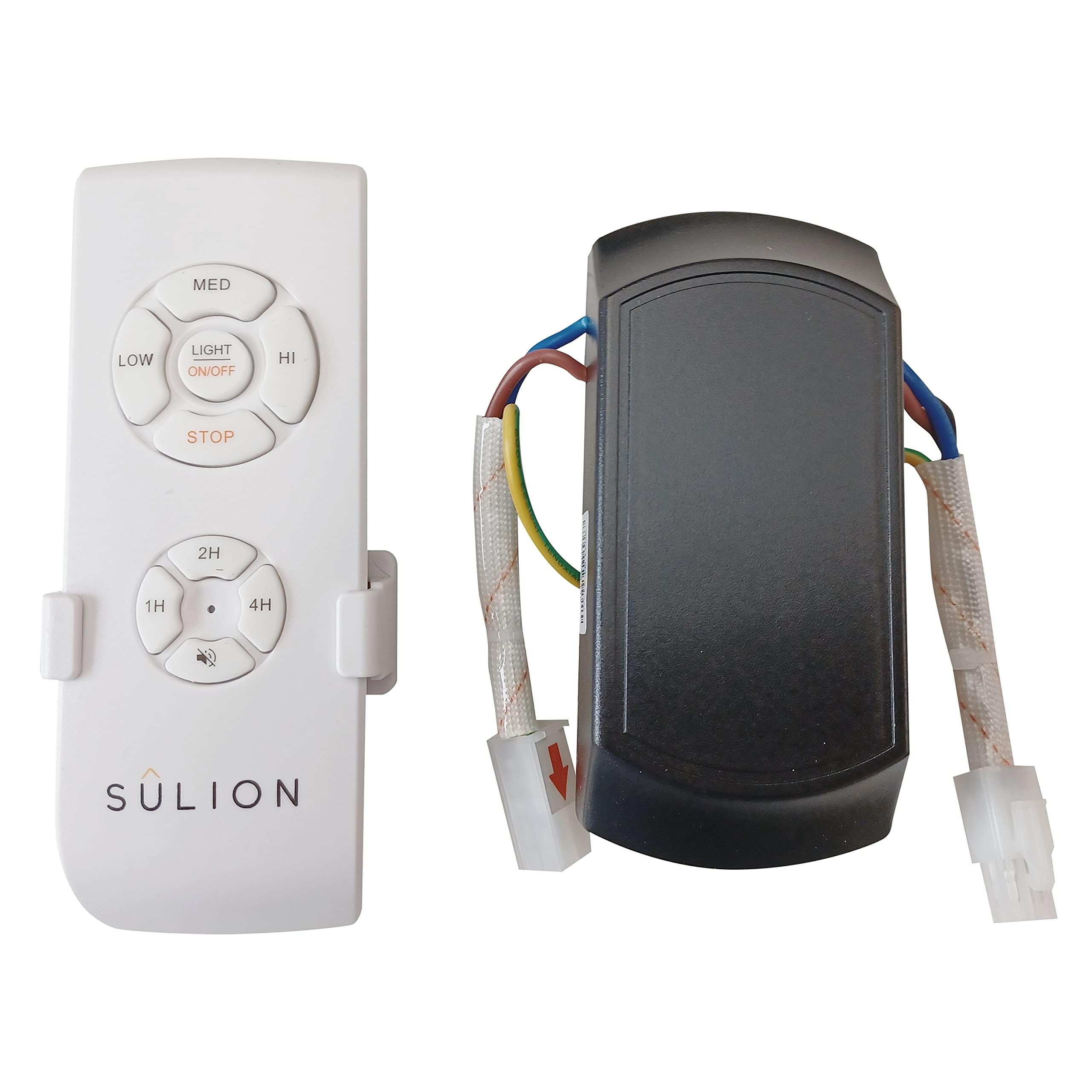
Sulion Ceiling Fan Remote Control with Sleep Function - Model 078100
Manual de instrucciones
Producto terminadoview
The Sulion Model 078100 is a wireless remote control system designed for ceiling fans. It offers convenient control over fan speeds and lighting, including a specialized sleep function. This system features 3 infrared fan speeds and a programmable shut-off timer, allowing users to set the fan to turn off automatically after 1/2 hour, 1 hour, or 3 hours.
Image: Sulion Ceiling Fan Remote Control Kit, showing the remote and receiver unit.
Información de seguridad
Always disconnect power at the main circuit breaker before installing or servicing the fan or remote control system.
La instalación debe ser realizada por un electricista calificado o de acuerdo con los códigos eléctricos locales.
Asegúrese de que todas las conexiones eléctricas estén seguras y adecuadamente aisladas.
Do not use this product with dimmer switches or other variable speed controls not specified for ceiling fans.
Mantenga el control remoto alejado del agua y de temperaturas extremas.
Contenido del paquete
Verifique que todos los componentes estén presentes antes de comenzar la instalación:
Unidad de control remoto
Unidad receptora
Soporte de montaje en pared para control remoto
Tornillos de montaje
Conectores de cableado
Manual de instrucciones
Vídeo: Un primer plano view of the remote control and receiver unit, demonstrating the components included in the package.
Configuración e instalación
1. Cableado de la unidad receptora
Before proceeding, ensure the power supply to the ceiling fan is completely disconnected at the circuit breaker.
Identify the existing wiring from your ceiling fan and the main power supply.
Connect the receiver unit's wires to the corresponding fan and power supply wires using appropriate electrical connectors. Typically, this involves connecting the live (L) and neutral (N) wires from the power supply to the receiver's input, and the fan's light and motor wires to the receiver's output. Refer to the wiring diagram provided in the video for detailed connections.
Securely mount the receiver unit within the fan's canopy or junction box, ensuring it does not interfere with the fan's operation.
2. Emparejamiento de control remoto
After wiring the receiver, you may need to pair the remote control with the receiver.
Restore power to the ceiling fan at the circuit breaker.
Within 30 seconds of restoring power, press and hold the "Light" button on the remote control for approximately 5 seconds.
The fan light should blink or the fan should briefly turn on/off to indicate successful pairing.
3. Smartphone App Pairing (if applicable)
Some models may support smartphone app control. Follow these general steps for pairing:
Download the recommended smart home app (e.g., Tuya Smart, Smart Life) from your device's app store.
Asegúrese de que su teléfono inteligente esté conectado a una red Wi-Fi de 2.4 GHz.
Open the app and select "Add Device" or "Auto Scan".
Follow the on-screen instructions to put the device into pairing mode (often involves cycling power or pressing a button on the receiver). The indicator light on the receiver should blink rapidly.
Confirm the indicator is blinking rapidly in the app and proceed with the pairing process.
Instrucciones de funcionamiento
Funciones del control remoto
Luz encendida / apagada: Presione el Luz button to toggle the fan light on or off.
Ventilador encendido / apagado: Presione el Admirador botón para encender o apagar el ventilador.
Control de velocidad del ventilador: Utilice el 1, 2, 3 buttons to select low, medium, or high fan speeds respectively.
Tiempo de dormir: Presione el 1/2H, 1H, 3H buttons to set the fan to automatically turn off after 30 minutes, 1 hour, or 3 hours.
Función inversa: If your fan supports it, the reverse button (often depicted as two arrows forming a circle) changes the fan blade direction for summer or winter use.
Funciones de la aplicación para teléfonos inteligentes
Control de luz: Toggle the light on/off directly from the app interface.
Ajuste de velocidad del ventilador: Adjust fan speed using a slider or predefined levels within the app.
Configuración del temporizador: Set custom timers for fan and light operation.
Control de voz: Integrate with smart assistants (e.g., Alexa, Google Assistant) for voice commands (if supported by the app and device).
Mantenimiento
Limpieza: Wipe the remote control and receiver with a soft, dry cloth. Do not use abrasive cleaners or solvents.
Reemplazo de batería: Replace the remote control batteries when the indicator light dims or the remote's range decreases. Refer to the remote's battery compartment for battery type (typically AAA or similar).
Controles periódicos: Revise periódicamente todas las conexiones del cableado para comprobar que estén bien ajustadas y que no presenten signos de desgaste.
Solución de problemas
Problema
Posible causa
Solución
El ventilador/la luz no responden al control remoto.
Low/dead remote battery.
El control remoto no está emparejado con el receptor.
Problema con la fuente de alimentación.
Reemplace las baterías del control remoto.
Re-pair the remote control (see Setup section).
Verifique el disyuntor y las conexiones del cableado.
El ventilador funciona pero la luz no.
Bombilla defectuosa.
Light wiring issue.
Reemplazar la bombilla.
Check light wiring connections to the receiver.
La aplicación no puede conectarse al dispositivo.
Incorrect Wi-Fi network (5GHz vs 2.4GHz).
El dispositivo no está en modo de emparejamiento.
Mala señal de Wi-Fi.
Ensure phone is on 2.4GHz Wi-Fi.
Follow app pairing steps to reset device.
Move router closer or improve Wi-Fi signal.
Presupuesto
Número de modelo: 078100
Marca: Sulión
Dimensiones del producto: 12 x 5 x 3 cm; 170 gramos
Tecnología de conectividad: Radio Frequency, Infrared
Característica especial: Alta velocidad
Dispositivos compatibles: Admirador
Color: Blanco
País natal: Porcelana
Garantía y soporte
This Sulion product is covered by a standard manufacturer's warranty. For specific warranty details, please refer to the documentation included with your purchase or contact Sulion customer support. For technical assistance, troubleshooting, or to inquire about replacement parts, please visit the official Sulion websitio o comuníquese con su departamento de servicio al cliente.
Ask a question about this manual
Ask about setup, troubleshooting, compatibility, parts, safety, or missing instructions. Manuals+ will review the question and use this page’s manual context to help answer it.