1. Introducción
The PIXEL RW-221 CB1 is a high-performance wireless shutter release remote control designed to provide photographers with enhanced flexibility and control over their Olympus digital cameras. Utilizing FSK 2.4GHz wireless technology, this device ensures reliable and stable remote operation, minimizing camera shake and enabling various shooting modes from a distance.
This remote control supports single shooting, continuous shooting, Bulb mode for long exposures, and a 4-second delay shooting mode. Its interchangeable cable design allows for compatibility with different camera brands and models by simply changing the connecting cable. The system consists of a transmitter and a receiver, both powered by easily replaceable AAA batteries, offering extended operational life.
Cámaras compatibles: Olympus E-1, E-10, E-20, E-3, E-5.
2. Contenido del paquete
Verifique que todos los artículos enumerados a continuación estén incluidos en su paquete:
- RW-221 Transmitter (x1)
- RW-221 Receiver (x1)
- Shutter Connecting Cable (x1)
- Manual de usuario (x1)
Nota: Las pilas AAA no están incluidas y deben comprarse por separado.

Image: The PIXEL RW-221 CB1 Wireless Shutter Release Remote Control, showing the transmitter, receiver, and connecting cable.
3. Configuración
3.1 Instalación de la batería
Both the transmitter and receiver require two AAA batteries each. Ensure correct polarity when inserting batteries.
- Open the battery compartment cover on both the transmitter and receiver.
- Insert two AAA batteries into each unit, aligning them with the '+' and '-' indicators inside the compartment. For the receiver, note that the two springs are on the same side, so ensure correct orientation.
- Cierre firmemente las tapas del compartimiento de la batería.
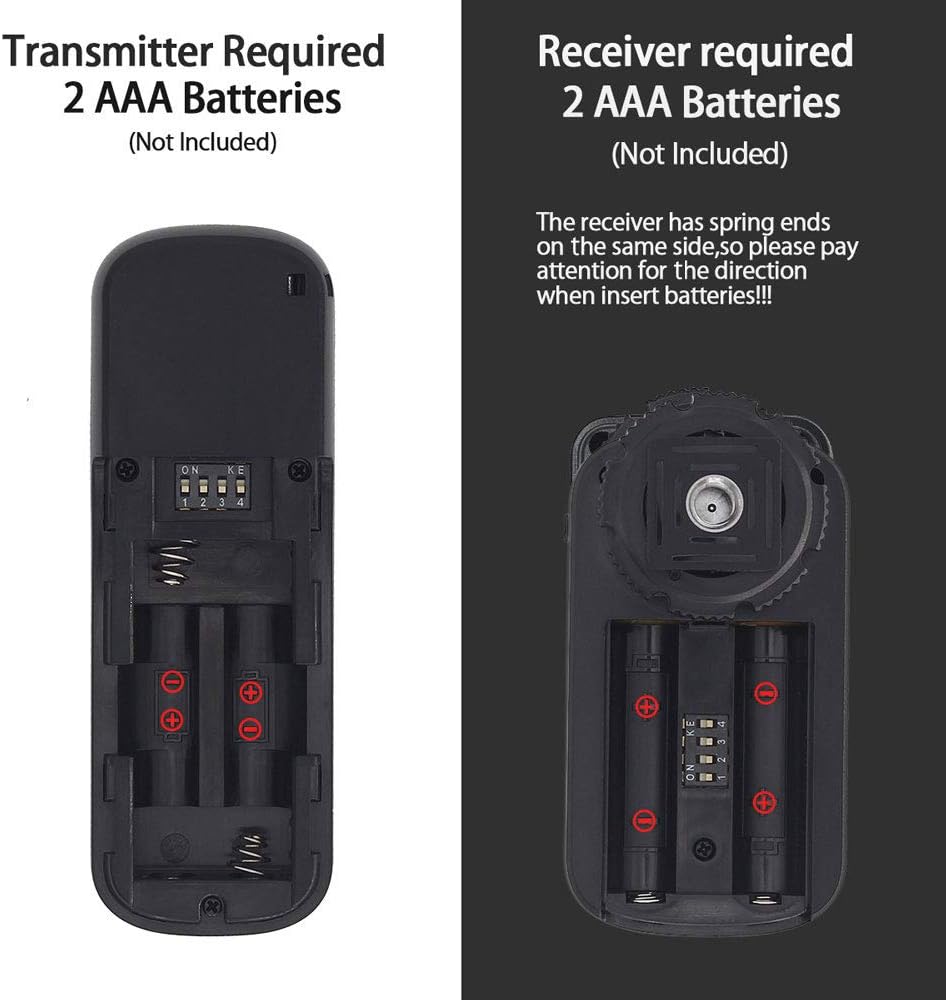
Imagen: Detallada view of the battery compartments for both the transmitter and receiver, illustrating correct AAA battery insertion.
3.2 Conexión a su cámara
The receiver connects to your camera's remote control port. The transmitter communicates wirelessly with the receiver.
- Attach the receiver to your camera's hot shoe. This provides a secure mounting point but does not affect flash operation as the shutter release does not use the hot shoe interface for electrical connection.
- Connect one end of the provided shutter connecting cable to the receiver.
- Connect the other end of the shutter connecting cable to the remote control port on your Olympus camera.
- Asegúrese de que tanto el transmisor como el receptor estén encendidos.

Image: An illustration of the interchangeable shutter connecting cables, highlighting the CB1 cable for Olympus cameras.
Video: This video demonstrates the installation process of the PIXEL RW-221 Wireless Shutter Remote Control onto a camera, including attaching the receiver to the hot shoe and connecting the cable to the camera's remote port.
4. Instrucciones de funcionamiento
The PIXEL RW-221 CB1 offers multiple shooting modes for various photographic needs.
4.1 Funcionamiento básico del obturador
The transmitter features a two-stage shutter button:
- Media presión: Press the shutter button halfway down to activate autofocus. The indicator light on the transmitter will turn green.
- Prensa completa: Press the shutter button completely down to trigger the camera's shutter. The indicator light will turn red.

Image: A visual guide to the transmitter's half-press (focus) and full-press (shutter) functions, indicated by green and red lights respectively.
4.2 Modos de disparo
The RW-221 CB1 supports the following shooting modes:
- Disparo único: Set your camera to single shot mode and the transmitter to single shot mode. Press the transmitter's shutter button fully to capture a single image.
- Disparo continuo: Set your camera to continuous shooting mode and the transmitter to continuous shot mode. Press and hold the transmitter's shutter button to capture a series of images. The number of frames per second depends on your camera's settings.
- Bulb Mode (Long Exposure): Set your camera to Bulb mode and the transmitter to Bulb mode. Press the transmitter's shutter button once to open the shutter, and press it again to close the shutter, allowing for custom long exposure times.
- Disparo con retardo de 4 segundos: Set your camera to single shooting mode and the transmitter to 4-second delay shooting mode. Press the transmitter's shutter button fully; the camera will capture an image after a 4-second delay.

Image: Demonstrates the wireless connection capability, showing two cameras simultaneously controlled by the remote for capturing a scene.

Image: An 'Anti-Shake' comparison, showing the improvement in image clarity when using the remote control to prevent camera movement during exposure.
Video: This video demonstrates the various shooting functions of the PIXEL RW-221 Wireless Shutter Remote Control, including single shooting, continuous shooting (high-speed), Bulb mode for long exposures, and 4-second delay shooting.
5. Mantenimiento
To ensure the longevity and optimal performance of your PIXEL RW-221 CB1 Wireless Shutter Release Remote Control, follow these maintenance guidelines:
- Limpieza: Use a soft, dry cloth to clean the device. Avoid using liquid cleaners or solvents, as they may damage the electronics.
- Almacenamiento: When not in use for extended periods, remove the batteries from both the transmitter and receiver to prevent leakage and corrosion. Store the device in a cool, dry place away from direct sunlight and extreme temperatures.
- Duración de la batería: The included AAA batteries can provide approximately 400 hours of operation. Replace batteries promptly when performance degrades or the indicator light fails to illuminate.
- Manejo: Handle the remote control with care. Avoid dropping it or subjecting it to strong impacts, which could damage internal components.
6. Solución de problemas
If you encounter issues with your PIXEL RW-221 CB1, please refer to the following common problems and solutions:
- El dispositivo no responde:
- Compruebe que las baterías estén correctamente instaladas y tengan suficiente carga. Reemplácelas si es necesario.
- Asegúrese de que tanto el transmisor como el receptor estén encendidos.
- Verify that the shutter connecting cable is securely plugged into both the receiver and the camera's remote port.
- La cámara no se activa:
- Confirm that your camera is set to the appropriate shooting mode (e.g., single shot, continuous, Bulb).
- Asegúrese de que la función de control remoto de la cámara esté habilitada en su configuración, si corresponde.
- Check the distance between the transmitter and receiver. The effective transmission distance is typically 100 meters or more in open areas. Obstacles may reduce this range.
- Conexión intermitente:
- Interference from other 2.4GHz devices might affect performance. Try changing your location or reducing interference sources.
- Ensure the receiver is not obstructed on the camera's hot shoe.
Si el problema persiste después de probar estas soluciones, comuníquese con el servicio de atención al cliente para obtener más ayuda.
7. Especificaciones
| Característica | Especificación |
|---|---|
| Modo de sistema | FSK 2.4GHz wireless system |
| Transmisión de potencia | 0 dB |
| Sensibilidad de recepción | -99dB |
| Distancia de transmisión | 100M+ (in open areas) |
| Canal de comunicación | 16 |
| Longitud del cable de control | 30cm (straight line) |
| Transmitter Stand-by Time | 1000 horas |
| Receiver Stand-by Time | 300 horas |
| Receiver Dimension (LWH) | 66 mm x 37.5 mm x 28.5 mm |
| Transmitter Dimension (LWH) | 97 mm x 33 mm x 15 mm |
| Dimensiones del producto | 3.15 x 1.18 x 0.39 pulgadas |
| Peso del artículo | 2.12 onzas |
| Pilas necesarias | 2 AAA batteries (Transmitter), 2 AAA batteries (Receiver) |
8. Garantía y soporte
8.1 Información de garantía
This PIXEL product is covered by a manufacturer's warranty against defects in materials and workmanship. The specific terms and duration of the warranty may vary by region and retailer. Please retain your proof of purchase for warranty claims.
8.2 Atención al cliente
For technical assistance, troubleshooting, or warranty inquiries, please contact the retailer where you purchased the product or visit the official PIXEL website for support resources. When contacting support, please have your product model (RW-221 CB1) and purchase details ready.