
1. Introducción
Gracias por la compraasing the Supersonic SC-20H DVD Player. This manual provides essential information for the proper installation, operation, and maintenance of your device. Please read this manual thoroughly before using the product and retain it for future reference.
2. Información de seguridad
Para garantizar un funcionamiento seguro y evitar daños, observe las siguientes precauciones:
- Fuente de energía: Connect the player only to a power supply within the specified range (110-240V, 50/60Hz).
- Ventilación: No obstruya las aberturas de ventilación. Asegúrese de que haya suficiente espacio alrededor de la unidad para una correcta circulación del aire.
- Humedad: Do not expose the player to rain, moisture, or dripping/splashing liquids. Do not place objects filled with liquids, such as vases, on the apparatus.
- Calor: Mantenga el reproductor alejado de fuentes de calor como radiadores, rejillas de calefacción, estufas u otros aparatos (incluidos ampificadores) que producen calor.
- Limpieza: Unplug the player from the wall outlet before cleaning. Use a dry cloth for cleaning.
- Servicio: No intente reparar este producto usted mismo. Refiera todo el servicio a personal de servicio calificado.
- Advertencia sobre la Proposición 65 de California: Este producto contiene sustancias químicas que el estado de California reconoce como causantes de cáncer, defectos de nacimiento u otros daños reproductivos.
3. Contenido del paquete
Verifique que todos los artículos estén presentes en el paquete:
- Supersonic SC-20H DVD Player
- Cable de suministro de energía
- AV Cables (Composite)
- Full Function Remote Control (Batteries not included)
- Manual de usuario (este documento)
4. Producto terminadoview
4.1 Panel frontal
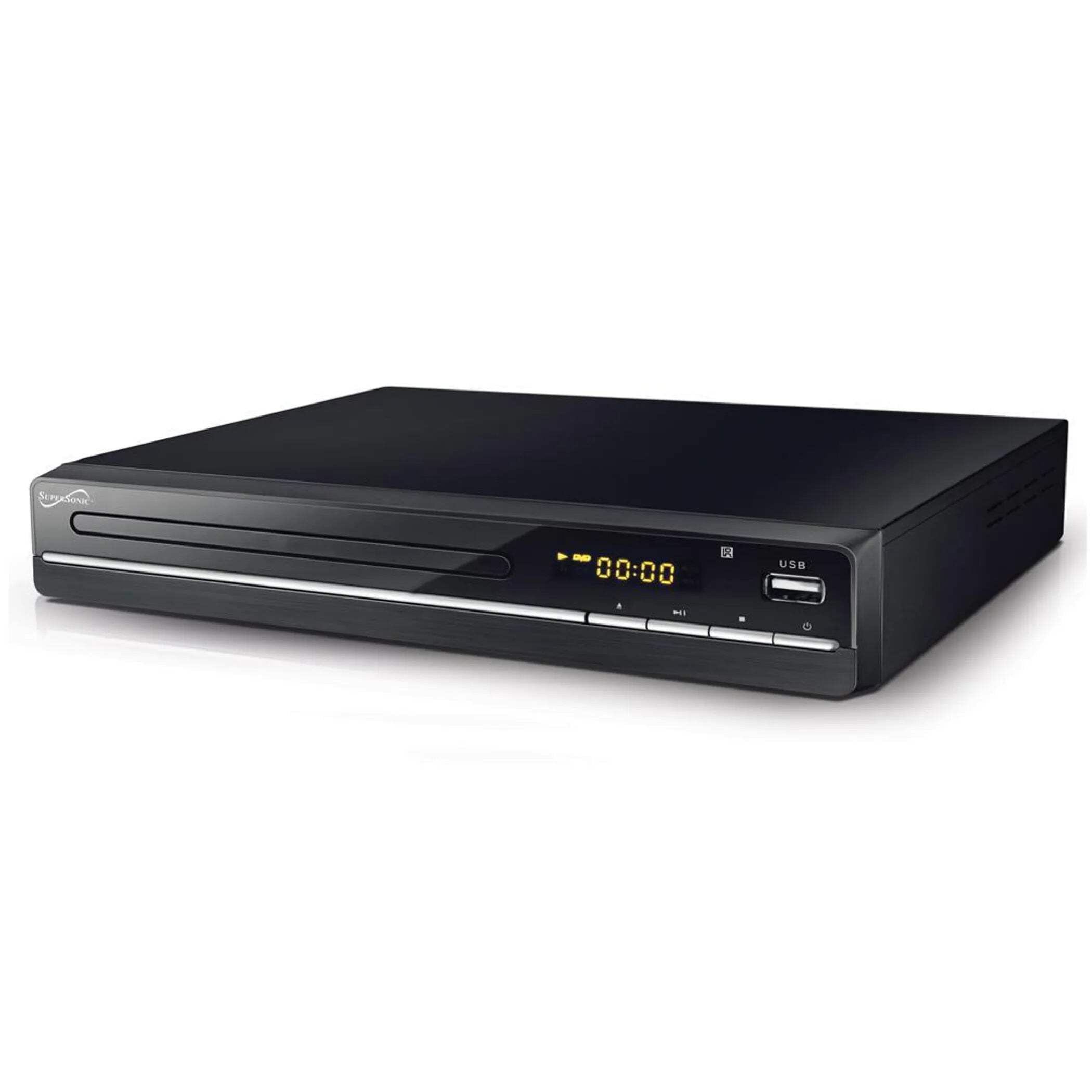
The image above displays the front panel of the SC-20H DVD Player. Key features include:
- Bandeja de disco: For inserting DVDs, VCDs, CDs, and other compatible discs.
- Pantalla de visualización: Muestra el tiempo de reproducción, el número de pista y otra información operativa.
- Botones de control: Includes Play/Pause, Stop, Previous, Next, and Power buttons for direct control.
- Entrada USB: Allows connection of USB flash drives for media playback.
- Ranura para tarjeta SD: Para insertar tarjetas SD para reproducir contenido multimedia files. (Note: The image primarily shows the USB port, but the product features indicate an SD input as well, typically located near the USB port or on the side).
4.2 Panel trasero
The rear panel of the DVD player contains all the necessary connection ports for audio and video output.
- Salida HDMI: Connects to an HDMI-enabled TV or display for high-definition audio and video.
- Composite A/V Output (RCA): Yellow (Video), White (Left Audio), Red (Right Audio) jacks for standard definition connection to older TVs.
- Component YUV Output: Y (Luminance), Pb (Blue difference), Pr (Red difference) jacks for progressive scan video output, offering better quality than composite.
- Entrada de energía: For connecting the power supply cable.
5. Configuración
5.1 Conexión a un televisor
Elija uno de los siguientes métodos de conexión:
- Conexión HDMI (recomendada):
- Connect one end of an HDMI cable (not included) to the HDMI OUT port on the DVD player.
- Conecte el otro extremo del cable HDMI a un puerto HDMI IN de su televisor.
- Seleccione la entrada HDMI correspondiente en su televisor usando su control remoto.
- Composite A/V Connection:
- Connect the yellow RCA cable to the VIDEO OUT port on the DVD player and the VIDEO IN port on your TV.
- Connect the white RCA cable to the L AUDIO OUT port on the DVD player and the L AUDIO IN port on your TV.
- Connect the red RCA cable to the R AUDIO OUT port on the DVD player and the R AUDIO IN port on your TV.
- Select the corresponding A/V input on your TV.
- Component YUV Connection:
- Connect the Y, Pb, and Pr cables to the corresponding YUV OUT ports on the DVD player and YUV IN ports on your TV.
- For audio, use the white and red RCA cables to connect the L/R AUDIO OUT ports on the DVD player to the L/R AUDIO IN ports on your TV.
- Select the corresponding Component input on your TV.
5.2 Conexión de alimentación
After connecting the audio/video cables, plug the power supply cable into the DVD player's power input and then into a wall outlet.
6. Instrucciones de funcionamiento
6.1 Reproducción básica de discos
- Encendido: Presione el botón de encendido en el panel frontal o en el control remoto.
- Insertar disco: Press the OPEN/CLOSE button to open the disc tray. Place a compatible disc (DVD, VCD, CD, KODAK CD, DVD±R/RW, CD-R, CD-RW) onto the tray with the label side facing up. Press OPEN/CLOSE again to close the tray.
- Reproducción: The player will typically begin playback automatically. If not, press the PLAY button.
- Pausar / Reanudar: Press the PAUSE button to temporarily stop playback. Press PLAY again to resume.
- Stop: Pulse el botón STOP para finalizar la reproducción.
- Skip Tracks/Chapters: Use the PREVIOUS and NEXT buttons to navigate between tracks or chapters.
6.2 Reproducción de medios USB/SD
- Insertar medios: Inserte una unidad flash USB en el puerto USB o una tarjeta SD en la ranura para tarjeta SD.
- Seleccionar fuente: Use the SOURCE or USB/SD button on the remote control to switch to the USB or SD input.
- Navegar Files: Use the navigation buttons (Up, Down, Left, Right) and OK button on the remote to browse through your media files (MP3, video formats).
- Jugar File: Seleccione el deseado file and press the PLAY button to begin playback.
6.3 System Settings (OSD Menu)
Access the On-Screen Display (OSD) menu to configure various settings:
- Menú de acceso: Press the SETUP button on the remote control.
- Navegación: Utilice los botones de navegación para moverse por las opciones del menú.
- Selección: Press OK to select an option or enter a sub-menu.
- Salida: Press SETUP again to exit the menu.
Las configuraciones clave incluyen:
- Idioma: Set OSD menu language and subtitle language (supports multiple languages).
- Relación de aspecto: Choose between 4:3 (Standard) and 16:9 (Widescreen) for video output.
- Control parental: Set a password and rating level to restrict playback of certain content.
- Configuración de audio: Adjust audio output modes (e.g., Surround).
7. Mantenimiento
Proper maintenance ensures the longevity of your DVD player:
- Limpieza de la unidad: Wipe the exterior of the player with a soft, dry cloth. Do not use liquid cleaners or aerosol sprays.
- Discos de limpieza: Use a soft, lint-free cloth to wipe discs from the center outwards. Do not use abrasive cleaners or solvents.
- Manejo del disco: Always hold discs by their edges to avoid fingerprints and scratches. Store discs in their cases when not in use.
- Ventilación: Asegúrese de que las aberturas de ventilación estén libres de polvo y residuos para evitar el sobrecalentamiento.
8. Solución de problemas
Si encuentra problemas, consulte los siguientes problemas y soluciones comunes:
| Problema | Posible causa | Solución |
|---|---|---|
| Sin poder | Cable de alimentación no conectado; toma de corriente defectuosa | Asegúrese de que el cable de alimentación esté bien enchufado. Pruebe la toma de corriente con otro dispositivo. |
| Sin imagen | Incorrect video connection; Wrong TV input selected | Check video cables (HDMI, Composite, Component) are correctly connected. Select the correct input source on your TV. |
| Sin sonido | Incorrect audio connection; TV/player volume too low; Mute activated | Check audio cables (HDMI, RCA) are correctly connected. Increase volume on TV and player. Deactivate mute function. |
| Disco que no se reproduce | Disc inserted incorrectly; Disc is dirty or scratched; Incompatible disc format | Ensure disc is inserted label-side up. Clean the disc. Check if the disc format is supported (DVD, VCD, CD, KODAK CD, DVD±R/RW, CD-R, CD-RW, MP3). |
| USB/SD media not playing | Incorrect source selected; Incompatible file format; USB/SD device faulty | Select USB or SD source. Ensure media files are compatible. Try another USB/SD device. |
9. Especificaciones
Detailed technical specifications for the Supersonic SC-20H DVD Player:
- Modelo: SC-20H
- Marca: Supersónico
- Compatibilidad de discos: DVD, VCD, KODAK CD, DVD±R/RW, CD, CD-R, CD-RW, MP3
- Salida de vídeo: HDMI, Composite A/V, Component YUV
- Modo de salida de audio: Rodear
- Resolución: 1920x1080 (via HDMI)
- Conectividad: USB 2.0, ranura para tarjeta SD
- Fuente de alimentación: 110-240 V, 50/60 Hz
- Consumo de energía: 15 W
- Dimensiones (L x An x Al): 10.5 x 10 x 3.3 pulgadas
- Peso del artículo: 1.75 libras
- Características especiales: Multi-language subtitles (up to 32 languages), PAL/NTSC compatible, Parental Lock, Aspect Ratio (4:3, 16:9)
10. Garantía y soporte
Para obtener información sobre la garantía y soporte técnico, consulte la documentación incluida con su compra o visite el sitio web oficial de Supersonic. webSitio. Conserve su comprobante de compra para cualquier reclamación de garantía.