Introducción
The Sony Alpha a6500 is a high-performance mirrorless digital camera designed for both still photography and video recording. It features a 24.2 MP APS-C Exmor CMOS sensor, offering exceptional image quality and low-light performance up to ISO 51,200. This camera is equipped with the world's fastest autofocus speed of 0.05 seconds, utilizing 425 phase-detection AF points for precise and rapid subject tracking.
Key features include 5-axis in-body image stabilization, which provides shake compensation for all mounted lenses, and continuous shooting at up to 11 frames per second with AF/AE tracking. For videographers, the a6500 supports 4K movie recording with 2.4x oversampling, full pixel readout, and no pixel binning, ensuring high-resolution video capture. Advanced video features like S-Log3/S-Log2 and S-Gamut are also integrated for professional-grade color grading flexibility.
Información de seguridad
Please read all safety instructions carefully before using the camera. Failure to do so may result in injury or damage to the product.
- No exponga la cámara al agua o la humedad.
- Evite la exposición directa a la luz solar intensa durante períodos prolongados.
- Utilice únicamente baterías y accesorios aprobados por Sony.
- Do not disassemble or attempt to repair the camera yourself. Refer to qualified service personnel.
- Mantenga la cámara y los accesorios fuera del alcance de los niños pequeños.
- Observe local regulations for battery disposal.
¿Qué hay en la caja?
Verifique que todos los siguientes elementos estén incluidos en el paquete de su producto:
- Sony Alpha a6500 Camera Body (ILCE-6500/B)
- Battery NP-FW50
- Adaptador de CA
- Bandolera
- Tapa del cuerpo
- Tapa de zapato de accesorios
- Copa del ocular
- Cable micro USB
Configuración
1. Carga de la batería
Insert the supplied NP-FW50 battery into the camera. Connect the camera to the AC adaptor using the Micro USB cable. The charge lamp Se iluminará durante la carga y se apagará al finalizar. Una carga completa suele tardar aproximadamente 150 minutos.
2. Insertar una tarjeta de memoria
Open the memory card/battery cover on the bottom of the camera. Insert a compatible SD card (SDHC/SDXC) or Memory Stick PRO Duo with the contacts facing the correct direction until it clicks into place. Ensure the card is inserted securely.

Abajo view of the Sony Alpha a6500 camera, illustrating the location of the battery and memory card compartment. The compartment cover is visible, indicating where to insert the NP-FW50 battery and a compatible memory card.
3. Colocación de una lente
Align the white index mark on the lens barrel with the white index mark on the camera body. Rotate the lens clockwise until it clicks into place. To detach, press the lens release button and rotate the lens counter-clockwise.

Frente view of the Sony Alpha a6500 camera body, showcasing the E-mount lens attachment system. The silver E-mount ring is prominent, indicating where compatible lenses are attached.
Operación de la cámara
Modos básicos de disparo
The mode dial on the top of the camera allows you to select various shooting modes, including Programmed AE (P), Aperture priority (A), Shutter-speed priority (S), Manual (M), and Intelligent Auto (AUTO).

Arriba view of the Sony Alpha a6500, highlighting the mode dial on the right side. The dial features various shooting modes such as P, A, S, M, and AUTO, along with custom settings and video modes.
Autofocus and Touchscreen Operation
The a6500 features a fast Hybrid AF system with 425 phase-detection points. You can use the 2.95-inch LCD touchscreen to intuitively select your focus point by simply tapping the desired area on the screen. This allows for quick and precise focusing.

Trasero view of the Sony Alpha a6500, displaying the LCD screen and various control buttons. Key controls like AF/MF, AEL, Menu, Fn, DISP, and ISO are visible around the screen.

A hand demonstrating interaction with the touchscreen of the Sony Alpha a6500. This image illustrates the ease of selecting focus points or navigating menus directly on the LCD.

Trasero view of the Sony Alpha a6500 with its LCD screen tilted upwards, providing flexibility for shooting from various angles, including low-angle shots or vlogging.
Grabación de vídeo
The a6500 supports 4K UHD (3840 x 2160) video recording. It utilizes 2.4x oversampling from a 6K equivalent area of the sensor, resulting in highly detailed 4K footage with minimal moiré and jaggies. Professional video features like S-Log3/S-Log2 gamma curves and S-Gamut are available for extensive post-production flexibility.
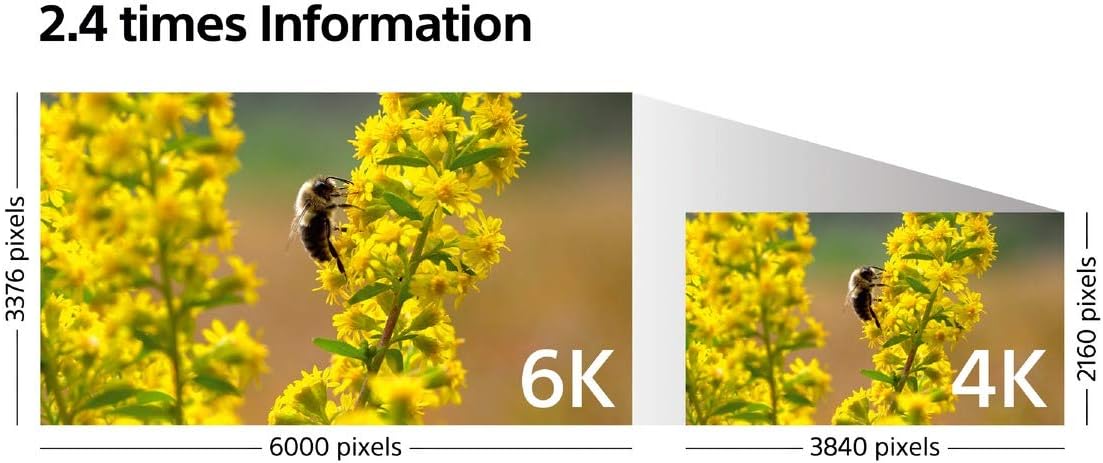
A diagram visually explaining the 2.4x oversampling process used by the Sony Alpha a6500 for 4K video recording. It shows how a 6K equivalent area (6000x3376 pixels) is downsampled to produce high-quality 4K footage (3840x2160 pixels).
Conectividad
The camera offers various connectivity options including Wi-Fi, NFC, USB, and HDMI. These ports are located on the side of the camera body.

Lado view of the Sony Alpha a6500, revealing the connectivity ports. These include the Micro USB port for charging and data transfer, and the HDMI port for video output.

Lado view of the Sony Alpha a6500, displaying the NFC (Near Field Communication) logo. This indicates the camera's capability for quick, tap-to-connect pairing with compatible smartphones and devices for easy image transfer.
Mantenimiento
Limpieza de la cámara
- Utilice un paño suave y seco para limpiar el cuerpo de la cámara.
- For the lens and LCD screen, use a lens cleaning cloth and solution specifically designed for optical surfaces.
- Avoid touching the sensor directly. If the sensor requires cleaning, consult a professional service.
Almacenamiento
When not in use, store the camera in a cool, dry place away from direct sunlight and extreme temperatures. If storing for an extended period, remove the battery to prevent leakage.
Solución de problemas
La cámara no se enciende
- Asegúrese de que la batería esté completamente cargada y correctamente insertada.
- Compruebe si los terminales de la batería están limpios.
Las imágenes están borrosas
- Compruebe si la lente está colocada correctamente.
- Ensure the autofocus is engaged and has locked onto the subject.
- Verify that the shutter speed is appropriate for the lighting conditions and subject movement.
- Consider using a tripod or increasing ISO in low light to avoid camera shake.
Error de la tarjeta de memoria
- Vuelva a insertar la tarjeta de memoria.
- Pruebe con una tarjeta de memoria diferente y compatible.
- Formatee la tarjeta de memoria (nota: esto borrará todos los datos).
Presupuesto
| Característica | Detalle |
|---|---|
| Nombre del modelo | Sony Alpha A6500 (ILCE-6500/B) |
| Tipo de sensor | CMOS Exmor APS-C |
| Resolución de imágenes fijas efectiva | 24.2 MP |
| Estabilización de imagen | 5-axis in-body (Sensor-shift) |
| Puntos de enfoque automático | 425 Phase-detection AF points |
| AF Acquisition Speed | 0.05 segundos |
| Disparo continuo | Hasta 11 fps con seguimiento AF/AE |
| Resolución de vídeo | 4K UHD 2160p (with 2.4x oversampabadejo) |
| Rango ISO | Hasta 51,200 (Ampliado) |
| Tamaño de pantalla | 2.95 Inches (Tilting LCD, Touchscreen) |
| Viewdescubridor | Electrónico |
| Conectividad | Wi-Fi, NFC, USB, HDMI |
| Tipo de batería | NP-FW50 Lithium Ion |
| Peso | 0.91 libras (solo el cuerpo) |
| Dimensiones (alto x ancho x profundidad) | Approx. 2.13 inches (Height) |
Garantía y soporte
The Sony Alpha a6500 comes with a manufacturer's warranty. Please refer to the warranty card included in your product packaging for specific terms and conditions. For technical support, service, or additional information, please visit the official Sony support websitio o póngase en contacto con su servicio de atención al cliente.
Return Policy: Returns are available within 30 days, subject to Amazon's policy.
Para obtener más ayuda, puede visitar el Tienda Sony en Amazon.