
1. Introducción
Thank you for choosing the Baseus Encok S16 Neck Hung Bluetooth Wireless In-Ear Earphone. This manual provides detailed instructions for setup, operation, and maintenance to ensure optimal performance and longevity of your device. Please read this manual thoroughly before use.
2. Contenido del paquete
Verifique que todos los artículos estén presentes en el paquete:
- 1 x Baseus Encok S16 Wireless Earphone
- 1 x cable de carga
- 1 x Manual de usuario
- 1 x Tarjeta de garantía

Image: Contents of the Baseus Encok S16 earphone package, showing the earphones, charging cable, user manual, and warranty card.
3. Producto terminadoview
The Baseus Encok S16 earphones feature a neck-hung design for comfortable and secure wear. Key features include:
- Fijación magnética: Earbuds can be magnetically joined when not in use, preventing tangling and loss.
- Adjustable Coils: The earphone line length can be adjusted by sliding for a customized fit.
- Sonido de alta fidelidad: Equipped with a dynamic speaker unit, composite diaphragm, and independent tune trope structure for clear audio.
- Energía eficiente: Utilizes a British CSR chip and 120mAh battery for low power consumption and extended battery life.
- Compatibilidad universal: Smartly matches with smartphones and tablet PCs, compatible with all Bluetooth 4.0 enabled devices.

Image: Close-up of the Baseus Encok S16 earbuds demonstrating their magnetic connection capability.
4. Configuración
4.1 Carga de los auriculares
- Connect the provided charging cable to the charging port on the earphone's control unit.
- Conecte el otro extremo del cable de carga a una fuente de alimentación USB (por ejemplo, puerto USB de computadora, adaptador de pared USB).
- La luz indicadora se iluminará durante la carga y se apagará o cambiará de color cuando esté completamente cargada.
- Una carga completa suele tardar entre 1.5 y 2 horas.
4.2 Emparejamiento Bluetooth
- Asegúrese de que los auriculares estén completamente cargados.
- Press and hold the Power button on the control unit until the indicator light flashes red and blue alternately, indicating pairing mode.
- En su teléfono inteligente o dispositivo con Bluetooth, vaya a la configuración de Bluetooth.
- Buscar available devices and select "Baseus Encok S16" from the list.
- Once connected, the indicator light will flash blue slowly or turn solid blue.
- Si se le solicita una contraseña, ingrese "0000".
5. Instrucciones de funcionamiento
5.1 Controles básicos
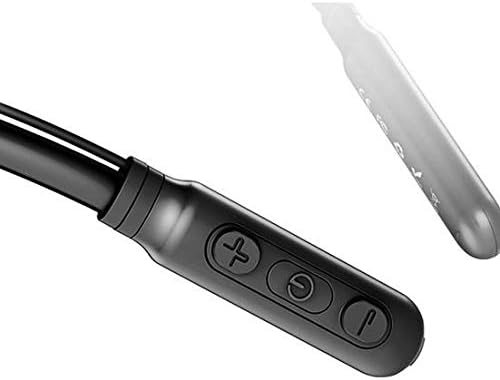
Image: Close-up of the Baseus Encok S16 earphone's inline control unit, showing the power/multi-function button, volume up, and volume down buttons.
| Botón | Función |
|---|---|
| Botón de encendido (centro) |
|
| Subir volumen (+) |
|
| Bajar volumen (-) |
|
5.2 Cómo usar los auriculares
Place the neckband around your neck, ensuring the control unit is easily accessible. Insert the earbuds comfortably into your ears. Adjust the earphone line length using the sliding coils for a secure and comfortable fit.
6. Mantenimiento
- Limpie los auriculares y la unidad de control periódicamente con un paño suave y seco.
- Avoid exposing the earphones to extreme temperatures, humidity, or corrosive liquids.
- Store the earphones in a cool, dry place when not in use. The magnetic earbuds can help prevent tangling during storage.
- No intente desmontar o reparar los auriculares usted mismo, ya que esto anulará la garantía.
7. Solución de problemas
| Problema | Solución |
|---|---|
| No se puede encender | Ensure the earphones are fully charged. Press and hold the Power button for 3 seconds. |
| No se puede emparejar con el dispositivo |
|
| Sin sonido o volumen bajo |
|
| Conexión intermitente |
|
8. Especificaciones
| Característica | Detalle |
|---|---|
| Marca | Baseus |
| Número de modelo | FWP-E-S16 |
| Tecnología de conectividad | Bluetooth |
| Versión de Bluetooth | 4.0 (compatible with devices enabling Bluetooth 4.0) |
| Factor de forma | In Ear, Neck Hung |
| Tipo de control | Voice Control, Touch (via buttons) |
| Capacidad de la batería | 120 mAh |
| Peso | 30 gramos |
| Componentes incluidos | Wireless Earphone, Charging Cable, User Manual, Warranty Card |
9. Garantía y soporte
This product comes with a Limited Warranty. Please refer to the included Warranty Card for detailed terms and conditions regarding coverage and duration.
For technical support or warranty claims, please contact your retailer or visit the official Baseus webSitio web con información de atención al cliente.
Número de identificación comercial global (GTIN): 06953156264489