
Introducción
Gracias por la compraasing the Mitzu Kaiser PAK-8915 Dual Audio System. This system includes an amplified speaker and a passive speaker, designed to deliver powerful and clear sound. This manual provides essential information for the safe and efficient operation of your new audio system. Please read it thoroughly before use and retain it for future reference.
Instrucciones de seguridad
- Fuente de energía: Asegúrese de que la fuente de alimentación coincida con el volumen.tage especificado en la unidad.
- Ventilación: No obstruya las aberturas de ventilación. Mantenga suficiente espacio alrededor de la unidad para una correcta circulación del aire.
- Agua y humedad: No exponga la unidad a la lluvia, la humedad ni a líquidos. Manténgala alejada del agua.
- Calor: No coloque la unidad cerca de fuentes de calor como radiadores, rejillas de calefacción, estufas u otros aparatos que produzcan calor.
- Limpieza: Unplug the unit before cleaning. Use a dry cloth. Do not use liquid cleaners or aerosol cleaners.
- Servicio: No intente reparar este producto usted mismo. Refiera todo el servicio a personal de servicio calificado.
- Colocación: Place the speakers on a stable, level surface. The amplified speaker features a rear knob for stand mounting.
- cables: Use only the provided cables and ensure they are not damaged or pinched.
Contenido del paquete
Por favor, compruebe que todos los siguientes elementos estén incluidos en su paquete:
- 1 x Amplified Speaker (with 15-inch woofer)
- 1 x Passive Speaker (with 15-inch woofer)
- 1 x control remoto
- Connection Cables (10 meters in length for speaker connection)
- Cable de alimentación
Producto terminadoview
Amplified Speaker Rear Panel
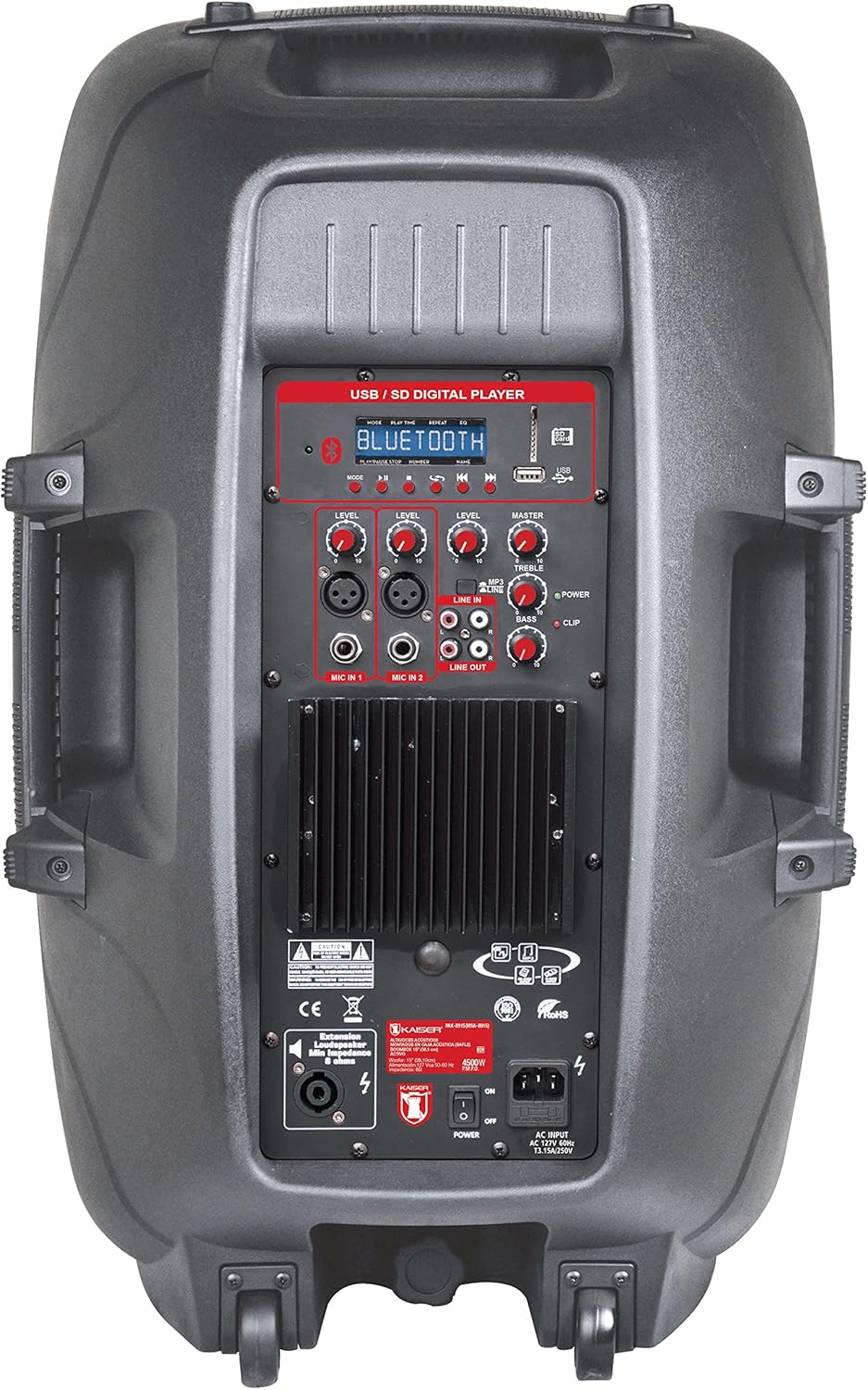
Figura 1: Amplified Speaker Rear Control Panel
El amplified speaker's rear panel houses all primary controls and connection ports:
- USB / SD Digital Player: Ports for USB drives and SD cards, along with a display and playback controls.
- Módulo Bluetooth: Para transmisión de audio inalámbrica.
- Perillas de nivel: Adjust input levels for MIC 1, MIC 2, LINE IN, and MASTER volume.
- Controles de tono: Knobs for TREBLE and BASS adjustment.
- Entradas de micrófono: Two inputs (Cannon and 6.3mm) for connecting microphones.
- Entrada de línea (RCA): Entradas RCA estéreo para conectar dispositivos de audio externos.
- Fuera de la linea: RCA output to connect to another amplified speaker or audio system.
- Salida del altavoz: Speakon connector for connecting the passive speaker.
- Interruptor de alimentación: Interruptor de encendido y apagado de la unidad.
- Entrada de CA: Para conectar el cable de alimentación.
- Indicador de clips: Lights up when the audio signal is clipping (distorting).
Passive Speaker Rear Panel

Figura 2: Passive Speaker Rear Panel
The passive speaker features simple input and output connections:
- Aporte: Speakon input for connection from the amporador autorizado.
- Producción: Speakon output for daisy-chaining to another passive speaker (if applicable).
Mando a distancia
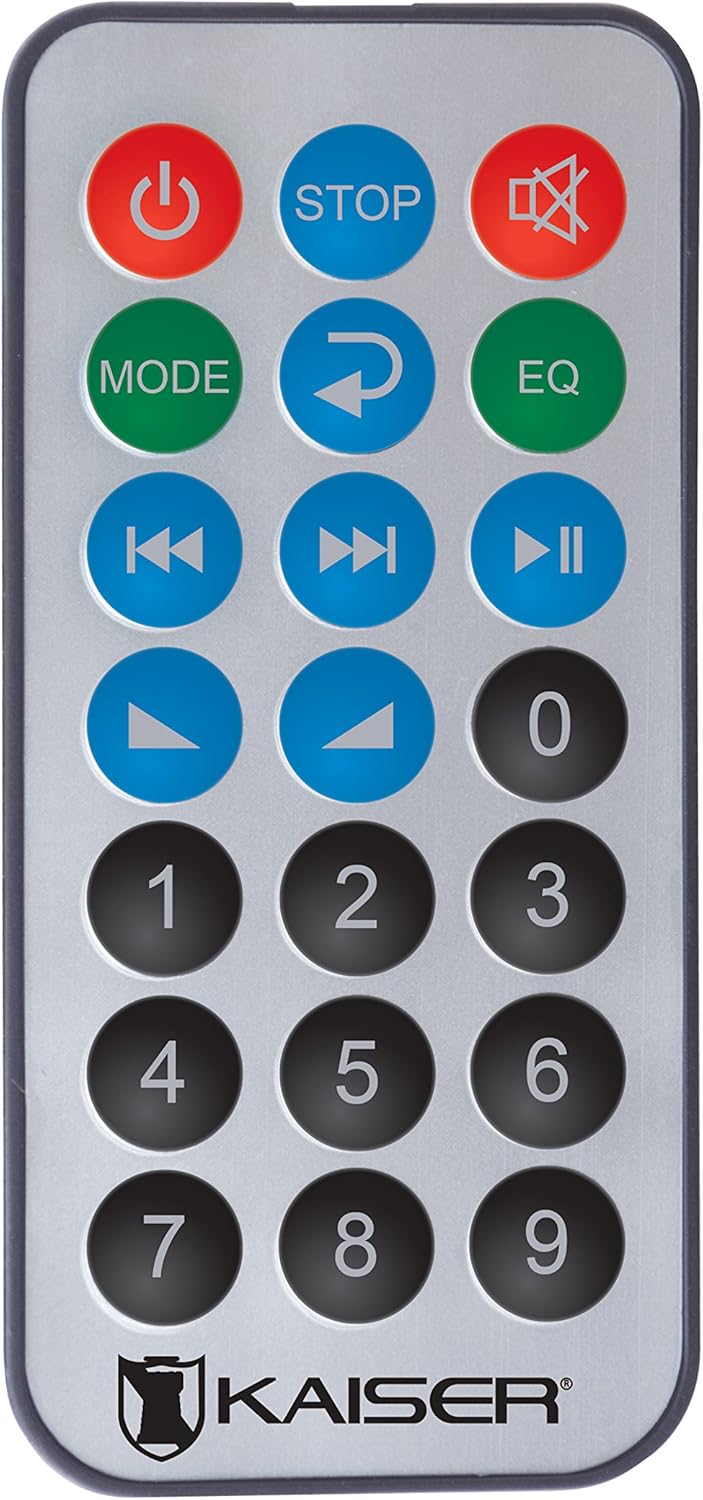
Figura 3: Mando a distancia
El control remoto proporciona acceso cómodo a varias funciones:
- Botón de encendido: Enciende/apaga la unidad.
- DETENER: Detiene la reproducción.
- Silenciar: Silencia o activa el sonido.
- MODO: Switches between input modes (Bluetooth, USB, SD, FM, RCA).
- Repetir: Repite la pista o lista de reproducción actual.
- EQ: Selecciona ajustes preestablecidos del ecualizador.
- Pista anterior/siguiente: Salta a la pista anterior o siguiente.
- Reproducir/Pausa: Inicia o pausa la reproducción.
- Subir/Bajar volumen: Ajusta el volumen principal.
- Teclado numérico: Para selección directa de pistas o sintonización de emisoras FM.
Configuración
- Colocación: Posicione el amplified and passive speakers in your desired location. The amplified speaker has handles and wheels for transport. Both speakers can be mounted on a stand using the rear knob on the amporador autorizado.
- Conectar altavoz pasivo: Use the provided speaker cable to connect the "Speaker Output" on the amplified speaker's rear panel to the "Input" on the passive speaker's rear panel. Ensure a secure connection.
- Conexión de energía: Connect the power cable to the AC input on the amplified speaker and then plug it into a suitable power outlet.
- Encendido inicial: Ensure all volume knobs are set to minimum before turning on the power switch.
Instrucciones de funcionamiento
Encendido/apagado
Flip the "POWER" switch on the rear panel of the amplified speaker to turn the system on or off. You can also use the power button on the remote control.
Seleccionar el modo de entrada
Press the "MODE" button on the control panel or remote control to cycle through available input sources: Bluetooth, USB, SD, FM Radio, and RCA Line In.
Conexión Bluetooth
- Switch the speaker system to Bluetooth mode using the "MODE" button. The display will show "Bluetooth" or a similar indicator.
- En su dispositivo móvil (teléfono inteligente, tableta, etc.), habilite Bluetooth y busque los dispositivos disponibles.
- Select "Kaiser PAK-8915" or a similar name from the list of devices.
- Once paired, you will hear a confirmation sound, and your device will show a connected status. You can now stream audio wirelessly from up to 30 meters away.
Reproducción USB / SD
- Inserte una unidad flash USB o una tarjeta SD que contenga audio files into the respective port on the amplified speaker's rear panel.
- The system should automatically switch to USB or SD mode and begin playback. If not, press the "MODE" button to select the correct source.
- Use the playback controls (Play/Pause, Previous/Next, Stop) on the speaker panel or remote control to manage your music.
Conexión de entrada de línea RCA
Connect an external audio device (e.g., DVD player, TV, computer) to the "LINE IN" RCA ports on the amplified speaker using an RCA cable. Select "LINE IN" mode using the "MODE" button.
Uso del micrófono
Plug your microphone(s) into the "MIC IN 1" (Cannon) or "MIC IN 2" (6.3mm) ports. Adjust the individual "MIC LEVEL" knobs to control the microphone volume. Ensure the MASTER volume is also adjusted appropriately.
Radio FM
Switch to FM Radio mode using the "MODE" button. The system will automatically scan and store available stations. Use the Previous/Next track buttons to navigate between stations or the numeric keypad on the remote for direct tuning.
Ajuste de volumen y tono
Use the "MASTER" volume knob to control the overall output volume. Adjust the "BASS" and "TREBLE" knobs to fine-tune the audio's low and high frequencies. Individual input levels (MIC 1, MIC 2, LINE IN) can also be adjusted.
Mantenimiento
- Limpieza: Desconecte la alimentación antes de limpiar. Utilice un paño suave y seco para limpiar las superficies exteriores. No utilice limpiadores abrasivos, ceras ni disolventes.
- Almacenamiento: If not in use for an extended period, store the speakers in a cool, dry place, away from direct sunlight and extreme temperatures.
- Ventilación: Regularly check that the ventilation grilles are free from dust and debris to prevent overheating.
Solución de problemas
| Problema | Posible causa | Solución |
|---|---|---|
| Sin poder | Cable de alimentación no conectado; Interruptor de encendido apagado; Toma de corriente defectuosa. | Asegúrese de que el cable de alimentación esté bien conectado. Encienda el interruptor. Pruebe la toma de corriente con otro dispositivo. |
| No hay salida de sonido | Volume too low; Incorrect input mode selected; Audio source not playing; Passive speaker not connected. | Increase MASTER volume. Select the correct input mode. Ensure the audio source is playing. Verify the passive speaker is correctly connected to the amporador autorizado. |
| El Bluetooth no se conecta | El altavoz no está en modo Bluetooth; el dispositivo está demasiado lejos; el dispositivo ya está conectado a otro altavoz. | Ensure the speaker is in Bluetooth mode. Move your device closer to the speaker (within 30m). Disconnect from other Bluetooth devices. |
| USB/SD no reproduce | Incorrecto file format; USB/SD card corrupted; Speaker not in USB/SD mode. | Asegurar audio files are in a compatible format. Try another USB/SD card. Select USB/SD mode. |
| Distorsión del sonido | Volume too high (clipping); Input level too high. | Reduce MASTER volume. Adjust individual input levels (MIC, LINE IN) to prevent the CLIP indicator from lighting up. |
Presupuesto
| Marca | Mitzu |
| Modelo | PAK-8915 |
| Amplified Speaker Power | 3500 W PMPO |
| Passive Speaker Power | 3000 W PMPO |
| Tamaño del woofer | 15 pulgadas (38.1 cm) |
| Impedancia | 8 ohmios |
| Tecnología de conectividad | Bluetooth, RCA, USB |
| Tecnología inalámbrica | Bluetooth |
| Alcance de Bluetooth | Hasta 30 metros |
| Modo de salida de audio | Estéreo |
| Respuesta de frecuencia | 4 kHz |
| Método de control | Buttons, Remote Control |
| Fuente de poder | Cable eléctrico |
| Peso del artículo | 34 kilogramos |
| Usos recomendados | Smartphones, Tablets, Computers, DVD Players, TVs, Surround Sound Systems, Microphones |
Garantía y soporte
Specific warranty information for the Mitzu Kaiser PAK-8915 is not provided in this manual. Please refer to the warranty card included with your purchase or contact your retailer for details regarding warranty coverage and terms.
For technical support or service inquiries, please contact the Mitzu customer service department or your authorized dealer. Keep your purchase receipt as proof of purchase.