
1. Introducción
This manual provides detailed instructions for the installation, operation, and maintenance of your Reolink RLC-410WS 4MP Super HD Dual-Band Wi-Fi Wireless Security IP Camera. Please read this manual thoroughly before using the product to ensure correct usage and optimal performance.
2. Producto terminadoview
2.1 Componentes de la cámara
Familiarize yourself with the main components of your RLC-410WS camera:

Imagen 2.1: Reolink RLC-410WS Camera Component Diagram. This image illustrates the various parts of the camera including the antenna, lens, IR LEDs, daylight sensor, and connection ports for power, network, and the reset button.
- Antena: Para conectividad Wi-Fi.
- Caja de aluminio y metal: Carcasa duradera para uso en exteriores.
- High Definition F=4.0mm Lens: Captures 4MP Super HD video.
- 36 PCS IR LEDs: Provides infrared illumination for night vision up to 100ft.
- Sensor de luz diurna: Detecta la luz ambiental para cambiar entre los modos diurno y nocturno.
- Botón de reinicio: Se utiliza para restaurar la configuración predeterminada de fábrica.
- Puerto de alimentación: Para conectar el adaptador de corriente CC de 12 V.
- Puerto de cable de red: For initial setup and optional wired Ethernet connection.
2.2 Características principales
- Vídeo Super HD de 4 MP: Records clear video at 1440p resolution, supporting 1080p and 720p.
- Visión nocturna de 100 pies: Equipped with IR LEDs for clear surveillance in low-light conditions.
- Wi-Fi de doble banda: Supports 2.4GHz and 5GHz Wi-Fi for flexible and stable wireless connection.
- Alertas de detección de movimiento: Sends real-time email alerts with photos or 30-second video clips, and push notifications to mobile phones.
- Almacenamiento local: Built-in 16GB Micro SD card for recording and storing up to 400 motion-activated events.
- Acceso remoto: Monitor your home from anywhere using the Reolink Client software (PC/Mac) or Reolink App (iPhone/Android).
- 80 grados Viewángulo de inclinación: Proporciona un amplio campo de view.
- Resistente a la intemperie IP67: Diseñado para uso en exteriores en diversas condiciones climáticas.
3. ¿Qué hay en la caja?
Verifique que todos los artículos estén presentes en su paquete:

Imagen 3.1: Package Contents. This image displays the camera, antenna, power adapter, extension cable, network cable, software CD, quick start guide, surveillance sign, mounting template, and screws.
- Reolink RLC-410WS Camera
- Adaptador de corriente
- Cable de extensión de energía
- Cable de red (1 metro)
- Antena
- Guía de inicio rápido
- Plantilla de orificio de montaje
- Tornillos y tacos de pared
- Señal de vigilancia
- CD (Manual/Software)
4. Configuración e instalación
4.1 Configuración inicial
- Connect Power and Ethernet: Connect the camera to the power adapter and then to your router using the provided Ethernet cable.
- Descargar la aplicación/cliente de Reolink: Download the Reolink App from the App Store or Google Play, or the Reolink Client software from the official Reolink website for PC/Mac.
- Agregar cámara: Open the app/client, click the "+" icon to add the camera. The app/client should automatically detect the camera on your local network.
- Configurar la clave: Crea una contraseña segura para tu cámara.
- Configurar Wi-Fi: Once connected via Ethernet, navigate to the camera settings in the app/client to configure Wi-Fi. Select your 2.4GHz or 5GHz network and enter the password. Ensure a strong Wi-Fi signal at the installation location. Note: Wi-Fi settings can typically only be changed while the camera is connected via Ethernet.
- Conexión de prueba: After configuring Wi-Fi, test the connection. Once successful, you can disconnect the Ethernet cable.
4.2 Montaje de la cámara
Consider the following when mounting your camera:
- Ubicación: Elija una ubicación que proporcione lo deseado viewángulo de visión y está dentro del alcance de su red Wi-Fi.
- Power Cable Routing: The power cable requires a hole of approximately 3/4 inch (19mm) to pass through a wall due to the Ethernet socket and reset switch on the breakout cable. Plan your cable routing carefully.
- Ajuste del soporte: The mounting bracket allows for three-dimensional adjustment. Loosen the small Allen screws to adjust the camera angle, then tighten them securely.
- Protección del agua: For outdoor installations, ensure the breakout cable connections (power, network, reset button) are protected from water. Consider using a waterproof junction box.

Imagen 4.1: Camera Dimensions. This image provides the physical measurements of the RLC-410WS camera, useful for planning installation.
5. Operación de la cámara
5.1 Acceso a la cámara
You can access your Reolink RLC-410WS camera using various platforms:

Imagen 5.1: Reolink Software Platform. This image illustrates how the Reolink camera can be accessed and managed from various devices, including Mac, Windows, iPhone, and Android.
- Reolink App: Available for iOS (iPhone/iPad) and Android devices. Provides live view, reproducción y gestión de configuraciones.
- Reolink Client: Desktop software for Windows and macOS. Offers comprehensive control, multi-camera viewing, and recording options.
- Web Navegador: Acceda a la cámara directamente a través de su dirección IP usando un web browser (features may be limited compared to the app/client).
5.2 Detección y grabación de movimiento
The RLC-410WS camera features customizable motion detection:
- Ajuste de sensibilidad: Ajuste la sensibilidad de detección de movimiento para minimizar las falsas alarmas.
- Zonas de detección: Define áreas específicas dentro de la cámara. view to monitor for motion, ignoring irrelevant areas.
- Máscara de privacidad: Mask out sensitive areas from being recorded or viewpublicado por
- Alertas: Receive instant push notifications on your phone, email alerts with snapshots or video clips, and upload recordings to an FTP server.
- Almacenamiento local: Motion-activated events are recorded to the built-in 16GB Micro SD card for later playback.
5.3 Calidad de vídeo y visión nocturna
The camera provides high-quality video day and night:
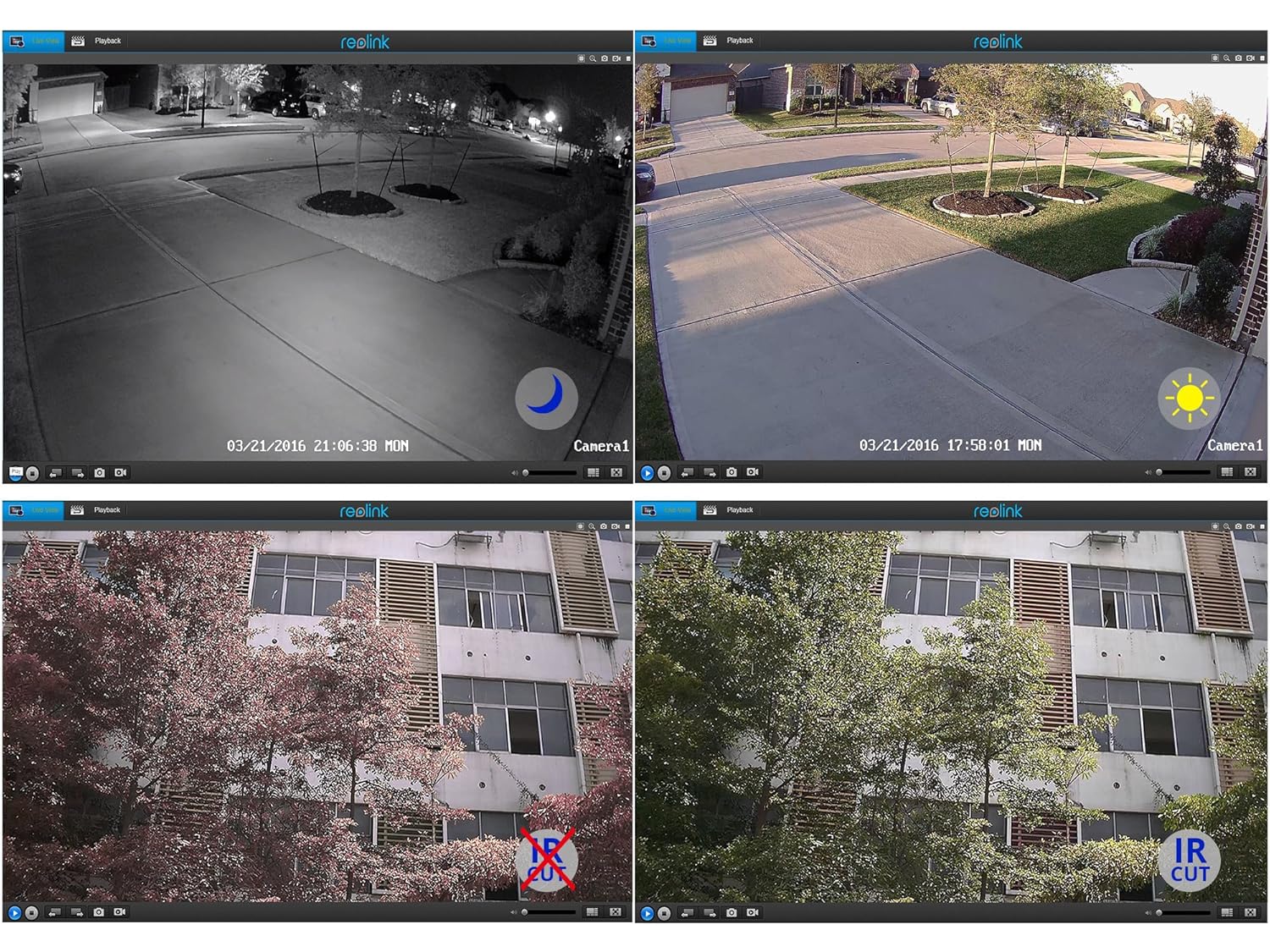
Imagen 5.2: Day and Night Vision Comparison. This image demonstrates the camera's ability to capture clear video in both daylight and low-light conditions using its infrared capabilities.
- Súper HD de 4 MP: Delivers crisp and clear video footage.
- Visión nocturna infrarroja: Automatically switches to night mode in low light, providing clear black and white video up to 100 feet.
- Filtro de corte IR: Ensures accurate color reproduction during the day and enhanced infrared sensitivity at night.
6. Especificaciones
Detailed technical specifications for the Reolink RLC-410WS camera:
| Característica | Especificación |
|---|---|
| Modelo | RLC-410WS |
| Resolución de vídeo efectiva | 4 MP (1440p) |
| Viewángulo de ing | 80 grados |
| Rango de visión nocturna | 100 pies |
| Velocidad de cuadros | 25 cuadros por segundo |
| Comunicación inalámbrica | Wi-Fi (2.4/5Ghz Dual Band) |
| Almacenamiento | Tarjeta Micro SD de 16 GB incorporada |
| Fuente de poder | 12 voltios CC |
| Calificación de protección internacional | IP67 |
| Dimensiones (L x An x Al) | 18.8 x 6.6 x 6.6 centímetros |
| Peso del artículo | 454 g (1 libra) |
| Método de control | Aplicación |
| Tipo de montaje | Montaje en pared |

Imagen 6.1: Reolink Model Feature Comparison. This table highlights the features available across various Reolink camera models, including PoE, Wi-Fi, Micro SD storage, optical zoom, and pan/tilt capabilities.
7. Solución de problemas
This section addresses common issues you might encounter with your RLC-410WS camera.
7.1 Problemas de conectividad Wi-Fi
- Sin conexión Wi-Fi:
- Ensure the camera is initially configured via Ethernet before setting up Wi-Fi.
- Verifique que su contraseña de Wi-Fi sea correcta.
- Perform a firmware update. Outdated firmware can cause connectivity problems.
- Ensure the camera is within range of your Wi-Fi router and has a strong signal. Signal strength can drop quickly with distance.
- If changing Wi-Fi settings, ensure the camera is connected via Ethernet, run a connection test, and save changes.
- Frequent Disconnects:
- Check Wi-Fi signal strength at the camera's location. Consider using a Wi-Fi extender if the signal is weak.
- Ensure your router's 2.4GHz and 5GHz channels are not overly congested.
- Actualice el firmware de la cámara a la última versión.
7.2 Camera Not Responding After Settings Change/Firmware Update
- If the camera becomes unresponsive after a settings change or firmware update, try power cycling the camera (unplug and re-plug the power adapter).
- If power cycling does not work, reconnect the camera via Ethernet. This often restores connectivity and allows further troubleshooting or re-configuration.
- If the issue persists, perform a factory reset using the reset button on the breakout cable. Note: This will erase all settings.
7.3 Alertas de detección de movimiento falso
- Adjust the motion detection sensitivity in the camera settings.
- Define specific motion detection zones to exclude areas with frequent irrelevant movement (e.g., trees swaying, busy roads).
- In night vision mode, insects flying close to the IR illuminators can trigger alerts. Consider adjusting sensitivity or, if possible, using an external IR illuminator placed away from the camera.
8. Mantenimiento
- Limpieza: Limpie periódicamente la lente y la carcasa de la cámara con un paño suave y húmedo.amp Paño para garantizar una calidad de imagen nítida. Evite los limpiadores abrasivos.
- Actualizaciones de firmware: Periodically check the official Reolink webSitio para actualizaciones de firmware. Mantener el firmware de su cámara actualizado garantiza un rendimiento óptimo, seguridad y acceso a nuevas funciones.
- Inspección de cables: Periodically inspect all cables and connections for wear or damage, especially in outdoor installations. Ensure waterproof seals are intact.
- Gestión de tarjetas SD: While the camera manages the 16GB SD card, it's good practice to occasionally check its status via the app/client.
9. Garantía y soporte
For warranty information, please refer to the warranty card included in your product package or visit the official Reolink website. Reolink provides dedicated customer support.
- Apoyo técnico: For technical assistance, troubleshooting, or any product-related queries, please contact Reolink support via their official website. Email support is typically provided with responses within 24 hours.
- Descargas de firmware: Latest firmware versions and software clients can be downloaded from the Reolink support page.