
Introducción
This manual provides essential instructions for the safe and efficient use of your Pioneer AVH-X2800BS In-Dash DVD Receiver. Please read this manual thoroughly before operating the unit to ensure proper installation, setup, and functionality. Keep this manual for future reference.
Información de seguridad
- Always operate the vehicle in a safe manner. Do not allow the use of this product to distract you while driving.
- Ensure the parking brake is engaged when performing certain operations, such as watching DVDs or accessing specific settings, to comply with safety regulations.
- Consult a professional for installation to prevent damage to the unit or vehicle.
- No desmonte ni modifique la unidad. Esto podría provocar descargas eléctricas, incendios u otros accidentes.
Contenido del paquete
Verifique que todos los artículos estén presentes en el paquete:
- Pioneer AVH-X2800BS In-Dash DVD Receiver
- Remote Control (CXE5116)
- Mazo de cables
- Micrófono
- Tornillos de montaje
- Manual de usuario (este documento)

Image: Pioneer AVH-X2800BS unit, remote control, and external microphone.

Imagen: Trasera view of the receiver displaying various audio, video, and power connection ports.
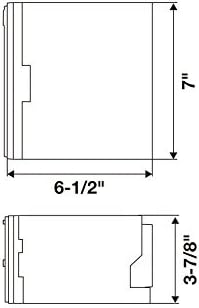
Image: Diagram illustrating the dimensions of the receiver for installation planning.
Configuración
1. Instalación
The Pioneer AVH-X2800BS is designed for in-dash installation. Due to the complexity of vehicle wiring and dashboard modifications, professional installation is highly recommended. Ensure the vehicle's battery is disconnected before beginning any electrical work.
- Montaje: Securely mount the unit in a double-DIN opening using the provided mounting screws and brackets.
- Alambrado: Connect the wiring harness to your vehicle's electrical system. Pay close attention to power, ground, speaker, and accessory wires.
- Cable del freno de estacionamiento: The parking brake wire must be connected and the parking brake engaged for certain functions (e.g., DVD playback) to operate.
- Micrófono: Connect the external microphone for hands-free calling and voice commands. Position it in a location that provides clear audio pickup, such as on the sun visor or near the rearview espejo.
- Puerto USB: Connect your smartphone via the USB port for Apple CarPlay or Android Auto functionality (if supported by your device and the unit's firmware).
- Trasero View Cámara: Si se instala una parte trasera view camera, connect it to the dedicated input.
2. Encendido inicial y configuración
After installation, reconnect the vehicle's battery. The unit will power on. Follow the on-screen prompts for initial setup.
- Selección de idioma: Elija su idioma preferido.
- Hora y fecha: Establezca la hora y fecha correctas.
- Configuración de audio: Ajuste configuraciones de audio básicas como fader, balance y ajustes preestablecidos del ecualizador.
Instrucciones de funcionamiento
1. Controles básicos
- Encendido/apagado: Presione el Fuente de origen botón para encender la unidad. presione y mantenga Fuente de origen para apagarlo.
- Volumen: Utilice el VOLUMEN + y VOLUMEN - buttons on the remote or the touchscreen controls to adjust the volume.
- Selección de fuente: Presione el Fuente de origen button repeatedly to cycle through available sources (Radio, CD/DVD, USB, Bluetooth Audio, AUX, SiriusXM, etc.).
- Silenciar: Presione el MUTE button to temporarily silence audio.

Image: The receiver's display showing the radio tuning interface.
2. Interfaz de pantalla táctil
The 6.2-inch touchscreen allows for intuitive control of the unit's functions.
- Pantalla de inicio: Access various functions and applications from the customizable home screen.
- Navegación: Swipe left/right to navigate through different screens or menus. Tap icons to select functions.
- Ajustes: Access the system settings menu via the gear icon on the home screen to customize display, audio, Bluetooth, and other preferences.

Image: The receiver's display showing a screen with various application icons.
3. Conectividad Bluetooth
Empareje su dispositivo con Bluetooth para realizar llamadas con manos libres y transmisión de audio.
- Emparejamiento: Go to the Bluetooth settings on the receiver and your device. Select the Pioneer unit from your device's Bluetooth list and confirm the pairing code.
- Llamadas manos libres: Once paired, you can make and receive calls directly through the receiver's interface using the external microphone.
- Transmisión auditiva: Stream music and other audio from your paired device to the receiver.
Image: The receiver's display showing an active Bluetooth phone call screen.
4. Reproducción multimedia
- CD/DVD: Insert a disc into the slot. The unit will automatically switch to the CD/DVD source and begin playback.
- USB: Connect a USB storage device or compatible smartphone to the USB port. Select the USB source to browse and play media files.
- Radio: Select the Radio source. Use the touchscreen to tune to AM/FM stations or select presets.
- Sirius XM: If a SiriusXM tuner is connected (sold separately), select the SiriusXM source to access satellite radio channels.
Mantenimiento
- Limpieza de pantalla: Utilice un paño suave y seco para limpiar suavemente la pantalla táctil. Para manchas difíciles, limpie ligeramenteampEnjuague el paño con agua o un limpiador de pantallas. Evite productos químicos agresivos.
- Actualizaciones de software: Revise periódicamente el Pioneer website for firmware updates for your model. Updates can improve performance and add new features. Follow the instructions provided with the update carefully.
- Reemplazo de fusibles: If the unit loses power, check the vehicle's fuse box and the fuse located on the unit's wiring harness. Replace with a fuse of the same ampcalificación de edad.
Solución de problemas
If you encounter issues with your AVH-X2800BS, refer to the following common solutions:
- Sin energía: Revise todas las conexiones eléctricas y los fusibles. Asegúrese de que el encendido del vehículo esté activado.
- Sin sonido: Verify speaker connections, volume level, and mute status. Check audio source selection.
- Problemas de conexión Bluetooth: Ensure Bluetooth is enabled on both the receiver and your device. Try unpairing and re-pairing the device.
- La pantalla táctil no responde: Try resetting the unit (refer to the full manual for reset procedure, usually a small reset button).
- DVD Playback Restricted: Ensure the parking brake is fully engaged. This is a safety feature.
For more detailed troubleshooting steps, please consult the comprehensive user manual available on the Pioneer support websitio.
Presupuesto
| Característica | Especificación |
|---|---|
| Marca | PIONEER |
| Número de modelo | AVH-X2800BS |
| Tamaño de pantalla | 6.2 pulgadas |
| Tipo de pantalla | Pantalla LCD |
| Tipo de medio | CD, DVD |
| Tecnología de conectividad | Bluetooth |
| Dispositivos compatibles | Teléfonos inteligentes |
| Dimensiones del artículo (largo x ancho x alto) | 11" de largo x 9.5" de ancho x 6" de alto |
| Peso del artículo | 3.7 libras |
| Código Postal | 783761467694, 884938315340 |
Información de garantía
Pioneer products are covered by a manufacturer's limited warranty. The specific terms and duration of the warranty may vary by region and product. Please refer to the warranty card included with your product or visit the official Pioneer webSitio para obtener información detallada sobre la garantía y los procedimientos de registro.
Atención al cliente
For technical assistance, product inquiries, or service requests, please contact Pioneer customer support:
- Soporte en línea: Visita el sitio oficial de Pioneer websitiowww.pioneerelectronics.com/PUSA/Soporte) for FAQs, downloads, and contact options.
- Soporte telefónico: Refer to your product's warranty card or the Pioneer websitio para números de contacto regionales.