
1. Producto terminadoview
The Brother LC101 Ink Cartridges utilize Innobella™ ink technology, designed to produce fade-resistant and colorfast prints. This technology ensures high-quality output with vivid colors and clear definition, suitable for various inkjet printer models. Each cartridge is designed to deliver a page yield of approximately 300 pages.
This package includes individual Cyan, Magenta, and Yellow ink cartridges, allowing for replacement of specific colors as needed.
2. ¿Qué hay en la caja?
- 1 cartucho de tinta cian Brother LC101
- 1 cartucho de tinta magenta Brother LC101
- 1 cartucho de tinta amarillo Brother LC101
3. Configuración e instalación
Follow these steps to properly install your Brother LC101 ink cartridges into your compatible Brother inkjet printer.
3.1 Unboxing the Ink Cartridges

Figure 1: Brother LC101 3-pack ink cartridge retail box.
The Brother LC101 ink cartridges come in a retail box containing three individually sealed color cartridges (Cyan, Magenta, Yellow). Each cartridge is sealed in its own plastic bag to maintain freshness and prevent leakage until use.
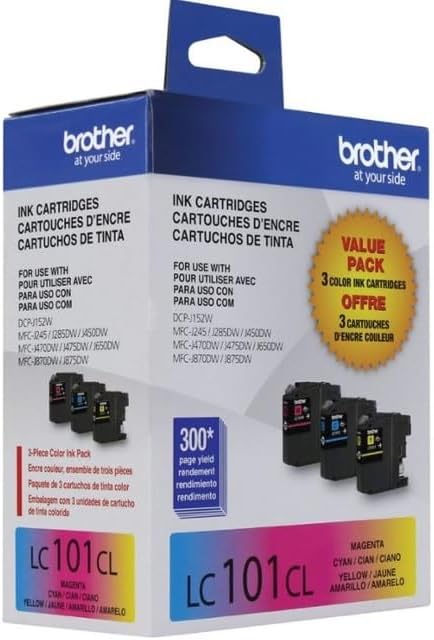
Figure 2: Individual Brother LC101 ink cartridges within their sealed packaging.
3.2 Preparing the Cartridge for Installation
Carefully open the individual plastic packaging for the color cartridge you wish to replace. Unlike some black ink cartridges, the Brother LC101 color cartridges typically do not have a plastic locking seal or tab that needs to be removed before installation. Simply remove the cartridge from its protective bag.
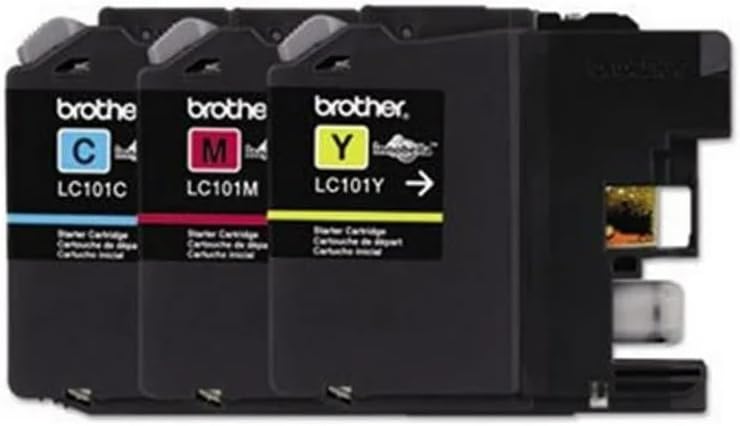
Figure 3: Brother LC101 ink cartridges ready for installation.
3.3 Installing the Cartridge into the Printer
- Asegúrese de que su impresora Brother esté encendida.
- Open the ink cartridge cover on your printer. Refer to your printer's specific manual for the exact location.
- Locate the empty color slot corresponding to the cartridge you are replacing (Cyan, Magenta, or Yellow).
- Gently push the new ink cartridge into the slot until it clicks securely into place. Do not force the cartridge.
- Close the ink cartridge cover. The printer will typically detect the new cartridge and initiate a brief setup process.
The installation process is designed to be quick and straightforward, minimizing printer downtime.
4. Operating Your Printer with LC101 Cartridges
Once installed, the Brother LC101 cartridges are ready for use. The Innobella™ ink technology ensures consistent, high-quality prints for documents and images. These cartridges are rated for approximately 300 pages, providing a reliable supply for your printing needs.
Para obtener una calidad de impresión óptima, asegúrese de que los controladores de su impresora estén actualizados y realice ciclos de limpieza del cabezal de impresión según lo recomendado por el manual de su impresora.
5. Mantenimiento y almacenamiento
5.1 Almacenamiento de cartuchos
Store unused Brother LC101 ink cartridges in their original, sealed packaging in a cool, dry place away from direct sunlight and extreme temperatures. This helps to preserve the ink's quality and prevent drying.
5.2 Mantenimiento de la impresora
Regularly perform printer maintenance tasks such as print head cleaning and nozzle checks through your printer's utility software. This prevents clogs and ensures consistent print quality, extending the life of your cartridges and printer.
6. Solución de problemas comunes
6.1 "Ink Almost Out" or Low Ink Warnings
If your printer displays a "low ink" or "ink almost out" warning, it indicates that the cartridge is nearing the end of its life. While the LC101 cartridges are rated for 300 pages, actual yield can vary based on print content and usage. Replace the indicated cartridge when print quality degrades or the printer stops printing.
6.2 Cartucho no reconocido
If a newly installed cartridge is not recognized by the printer:
- Ensure the cartridge is fully seated in its slot and has clicked into place.
- Remove and reinsert the cartridge firmly.
- Verify that you are using genuine Brother LC101 cartridges.
- Clean the electrical contacts on the cartridge and inside the printer with a lint-free cloth if necessary.
6.3 Mala calidad de impresión
Si las impresiones aparecen descoloridas, con rayas o tienen colores incorrectos:
- Perform a print head cleaning and nozzle check from your printer's maintenance menu.
- Asegúrese de que la configuración del tipo de papel en el controlador de la impresora coincida con el papel cargado en la bandeja.
- Check ink levels and replace any empty or very low cartridges.
7. Especificaciones del producto
| Característica | Detalle |
|---|---|
| Marca | Hermano |
| Nombre del modelo | LC101 |
| Color de tinta | Cian, Magenta, Amarillo |
| Rendimiento de la página | 300 páginas (aproximadamente) |
| Tecnología de tinta | Innobella™ |
| Dispositivos compatibles | Inkjet Printers (Brother models compatible with LC101 series) |
| Peso del artículo | 4.6 onzas (total para paquete de 3) |
| Dimensiones del producto | 2 x 3.7 x 4.7 pulgadas |
| Tipo de suministro | Tinta |
| Base de tinta | Agua |
8. Información de garantía
Brother LC101 ink cartridges are covered by Brother's standard manufacturer warranty, which typically protects against defects in materials and workmanship. For specific warranty terms and conditions, please refer to the documentation included with your product or visit the official Brother support websitio.
9. Atención al cliente
For further assistance, technical support, or to inquire about compatible printer models, please contact Brother customer support. You can find contact information and additional resources on the official Brother websitio.