
1. Introducción
Thank you for choosing the Grundig PS 5040 Personal Scale. This manual provides essential information for the safe and effective use of your new scale. Please read these instructions thoroughly before first use and keep them for future reference. This scale is designed for personal use to measure body weight and, potentially, body composition metrics.
2. Información de seguridad
- Coloque siempre la báscula sobre una superficie dura, plana y estable. Las superficies irregulares pueden afectar la precisión.
- No utilice la báscula sobre suelos mojados o resbaladizos para evitar caídas.
- The glass surface can be slippery when wet. Ensure your feet and the scale surface are dry before use.
- No salte sobre la báscula ni deje caer objetos pesados sobre ella.
- Keep the scale away from water and high humidity. Do not immerse it in water.
- Esta báscula está diseñada únicamente para uso doméstico y no para diagnóstico o tratamiento médico.
- Mantenga las baterías fuera del alcance de los niños. Si se ingiere, busque atención médica inmediata.
- Deshazte de las baterías de acuerdo a las regulaciones locales.
3. Contenido del paquete
- Grundig PS 5040 Personal Scale
- Manual de instrucciones
Nota: Las baterías no están incluidas y deben comprarse por separado.
4. Producto terminadoview
The Grundig PS 5040 is a sleek digital personal scale designed for accurate weight measurement. It features a clear digital display and user-friendly controls.

Figura 4.1: Arriba view of the Grundig PS 5040 Personal Scale, showing the black glass platform and silver accents.
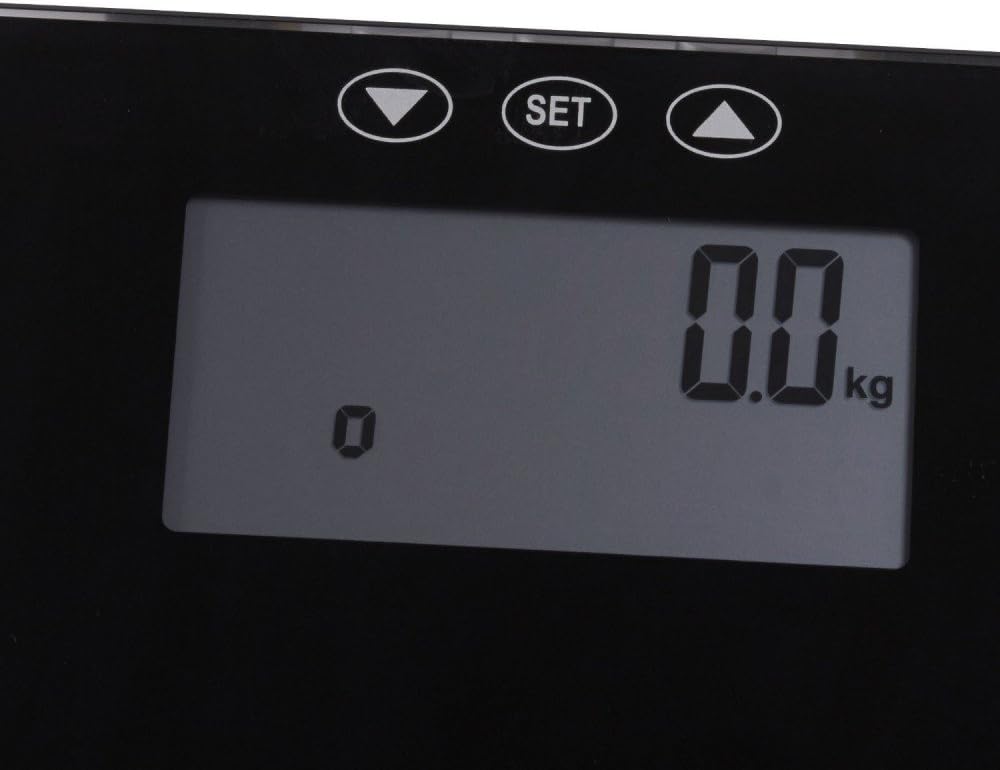
Figure 4.2: Close-up of the digital display showing '0.0 kg' and the 'SET', Up, and Down control buttons.

Figura 4.3: Parte inferior view of the scale, indicating the location of the battery compartment.
5. Configuración
- Desembalaje de la báscula: Retire con cuidado la báscula de su embalaje.
- Instale las baterías: Locate the battery compartment on the underside of the scale (refer to Figure 4.3). Open the cover and insert the required batteries (e.g., AAA or CR2032, typically 2 or 3 depending on model) ensuring correct polarity (+/-). Close the battery cover securely.
- Colocación: Place the scale on a firm, flat, and stable surface. Avoid carpets or soft flooring, as this can affect accuracy.
- Calibración inicial (puesta a cero): After installing batteries or moving the scale, step onto the scale briefly until the display shows a reading, then step off. The display should return to '0.0 kg' (or your selected unit). This indicates the scale has calibrated itself.
6. Instrucciones de funcionamiento
6.1. Medición básica del peso
- Ensure the scale is on a flat, stable surface and shows '0.0 kg'.
- Step onto the scale barefoot, standing still with your weight evenly distributed.
- Your weight will be displayed. The reading will flash or stabilize, then lock.
- Step off the scale. The scale will automatically turn off after a few seconds.
6.2. Conversión de unidades (kg/lb/st)
The scale typically allows switching between metric (kilograms) and imperial (pounds/stones). Look for a button on the underside of the scale or use the 'SET' button and arrow keys on the top surface (refer to Figure 4.2) to cycle through units. Press the unit button or use the 'SET' button to confirm your selection.
6.3. Usuario profesionalfile Setup (for Body Composition Measurement)
If your PS 5040 model includes body composition analysis (e.g., body fat, muscle mass), you will need to set up user profiles. The 'SET' and arrow buttons (Up/Down) are used for this purpose.
- Ingrese al modo de configuración: Press the 'SET' button. The display will likely show a user number (e.g., P01).
- Select User Number: Use the Up/Down arrow buttons to select an empty user profile (e.g., P01-P10). Press 'SET' to confirm.
- Introducir datos personales: The display will prompt you to enter data such as:
- Gender (Male/Female) - Use Up/Down, then 'SET'.
- Height (cm/inches) - Use Up/Down, then 'SET'.
- Age (years) - Use Up/Down, then 'SET'.
- Activity Level (if applicable) - Use Up/Down, then 'SET'.
- Guardar Profile: Once all data is entered, the scale will save the profile and return to '0.0 kg'.
6.4. Medición de la composición corporal
- Step onto the scale barefoot. The scale will first display your weight.
- If multiple users are set up, the scale may automatically recognize you or prompt you to select your user profile using the Up/Down arrows. Confirm with 'SET'.
- Remain still. The scale will send a low electrical current through your body (imperceptible) to measure impedance.
- The display will cycle through your body composition metrics (e.g., Body Fat %, Muscle Mass %, Water %, Bone Mass %).
- Bájese de la báscula. La báscula se apagará automáticamente.
7. Mantenimiento
- Limpieza: Limpie la superficie de la escala con un paño ligeramente húmedo.amp Paño y detergente suave si es necesario. No utilice limpiadores abrasivos ni sumerja la báscula en agua.
- Almacenamiento: Guarde la báscula en un lugar fresco y seco, alejado de la luz solar directa y de temperaturas extremas.
- Reemplazo de batería: If the display shows 'Lo' or becomes dim, it's time to replace the batteries. Follow the instructions in Section 5.2.
8. Solución de problemas
| Problema | Posible causa | Solución |
|---|---|---|
| La báscula no enciende | Baterías muertas o instaladas incorrectamente. | Verifique la polaridad de la batería o reemplace las baterías. |
| Lecturas inexactas | Escala en superficie irregular; no calibrada; movida recientemente. | Place on a hard, flat surface. Step on and off to re-calibrate. |
| La pantalla muestra "Lo" | Batería baja. | Reemplace las baterías. |
| Display shows "Err" or "OL" | Sobrecarga (el peso excede la capacidad máxima). | Bájese de la báscula. No exceda el peso máximo permitido. |
| Body composition readings are inconsistent | Not standing still; feet not making good contact; incorrect user profile datos. | Ensure bare feet are clean and dry. Stand still. Verify user profile data (height, age, gender). |
9. Especificaciones
- Marca: Grundig
- Modelo: PS 5040
- Material: Vaso
- Dimensiones: 34.5 x 34 x 4 cm (aprox. 13.6 x 13.4 x 1.6 pulgadas)
- Peso: 798.32 g (aprox. 1.76 libras)
- Fuente de energía: Requiere pilas (no incluidas)
- Unidades de medida: Kilograms (kg), Pounds (lb), Stones (st) - (Unit conversion capability based on typical scale features and display)
10. Garantía y soporte
For warranty information and customer support, please refer to the warranty card included with your purchase or visit the official Grundig webSitio. También puede ponerse en contacto con el minorista donde compró el producto para obtener ayuda.
Grundig Store: Visit the Grundig Store on Amazon.nl