
Motorola TX550
Motorola TX550 Bluetooth Car Kit
Manual de usuario
Introducción
The Motorola TX550 Bluetooth Car Kit, also known as SonicRider, is designed to provide a safe and convenient hands-free communication solution while driving. This device allows you to make and receive calls without holding your phone, enhancing road safety and compliance with hands-free driving laws.
Equipped with advanced echo and noise reduction technology, the TX550 ensures clear audio quality for both you and the person on the other end of the line. Its powerful 2-watt speaker delivers loud and clear sound, even over road noise. The device also features audible voice prompts to keep you informed about its status, such as connection, battery level, and mute status.

Figura 1: Frente view of the Motorola TX550 Bluetooth Car Kit, showing the speaker grille and central Motorola logo button.
Contenido del paquete
Your Motorola TX550 Bluetooth Car Kit package typically includes the following items:
- Motorola TX550 Bluetooth Car Kit unit
- Cable de carga USB
- Car Charger Adapter (may vary by region/packaging)
- Visor Clip (pre-attached or separate)
Please inspect all contents upon unboxing. If any items are missing or damaged, contact your retailer or Motorola support.
Características del producto
- Llamadas manos libres: Enables safe communication without holding your phone.
- Exceptional Noise Reduction: World-class echo and noise cancellation with a single microphone to minimize road noise.
- Altavoz potente: Integrated 2-watt speaker for clear audio output.
- Audible Voice Prompts: Provides spoken updates on connection status, battery level, and mute status.
- Multi-Phone Connectivity: Connects to up to two phones simultaneously, allowing multiple passengers to use the speakerphone.
- Mayor duración de la batería: Offers up to 45 hours of talk time and five months of standby time on a single charge.
- Compatibilidad universal: Pairs with various Bluetooth-enabled devices from different brands.
Configuración
Carga del dispositivo
Before initial use, fully charge your Motorola TX550. Locate the micro USB charging port on the side of the device.

Figura 2: Lado view of the Motorola TX550, highlighting the micro USB charging port and volume slider.
- Connect the small end of the USB charging cable to the micro USB port on the TX550.
- Connect the large end of the USB cable to the car charger adapter or any compatible USB power source.
- La luz indicadora del dispositivo se iluminará durante la carga y se apagará cuando esté completamente cargado.
Emparejamiento con su teléfono
The TX550 can be paired with up to six different phones, and can actively connect to two phones simultaneously.
- Encendido: Press and hold the central Motorola button (M button) for approximately 3 seconds until you hear a voice prompt indicating power on.
- Ingrese al modo de emparejamiento: If this is the first time using the device, it will automatically enter pairing mode. If not, or to pair a new device, press and hold the M button for about 5 seconds until the indicator light flashes blue and red, and you hear "Ready to pair."
- Habilite Bluetooth en su teléfono: Go to your phone's Bluetooth settings and ensure Bluetooth is turned on.
- Buscar Dispositivos: Your phone will scan for available Bluetooth devices. Select "Motorola TX550" or "SonicRider" from the list.
- Confirmar emparejamiento: If prompted for a passcode, enter "0000" (four zeros). Once successfully paired, the TX550 will announce "Phone connected."
Operación del dispositivo
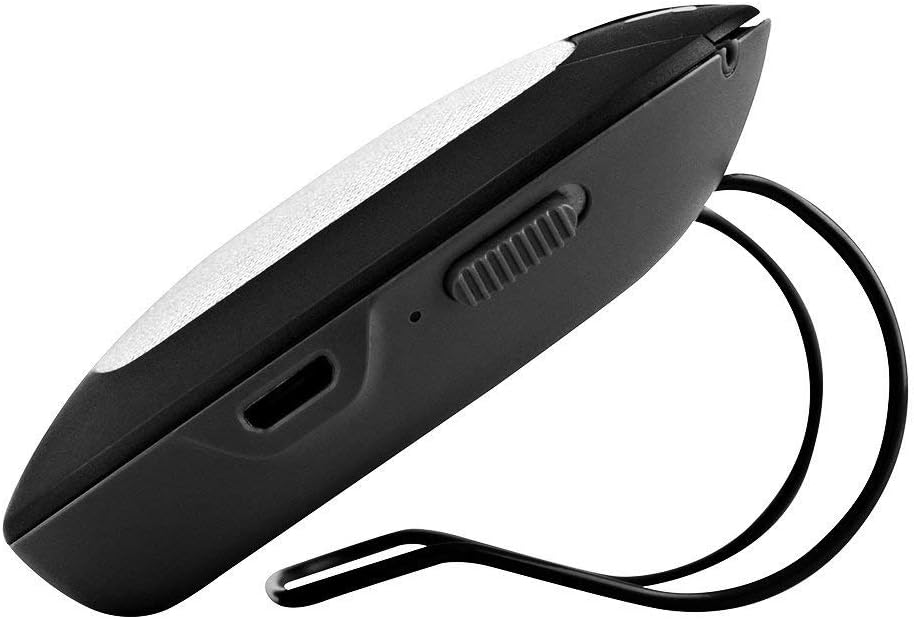
Figura 3: Arriba view of the Motorola TX550, illustrating the call, volume, and mute buttons.
Encendido/apagado
- Para encender: Press and hold the central Motorola button (M button) for approximately 3 seconds.
- Para apagar: Press and hold the M button for approximately 3 seconds until you hear a voice prompt indicating power off.
Gestión de llamadas
- Responder una llamada: Presione el Llamar button (phone icon).
- Finalizar una llamada: Presione el Llamar botón de nuevo.
- Rechazar una llamada: Mantenga pulsado el Llamar Botón durante 2 segundos.
- Volver a marcar el último número: Presione dos veces el Llamar botón.
- Silenciar/activar micrófono: Presione el Silenciar button (microphone with slash icon). The device will announce "Mute on" or "Mute off."
Control de volumen
Adjust the speaker volume using the dedicated volume buttons or slider on the device.
- Aumenta el volumen: Presione el + button or slide the volume control up.
- Disminuir volumen: Presione el - button or slide the volume control down.
Indicaciones de voz
The TX550 provides audible voice prompts for various statuses:
- "Power on" / "Power off"
- "Ready to pair"
- "Phone connected" / "Phone disconnected"
- "Battery high" / "Battery medium" / "Battery low"
- "Mute on" / "Mute off"
Mantenimiento
Limpieza
To maintain the appearance and functionality of your TX550, clean it regularly:
- Utilice un paño suave, seco y sin pelusa para limpiar el exterior.
- No utilice limpiadores abrasivos, disolventes o productos químicos fuertes, ya que pueden dañar la superficie.
- Evite que entre humedad en las aberturas.
Cuidado de la batería
Para maximizar la vida útil y el rendimiento de la batería:
- Cargue el dispositivo completamente antes del primer uso.
- Evite exponer el dispositivo a temperaturas extremas (calor o frío).
- Si va a almacenar el dispositivo durante un período prolongado, cárguelo aproximadamente al 50 % antes de guardarlo y recárguelo cada pocos meses.
Solución de problemas
| Problema | Posible causa | Solución |
|---|---|---|
| El dispositivo no se enciende. | La batería está agotada. | Cargue el dispositivo durante al menos 30 minutos. |
| No se puede emparejar con el teléfono. | Device not in pairing mode; Bluetooth off on phone; previously paired. | Ensure TX550 is in pairing mode (flashing blue/red). Turn phone's Bluetooth off and on. Delete previous pairing from phone and try again. |
| Poor audio quality / Echo. | Volume too high; device too far from mouth; environmental noise. | Adjust volume. Ensure device is positioned correctly on visor. Reduce background noise if possible. |
| No voice prompts. | Voice prompt feature disabled (not applicable for this model); software glitch. | Ensure device is powered on and connected. Try powering off and on again. |
| El dispositivo se desconecta con frecuencia. | Fuera de rango; interferencia; batería baja. | Keep phone within 10 meters (33 feet) of the device. Charge the device. Avoid strong electromagnetic interference. |
Presupuesto
| Nombre del modelo | TX550 |
| Marca | Motorola |
| Material | Metal, Plástico |
| Tecnología de conectividad | Bluetooth |
| Potencia de salida del altavoz | 2 vatios |
| Modo de salida de audio | Mononucleosis infecciosa |
| Duración de la batería (tiempo de conversación) | Hasta 45 horas |
| Tipo de batería | 1 polímero de litio (incluido) |
| Peso del artículo | 249 gramos |
| Dimensiones del producto | 17.02 x 11.18 x 5.08 cm |
| Color | Plata |
Garantía y soporte
For specific warranty information regarding your Motorola TX550 Bluetooth Car Kit, please refer to the documentation included with your purchase or visit the official Motorola support webSitio. Los términos y condiciones de la garantía pueden variar según la región y el minorista.
If you encounter issues not covered in this manual or require further assistance, please contact Motorola customer support through their official channels. Keep your proof of purchase handy when seeking support.
Ask a question about this manual
Ask about setup, troubleshooting, compatibility, parts, safety, or missing instructions. Manuals+ will review the question and use this page’s manual context to help answer it.