
1. Introducción
This manual provides essential instructions for the safe and proper installation and use of the RACO 8590 Gangable Switch Box. This electrical box is designed for use in residential and commercial electrical wiring systems to house electrical connections, switches, or receptacles. Please read all instructions carefully before beginning installation.
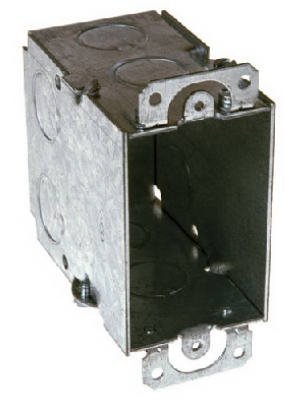
Imagen 1.1: The RACO 8590 Gangable Switch Box. This image displays the metal construction of the electrical box, featuring knockouts for conduit entry and mounting tabs. The box is designed to be ganged with other similar boxes for multi-device installations.
2. Información de seguridad
WARNING: Risk of electric shock or fire. Installation must be performed by a qualified electrician in accordance with all national and local electrical codes.
- Always turn off power at the circuit breaker or fuse box before installing, servicing, or removing this product.
- Use only approved wiring methods and materials.
- Asegúrese de que todas las conexiones estén seguras y adecuadamente aisladas.
- Do not exceed the maximum wire fill capacity of the box. Refer to local electrical codes for specific requirements.
- Utilice equipo de protección personal (EPP) adecuado, como gafas de seguridad y guantes aislantes.
- Inspect the box for any damage before installation. Do not install damaged products.
3. Configuración e instalación
The RACO 8590 switch box is designed for secure mounting and easy wiring. Follow these steps for proper installation:
- Prepare la ubicación de instalación:
Ensure the wall or surface where the box will be installed is clear of obstructions and provides adequate support. Mark the desired location for the box.
- Apagar la energía:
Crucially, turn off the power to the circuit at the main service panel before proceeding. Verify with a voltage probador.
- Montar la caja:
Secure the switch box to a stud or other structural element using appropriate fasteners (screws, nails) through the designated mounting holes or ears. Ensure the box is flush with the finished wall surface.
- Remove Knockouts:
Carefully remove the necessary knockouts for wire entry using a screwdriver and pliers. Ensure the opening size matches the conduit or cable connector being used.
- Install Cable Connectors:
Insert appropriate cable connectors into the knockout openings and secure them tightly. These connectors protect the wires and hold them in place.
- Pasar cables:
Feed the electrical wires through the cable connectors into the box, leaving sufficient length for connections.
- Gangable Feature:
If installing multiple devices side-by-side, the RACO 8590 is gangable. Remove the side plates between adjacent boxes by breaking them off. This allows multiple boxes to be joined together to form a larger enclosure for multiple switches or receptacles.
4. Principios de funcionamiento
The RACO 8590 switch box serves as a protective enclosure for electrical wiring connections and devices. Its primary function is to:
- Contain Wiring: Safely house wire splices, switches, and receptacles, protecting them from physical damage and environmental factors.
- Provide Grounding: When properly installed and bonded, the metal box contributes to the grounding path of the electrical system, enhancing safety.
- Facilitate Device Installation: Offer a standardized mounting point for electrical devices like light switches, dimmer switches, and electrical outlets.
- Permitir la expansión: The gangable design allows for easy expansion to accommodate multiple devices in a single location.
Once installed and wired correctly, the box itself does not require "operation" in the traditional sense, but rather functions as a permanent part of the electrical infrastructure.
5. Mantenimiento
Proper maintenance of electrical boxes ensures long-term safety and functionality. While the RACO 8590 switch box itself requires minimal maintenance, periodic inspection of the electrical system it houses is recommended.
- Inspección periódica: Annually inspect visible electrical boxes and devices for signs of wear, damage, or loose connections.
- Comprobar si hay daños: Look for cracks, corrosion, or deformation of the box. Replace any damaged boxes immediately.
- Garantice conexiones seguras: If accessing the interior of the box (after turning off power!), ensure all wire connections are tight and secure. Loose connections can cause overheating and fire hazards.
- Mantenerse alejado: Ensure the area around the electrical box is free from obstructions and flammable materials.
6. Solución de problemas
Issues related to an electrical box are typically symptoms of problems with the wiring or devices connected within it. Always ensure power is OFF before troubleshooting.
| Problema | Posible causa | Solución |
|---|---|---|
| Device (switch/outlet) not working | Loose wire connection, tripped circuit breaker, faulty device. | Check circuit breaker. With power off, inspect and tighten wire connections. Test or replace the device. |
| Burning smell or discoloration around box | Overheating due to loose connections, overloaded circuit, or short circuit. | Immediately turn off power. Do not use the circuit. Call a qualified electrician for inspection and repair. |
| Box feels warm to the touch | Overloaded circuit, loose connections, or improper wire sizing. | Turn off power. Reduce load on the circuit. Inspect connections and wire gauges. Consult an electrician. |
If you are unsure about any electrical issue, always consult a qualified electrician.
7. Especificaciones
- Modelo: RACO 8590
- Tipo: Gangable Switch Box
- Dimensiones: 3 x 2 inches (width x height), 3 1/2 inches deep
- Material: Acero aleado
- Tipo de instalación: Atornillar
- Estilo: Compacto
- Fabricante: RACÓ
- ASIN: B00IPHFPQE
Nota: Las especificaciones están sujetas a cambios sin previo aviso. Consulte siempre el embalaje del producto para obtener la información más actualizada.
8. Garantía y soporte
RACO products are manufactured to high standards of quality and durability. For specific warranty information, please refer to the documentation included with your purchase or visit the official RACO website. For technical support or inquiries, please contact RACO customer service through their official channels.
RACO Official Websitio: www.hubbell.com/raco/en