
1. Introducción
This manual provides instructions for the OEM RMT-B119A remote control, designed as a replacement or secondary remote for various Sony Blu-ray player models. This remote offers full functionality for controlling your Blu-ray player's features.
Compatible Sony Blu-ray Player Models:
- BDP-BX59
- BDP-S390
- BDP-S590
- BDP-BX110
- BDP-S1100
- BDP-S3100
- BDP-BX310
2. Configuración
2.1 Instalación de la batería
El control remoto requiere dos (2) pilas AAA (no incluidas). Siga estos pasos para instalar las pilas:
- Ubique la tapa del compartimiento de la batería en la parte posterior del control remoto.
- Presione la pestaña y deslice la tapa hacia abajo para abrir el compartimento.
- Inserte dos pilas AAA, asegurándose de que los terminales positivo (+) y negativo (-) estén alineados correctamente con las marcas dentro del compartimiento.
- Deslice la tapa del compartimiento de la batería nuevamente a su lugar hasta que encaje firmemente.
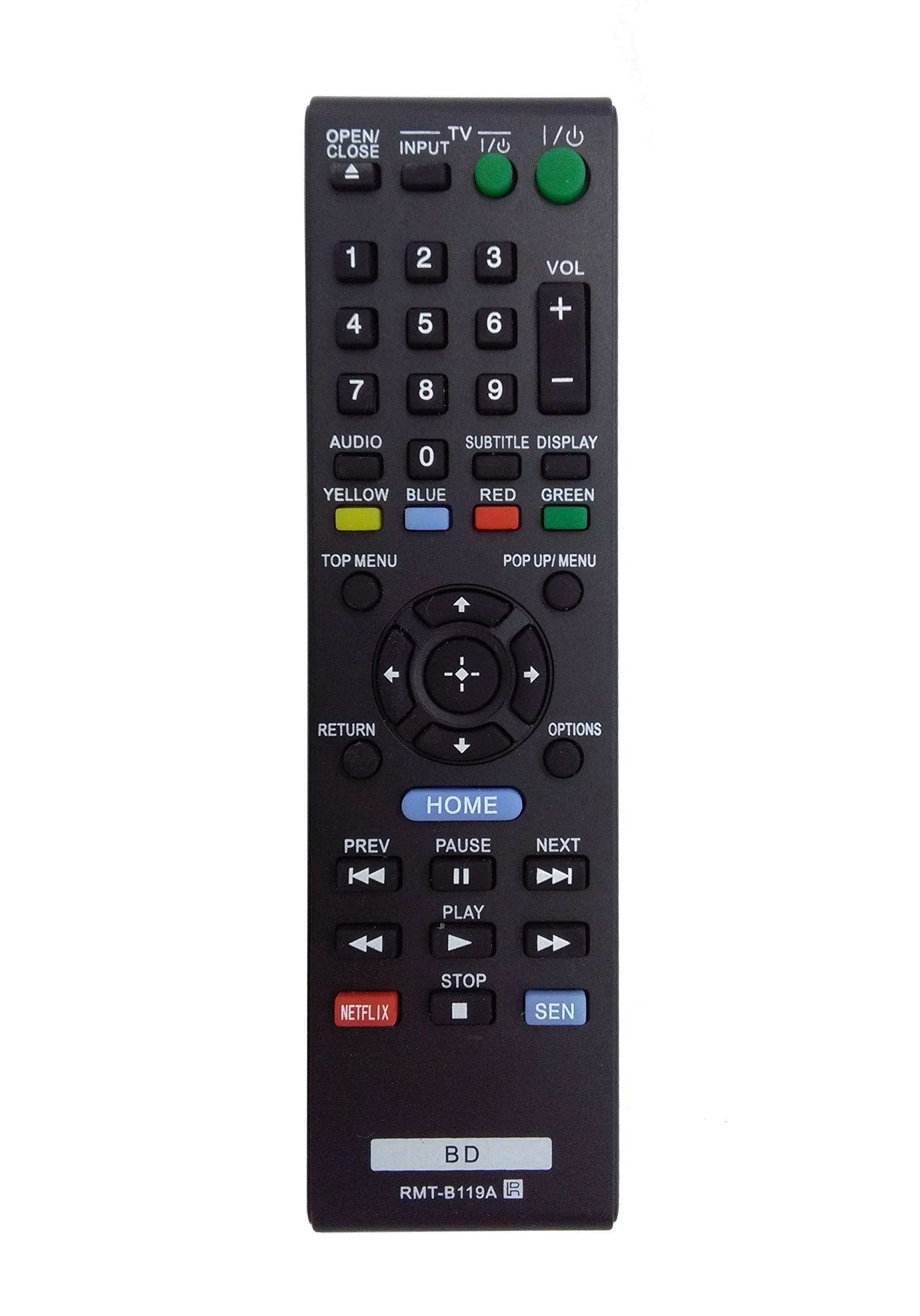
Image: The OEM RMT-B119A remote control, showing the full button layout on the front and a partial view of the open battery compartment on the back, revealing the battery terminals.
3. Instrucciones de funcionamiento
3.1 Remote Control Layout and Button Functions
Familiarize yourself with the buttons on your RMT-B119A remote control. Below is a description of each button's primary function.
Image: The OEM RMT-B119A remote control, displaying all buttons and their labels.
- Potencia (E/S): Turns the Blu-ray player on or off.
- OPEN/CLOSE (▲): Abre o cierra la bandeja del disco.
- ENTRADA: Switches the input source on the connected TV (if programmed).
- TELEVISOR: Switches the remote to TV control mode (if programmed).
- Teclado numérico (0-9): Used for direct track selection, chapter selection, or entering numerical data.
- VOL (+/-): Adjusts the volume level (typically for the connected TV, if programmed).
- AUDIO: Changes the audio track or language during playback.
- SUBTITLE DISPLAY: Toggles subtitle display on or off, or cycles through available subtitle languages.
- YELLOW, BLUE, RED, GREEN: Color-coded function buttons, typically used for specific features within menus or interactive content. Their function varies depending on the disc or menu.
- MENU PRINCIPAL: Accesses the main menu of the Blu-ray disc.
- MENÚ EMERGENTE: Displays the pop-up menu during disc playback.
- Directional Pad (↑↓←→): Navega por menús y opciones.
- Center Button (Enter/Select): Confirma una selección o ingresa a un elemento del menú.
- DEVOLVER: Vuelve a la pantalla o menú anterior.
- OPCIONES: Displays context-sensitive options or settings.
- HOGAR: Accesses the Blu-ray player's home menu.
- ANTERIOR (◀◀): Skips to the beginning of the current track/chapter or the previous track/chapter.
- PAUSE (▌▌): Pausa la reproducción.
- SIGUIENTE (▶▶): Salta a la siguiente pista o capítulo.
- JUGAR (▶): Inicia o reanuda la reproducción.
- ALTO (■): Detiene la reproducción.
- NETFLIX: Direct access button for the Netflix streaming service.
- SE: Direct access button for the Sony Entertainment Network (now PlayStation Video/Music).
- BD: Likely a dedicated button for Blu-ray Disc functions or to switch to Blu-ray mode.
4. Mantenimiento
Para garantizar la longevidad y el correcto funcionamiento de su control remoto, siga estas pautas de mantenimiento:
- Limpieza: Limpie el control remoto con un paño suave y seco. Para suciedad difícil de eliminar, limpie ligeramenteampLimpie el paño con agua o un limpiador suave no abrasivo. Evite usar productos químicos o disolventes agresivos.
- Reemplazo de batería: Reemplace las pilas cuando el control remoto responda con lentitud o deje de funcionar. Siempre reemplace ambas pilas a la vez por otras nuevas del mismo tipo.
- Almacenamiento: Guarde el control remoto en un lugar fresco y seco, alejado de la luz solar directa, temperaturas extremas y humedad alta. Si no lo va a usar durante un período prolongado, retire las pilas para evitar fugas.
- Evite las gotas: Proteja el control remoto contra impactos físicos, ya que las caídas pueden dañar los componentes internos.
5. Solución de problemas
Si tiene problemas con su control remoto, consulte la siguiente tabla para conocer problemas y soluciones comunes:
| Problema | Posible causa | Solución |
|---|---|---|
| El control remoto no funciona. | Pilas muertas o insertadas incorrectamente. | Reemplace las baterías por otras nuevas, asegurándose de la polaridad correcta (+/-). |
| El control remoto funciona de forma intermitente. | Baja carga de batería u obstrucción. | Replace batteries. Ensure no objects are blocking the remote's signal path to the Blu-ray player. |
| El control remoto no controla el televisor. | Remote not programmed for TV or TV mode not selected. | This remote is primarily for Blu-ray players. TV control functionality may require specific programming not covered by this manual, or may not be supported by this OEM model. |
| Los botones no responden o están pegajosos. | Suciedad o residuos debajo de los botones. | Limpie la superficie del control remoto. Evite derramar líquidos sobre él. |
6. Especificaciones
- Marca: Fabricante de equipos originales (OEM)
- Número de modelo: RMT-B119A
- Tecnología de conectividad: Infrarrojos (IR)
- Dispositivos compatibles: Sony Blu-ray Players (specific models listed in Introduction)
- Fuente de energía: Pilas 2 x AAA (no incluidas)
- Alcance máximo: Aproximadamente 10 metros (33 pies)
- Característica especial: Diseño ergonómico
7. Garantía y soporte
This OEM RMT-B119A remote control comes with a Garantía de 30 días A partir de la fecha de compra, cubre defectos de fabricación. Conserve el comprobante de compra para reclamaciones de garantía.
For technical support or warranty inquiries, please contact the retailer or manufacturer directly. Refer to your purchase documentation for specific contact information.