
1. Introducción
This manual provides instructions for the StuntCams Replay XD 1080P / Prime X Hat Clip Tilt Shoulder Epaulette Visor Cap Mount. This universal clip mount is designed for use with Replay XD 1080p and Prime X cameras, offering a versatile solution for hands-free recording.
The mount facilitates on-the-go shooting for various activities such as walking, biking, fishing, and hunting by securely attaching to a hat brim or shoulder strap.
2. Producto terminadoview
The StuntCams Hat Clip Mount is a lightweight accessory designed for secure camera attachment.

Figure 2.1: The Replay XD camera mount attached to the brim of a baseball cap, demonstrating its primary use.
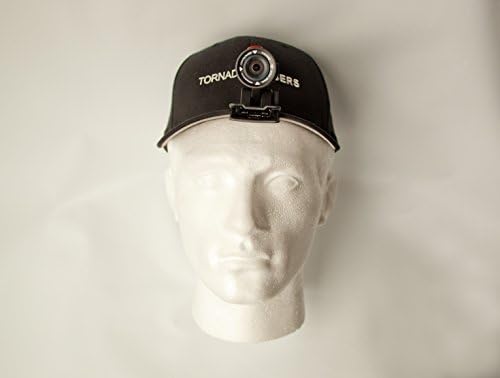
Figure 2.2: The camera mount and camera assembly shown on a mannequin head, illustrating how it appears when worn.
Características principales:
- Universal clip design for easy attachment.
- Compatible with Replay XD 1080p and Prime X cameras.
- Lightweight construction for comfortable wear.
- Tilt feature for adjusting camera angle.
3. Configuración
Colocación del soporte:
- Identify the desired attachment point: This mount can be clipped onto the brim of a baseball cap, a shoulder strap, or any similar thin edge.
- Open the clip: Gently press the rear end of the clip to open its jaws.
- Position the mount: Slide the open clip onto the edge of your hat brim or shoulder strap, ensuring a secure grip. Release the clip to allow it to close firmly.
- Verify stability: Once attached, gently tug on the mount to ensure it is securely fastened and will not easily dislodge during activity.
Conexión de la cámara:
- Locate the camera attachment point on the mount. This is typically a standard tripod screw or a specific receptacle for Replay XD cameras.
- Align your Replay XD 1080p or Prime X camera with the mount's attachment point.
- Secure the camera: Twist the camera onto the screw or push it into the receptacle until it is firmly attached to the mount. Ensure it is snug but do not overtighten.
4. Operando
Once the mount and camera are securely attached, the system is ready for use. The mount's primary function is to provide a stable platform for your camera in a hands-free configuration.
Ajuste de la inclinación:
The mount features a tilt mechanism, allowing you to adjust the camera's vertical angle. This is crucial for capturing the desired field of view, whether you are looking straight ahead, slightly up, or down.
- Gently hold the camera and the mount.
- Pivot the camera assembly up or down to achieve the desired recording angle.
- The tilt mechanism is designed to hold its position once set, but avoid excessive force when adjusting.
For optimal recording, ensure the camera lens is clear of obstructions (e.g., hat brim, hair) and pointed in the intended direction.
5. Mantenimiento
Proper care will extend the lifespan of your StuntCams Hat Clip Mount.
- Limpieza: Limpie el soporte con un paño suave.amp cloth to remove dust or dirt. Avoid using harsh chemicals or abrasive materials, which could damage the finish.
- Almacenamiento: Guarde el soporte en un lugar fresco y seco, alejado de la luz solar directa y de temperaturas extremas cuando no esté en uso.
- Inspección: Periodically inspect the clip mechanism and camera attachment point for any signs of wear or damage. If any components appear compromised, discontinue use to prevent potential camera damage.
6. Solución de problemas
Mount Not Holding Securely:
- Ensure the surface you are clipping to is thin enough for the clip to fully engage.
- Check for any debris or obstructions within the clip jaws that might prevent a firm grip.
- Verify that the clip mechanism is not damaged or worn.
Camera Feels Loose on Mount:
- Re-tighten the camera to the mount's attachment point.
- Ensure the camera's mounting thread or receptacle is not stripped or damaged.
- Confirm that you are using a compatible Replay XD 1080p or Prime X camera.
Tilt Mechanism is Too Loose or Too Stiff:
- The tilt mechanism is designed for a specific friction level. If it becomes excessively loose or stiff, it may indicate wear or damage.
- Avoid forcing the tilt if it feels stiff, as this could cause breakage.
7. Especificaciones
| Característica | Detalle |
|---|---|
| Número de modelo | SC-Replay-Hat-Mount |
| Marca | Cámaras acrobáticas |
| Dispositivos compatibles | Replay XD 1080p, Replay Prime X Cameras |
| Peso de montaje | 1.1 onzas (aprox. 31 gramos) |
| Tipo de montaje | Clip, Tilt |
| Color | Negro |
| Fecha de primera disponibilidad | 30 de noviembre de 2012 |
Note: Camera weight (3.2 ounces) and total weight (4.3 ounces) are provided for reference when combined with a compatible camera.
8. Garantía y soporte
For information regarding warranty coverage, product support, or replacement parts, please contact StuntCams directly through their official websitio o canales de atención al cliente.
Conserve su comprobante de compra para cualquier reclamo de garantía.