
Introducción
The GoPro HERO3: White Edition is a compact and versatile action camera designed for capturing high-quality video and photos in various environments, including underwater. It features built-in Wi-Fi, a redesigned user interface, and is significantly smaller and lighter than its predecessor. This manual provides essential information for setting up, operating, and maintaining your camera.
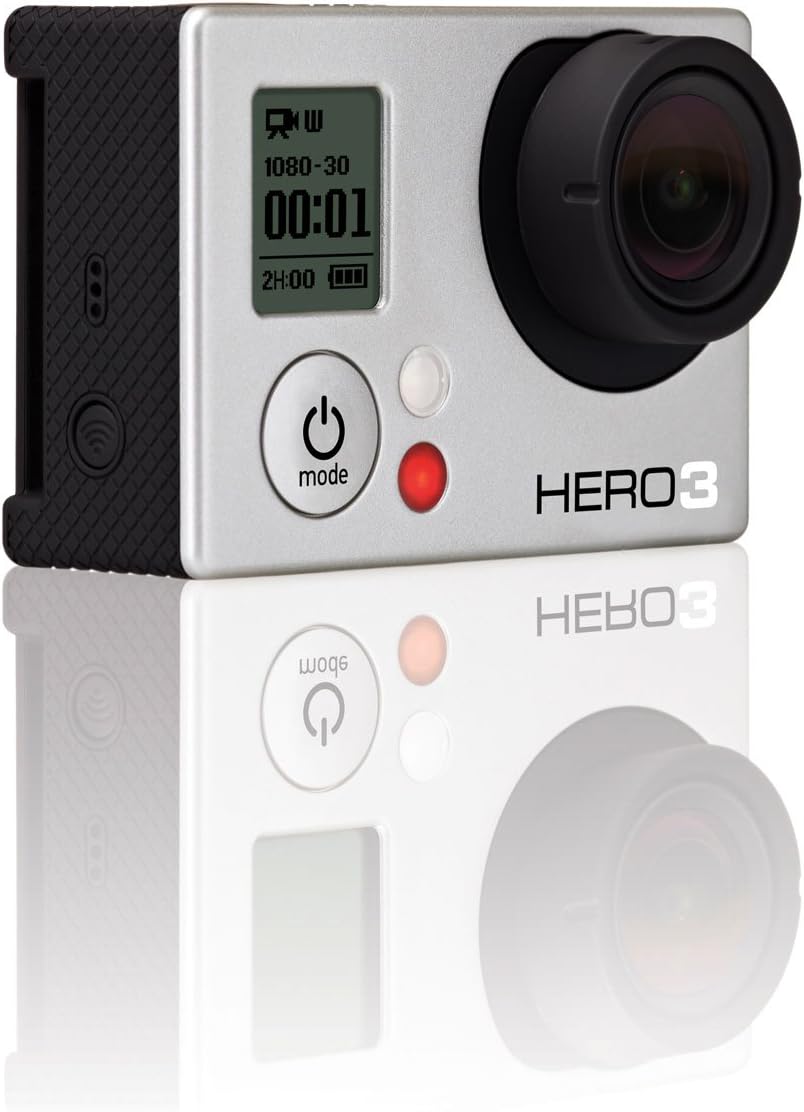
Frente view of the GoPro HERO3: White Edition camera, highlighting its compact design and primary controls.
Configuración
¿Qué hay en la caja?
- HERO3: White Edition Camera
- 197'/ 60m Waterproof Housing
- Batería recargable de Li-ion
- QR Buckle
- 1 Curved Adhesive Mount
- 1 Flat Adhesive Mount
- Assorted Mounts and Hardware
- Cable de carga USB
Pasos de configuración inicial
- Cargar la batería: Insert the included rechargeable Li-ion battery into the camera. Connect the camera to a USB power source using the provided USB Charging Cable. The camera's indicator light will show charging status.
- Inserte la tarjeta Micro SD: A micro-SD card (not included) is required for operation. Open the side door and gently insert the micro-SD card into the designated slot until it clicks into place. Ensure the card is formatted correctly (refer to the Operating section for formatting instructions).
- Attach Waterproof Housing: For protection against water and impacts, place the camera inside the 197'/ 60m Waterproof Housing. Ensure the housing is securely latched before use, especially near water.

Trasero view of the GoPro HERO3: White Edition, showing the battery compartment and a note regarding sound performance with different backdoors.
Instrucciones de funcionamiento
Controles básicos
- Botón de encendido / modo: Located on the front of the camera. Press and hold to power on/off. Press briefly to cycle through camera modes (Video, Photo, Burst, Time Lapse, Settings).
- Botón obturador/selector: Located on the top of the camera. Press to start/stop recording video, take a photo, or confirm a selection in the settings menu.
Grabación de vídeo
The HERO3: White Edition supports professional quality video capture at various resolutions and frame rates:
- 1080p at 30 frames per second (fps)
- 960p a 30 fps
- 720p a 60 fps
- WVGA at 60 fps
To record video, select video mode using the Mode button, then press the Shutter button to start recording. Press again to stop.
Captura de fotos
Capture high-resolution 5 MP photos with the following modes:
- Foto única: Capture one photo at a time.
- Modo ráfaga: Capture 3 photos per second.
- Lapso de tiempo: Automatically capture photos at intervals of 0.5, 2, 5, 10, 30, or 60 seconds.
To take photos, cycle to photo mode using the Mode button, then press the Shutter button.
Conectividad Wi-Fi
The camera features built-in Wi-Fi, compatible with the GoPro App for smartphones/tablets and the Wi-Fi remote (sold separately). This allows for remote control and content preview.
Rendimiento de audio
The HERO3 features a redesigned audio system for improved capture of subtle sounds like voice or music, as well as sports sounds. A port for a 3.5mm Stereo Mic Adapter (sold separately) is included for external microphone use.
Mantenimiento
Cuidado de la cámara
- Limpieza: Utilice un paño suave y sin pelusa para limpiar la lente y el cuerpo de la cámara. Para la suciedad difícil, frote ligeramente.ampEnjuague el paño con agua. Evite productos químicos agresivos.
- Cuidado de la batería: Store batteries in a cool, dry place. Do not expose to extreme temperatures. Fully charge batteries before extended storage.
- Almacenamiento: Cuando no esté en uso, guarde la cámara en un estuche protector para evitar rayones y daños.
Waterproof Housing Care
- After use in saltwater, rinse the housing with fresh water and allow it to air dry.
- Inspect the rubber seal (gasket) around the housing door regularly for dirt, sand, or damage. Clean the seal with a soft cloth and ensure it is free of debris to maintain its waterproof integrity.
- Do not use sharp objects to clean the housing or its seal.

Lado view of the GoPro HERO3: White Edition, illustrating the battery door and textured grip for secure handling.
Solución de problemas
Problemas comunes y soluciones
- La cámara no se enciende:
- Ensure the battery is fully charged. Connect the camera to a power source.
- Remove and reinsert the battery.
- If using an external power source, ensure it provides sufficient power. - Problemas de grabación (tartamudeo/congelamiento):
- Ensure you are using a compatible and high-speed micro-SD card (Class 10 or higher recommended).
- Format the micro-SD card within the camera's settings.
- Check if the card is full and transfer files a una computadora. - Problemas de conexión Wi-Fi:
- Ensure Wi-Fi is enabled on the camera.
- Restart both the camera and your smartphone/tablet.
- Ensure your device is within range of the camera's Wi-Fi signal.
- Update the GoPro App to the latest version. - Mala calidad de audio:
- Ensure the microphone port is clear of debris.
- If using the waterproof housing, note that audio capture will be muffled. Consider using a skeleton backdoor (if available and appropriate for your environment) for better audio in non-waterproof situations.
Presupuesto
| Característica | Detalle |
|---|---|
| Marca | GoPro |
| Número de modelo | CHDHE-301 |
| Peso del artículo | 1.2 libras |
| Dimensiones del producto | 3.94 x 3.94 x 9.65 pulgadas |
| Baterías | Se requieren 1 batería de iones de litio (incluidas) |
| Color | Multi |
| Características especiales | Resistente al agua (con carcasa) |
| Tecnología de fotosensor | CMOS |
| Resolución de captura de video | 1080p |
| Tipo de memoria flash | Micro SD |
| Formato de captura de video | H.264 |
| Formato de audio compatible | AAC, MP3 |
| Tamaño de pantalla | 2 Inches (visible screen diagonal) |
| Tecnología de conectividad | USB, Wi-Fi |
| Profundidad impermeable | 197' (60m) with included housing |
Información importante
Aviso legal
This product may be sold in open box condition but is in its original packaging. Please verify product condition upon receipt.
Garantía y soporte
Para obtener información detallada sobre la garantía, consulte el sitio web oficial de GoPro. website or the warranty card included with your product. GoPro provides customer support and resources for product assistance.
Soporte oficial de GoPro: For the most up-to-date support, FAQs, and software downloads, please visit the official GoPro support website. You can typically find this by searching for "GoPro Support" online.


