
Producto terminadoview
The Targus Presenter AMP09AP is a multimedia presentation remote designed for ease of use during presentations. It features a laser pointer for highlighting content, backlit buttons for low-light environments, and an ergonomic design for comfortable handling. This remote also offers cursor control for remote program access and volume adjustment for media. Its wireless technology provides a range of up to 50 feet, and the USB receiver conveniently stores within the presenter.
Guía de configuración
1. Desembalaje
Carefully remove the Targus Presenter AMP09AP and its components from the packaging. The box should contain:
- One Targus Presentation Remote
- One USB Receiver
2. Instalación de la batería
The Targus Presenter AMP09AP requires batteries (not included). Use alkaline batteries for optimal performance.
- Localice el compartimento de la batería en la parte posterior del presentador.
- Abra la tapa del compartimiento de la batería.
- Inserte las pilas necesarias, asegurándose de la polaridad correcta (+/-).
- Cierre bien la tapa del compartimento de la batería.
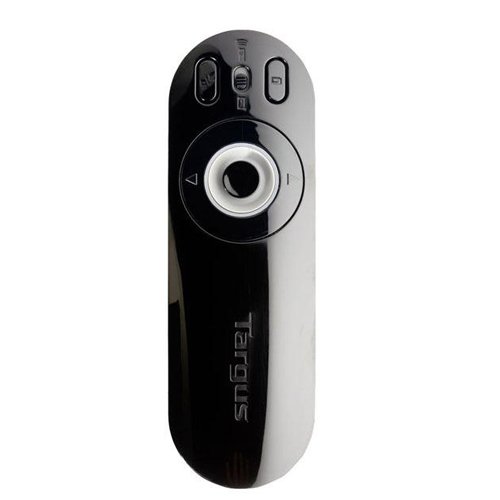
Image: The Targus Presenter AMP09AP, its USB receiver, and the open battery compartment revealing two AAA batteries.
3. Conexión del receptor USB
- Remove the USB receiver from its storage slot within the presenter.
- Conecte el receptor USB a un puerto USB disponible en su computadora.
- La computadora debería detectar e instalar automáticamente los controladores necesarios.
El control remoto ahora está listo para usarse.
Instrucciones de funcionamiento
Modo de presentación
The presenter's simplistic layout allows for easy navigation during presentations.
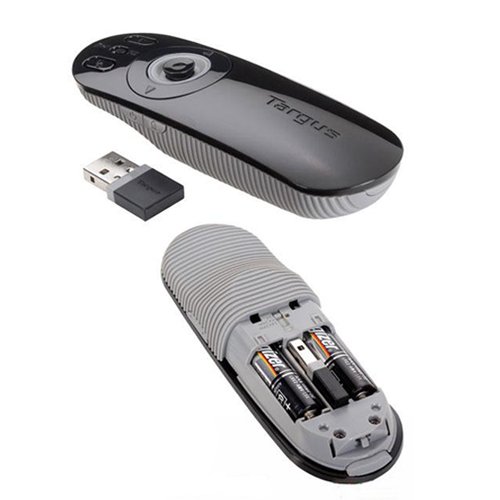
Imagen: Arriba view of the Targus Presenter AMP09AP, highlighting the laser pointer button, slide navigation buttons, and the mode switch.
- Puntero láser: Press and hold the dedicated laser button to activate the laser pointer for highlighting content.
- Siguiente diapositiva: Press the forward arrow button to advance to the next slide.
- Diapositiva anterior: Press the backward arrow button to return to the previous slide.
- Botones retroiluminados: Buttons are backlit for visibility in dimly lit rooms.
Cursor Control Mode
The presenter features cursor control for remote access to programs and media functions.
- Activating Cursor Control: Use the mode switch (located at the top right of the remote) to toggle between presentation and cursor control modes.
- Moving Cursor: Use the central circular button (joystick/directional pad) to move the mouse cursor on the screen.
- Haciendo clic: Press the center of the circular button to perform a left-click action.
- Control de volumen: Adjust the volume for music and videos remotely using the designated volume controls (if available on your specific model).
alcance inalámbrico
The wireless technology allows operation up to 50 feet (approximately 15 meters) from the computer, providing flexibility during presentations.
Mantenimiento
- Limpieza: Limpie el presentador con un paño suave y seco. Evite el uso de productos químicos agresivos o limpiadores abrasivos.
- Reemplazo de batería: Replace batteries when the indicator light (if present) signals low power, or when performance degrades. Ensure correct polarity during replacement.
- Almacenamiento: When not in use, store the USB receiver inside the presenter's dedicated slot to prevent loss. Store the presenter in a cool, dry place.
Solución de problemas
| Problema | Posible causa | Solución |
|---|---|---|
| El presentador no responde. | Baterías bajas o agotadas | Reemplace las baterías con baterías alcalinas nuevas. |
| El presentador no responde. | Receptor USB no conectado correctamente | Asegúrese de que el receptor USB esté conectado correctamente a un puerto USB que funcione en su computadora. Pruebe con otro puerto USB. |
| El presentador no responde. | Fuera de rango | Move closer to the computer (within 50 feet / 15 meters). |
| El puntero láser no funciona | Batería baja | Reemplace las baterías. |
| Cursor control erratic or not working | Interference or mode not activated | Ensure no obstructions between presenter and receiver. Check if cursor control mode is active using the mode switch. |
Presupuesto
| Característica | Detalle |
|---|---|
| Marca | Targus |
| Número de modelo | AMP09AP-51 |
| Color | Negro y gris |
| Dimensiones (LxAnxAl) | 12.1 x 3.8 x 2.5 cm |
| Peso del artículo | 140 gramos |
| Tecnología de conectividad | Inalámbrico |
| alcance inalámbrico | Hasta 50 pies (aprox. 15 metros) |
| Tipo de batería | Alcalina (no incluida) |
| Componentes incluidos | Presentation Remote, USB Receiver |
| Características especiales | Ergonomic design, Laser pointer, Cursor control, Backlit buttons |
Garantía y soporte
For warranty information and technical support, please refer to the documentation provided with your purchase or visit the official Targus webSitio. Conserve su comprobante de compra para reclamaciones de garantía.