
Introducción
This manual provides comprehensive instructions for the proper setup, operation, and maintenance of your Health o meter Professional Digital Scale, Model B006RNPYOG. Please read this manual thoroughly before using the scale to ensure accurate measurements and safe operation. Keep this manual for future reference.
Configuración
Desembalaje
- Retire con cuidado todos los componentes del embalaje.
- Inspeccione la báscula para detectar cualquier signo de daño. Si está dañada, no la use y contacte con atención al cliente.
- Retain packaging materials for potential future transport or storage.
Asamblea
The Health o meter Professional Digital Scale typically requires minimal assembly. Follow these steps:
- Adjuntar la columna: Securely connect the vertical column to the base platform. Ensure it clicks into place or is fastened with provided screws.
- Connect the Display Unit: Attach the display unit to the top of the column. Ensure all cables are properly connected and secured.
- Conexión de energía: Connect the power adapter to the scale and plug it into a suitable electrical outlet. Alternatively, install batteries if your model supports battery operation (refer to battery compartment for type and orientation).
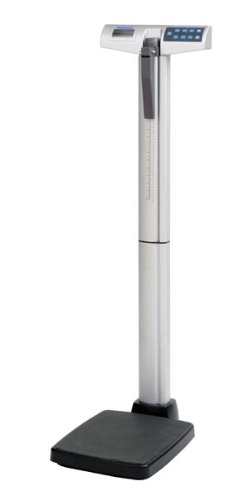
Figure 1: Health o meter Professional Digital Scale, showing the base, column, and display unit.
Instrucciones de funcionamiento
Encendido/apagado
- Para encender: Presione el ENCENDIDO/APAGADO button. The display will illuminate and perform a self-test.
- Para apagar: Mantenga pulsado el ENCENDIDO/APAGADO button until the display turns off, or the scale may automatically power off after a period of inactivity.
Tomando una medida
- Asegúrese de que la báscula esté sobre una superficie firme y plana.
- Presione el ENCENDIDO/APAGADO para encender la báscula.
- Wait for the display to show "0.0" or "0.00" and the "READY" indicator.
- Step onto the center of the scale platform barefoot and stand still.
- La pantalla mostrará su peso. Espere a que la lectura se estabilice.
- Bájese de la báscula. La lectura puede mantenerse brevemente o volver a cero.
Unit Selection (if applicable)
If your scale supports multiple units (e.g., pounds, kilograms), locate the UNIDAD button. Press this button to toggle between available measurement units.
Tare Function (if applicable)
The Tare function allows you to weigh an item while subtracting the weight of a container. Place the empty container on the scale, press the TARA button, then place the item inside the container. The display will show the net weight of the item.
Mantenimiento
Limpieza
- Limpie la superficie de la báscula con un paño suave.amp paño.
- No utilice limpiadores abrasivos ni sumerja la báscula en agua.
- Asegúrese de que la báscula esté seca antes de guardarla o volver a usarla.
Almacenamiento
Guarde la báscula en un lugar fresco y seco, alejado de la luz solar directa y de temperaturas extremas.
Reemplazo de batería (si corresponde)
If the display shows a low battery indicator, replace the batteries according to the instructions in the battery compartment. Ensure correct polarity.
Solución de problemas
| Problema | Posible causa | Solución |
|---|---|---|
| La báscula no enciende | No power, dead batteries, loose connection | Check power adapter connection, replace batteries, ensure all cables are secure. |
| Lecturas inexactas | Uneven surface, scale not calibrated, movement during weighing | Place scale on a firm, flat surface. Ensure scale is stable before stepping on. Refer to calibration section if available (not detailed in this manual). |
| "LO" or "BAT" on display | Batería baja | Reemplace las baterías. |
| "ERR" on display | Sobrecarga, error interno | Ensure weight does not exceed maximum capacity. Turn scale off and on again. If error persists, contact customer support. |
Presupuesto
- Modelo: B006RNPYOG
- Marca: Salud o metro
- Tipo: Balanza digital profesional
- Peso del artículo: 0.96 onzas (Note: This weight may refer to packaging or a component, not the full scale unit.)
- Fabricante: Health-O-Meter Professional
- Primero disponible: 6 de marzo de 2013
Garantía y soporte
For warranty information, technical support, or service inquiries, please refer to the official Health o meter webSitio web o contacte con el departamento de atención al cliente. Conserve su recibo de compra como comprobante.
Fabricante: Health-O-Meter Professional
Websitio: www.healthometermedical.com