
1. Introducción
This manual provides detailed instructions for the installation, operation, and maintenance of your Clarion NAX970HD HDD Navigation System. The NAX970HD is an advanced in-car navigation unit featuring a high-speed 30 GB Mobile Hard Disk Drive pre-loaded with maps of the US and Canada, including nearly 9 million points of interest. It integrates a high-sensitivity GPS receiver and an on-board gyroscope for precise positioning. The system is designed with Clarion's Human Machine Interface (H.M.I.) for intuitive touch screen operation and can be integrated with Clarion MAX675VD or VRX775VD units for a comprehensive audio, video, and navigation experience.
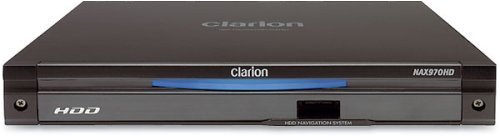
Figura 1: Frente view of the Clarion NAX970HD HDD Navigation System.
2. Información de seguridad
- Seguridad en la conducción: Always prioritize safe driving. Do not operate the navigation system in a way that distracts you from the road. Adjust settings or input destinations only when the vehicle is stationary and safely parked.
- Instalación: Ensure the unit is securely installed to prevent it from becoming a projectile during sudden stops or collisions. Professional installation is recommended.
- Fuente de alimentación: Connect the unit only to a 12V DC negative ground power supply. Incorrect wiring can cause damage or fire.
- Temperatura: Evite exponer la unidad a temperaturas extremas, luz solar directa durante períodos prolongados o humedad excesiva.
- Limpieza: Utilice un paño suave y seco para limpiar. No utilice limpiadores abrasivos ni disolventes.
3. Contenido del paquete
Verifique que todos los elementos estén presentes en el paquete antes de continuar con la instalación:
- Clarion NAX970HD HDD Navigation System Unit
- Antena GPS
- Arnés de alimentación/altavoz
- Herrajes de montaje
- Manual de usuario (este documento)
- Tarjeta de garantía
4. Configuración e instalación
4.1. Directrices de instalación
Due to the complexity of vehicle electrical systems, professional installation by a qualified technician is highly recommended. Incorrect installation can lead to vehicle damage or malfunction of the navigation system.
- Montaje: Securely mount the NAX970HD unit in the designated location within your vehicle's dashboard. Ensure adequate ventilation.
- Antena GPS: Instale la antena GPS en un lugar despejado. view of the sky, free from obstructions like metal or tinted windows. Common locations include the dashboard or rear deck.
- Alambrado: Connect the power harness, GPS antenna, and any other necessary cables (e.g., for integration with MAX675VD/VRX775VD) according to the wiring diagram provided with the unit. Ensure all connections are secure and insulated.
4.2. Encendido inicial y configuración
- After installation, turn on your vehicle's ignition. The NAX970HD should power on automatically.
- Follow the on-screen prompts to select your preferred language (English, French, etc.) and region settings.
- Allow the system to acquire a GPS signal. This may take a few minutes during the first use or after being moved to a new location.
- Calibrate the touch screen if prompted, by touching the indicated points accurately.
5. Instrucciones de funcionamiento
The NAX970HD features a user-friendly Human Machine Interface (H.M.I.) with touch screen operation.
5.1. Navegación básica
- Introducir un destino:
- From the main menu, touch the "Destination" or "Navigate To" icon.
- Choose your preferred input method: Address, Point of Interest (POI), Previous Destinations, or Home.
- Introduzca la información requerida utilizando el teclado en pantalla.
- Confirm your selection to initiate route calculation.
- Guía de ruta: Once a route is calculated, the system will display the map and provide audible voice commands for turn-by-turn directions.
- Automatic Route Recalculation: If you deviate from the planned route, the system will automatically recalculate a new route to your destination.
5.2. Mapa Views and Display Options
- 2D View: Displays a flat, overhead view of the map. You can choose different scales.
- 3D View: Provides a perspective view, simulating a driver's view del camino por delante.
- Pantalla dividida: The system supports split-screen configurations, allowing you to view two 2D maps at different scales or a combination of 2D and 3D views simultaneously. Access these options through the "Map View" ajustes.
5.3. Points of Interest (POI)
The NAX970HD includes a comprehensive database of nearly 9 million Points of Interest. To search for a POI:
- From the main menu, select "POI" or "Search POI".
- Browse by category (e.g., Restaurants, Gas Stations, Hotels) or search by name.
- Select the desired POI and choose to navigate to it.
5.4. Funcionalidad del puerto USB
The front panel USB port allows for:
- Fondos de pantalla personalizados: Download new background images to customize your display. Refer to the system settings for supported image formats.
- User Data Backup: Back up your personalized settings, saved destinations, and other user data to a USB memory stick. This is useful before system updates or for transferring settings.
5.5. Integration with MAX675VD or VRX775VD
The NAX970HD is designed to seamlessly integrate with Clarion MAX675VD or VRX775VD units, creating a fully integrated audio, video, and navigation system. Refer to the manuals of the MAX675VD or VRX775VD for specific integration and control instructions.
6. Mantenimiento
- Limpieza de la pantalla: Limpie suavemente la pantalla táctil con un paño suave que no deje pelusa. Para manchas difíciles, limpie ligeramenteampen the cloth with water. Do not use chemical cleaners, alcohol, or abrasive materials.
- Actualizaciones de software: Periodically check the Clarion support website for available software or map updates. Follow the instructions provided with the update package carefully. It is recommended to back up your user data via the USB port before performing any updates.
- HDD Care: The internal Hard Disk Drive is a sensitive component. Avoid subjecting the unit to severe shocks or vibrations, especially when the vehicle is in motion.
7. Solución de problemas
| Problema | Posible causa | Solución |
|---|---|---|
| La unidad no se enciende. | No hay suministro de energía; Fusible quemado; Cableado incorrecto. | Check vehicle's ignition and battery connections. Inspect fuses. Verify wiring connections. Consult a professional installer. |
| No GPS signal or inaccurate positioning. | GPS antenna obstructed; Antenna faulty; Initial signal acquisition. | Asegúrese de que la antena GPS tenga una vista clara. view of the sky. Wait a few minutes for signal acquisition. Check antenna connection. |
| La pantalla táctil no responde o es imprecisa. | Needs calibration; Software glitch. | Perform touch screen calibration (refer to system settings). Restart the unit. |
| No voice guidance. | Volume too low; Muted; Language settings incorrect. | Increase volume. Check if voice guidance is muted in settings. Verify language settings. |
| El sistema se congela o falla. | Software error; Overheating. | Perform a soft reset (refer to manual for specific button combination or power cycle). Ensure adequate ventilation. If persistent, check for software updates. |
8. Especificaciones
| Número de modelo | NAX970HD |
| Almacenamiento | 30 GB Mobile HDD (Hard Disk Drive) |
| Cobertura del mapa | Estados Unidos y Canadá |
| Puntos de interés (PDI) | Aproximadamente 9 millones |
| Receptor GPS | Alta sensibilidad |
| Sensores | Built-in Gyro Sensor |
| Interfaz de pantalla | Operación de pantalla táctil |
| Voice Guidance Languages | English, French (and others as specified by region) |
| Conectividad | Puerto USB del panel frontal |
| Compatibilidad | Clarion MAX675VD, Clarion VRX775VD |
| Dimensiones (L x An x Al) | 31.75 x 25.65 x 12.7 cm (aprox.) |
| Peso | 1.81 kg (aprox.) |
9. Garantía y soporte
For detailed warranty information, please refer to the warranty card included with your product package. Clarion provides limited warranty coverage for manufacturing defects. Keep your proof of purchase for warranty claims.
For technical support, service, or to inquire about replacement parts, please visit the official Clarion website or contact their customer service department. You may need to provide your product model number (NAX970HD) and serial number (located on the unit's chassis) when seeking support.
Clarion Oficial Websitio: www.clarion.com