
1. Introducción
The Extech Instruments HW30 HeatWatch is a multi-function stopwatch designed to provide essential environmental data alongside precise timing capabilities. This device displays digital up/down timer functions, current temperature, humidity, and calculates the heat index, which indicates how hot it feels when humidity is combined with the actual temperature. It is an ideal tool for monitoring conditions in various environments, particularly those with hot weather. Additional features include a 12/24-hour clock, a standard stopwatch, 30 lap/split memory, and a programmable alarm.
2. Características principales
- Multi-function stopwatch with digital display.
- Integrated up/down timer.
- Real-time temperature display.
- Real-time humidity display.
- Heat Index calculation for perceived temperature.
- 12/24-hour clock display.
- Stopwatch function with 30 lap/split memory.
- Función de alarma programable.
3. Contenido del paquete
Verifique que todos los artículos estén presentes y en buen estado al abrir el paquete:
- HW30 HeatWatch Humidity and Temperature Stopwatch
- Acollador
- 1 x Lithium Metal Battery (installed or separate)
- Instrucciones de funcionamiento (este manual)
4. Producto terminadoview
The HW30 HeatWatch features a robust design with clearly labeled buttons for easy operation and a large LCD for clear readings.

Figura 4.1: Frente view of the Extech HW30 HeatWatch, showing the display and control buttons.

Figura 4.2: detallada view of the HW30 display, indicating humidity (50%), temperature (86°F), and heat index (88°).
4.1. Controles y pantalla
- Botón START / STOP: Inicia y pausa funciones de temporización.
- Botón MODE: Cycles through different operating modes (Time, Stopwatch, Humidity/Temperature/Heat Index, Alarm).
- LAP/SPLIT/RESET Button: Records lap/split times or resets the stopwatch.
- Botón RECUPERAR: Accesses stored lap/split memory.
- Pantalla LCD: Shows time, measurements, and function indicators.
5. Configuración
5.1. Instalación de la batería
The HW30 HeatWatch requires one Lithium Metal battery for operation. The battery is typically included with the device.
- Localice la tapa del compartimiento de la batería en la parte posterior de la unidad.
- Use a small screwdriver or coin to open the battery compartment.
- Insert the Lithium Metal battery, ensuring correct polarity (+/-) as indicated inside the compartment.
- Vuelva a colocar la tapa del compartimiento de la batería y asegúrela.
Nota: Deseche las baterías usadas de manera responsable de acuerdo con las regulaciones locales.
6. Instrucciones de funcionamiento
This section details the various functions and modes of the HW30 HeatWatch.
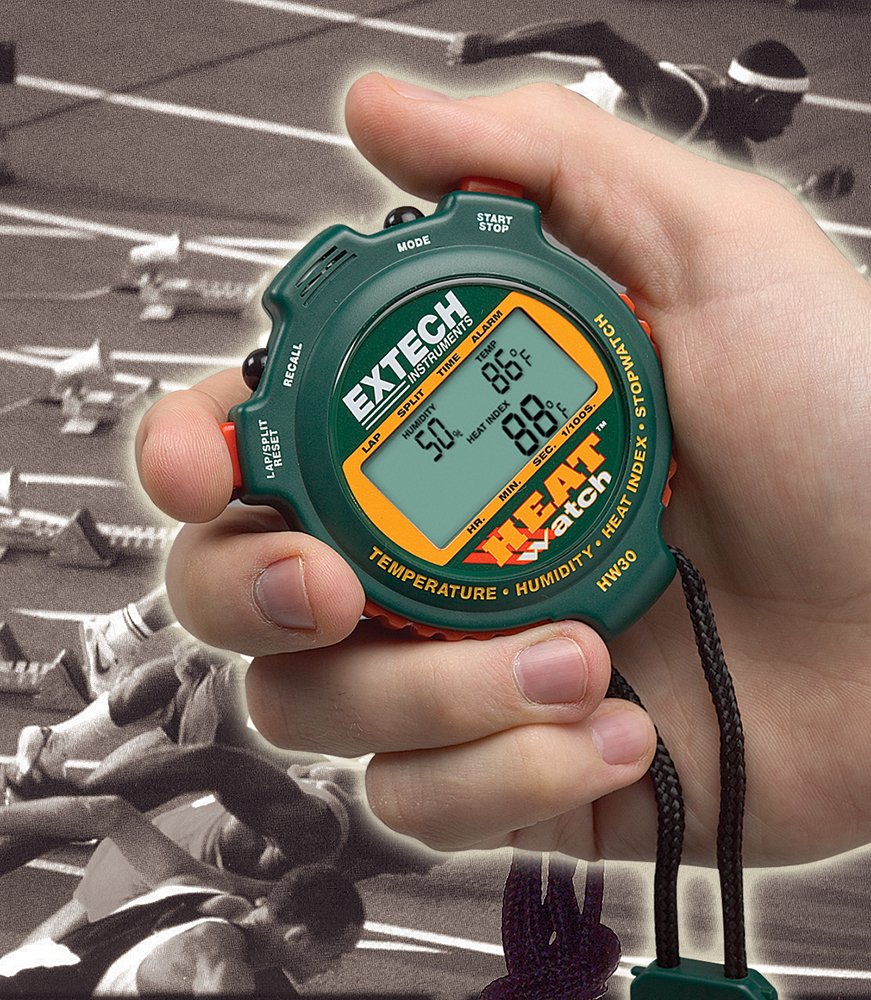
Figure 6.1: The HW30 HeatWatch being held, demonstrating its portable and ergonomic design for active use.
6.1. Funcionamiento básico y selección de modo
Presione el MODO Botón para recorrer los siguientes modos de visualización:
- Modo horario: Displays the current time (12 or 24-hour format).
- Modo de cronómetro: For timing events, including lap/split functions.
- Humidity/Temperature/Heat Index Mode: Shows environmental readings.
- Modo de alarma: For setting and activating the programmable alarm.
6.2. Configuración de la hora y la fecha
- En el modo Hora, mantenga presionada la tecla MODO Botón hasta que los dígitos de la hora comiencen a parpadear.
- Utilice el INICIAR/DETENER Botón para ajustar el dígito parpadeante (horas, minutos, segundos).
- Presione el LAP/SPLIT/RESET button to move to the next digit or setting (e.g., 12/24-hour format, date).
- Una vez configurados todos los ajustes, presione el botón MODO button to exit setup.
6.3. Using the Stopwatch Functions
- Cambie al modo cronómetro usando el MODO botón.
- Prensa INICIAR/DETENER para empezar a cronometrar.
- Prensa LAP/SPLIT/RESET to record a lap or split time. The display will momentarily show the recorded time while the stopwatch continues to run in the background.
- Prensa INICIAR/DETENER de nuevo para pausar el cronómetro.
- Para reanudar, presione INICIAR/DETENERPara reiniciar, presione LAP/SPLIT/RESET mientras el cronómetro está en pausa.
- To recall stored lap/split times, press the RECORDAR button in Stopwatch Mode. Use LAP/SPLIT/RESET to scroll through memory.
6.4. Humidity, Temperature, and Heat Index Measurement
The HW30 automatically measures and displays humidity, temperature, and calculates the heat index in the dedicated mode.
- Switch to Humidity/Temperature/Heat Index Mode using the MODO botón.
- The display will show the current humidity percentage, temperature (in °F or °C), and the calculated heat index.
- Allow a few minutes for the sensors to stabilize and provide accurate readings, especially when moving the device between environments with different conditions.
6.5. Configuración de la alarma
- Switch to Alarm Mode using the MODO botón.
- Mantenga pulsado el MODO Botón hasta que los dígitos de la hora de la alarma comiencen a parpadear.
- Utilice el INICIAR/DETENER button to adjust the flashing digit (hours, minutes).
- Presione el LAP/SPLIT/RESET Botón para moverse entre horas y minutos.
- Una vez configurada la hora de alarma deseada, presione el botón MODO Botón para confirmar.
- Para activar o desactivar la alarma, presione el botón INICIAR/DETENER button in Alarm Mode. An alarm icon will appear on the display when activated.
7. Mantenimiento
7.1. Limpieza
- Limpie la unidad con un paño suave yamp Paño. No utilice limpiadores abrasivos ni disolventes.
- Ensure the device is dry before storage or further use.
7.2. Almacenamiento
- Store the HW30 in a cool, dry place away from direct sunlight and extreme temperatures.
- If storing for extended periods, it is recommended to remove the battery to prevent leakage.
7.3. Reemplazo de la batería
Replace the battery when the display becomes dim or the unit ceases to function. Refer to Section 5.1 for battery installation instructions.
8. Solución de problemas
This section addresses common issues you might encounter with your HW30 HeatWatch.
| Problema | Posible causa | Solución |
|---|---|---|
| Sin pantalla o pantalla tenue | Batería baja o muerta; Instalación incorrecta de la batería. | Replace the battery; Ensure battery is installed with correct polarity. |
| Lecturas inexactas de temperatura y humedad | Sensors not stabilized; Extreme environmental conditions. | Allow several minutes for the unit to acclimate to the environment; Ensure sensors are not obstructed. |
| Stopwatch not responding | Unit in incorrect mode; Buttons stuck. | Cycle through modes to Stopwatch Mode; Check for any physical obstructions on buttons. |
| Heat Index reading seems off | Heat index calculation is based on specific algorithms and can vary slightly; Sensor acclimation. | Ensure temperature and humidity readings are stable; Understand that heat index is a calculated value. |
9. Especificaciones
Technical specifications for the Extech HW30 HeatWatch Humidity and Temperature Stopwatch:
| Especificación | Valor |
|---|---|
| Número de modelo | HW30 |
| Dimensiones del producto | 3.1 x 2.6 x 0.8 pulgadas (7.9 x 6.6 x 2.0 cm) |
| Peso del artículo | 0.71 onzas (0.02 kilogramos) |
| Tipo de batería | 1 batería de litio metálico (incluida) |
| Material | Plástico |
| Color | Verde |
| Fabricante | Extec |
| Primera fecha disponible | 20 de abril de 2004 |
10. Garantía y soporte
Extech Instruments products are designed for reliability and performance. For specific warranty information, please refer to the warranty card included with your product or visit the official Extech Instruments website. For technical support, troubleshooting assistance beyond this manual, or to inquire about replacement parts, please contact Extech Instruments customer service through their official channels.
Puede encontrar más información y recursos de apoyo en Extech Instruments Brand Store on Amazon.