
1. Enkonduko
The Festina Connected Full D hybrid smartwatch combines traditional watch aesthetics with advanced smart technology. Designed for individuals seeking a balance between classic style and intelligent features, this manual provides essential information for setup, operation, and maintenance of your device.
Key features include a 44mm titanium case, sapphire crystal, and a comfortable blue rubber strap. It offers notifications for calls and messages, music and camera control, customizable digital watch faces, and comprehensive health tracking.
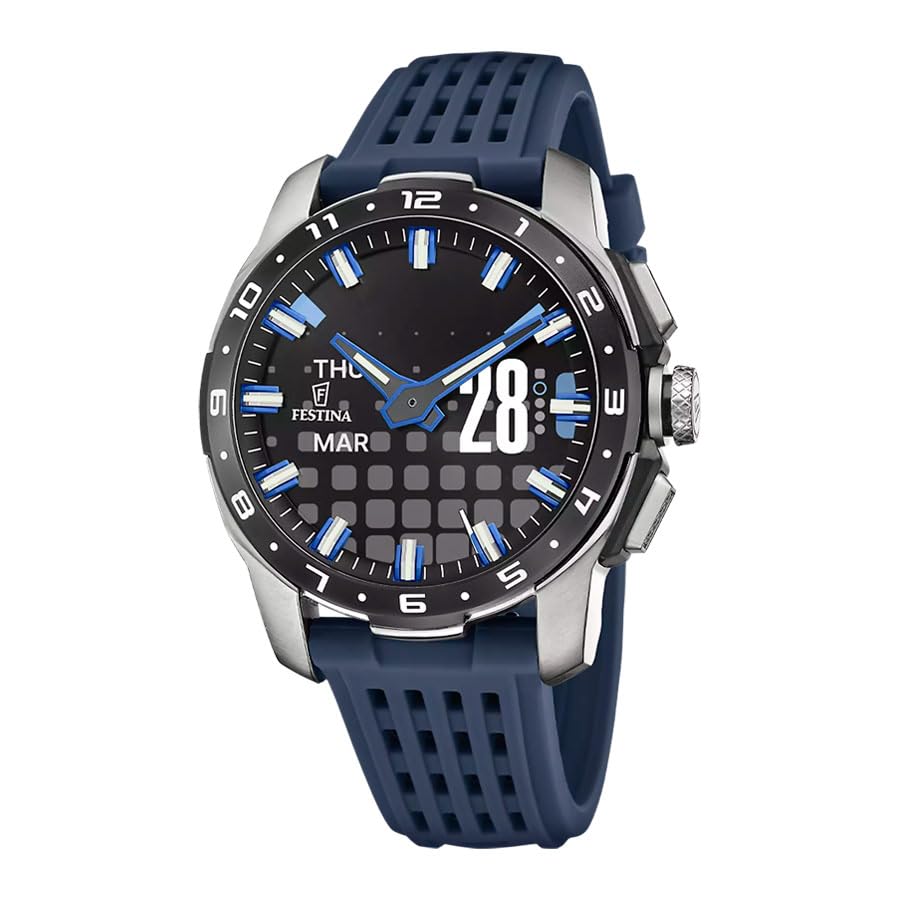
Image: The Festina Connected Hybrid Smartwatch F23305/3 being worn on a wrist, displaying its hybrid watch face.
2. Instalada Gvidilo
2.1 Malpakado kaj Komenca Ŝargado
Upon unboxing your Festina Connected Hybrid Smartwatch, ensure all components are present: the smartwatch, charging base, and charging cable.
- Konektu la ŝargan kablon al la ŝarga bazo.
- Place your smartwatch onto the charging base, ensuring the charging pins align correctly.
- Connect the charging cable to a suitable USB power source.
- Kalkulu ĉirkaŭ 2.5 horojn por plena ŝargo.
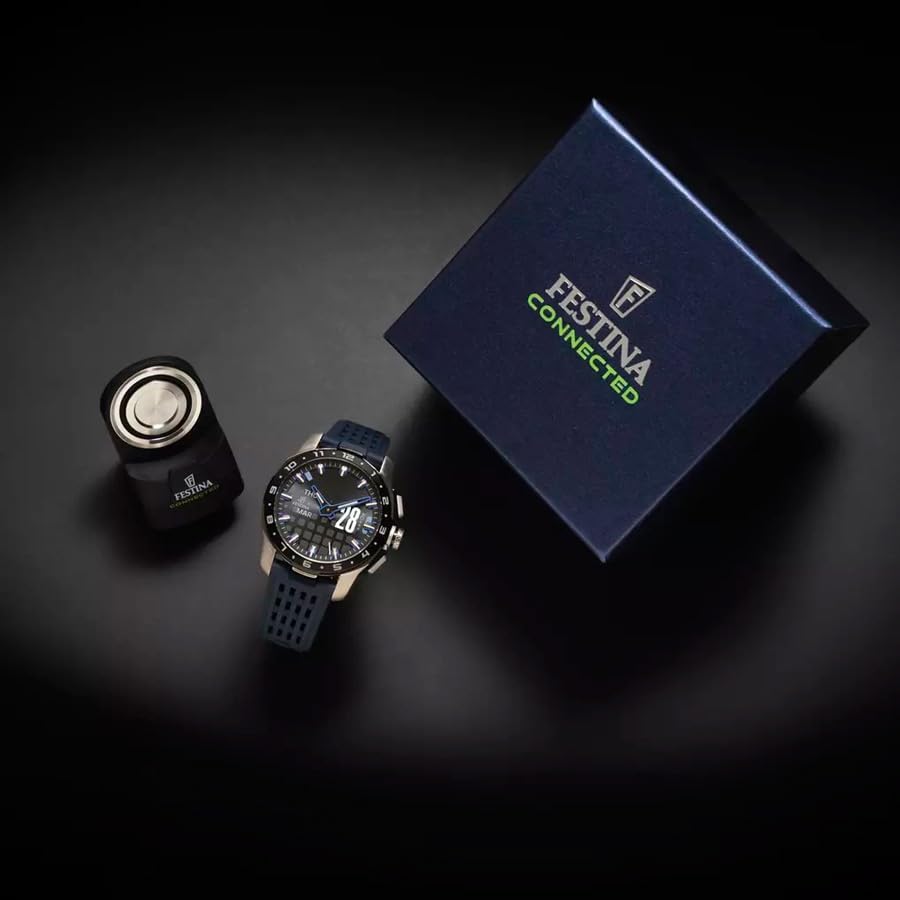
Image: The Festina Connected Hybrid Smartwatch F23305/3 alongside its charging base and packaging.
2.2 Instalo kaj Parigo de Aplikaĵo
To unlock the full functionality of your smartwatch, download and install the 'Festina Connected' application on your smartphone.
- Serĉu 'Festina Connected' in your smartphone's app store (compatible with iOS and Android).
- Elŝutu kaj instalu la aplikaĵon.
- Malfermu la apon kaj sekvu la surekranajn instrukciojn por krei konton aŭ ensaluti.
- Certigu, ke Bluetooth estas ebligita sur via inteligenta telefono.
- Within the app, select 'Add New Device' and choose your Festina Connected F23305/3 from the list of available devices.
- Confirm the pairing request on both your smartphone and smartwatch if prompted.
2.3 Komenca Agordo
After successful pairing, the app will guide you through initial settings, including:
- Setting your personal profile (age, height, weight) for accurate health tracking.
- Customizing watch faces and notification preferences.
- Starigi ĉiutagajn agadcelojn.
3. Funkciaj Instrukcioj
3.1 Basic Navigation and Controls
Your Festina Connected Hybrid Smartwatch features physical buttons for interaction. Refer to the diagram below for button functions.
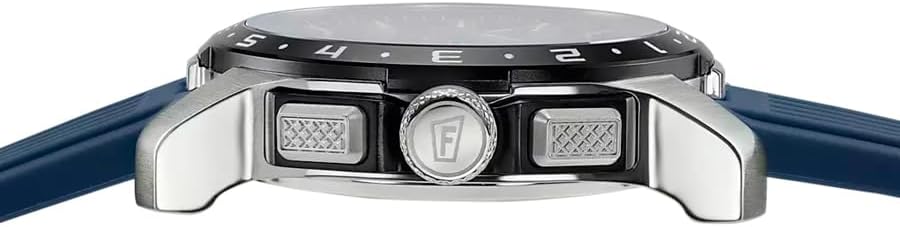
Bildo: Flanko view of the Festina Connected Hybrid Smartwatch F23305/3, highlighting the control buttons.
- Krono: Typically used for navigating menus or confirming selections.
- Pusiloj: Assigned to quick actions such as launching specific features or controlling media. Customizable via the Festina Connected app.
3.2 Smart Features and Functions
The F23305/3 offers a range of smart functionalities:
- Sciigoj: Receive alerts for calls, messages, and app notifications directly on your watch.
- Spurado pri Sano: Monitor heart rate, sleep duration and quality, calories burned, and step count.
- Agado-Spurado: Utilize connected GPS for tracking distance, pace, and elevation during workouts. Features include VO2 max and fitness level assessment.
- Administrado de Tempo: Access alarm, timer, stopwatch, and world time functions.
- Muzika Kontrolo: Kontrolu muzikreprodukton per via inteligenta telefono rekte de via horloĝo.
- Fotila Kontrolo: Uzu vian horloĝon kiel teleregilon por la fotilo de via inteligenta telefono.
- Telefona Serĉilo: Trovu vian mislokigitan inteligentan telefonon per aktivigado de alarmo de via horloĝo.
- Rapidaj Agoj: Customize buttons for quick access to frequently used features.

Bildo: Detala view of the Festina Connected Hybrid Smartwatch F23305/3 watch face, displaying date and time.
3.3 Bateria Administrado
The smartwatch offers up to 10 days of battery life in standard mode. A power-saving mode can extend this to up to 3 months by limiting certain smart features.
- Monitor battery status via the Festina Connected app.
- Enable power-saving mode through the app settings when extended battery life is required.
4. Prizorgado
4.1 Purigado de Via Saĝhorloĝo
Regular cleaning helps maintain the appearance and functionality of your device.
- Viŝu la horloĝujon kaj rimenon per mola, damp ŝtofo.
- Avoid using harsh chemicals, abrasive materials, or solvents.
- Ensure the charging contacts on the back of the watch are clean and dry before charging.

Image: The rear of the Festina Connected Hybrid Smartwatch F23305/3, displaying the heart rate sensor and charging contacts.
4.2 Akvorezisto
The Festina Connected Hybrid Smartwatch F23305/3 has a water resistance rating of 5 ATM (50 meters). This means it is suitable for splashes, rain, and brief immersion in water, such as washing hands. It is not recommended for swimming, diving, or high-pressure water activities.
- Ne funkciigu butonojn dum la horloĝo estas subakvigita en akvo.
- Evitu eksponi la horloĝon al varma akvo aŭ vaporo, ĉar tio povas difekti la sigelojn.
4.3 Bateria Prizorgo
Por plilongigi la daŭron de la baterio:
- Evitu ekstremajn temperaturojn.
- Ne lasu la kuirilaron plene malŝarĝita dum longaj periodoj.
- Charge the watch regularly, even if not in daily use.
5. Respondecaj problemoj
If you encounter issues with your Festina Connected Hybrid Smartwatch, refer to the following common solutions:
| Problemo | Ebla Kaŭzo | Solvo |
|---|---|---|
| Horloĝo ne ŝaltanta | Malalta kuirilaro | Ŝarĝu la horloĝon dum almenaŭ 30 minutoj. |
| Ne eblas pariĝi kun inteligenta telefono | Bluetooth off, app issue, watch not in pairing mode | Ensure Bluetooth is on. Restart the Festina Connected app and your phone. Restart the watch. Try re-pairing through the app. |
| Sciigoj ne ricevitaj | App permissions, Bluetooth connection lost, notification settings | Check app permissions on your phone. Ensure the watch is connected via Bluetooth. Verify notification settings in the Festina Connected app. |
| Malprecizaj sandatumoj | Improper fit, sensor obstruction, incorrect profile datumoj | Ensure the watch is worn snugly on your wrist. Clean the sensor on the back of the watch. Update personal information in the app. |
| Mallonga bateria vivo | Frequent use of power-intensive features, old battery | Reduce usage of features like continuous heart rate monitoring. Enable power-saving mode. If the issue persists, contact support. |
5.1 Rekomencigo de la Aparato
If issues persist, a factory reset may resolve them. Consult the Festina Connected app or the official Festina website for specific instructions on how to perform a factory reset for your F23305/3 model, as this process can vary.
6. Specifoj
Below are the technical specifications for the Festina Connected Hybrid Smartwatch F23305/3:
| Karakterizaĵo | Detalo |
|---|---|
| Modela Nombro | F23305/3 |
| Marko | Festina |
| Montra Tipo | Digital (Hybrid) |
| Kaza Materialo | Titanio |
| Rimeno Materialo | Kaŭĉuko |
| Kaza Diametro | 44 Milimetroj |
| Akvorezisto | 5 ATM (50 metroj) |
| Konektebleco | Bluetooth |
| Kongruaj Aparatoj | Saĝtelefonoj (iOS kaj Android) |
| Tipo de Baterio | Litiojono |
| Bateria Kapacito | 110 mAh |
| Meza Bateria Daŭro | 10 Days (up to 3 months in power-saving mode) |
| Ŝarga Tempo | 2.5 Horoj |
| Sensiloj | Korfrekvenca Monitoro |
| GPS | Connected GPS (via smartphone) |
| Pezo | 91.25 Gramoj |
| Inkludita en Skatolo | Charging Base, Charging Cable |
7. Garantiaj Informoj
Your Festina Connected Hybrid Smartwatch F23305/3 is covered by a 3-jara garantio de la fabrikanto. Ĉi tiu garantio kovras difektojn en materialoj kaj laboro sub normala uzo.
Please retain your proof of purchase for warranty claims. The warranty does not cover damage caused by misuse, accidents, unauthorized modifications, or normal wear and tear.
For detailed terms and conditions, please refer to the warranty card included with your product or visit the official Festina webretejo.
8. Klienta Subteno
For further assistance, technical support, or service inquiries regarding your Festina Connected Hybrid Smartwatch F23305/3, please utilize the following resources:
- Festina Connected App: The application often includes a help section, FAQs, and direct contact options.
- Official Festina Webretejo: Visit the official Festina website for product information, support documentation, and contact details for your region.
- Rajtigitaj Servocentroj: For hardware issues, locate an authorized Festina service center through the official webretejo.
When contacting support, please have your model number (F23305/3) and proof of purchase readily available.