
1. Enkonduko
This manual provides essential information for the safe and efficient operation of your Samsung QN55S85FAFXZA 55-inch OLED HDR 4K Smart TV. Please read this manual thoroughly before using the product and retain it for future reference. This bundle includes the Samsung QN55S85FAFXZA TV and an Amber Protection Plan, along with an Amber Protection HDTV Screen Cleaner Kit.

This image displays the Samsung QN55S85FAFXZA 55-inch OLED 4K Smart TV, highlighting its sleek design. Alongside the television, the Amber Protection Plan document is visible, indicating the extended warranty coverage included with this bundle.
2. Sekurecaj Informoj
Always observe the following safety precautions to prevent fire, electric shock, or personal injury.
- Ne elmontru ĉi tiun aparaton al pluvo aŭ humideco.
- Ne bloku iujn ajn ventoladmalfermaĵojn. Instalu laŭ la instrukcioj de la fabrikanto.
- Protektu la elektran ŝnuron de esti piedirita aŭ pinĉita.
- Uzu nur aldonaĵojn/akcesoraĵojn specifitajn de la fabrikanto.
- Referu ĉian servadon al kvalifikita servopersonaro.
3. Pako Enhavo
Kontrolu, ke ĉiuj eroj ĉeestas en la skatolo:
- Samsung QN55S85FAFXZA 55-inch OLED HDR 4K Smart TV
- Teleregilo (BT SolarCell Remote)
- Potenca Kablo
- Televida Stando Komponantoj
- Uzanta Manlibro (ĉi tiu dokumento)
- Dokumentaro pri Sukcena Protekta Plano
- Amber Protection HDTV Ekranpurigilo Kompleto

The Amber Protection HDTV Screen Cleaner Kit is displayed, consisting of a spray bottle of cleaning solution and two microfiber cloths. This kit is designed for cleaning TV screens, monitors, tablets, phones, and glasses without leaving streaks or residue.
4. Instalado
4.1 Kunmetado de la Stando
Carefully place the TV screen-down on a soft, flat surface. Attach the stand components to the designated slots on the TV's bottom panel using the provided screws. Ensure the stand is securely fastened before placing the TV upright.

Klara fronto view of the Samsung QN55S85FAFXZA 55-inch OLED 4K Smart TV, showcasing its slim bezels and the vibrant display area. The TV is mounted on its included stand.

Ĉi tiu bildo provizas kroman avantaĝonfile of the Samsung QN55S85FAFXZA 55-inch OLED 4K Smart TV, emphasizing its ultra-thin design and the elegant curve of its stand.
4.2 Konekti aparatojn
Connect your external devices (e.g., cable box, Blu-ray player, gaming console) to the appropriate HDMI ports on the back of the TV. For internet connectivity, use either the LAN port for a wired connection or connect via Wi-Fi 5 during the initial setup process.
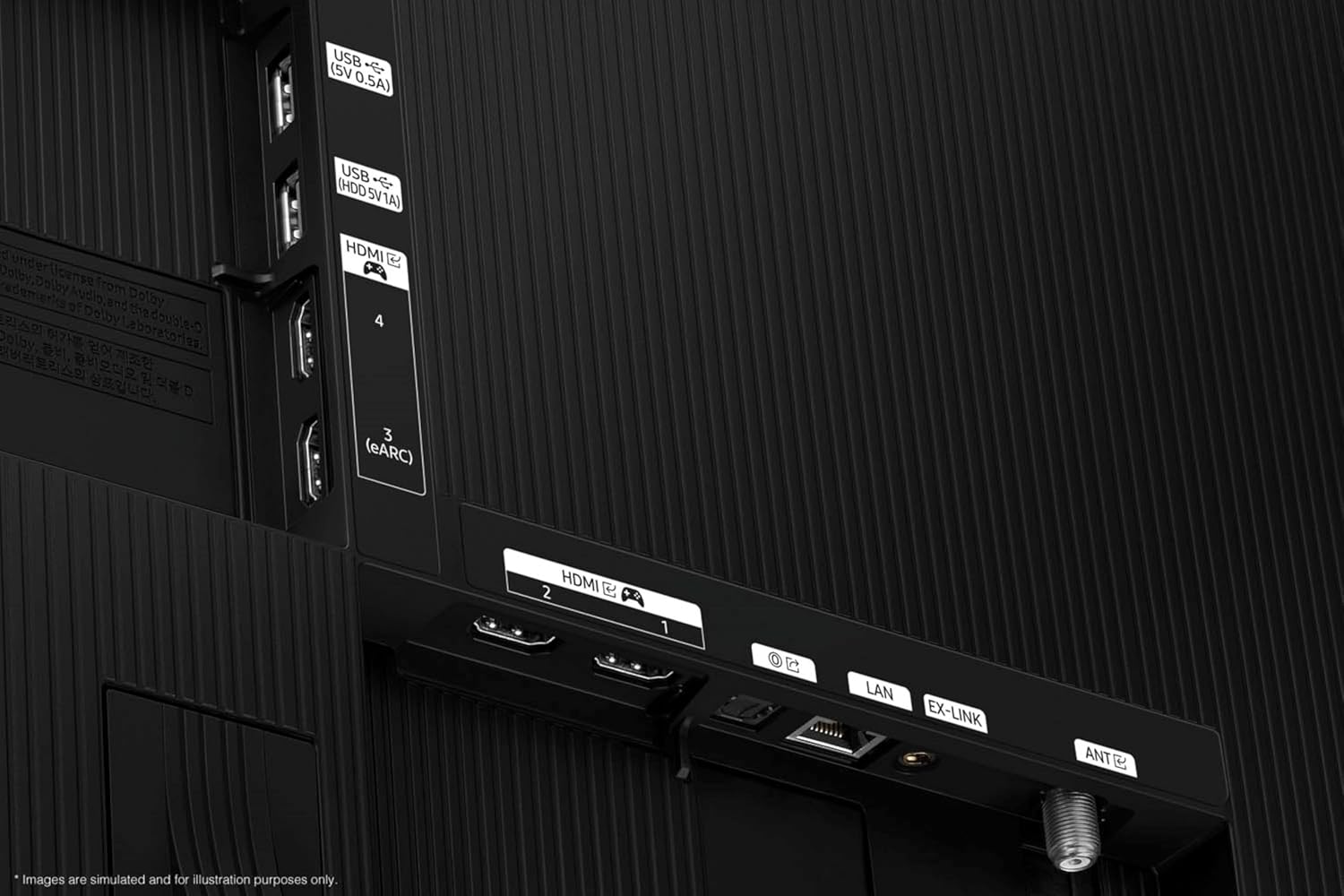
The rear panel of the Samsung QN55S85FAFXZA TV is shown, detailing the various input and output ports. These include multiple HDMI ports (one with eARC), USB ports, a LAN port for wired internet, and an antenna input.
4.3 Komenca Ŝaltado kaj Agordo
Plug the power cord into an electrical outlet. Press the power button on the remote control. Follow the on-screen instructions to complete the initial setup, including language selection, network connection, and channel scanning.
5. Funkciaj Instrukcioj
5.1 Navigado per Smart Hub
The Smart Hub is your central access point for apps, live TV, and connected devices. Use the directional pad on your remote to navigate and the center button to select. Popular streaming services like Netflix, Prime Video, Disney+, Hulu, Apple TV, YouTube, HBO Max, Peacock, and Sling are supported.
5.2 Voĉa Asistanto
Your TV supports multiple voice assistants. Press the microphone button on your remote and speak your commands to control the TV, search for content, or get information.
5.3 Bildaj kaj Sonaj Agordoj
Access the settings menu to customize picture modes (e.g., Standard, Movie, Dynamic) and sound modes (e.g., Standard, Adaptive Sound Pro). Adjust brightness, contrast, color, and other advanced settings to optimize your viewing experience. The TV features Dolby Atmos and OTS Lite for immersive audio, enhanced by Q-Symphony Pro when paired with compatible Samsung soundbars.
6. Karakterizaĵoj
6.1 NQ4 AI Gen2 Processor & 4K AI Upscaling
The NQ4 AI Gen2 Processor drives AI-enhanced 4K picture and optimized sound. It utilizes advanced AI algorithms to upscale all your content to captivating 4K resolution, bringing details to life even from lower-resolution sources.

A conceptual image of the NQ4 AI Gen2 Processor, depicted as a microchip on a circuit board. This processor is responsible for AI-enhanced 4K picture quality and optimized sound, including 4K AI Upscaling.
6.2 OLED HDR
OLED HDR technology provides optimized brightness and improved contrast through self-illuminating pixels. This results in deep blacks and vibrant highlights, creating a more dynamic and lifelike image.

This image visually explains the OLED HDR feature, showing a scene with high contrast and dynamic range. The self-illuminating pixels of the OLED display provide optimized brightness and deep blacks, enhancing the overall picture quality.
6.3 Pantone Validated Color
Experience true-to-life color and accurate expression of skin tones, validated by the experts at Pantone. This ensures that the colors you see on screen are as accurate as possible to the original content.
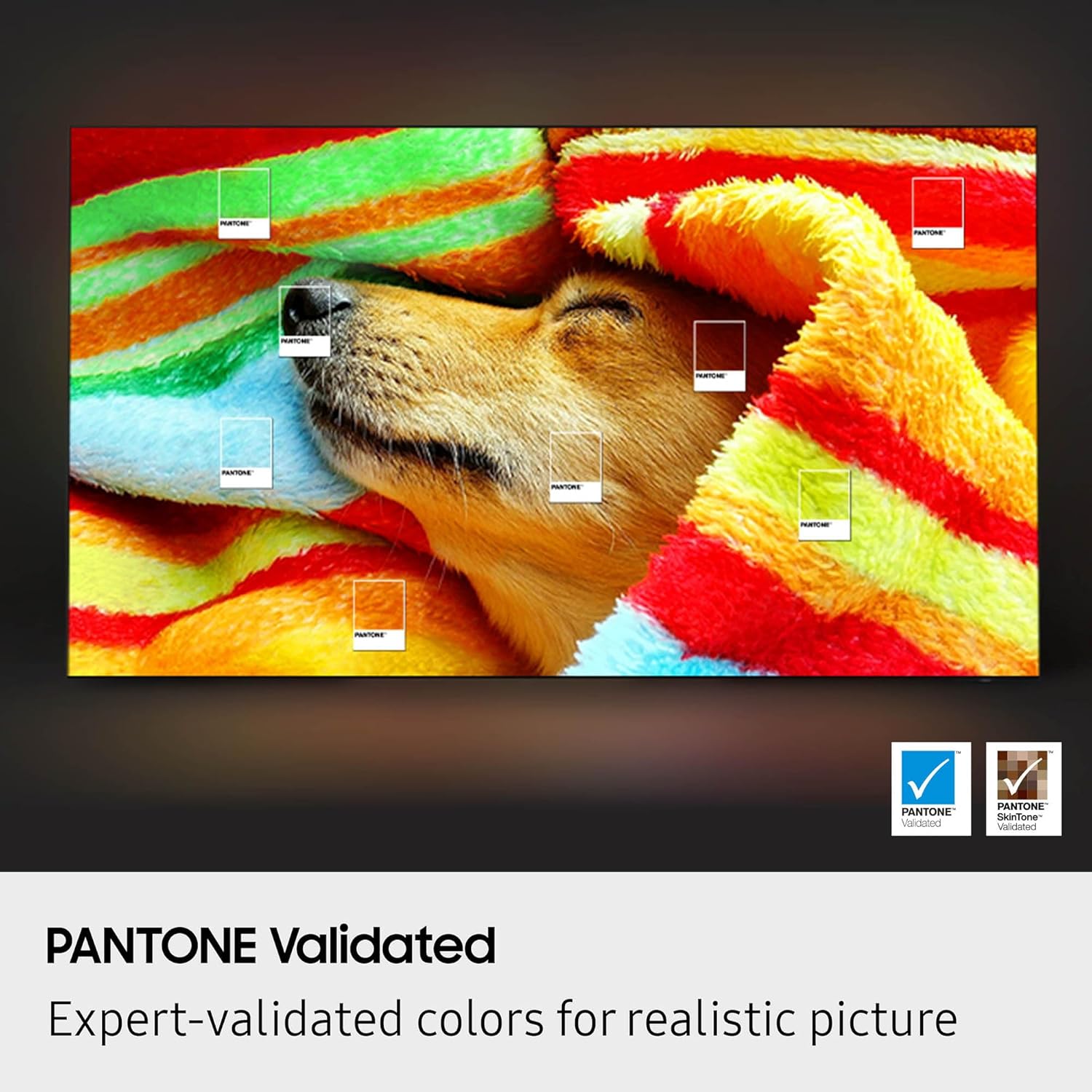
An on-screen image demonstrating the Pantone Validated color accuracy feature of the Samsung OLED TV. The image shows a dog sleeping under a colorful blanket, with small Pantone swatches overlaid to highlight the precise color reproduction.
6.4 Pliaj Trajtoj
- Contour Design: A sleek and modern aesthetic.
- Aktiva Voĉo Ampvivigilo Profesiulo: Plibonigas dialogan klarecon.
- Kontraŭreflekto: Reduktas brilegon por pli bona viewing.
- Ultra ViewAngulo: Maintains picture quality from various seating positions.
- Movada Xceleratoro 120Hz: Ensures smooth motion for fast-paced content.
- Samsung Sano: Access fitness and wellness content.
- BT SolarCell Remote: Eco-friendly remote control powered by solar energy.
7. Prizorgado
7.1 Purigado de la Ekrano
Use the provided Amber Protection HDTV Screen Cleaner Kit. Spray the non-ammonia, alcohol-free solution onto a microfiber cloth (not directly onto the screen) and gently wipe the screen. This solution cleans without dripping, streaking, or leaving residue, effectively removing dust, dirt, and fingerprints.
7.2 Ĝenerala Prizorgo
Unplug the TV from the power outlet before cleaning. Do not use abrasive cleaners or solvents. Keep the TV away from direct sunlight and heat sources. Ensure proper ventilation around the TV.
8. Respondecaj problemoj
8.1 Neniu potenco
- Kontrolu ĉu la elektra ŝnuro estas firme konektita al kaj la televidilo kaj la mura konektilo.
- Verify that the outlet is functioning by plugging in another device.
- Provu alian elektran elirejon.
8.2 Neniu Bildo/Sono
- Certigu, ke la ĝusta eniga fonto estas elektita (ekz., HDMI 1, televidilo).
- Kontrolu ĉiujn kablokonektojn inter la televidilo kaj eksteraj aparatoj.
- If using an external sound system, ensure it is powered on and correctly connected.
8.3 Teleregilo Ne Funkcias
- Certigu, ke ne estas obstakloj inter la teleregilo kaj la televidilo.
- If the remote is not charging via solar, try charging it via USB-C.
- Reset the remote by removing the back cover and pressing the reset button (if available).
8.4 Problemoj pri retkonekto
- Rekomencu vian rutero kaj modemo.
- Check Wi-Fi password and network settings on the TV.
- Se vi uzas kablan konekton, certigu, ke la Eterreta kablo estas sekure konektita.
9. Specifoj
| Modela Nomo | QN55S85FAFXZA |
| Ekrano Grandeco | 55 Coloj (140 cm) |
| Montra Teknologio | OLEDO |
| Rezolucio | 4K (3840 x 2160) |
| Refreŝiga indico | 120 Hz |
| Procesoro | Procesoro NQ4 AI Gen2 |
| Konektebleco | 4 x HDMI, 2 x USB-A, Wi-Fi 5, Bluetooth, LAN |
| Aŭdiaj Trajtoj | Dolby Atmos, OTS Lite, Q-Symphony Pro, Adaptive Sound Pro, Active Voice Ampligilo Pro |
| Smart TV Platformo | Tizen Smart TV |
| Produktaj Dimensioj (D x W x H) | 9.3" x 48.2" x 30.1" |
| Item Pezo | 27.8 Funtoj |
| Koloro | Nigra grafito |
10. Garantio kaj Subteno
10.1 Garantio de la Fabrikisto
This Samsung TV comes with a full 1-year manufacturer's warranty from the date of purchase, covering defects in materials and workmanship under normal use.
10.2 Sukcena Protekta Plano
In addition to the manufacturer's warranty, this bundle includes a 4-year Amber Protection Plan. This plan provides extended coverage for mechanical & electrical failures and power surge protection. The benefits of the Amber Protection Plan begin on Day 1 of purchase. This plan is intended for residential use only.

This image outlines the key features and benefits of the Amber Protection Plan. It lists covered items such as Mechanical & Electrical Failures and Power Surge Protection, along with details on when the plan begins and eligible products like Televisions, Laptops, and Tablets.
10.3 Klienta Subteno
For technical assistance or warranty claims, please refer to the contact information provided in your Amber Protection Plan documentation or visit the official Samsung support webretejo.