
Enkonduko
Thank you for choosing the VTech ES2051 Digital Cordless Phone. This manual provides comprehensive instructions for setting up, operating, and maintaining your new phone system. The ES2051 is designed for ease of use, featuring a digital answering machine, call blocking capabilities, volume amplification, and an antibacterial plastic construction for enhanced hygiene.
Please read this manual thoroughly before using your phone to ensure proper operation and to take full advantage el ĝiaj trajtoj.
Sekurecaj Informoj
Ĉiam sekvu bazajn sekurecajn antaŭzorgojn dum uzado de ĉi tiu produkto por redukti la riskon de fajro, elektra ŝoko kaj vundo al personoj.
- Ne uzu ĉi tiun produkton proksime al akvo aŭ kiam vi estas malseka.
- Avoid using the phone during a thunderstorm. There may be a remote risk of electric shock from lightning.
- Ne uzu ĉi tiun produkton por raporti gasfluon en la ĉirkaŭo de la elfluado.
- Use only the power adapter and batteries provided with this product.
- Ne forĵetu bateriojn en fajron. Ili povus eksplodi. Kontrolu la lokajn kodojn por specialaj instrukcioj pri forigo.
- Malkonektu ĉi tiun produkton el la murelejo antaŭ purigado. Ne uzu likvajn aŭ aerosolajn purigilojn. Uzu reklamonamp ŝtofo por purigado.
Enhavo de Pako
Certigu, ke ĉiuj eroj troviĝas en via pakaĵo:
- Main Base Unit with Digital Answering Machine
- Cordless Handset(s) (typically two for this model)
- Handset Charger(s) (for additional handsets)
- Potencaj Adaptiloj
- Telefonlinia Ŝnuro
- NiMH AAA Rechargeable Batteries (4 included)
- Uzanta Manlibro (ĉi tiu dokumento)
Agordi
1. Konektante la Bazan Unuon
- Enŝovu la malgrandan finon de la elektra adaptilo en la elektran konektilon sur la malantaŭo de la baza unuo.
- Plug the large end of the power adapter into a wall outlet not controlled by a wall switch.
- Enŝovu unu finon de la telefona ŝnuro en la telefonan konektilon sur la malantaŭo de la baza unuo.
- Enŝovu la alian finon de la telefona ŝnuro en telefonan murŝtopilon.
2. Installing and Charging Batteries
- Malfermu la kovrilon de la kupeo de la kuirilaro sur la malantaŭo de la telefontelefono.
- Insert the supplied NiMH AAA batteries, observing the correct polarity (+ and -).
- Fermu la kovrilon de la kuirilaro.
- Place the handset in the base unit or charger to charge. The handset will beep, indicating it is charging.
- Allow the handset to charge for at least 16 hours before initial use. For optimal battery performance, keep the handset in the charger when not in use.

Image: The VTech ES2051 Digital Cordless Phone system, showing the main base with one handset and a charging cradle for the second handset, ready for setup.
Funkciaj Instrukcioj
Farante kaj Ricevante Vokojn
- Por Voki: Premu Babilado / Ekbrilo or PAROLANTO, poste tajpu la telefonnumeron.
- Por Respondi Vokon: Premu Babilado / Ekbrilo or PAROLANTO kiam la telefono sonoras.
- Por Fini Vokon: Premu OFF/CLEAR aŭ remetu la aŭdilon en la bazon/ŝargilon.
Cifereca Respondilo
The integrated digital answering machine can record up to 30 minutes of messages. It automatically answers calls when you are unavailable.
- Ludante Mesaĝojn: Premu LUDU/HALTU sur la baza unuo.
- Forigo de Mesaĝoj: Premu FORIGI dum mesaĝa reproduktado.
- Registrado de Anonco: Follow the instructions in the full manual for custom outgoing message recording.

Image: A woman interacting with the VTech ES2051 phone, highlighting the digital message counter on the base unit, which indicates the number of new messages.
Voko Blocker
The selective call blocking feature allows you to block up to 100 unwanted numbers, preventing them from ringing your phone.
- Por Bloki Numeron: During a call or from the Caller ID log, press the VOKA BLOKO button (often represented by a specific icon) and follow the on-screen prompts to add the number to the blacklist.
- Managing Blocked Numbers: Access the call block list through the handset menu to review or remove blocked numbers.

Image: A visual representation of the call blocker feature, showing a family in a kitchen setting with an icon indicating unwanted calls are being blocked.
Volumo Amppli viva
La volumo amplification feature enhances incoming sounds and voices, improving clarity and volume in the handset earpiece. This is particularly useful for users with hearing impairments or those who prefer a louder audio experience.
- Activating/Adjusting: During a call, press the dedicated VOLUMALTIGO button (often indicated by a speaker icon with a plus sign) or use the volume up/down keys to increase the earpiece volume.
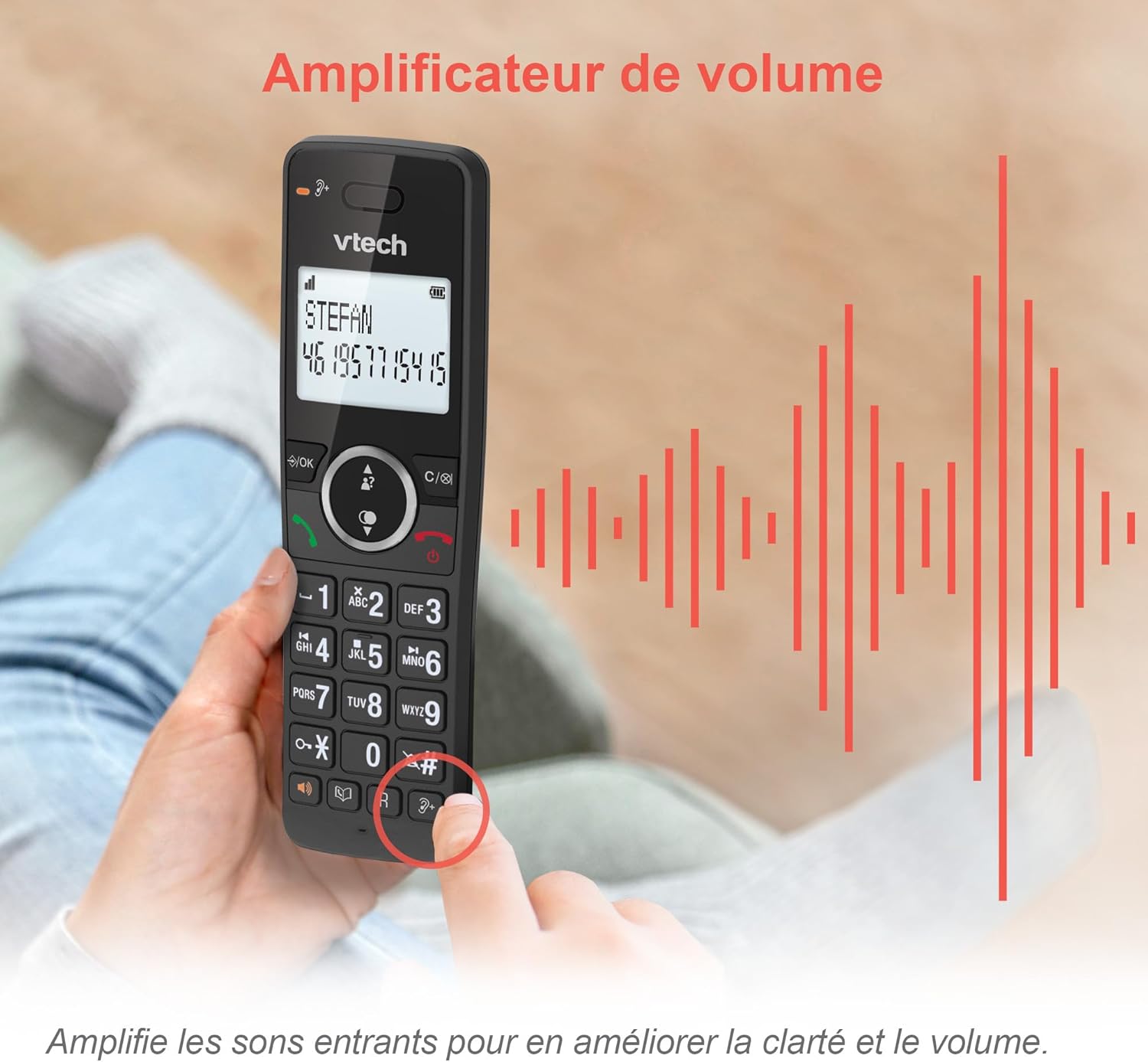
Image: A hand holding the VTech ES2051 handset, with graphic sound waves emanating from the earpiece, illustrating the volume amplification feature.
Conference Function
The conference function allows multiple users to participate in a single conversation. You can set up a three-way conference call with two internal callers (handsets) and one external caller.
- Komencante Konferencan Vokon: Refer to the detailed instructions in the full manual for specific steps on how to add a third party to an ongoing call.

Image: Three people engaged in a conversation, visually representing the three-way conference call capability of the VTech ES2051 phone system.
Interfona Funkcio
The intercom feature allows you to communicate between handsets within your home without using the landline. This is useful for calling family members in different rooms.
- Uzante interkomunikilon: Premu la INTERFONO button (if available) or access the intercom function through the handset menu, then select the desired handset to call.
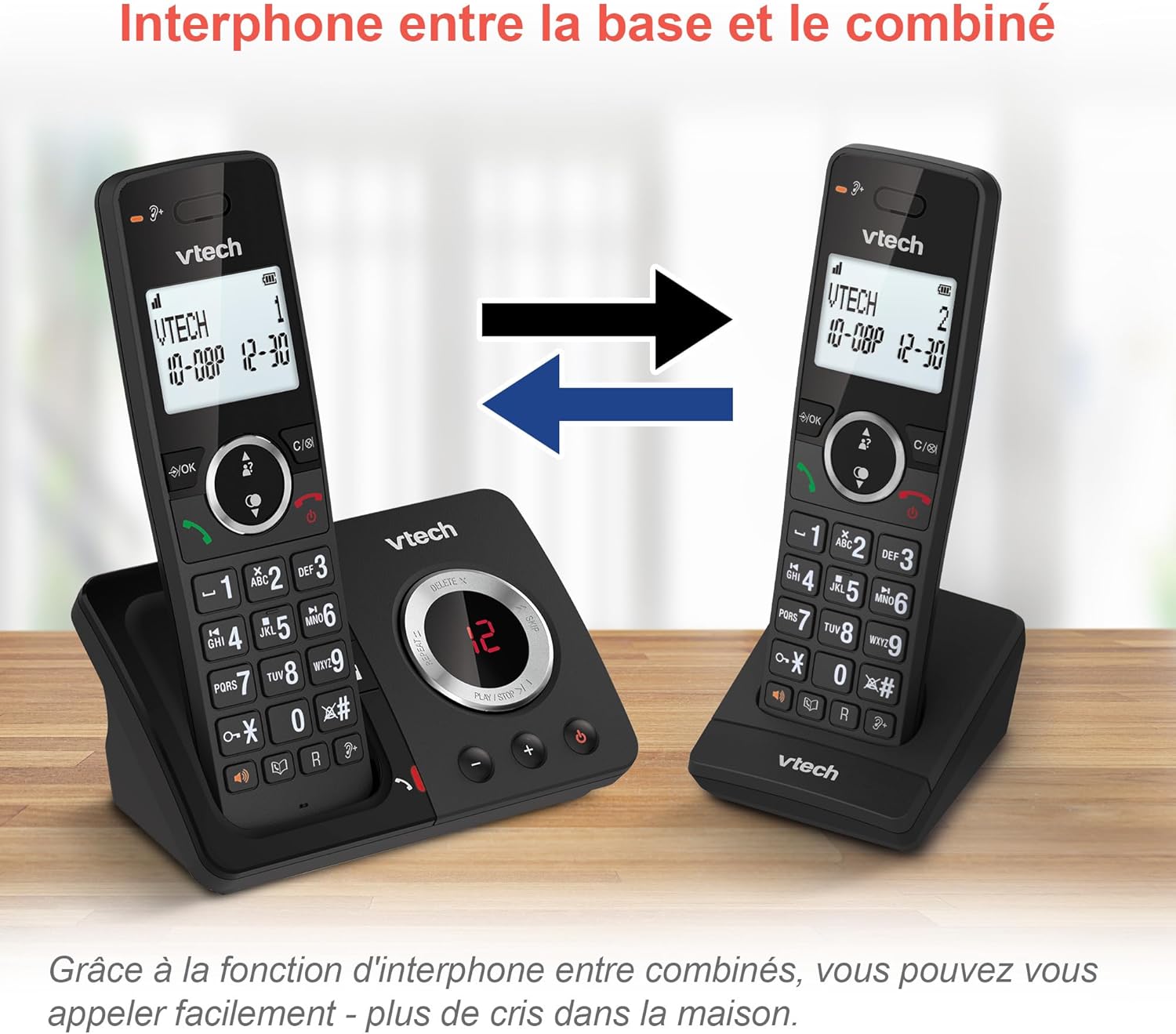
Image: A diagram showing two VTech ES2051 handsets with arrows indicating communication between them, illustrating the intercom feature.
Phonebook and Call Features
The phone includes a 100-name and number phonebook, 8 speed dial keys, and a backlit screen and keypad for easy visibility.
- Stokado de Kontaktoj: Navigate to the phonebook menu to add, edit, or delete contacts.
- Rapida Dial: Assign frequently called numbers to the 8 speed dial keys for quick access.
- Caller ID Log: Review the last 20 incoming calls with Caller ID information.
- Rekomenci: Access the list of the last 10 dialed numbers for quick redialing.

Bildo: Kolaĝo de bildoj montrasasing various VTech ES2051 phone features, including the 100-entry phonebook, call display, redial function, and an 18-hour talk time battery life indicator.
EOa reĝimo
The ECO mode automatically adjusts and minimizes the radio frequency power based on the distance between the handset and the base unit. This feature helps conserve energy and reduce power consumption.
Prizorgado
Purigante la Telefonon
The VTech ES2051 is made with antibacterial plastic and features a seamless, easy-to-clean design. To clean your phone:
- Unplug the base unit from the wall outlet and telephone line.
- Wipe the phone surfaces with a soft, damp ŝtofo. Ne uzu likvajn aŭ aerosolajn purigilojn.
- Ensure the phone is completely dry before plugging it back in.
Bateria Prizorgo
- Use only the supplied rechargeable NiMH AAA batteries.
- Ne forĵetu bateriojn en fajron.
- Se la telefono ne estos uzata dum plilongigita periodo, forigu la bateriojn por eviti elfluon.
Solvado de problemoj
If you experience any issues with your VTech ES2051 phone, try the following troubleshooting steps:
| Problemo | Solvo |
|---|---|
| Neniu telefona tono | Ensure the telephone line cord is securely plugged into both the base unit and the wall jack. Check if other phones on the same line are working. |
| Ne eblas fari aŭ ricevi vokojn | Check the power connection to the base unit. Ensure the handset batteries are charged. If using a DSL service, you may need a DSL filter. |
| Handset displays "Out of Range" or "No Power at Base" | Move the handset closer to the base unit. Ensure the base unit's power adapter is securely plugged in. |
| Respondilo ne registras mesaĝojn | Check if the answering machine is turned ON. Ensure there is enough recording time available (max 30 minutes). |
| Malbona sonkvalito aŭ statika | Movu la telefonujon pli proksimen al la baza unuo. Evitu meti la bazan unuon proksime al aliaj elektronikaj aparatoj (ekz. mikroondiloj, Wi-Fi-enkursigiloj), kiuj povus kaŭzi interferon. |
If the problem persists after trying these steps, please refer to the VTech support webretejon aŭ kontaktu klientan servon por plia helpo.
Specifoj
| Karakterizaĵo | Detalo |
|---|---|
| Marko | VTech |
| Modela Nombro | ES2051 |
| Koloro | nigra |
| Telefona Tipo | Senkabla |
| Respondsistemo-Tipo | Cifereca |
| Registra Tempo de Respondilo | Ĝis 30 minutoj |
| Kongruaj Aparatoj | Landlines, Answering Machine |
| Baterioj | 4 AAA - inkluzivita |
| Bateria Komponado | NiMH |
| Elektrofonto | Baterio Funkciita |
| Materialo | Plastic (Antibacterial) |
| Telefona Tipo | Simple Keypad |
| Dimensioj de la objekto (L x W x H) | 18.3 x 13.5 x 11 centimetroj |
| Lando de Origino | Ĉinio |
Garantio kaj Subteno
VTech products are manufactured to high-quality standards. For information regarding warranty coverage, please refer to the warranty card included with your product or visit the official VTech webretejo por via regiono.
For technical support, frequently asked questions, or to download the full user manual, please visit the VTech support section online or contact their customer service helpline. Contact details can typically be found on the VTech webretejo aŭ sur la produkta pakaĵo.