
Enkonduko
This manual provides comprehensive instructions for the setup, operation, and maintenance of your VTech CS6829-2 2-Handset Cordless Phone with Answering System. This system is designed for home use, offering features such as caller ID, a digital answering machine, backlit keypad, and a full duplex speakerphone for enhanced communication.
Kio estas en la Skatolo
Kontrolu, ke ĉiuj eroj estas inkluditaj en via pakaĵo:
- Bazunuo
- 2 sendrataj telefonteniloj
- Ŝargilo
- 2 adaptiloj
- 2 kuirilaroj
- Telefonlinia ŝnuro
- Murmonta krampo
- Rapida starta gvidilo
Agordi
Follow these steps to set up your VTech CS6829-2 phone system:
- Konekti la Bazan Unuon:
Plug one end of the telephone line cord into the TEL LINE jack on the back of the base unit. Plug the other end into a telephone wall jack. Plug the small end of the power adapter into the POWER jack on the back of the base unit. Plug the large end of the power adapter into a wall outlet not controlled by a wall switch.
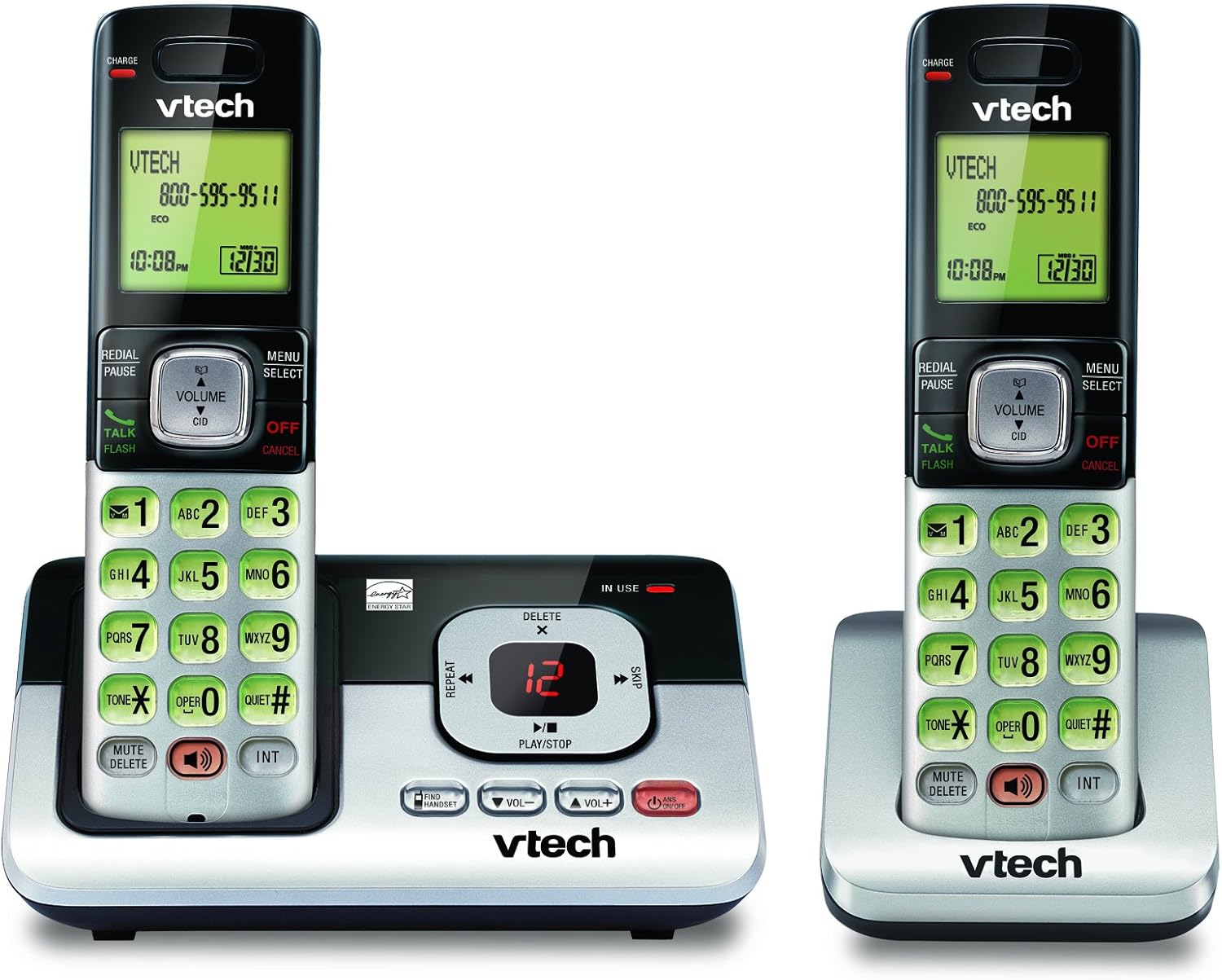
Image: The VTech CS6829-2 base unit with one handset docked, and a second handset with its charging cradle. This illustrates the main components of the phone system.
- Instalu la bateriojn de la poŝtelefono:
Open the battery compartment cover on the back of each handset. Connect the battery pack connector securely into the jack inside the compartment. Place the battery pack with the label facing up and tuck the wires inside the compartment. Close the battery compartment cover.
- Ŝarĝaj Poŝtelefonoj:
Place each handset in the base unit or charger with the display facing up. The CHARGE light on the handset will illuminate, indicating proper charging. Allow the handsets to charge for at least 16 hours before initial use for optimal battery performance.

Bildo: Angula view of the VTech CS6829-2 base unit with one handset docked, and the second handset in its separate charging cradle. This shows how the handsets are placed for charging.
- Agordu Daton kaj Tempon:
After the handsets are charged, follow the on-screen prompts or refer to the quick start guide to set the date and time. This is important for accurate caller ID and answering system timestamps.
Funkciaj Instrukcioj
Farante kaj Respondante Vokojn
- Por Voki: Premu Babilado / Ekbrilo or any dialing key to get a dial tone, then dial the phone number.
- Por Respondi Vokon: Kiam la telefono sonas, premu Babilado / Ekbrilo aŭ iu ajn diskklavo.
- Por Fini Vokon: Premu OFF/NULIGI or place the handset back in the base unit/charger.
Cifereca Respondsistemo
- Ludante Mesaĝojn: Sur la baza unuo, premu LUDU/HALTU. On a handset, press MENUO/SELECT, scroll to "Answering System", then select "Play Messages".
- Recording an Outgoing Announcement: On the base unit or handset, navigate to the answering system menu and select "Record OGM" (Outgoing Message).
- Forigo de Mesaĝoj: While a message is playing, press FORIGI sur la bazunuo aŭ telefontenilo.
Paroltelefona Funkcio
- To Use Speakerphone: Dum alvoko, premu la PAROLANTO button on the handset. Press it again to switch back to the handset earpiece.
Ŝlosilaj Trajtoj
- Digital Answering System with LED Indicator and Volume Control: This system records up to 14 minutes of messages, announcements, and memos. An LED indicator notifies you of new messages. Volume control keys on the base allow easy adjustment of message playback volume.
- Caller ID / Call Waiting — Stores up to 50 Calls: Displays the name, number, time, and date of incoming calls, helping you identify callers before answering.
- Plena Dupleksa laŭttelefono: The handset features a full duplex speakerphone, enabling natural two-way conversations where both parties can speak and be heard simultaneously.
- Retroluma klavaro kaj ekrano: The entire keypad and LCD screen on the handset illuminate, ensuring clear visibility and easy dialing even in low-light conditions.
- ECO Mode Power-Conserving Technology: This technology optimizes power consumption for extended battery performance and energy efficiency.
- Kvieta Reĝimo: Allows you to silence the ringer on both the handset and base unit immediately or for a set period, providing peace and quiet when needed.
Prizorgado
- Purigado: Purigu la telefonon kaj bazan unuon per mola, damp tuko. Ne uzu purigajn ŝprucaĵojn aŭ likvajn purigilojn.
- Prizorgado de Bateria: Replace batteries when they no longer hold a charge. Use only the specified battery type. Dispose of old batteries responsibly according to local regulations.
- Mediaj Kondiĉoj: Evitu meti la telefonon en rektan sunlumon, proksime al varmofontoj aŭ en lokojn kun troa humideco.
Solvado de problemoj
If you experience issues with your phone, try the following solutions:
| Problemo | Solvo |
|---|---|
| Neniu diskotono. | Ensure the telephone line cord is securely plugged into both the base unit and the wall jack. Check that the power adapter is plugged into a working electrical outlet. |
| La poŝtelefono ne ŝargiĝas. | Ensure the handset is properly seated in the base unit or charger. Clean the charging contacts on both the handset and base/charger with a dry cloth. Verify the power adapter is connected. |
| Malbona sonkvalito / Statika. | Move the handset closer to the base unit. Avoid placing the phone near other electronic devices (e.g., microwaves, computers) that may cause interference. Check the telephone line cord for damage. |
| Respondilo ne registras mesaĝojn. | Certigu, ke la respondilo estas ŝaltita. Kontrolu ĉu la memoro estas plena; forigu malnovajn mesaĝojn se necese. |
Specifoj
| Karakterizaĵo | Detalo |
|---|---|
| Modela Nombro | CS6829-2 |
| Produktaj Dimensioj | 5.77 x 3.41 x 6.77 coloj |
| Item Pezo | 1.41 funtoj |
| Baterioj | 2 Produktaj specifaj kuirilaroj bezonataj (inkluditaj) |
| Respondsistemo-Tipo | Cifereca |
| Memoro de alvokanto | Up to 50 calls |
| Registra Tempo de Responda Sistemo | Ĝis 14 minutoj |
| Koloro | Nigra/Arĝento |
| Telefona Tipo | Senkabla |
Garantio kaj Subteno
For warranty information and technical support, please refer to the warranty card included with your product or visit the official VTech webretejo. Konservu vian aĉetkvitancon kiel pruvon de aĉeto por garantiaj reklamoj.
Vi ankaŭ povas viziti la VTech-butiko ĉe Amazono por pliaj produktaj informoj kaj subtenaj rimedoj.