1. Εισαγωγή
This hogance Kindle Support with RF Remote Page Turner (Model HKRC004) is designed to enhance your reading experience by providing hands-free operation. It combines a stable, adjustable stand with a remote page-turning device, allowing you to read comfortably without needing to hold your e-reader or tablet. This manual provides instructions for setup, operation, and maintenance.
The remote page turner utilizes radio frequency technology for effortless page turning on compatible capacitive screen devices. The stand offers 360-degree adjustability for optimal viewing angles, reducing neck strain and arm fatigue.
2. Τι υπάρχει στο κουτί
- 1x Kindle/Tablet Stand
- 1x Τηλεχειριστήριο
- 1x Δέκτης
- Καλώδιο φόρτισης USB 1x
- 1x Κορδόνι
- 1x Εγχειρίδιο χρήστη
3. Συμβατές συσκευές
3.1. Remote Page Turner Compatibility
The remote page turner is compatible with a wide range of capacitive screen devices, including:
- Kindle models: Kindle 10, Kindle 11, Kindle Scribe, Kindle Paperwhite (KPW, KPW2, KPW3, KPW4, KPW5), Kindle Oasis (KO2, KO3), Kindle Kids Edition, Kindle Voyage.
- Other e-readers: New KoBo versions.
- Tablets and Smartphones: All e-reading applications on iPad, Android tablets, iPhone, and Android phones.
Σημείωμα: If you encounter issues with page turning on your iPad or mobile phone, please disable the scrolling function within the reading application.
3.2. Stand Compatibility
The stand is suitable for all devices with screen sizes between 4.7 and 10.5 inches, including Kindles, tablets, and phones.
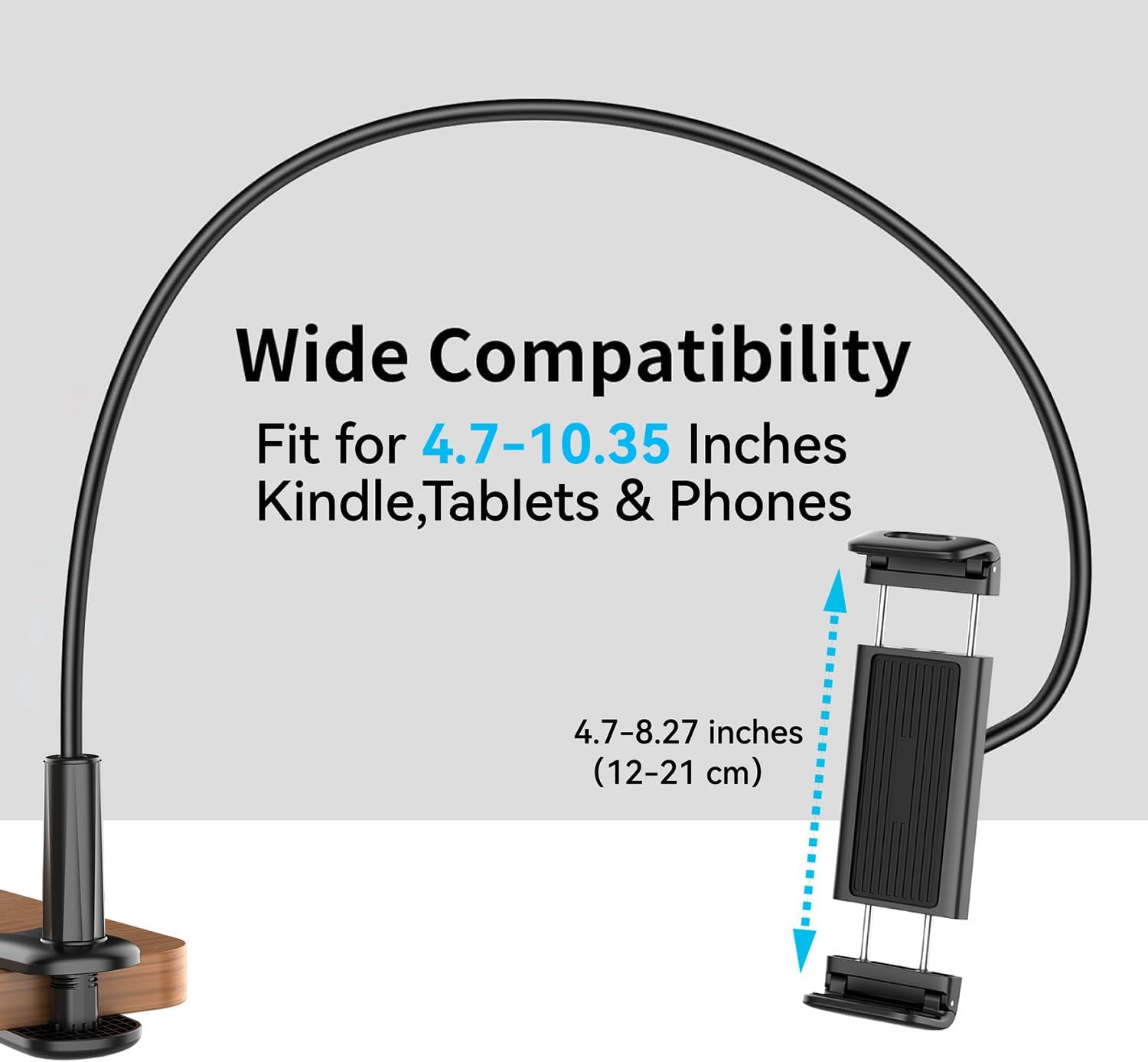
Figure 3.2.1: Diagram illustrating the wide compatibility of the stand with various device sizes.
4. Οδηγίες εγκατάστασης
4.1. Συναρμολόγηση του περιπτέρου
The stand features a flexible arm and a clamp for attachment to surfaces like a bedside table, desk, or kitchen counter. Securely fasten the clamp to a stable surface. Insert the flexible arm into the clamp base and then attach the device holder to the top of the flexible arm. Adjust the arm and holder to your desired viewγωνία

Figure 4.1.1: The adjustable stand allows for 360-degree rotation to achieve optimal reading comfort.
4.2. Preparing the Remote Page Turner
- Charge the Receiver and Remote: Use the provided USB charging cable to fully charge both the remote control and the receiver. A full charge provides extended battery life.
- Ενεργοποιήστε τον δέκτη: Press the active button on the receiver to turn it on. A small indicator light will illuminate.
- Συνδέστε τον δέκτη: Clip the receiver onto the edge of your e-reader or tablet screen in a position that allows it to simulate a finger tap on the screen for page turning. Ensure it does not obstruct your view.
- Σύζευξη (Αυτόματη): The remote control and receiver are pre-paired. No Bluetooth or Wi-Fi connection is required. Simply activate the receiver and it's ready for use with the remote.

Figure 4.2.1: Step-by-step guide for setting up the remote page turner.
Βίντεο επίδειξης εγκατάστασης
Video 4.2.1: A demonstration of how to set up and use the Kindle page turner remote and receiver.
5. Οδηγίες λειτουργίας
5.1. Χρήση του τηλεχειριστηρίου
Once the receiver is clipped to your device and active, you can use the remote control to turn pages. The remote has two page-turning buttons, designed to extend its service life. Press either button to advance to the next page in your e-book or document.

Figure 5.1.1: Enjoy hands-free reading by using the remote control to turn pages.
5.2. Λειτουργία εξοικονόμησης ενέργειας
The receiver features a 10-minute sleep mode to conserve energy. If the receiver enters sleep mode, simply press the activation button again to reactivate it.
Βίντεο επίδειξης επιχείρησης
Video 5.2.1: Detailed demonstration of the remote page turner's operation with various devices like Kindle, iPad, and iPhone.
6. Συντήρηση
- Keep the device clean and dry. Avoid exposure to liquids or extreme temperatures.
- Χρησιμοποιήστε ένα μαλακό, στεγνό πανί για τον καθαρισμό. Μην χρησιμοποιείτε λειαντικά καθαριστικά ή διαλύτες.
- Store the remote and receiver in a safe place when not in use to prevent damage.
- Ensure the USB charging cable is handled with care to prevent damage to the connectors.
7. Αντιμετώπιση Προβλημάτων
- Page turner not responding:
- Ensure both the remote control and receiver are charged.
- Verify the receiver is active (indicator light on).
- Check if the receiver is correctly clipped to the screen, making proper contact for page turning.
- If using with an iPad or mobile phone, ensure the scrolling function in the reading application is disabled.
- Μικρή διάρκεια μπαταρίας:
- Βεβαιωθείτε ότι οι συσκευές είναι πλήρως φορτισμένες πριν από τη χρήση.
- The receiver has a 10-minute sleep mode; reactivate if it enters sleep mode to ensure continuous operation.
- Stand instability:
- Βεβαιωθείτε ότι το clamp είναι σφιγμένο με ασφάλεια σε μια σταθερή επιφάνεια.
- Avoid over-extending the flexible arm with heavier devices, as this may reduce stability.
8. Προδιαγραφές
| Μάρκα | hogance |
| Αριθμός μοντέλου | HKRC004 |
| Χρώμα | Μαύρος |
| Υλικό | Μέταλλο |
| Τύπος προϊόντος | Tablet Stand with Remote Page Turner |
| Ειδικά Χαρακτηριστικά | Includes tablet stand and remote control for page turning |
| Compatible Devices (Remote) | Kindle (various models), KoBo, iPad, Tablets, iPhone, Android Phones (capacitive screens) |
| Compatible Devices (Stand) | Devices 4.7 to 10.5 inches (Kindle, Tablet, iPad, Smartphone, E-reader, Kobos) |
| Τύπος τοποθέτησης | Επιτραπέζια βάση |
| Προτεινόμενες χρήσεις | Sofa, Bed |
| Τύπος μπαταρίας | Ιόν λιθίου |
| Επαναφορτιζόμενη Μπαταρία | Ναί |
| Απομακρυσμένη εμβέλεια | Έως 30 μέτρα |
9. Εγγύηση και υποστήριξη
Specific warranty information is not provided in this manual. Please refer to the product packaging or contact hogance customer support for details regarding warranty coverage and technical assistance.
For further inquiries or support, please visit the official hogance webστον ιστότοπο ή επικοινωνήστε με το τμήμα εξυπηρέτησης πελατών τους.