
1. Εισαγωγή
This manual provides detailed instructions for setting up, operating, and maintaining your Mercusys MR27BE BE3600 Dual-Band Wi-Fi 7 Router. The MR27BE is designed to deliver high-speed wireless connectivity with Wi-Fi 7 technology, featuring dual-band operation and multiple high-speed Ethernet ports for a robust home or small office network.
2. Περιεχόμενα συσκευασίας
Βεβαιωθείτε ότι το πακέτο σας περιέχει τα ακόλουθα στοιχεία:
- Mercusys MR27BE Wi-Fi 7 Router
- Μετασχηματιστής ρεύματος
- Καλώδιο Ethernet
- Οδηγός γρήγορης εγκατάστασης

This image displays the retail packaging for the Mercusys MR27BE BE3600 Dual Band Wi-Fi 7 Router, highlighting key features and branding.
3. Φυσική Υπέρβασηview
3.1 Πίσω πίνακας
The rear panel of the MR27BE router features various ports and buttons for connectivity and control.
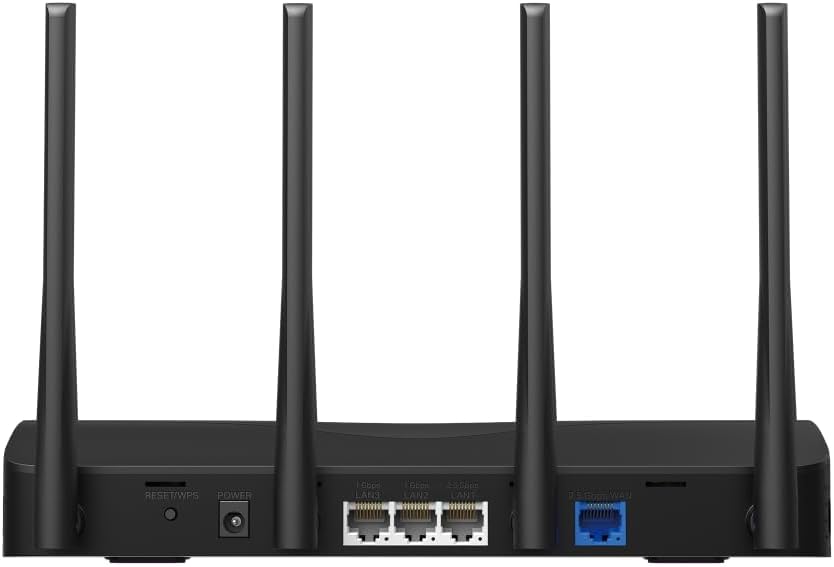
This image displays the rear panel of the MR27BE router, highlighting the 2.5 Gbps WAN port (blue), 2.5 Gbps LAN port, two 1 Gbps LAN ports, the Reset/WPS button, and the power input.
- Θύρα ισχύος: Συνδέστε εδώ τον παρεχόμενο προσαρμογέα ρεύματος.
- Κουμπί επαναφοράς/WPS: Press and hold for 1 second to activate WPS. Press and hold for more than 5 seconds to factory reset the router.
- Θύρες LAN (1 Gbps): Two Gigabit Ethernet ports for connecting wired devices.
- LAN Port (2.5 Gbps): One 2.5 Gigabit Ethernet port for high-speed wired connections.
- WAN Port (2.5 Gbps): One 2.5 Gigabit Ethernet port for connecting to your modem or internet service provider's (ISP) network.
3.2 Βασικά χαρακτηριστικά
The MR27BE router incorporates advanced features for enhanced network performance.

This graphic illustrates key features of the MR27BE, including its Wi-Fi 7 capabilities, the presence of 2x 2.5 Gbps ports and 2x Gigabit ports, four omni-directional high-gain antennas, EasyMesh compatibility, and easy app control.

This image demonstrates the speed performance of the MR27BE router, indicating up to 2880 Mbps on the 5 GHz band and 688 Mbps on the 2.4 GHz band, showcasing its Wi-Fi 7 capabilities.
4. Ρύθμιση
4.1 Σύνδεση υλικού
- Απενεργοποιώ: Disconnect the power from your modem (if applicable).
- Σύνδεση θύρας WAN: Connect one end of the Ethernet cable to your modem's Ethernet port and the other end to the blue 2.5 Gbps WAN port on your MR27BE router.
- Σύνδεση τροφοδοσίας: Connect the power adapter to the router's Power port and plug it into an electrical outlet.
- Ενεργοποίηση: Wait for the router to power on completely. The LED indicator should turn solid green.
- Σύνδεση συσκευών (Προαιρετικά): For wired devices, connect an Ethernet cable from your computer or other device to one of the yellow LAN ports on the router.

This image shows the 2.5 Gbps ports of the MR27BE router in use, illustrating connections for 2.5 Gbps wired devices and multi-gig internet access, emphasizing high-performance networking.
4.2 Αρχική διαμόρφωση
You can configure your router using the MERCUSYS app or a web πρόγραμμα περιήγησης.
Using the MERCUSYS App:
- Κατεβάστε την εφαρμογή MERCUSYS από το App Store ή το Google Play.
- Connect your smartphone to the router's default Wi-Fi network (SSID and password are on the label at the bottom of the router).
- Ανοίξτε την εφαρμογή MERCUSYS και ακολουθήστε τις οδηγίες στην οθόνη για να ολοκληρώσετε τη ρύθμιση.
Χρησιμοποιώντας ένα Web Πρόγραμμα περιήγησης:
- Connect your computer to the router via an Ethernet cable or the default Wi-Fi network.
- Ανοίξτε α web πρόγραμμα περιήγησης και πληκτρολογήστε
mwlogin.netor192.168.1.1στη γραμμή διευθύνσεων. - Δημιουργήστε έναν κωδικό πρόσβασης σύνδεσης όταν σας ζητηθεί.
- Follow the Quick Setup wizard to configure your internet connection and Wi-Fi settings.
5. Λειτουργία του δρομολογητή
5.1 Σύνδεση συσκευών
- Ασύρματες συσκευές: Αναζήτηση για your Wi-Fi network name (SSID) on your device and enter the Wi-Fi password you set during setup.
- Ενσύρματες συσκευές: Συνδέστε ένα καλώδιο Ethernet από τη συσκευή σας σε οποιαδήποτε διαθέσιμη θύρα LAN στο δρομολογητή.
5.2 Συμβατότητα με EasyMesh
The MR27BE router supports EasyMesh, allowing you to create a seamless whole-home Wi-Fi network by adding compatible EasyMesh range extenders or other routers.

This diagram visually explains how the EasyMesh system, compatible with the MR27BE router, can expand Wi-Fi coverage throughout an entire home, ensuring seamless connections.
To set up an EasyMesh network, refer to the instructions provided with your EasyMesh compatible devices or the MERCUSYS app.
5.3 Advanced Settings (via Web Διεπαφή)
Πρόσβαση στο web διεπαφή (mwlogin.net) για να διαμορφώσετε προηγμένες ρυθμίσεις όπως:
- Δίκτυο επισκεπτών: Create a separate Wi-Fi network for guests.
- Γονικός έλεγχος: Διαχειριστείτε την πρόσβαση στο διαδίκτυο για συγκεκριμένες συσκευές.
- Ασφάλεια δικτύου: Configure firewall rules and access control.
- Τρόπος λειτουργίας: Switch between Router, Access Point, or Range Extender modes.
6. Συντήρηση
6.1 Ενημέρωση υλικολογισμικού
Regularly updating the router's firmware ensures optimal performance and security. You can check for updates via the MERCUSYS app or the web interface under System Tools > Firmware Upgrade.
6.2 Restarting the Router
If you experience network issues, a simple restart can often resolve them. You can restart the router via the MERCUSYS app, the web interface, or by unplugging and replugging the power adapter.
6.3 Επαναφορά εργοστασιακών ρυθμίσεων
A factory reset will restore the router to its default settings. This can be done by pressing and holding the Reset/WPS button on the rear panel for more than 5 seconds until the LED blinks rapidly, or via the web interface under System Tools > Factory Defaults.
7. Αντιμετώπιση Προβλημάτων
7.1 Δεν υπάρχει πρόσβαση στο Διαδίκτυο
- Check all cable connections, especially the WAN port connection to your modem.
- Βεβαιωθείτε ότι το μόντεμ σας λειτουργεί σωστά.
- Επανεκκινήστε τόσο το μόντεμ όσο και το δρομολογητή σας.
- Επαληθεύστε τις ρυθμίσεις διαδικτύου στο δρομολογητή σας web διεπαφή.
7.2 Προβλήματα σήματος Wi-Fi
- Βεβαιωθείτε ότι ο δρομολογητής είναι τοποθετημένος σε κεντρική θέση, μακριά από εμπόδια και πηγές παρεμβολών (π.χ. φούρνοι μικροκυμάτων, ασύρματα τηλέφωνα).
- Ρυθμίστε τις κεραίες του δρομολογητή για βέλτιστη κάλυψη.
- Consider using EasyMesh compatible devices to extend coverage in larger homes.
7.3 Ξεχάσατε τον κωδικό πρόσβασης Wi-Fi ή τον κωδικό πρόσβασης σύνδεσης
- Ο προεπιλεγμένος κωδικός πρόσβασης Wi-Fi βρίσκεται στην ετικέτα στο κάτω μέρος του δρομολογητή.
- If you changed it and forgot, you will need to perform a factory reset to restore default settings, then reconfigure the router.
8. Προδιαγραφές
| Όνομα μοντέλου | MR27BE |
| πρότυπο ασύρματης | 802.11be (Wi-Fi 7) |
| Κατηγορία ζώνης συχνοτήτων | Dual-Band |
| WAN Port | 1 θύρα WAN 2.5 Gbps |
| Θύρες LAN | 1x 2.5 Gbps LAN Port, 2x 1 Gbps LAN Ports |
| Ειδικό χαρακτηριστικό | Συμβατό με EasyMesh |
| Διαστάσεις προϊόντος | 7.87 x 5.91 x 3.94 ίντσες |
| Βάρος αντικειμένου | 2.23 λίρες |
| Συμπεριλαμβανόμενα εξαρτήματα | MR27BE, Power Adapter, instruction manual |
9. Υποστήριξη
For technical support, warranty information, or further assistance, please visit the official Mercusys website or contact Mercusys customer support.
- Επίσημο Mercusys Webτοποθεσία: www.mercusys.com
- Refer to the Quick Installation Guide for initial setup and contact details.