1. Εισαγωγή
Welcome to the Sudio A1 Pro Wireless Earbuds user manual. This guide provides comprehensive instructions for setting up, operating, and maintaining your new earbuds. Please read this manual carefully before use to ensure optimal performance and longevity of your device.
The Sudio A1 Pro earbuds are designed for seamless sound and effortless style, featuring Active Noise Cancellation (ANC) and Bluetooth 5.3 connectivity for a superior audio experience.
2. Περιεχόμενα συσκευασίας
Please verify that all items are present in your Sudio A1 Pro package:
- Sudio A1 Pro Wireless Earbuds (Left and Right)
- Θήκη φόρτισης
- Καλώδιο φόρτισης USB-C
- Πολλαπλά μεγέθη ακουστικών (S, M, L)
- Εγχειρίδιο χρήστη (αυτό το έγγραφο)
3. Το προϊόν τελείωσεview
Familiarize yourself with the components of your Sudio A1 Pro earbuds and charging case.

Εικόνα: Μπροστά view of the Sudio A1 Pro Wireless Earbuds (Purple), showing both the left and right earbuds with their sleek design and Sudio branding.
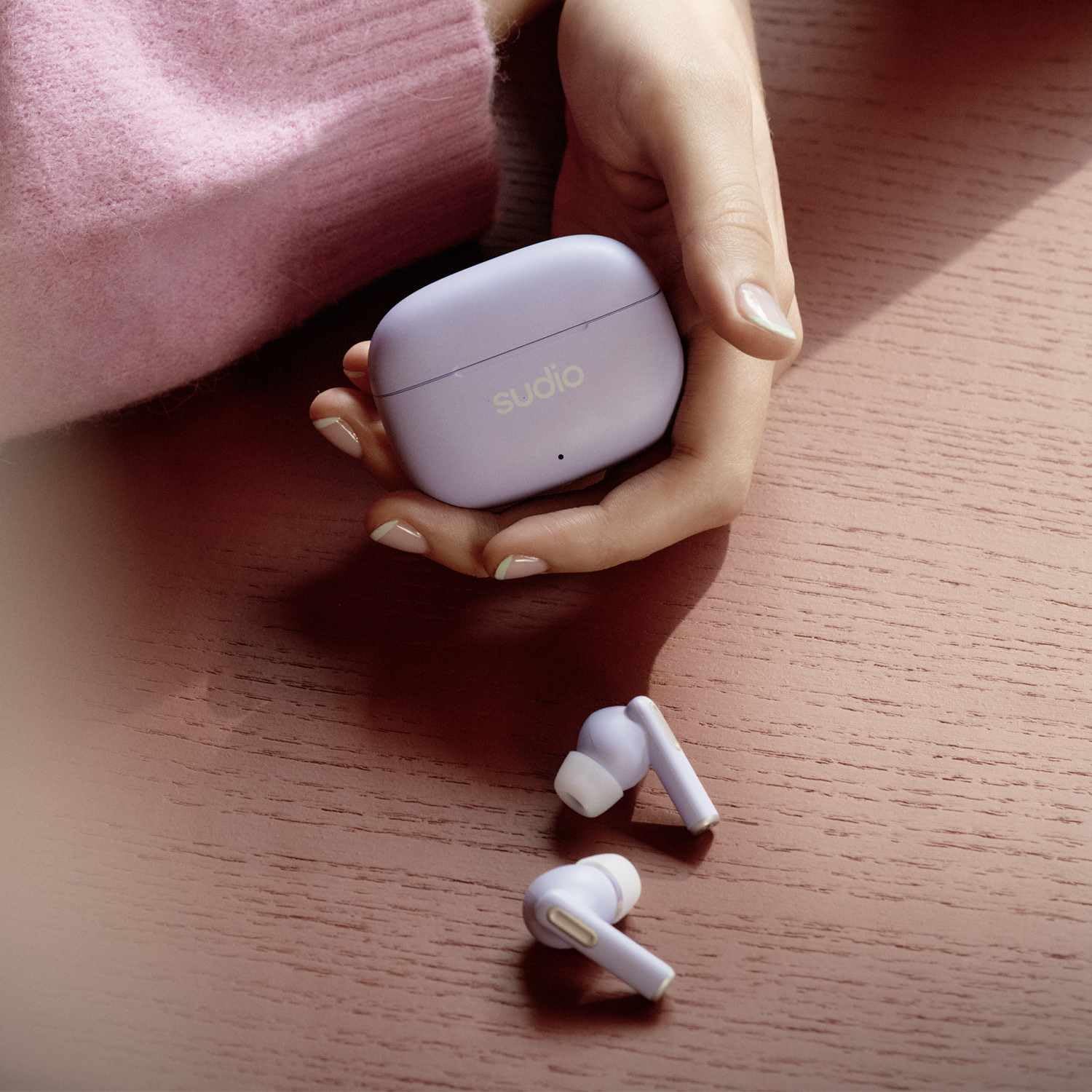
Image: The Sudio A1 Pro Wireless Earbuds (Purple) placed next to their matching charging case, highlighting the compact and portable design.

Εικόνα: Κοντινό πλάνο view of the Sudio A1 Pro charging case (Purple), featuring the Sudio logo and an LED indicator light.
4. Ρύθμιση
4.1 Φόρτιση των ακουστικών και της θήκης
Before first use, fully charge the Sudio A1 Pro earbuds and their charging case.
- Τοποθετήστε και τα δύο ακουστικά στη θήκη φόρτισης. Βεβαιωθείτε ότι έχουν τοποθετηθεί σωστά.
- Συνδέστε το καλώδιο φόρτισης USB-C στη θύρα φόρτισης της θήκης και το άλλο άκρο σε μια πηγή τροφοδοσίας USB (π.χ., υπολογιστή, προσαρμογέα τοίχου).
- The LED indicator on the case will show charging status. A full charge typically takes approximately 1.5 hours for the earbuds and 2 hours for the case.
4.2 Σύζευξη με συσκευή
The Sudio A1 Pro earbuds support Bluetooth 5.3 for stable and efficient wireless connection.
- Open the charging case. The earbuds will automatically enter pairing mode (LED indicators on earbuds will flash).
- On your device (smartphone, tablet, laptop), go to Bluetooth settings and ensure Bluetooth is enabled.
- Αναζήτηση για available devices and select "Sudio A1 Pro" from the list.
- Once connected, the LED indicators on the earbuds will stop flashing, and you will hear a confirmation tone.
- For multi-point connection, repeat the pairing process with a second device. The earbuds will remember up to two paired devices.
Note: If pairing fails, ensure the earbuds are charged and within range of your device. Try resetting the earbuds by placing them in the case, closing the lid for 10 seconds, then reopening.
5. Οδηγίες λειτουργίας
5.1 Αγγίξτε Στοιχεία ελέγχου
The Sudio A1 Pro earbuds feature intuitive touch controls on each earbud.
| Δράση | Αριστερό ακουστικό | Δεξιά Earbud |
|---|---|---|
| Αναπαραγωγή/Παύση | Μονό πάτημα | Μονό πάτημα |
| Επόμενο κομμάτι | Διπλό πάτημα | Διπλό πάτημα |
| Προηγούμενο κομμάτι | Τριπλή βρύση | Τριπλή βρύση |
| Απάντηση/Τερματισμός κλήσης | Μονό πάτημα | Μονό πάτημα |
| Απόρριψη κλήσης | Πατήστε και κρατήστε πατημένο για 2 δευτερόλεπτα | Πατήστε και κρατήστε πατημένο για 2 δευτερόλεπτα |
| Ενεργοποιήστε το Voice Assistant | Πατήστε και κρατήστε πατημένο για 3 δευτερόλεπτα | Πατήστε και κρατήστε πατημένο για 3 δευτερόλεπτα |
| Εναλλαγή λειτουργίας ANC/Διαφάνειας | Press and hold for 2 seconds (when not on call) | Press and hold for 2 seconds (when not on call) |
5.2 Ενεργή ακύρωση θορύβου (ANC)
The Sudio A1 Pro features Active Noise Cancellation to reduce ambient noise, allowing for a more immersive listening experience. To toggle between ANC and Transparency modes, press and hold either earbud for 2 seconds (when not on a call). Transparency mode allows you to hear your surroundings while still enjoying your audio.
5.3 Ενεργοποίηση/Απενεργοποίηση
- Ενεργοποίηση: Ανοίξτε τη θήκη φόρτισης και τα ακουστικά θα ενεργοποιηθούν αυτόματα και θα συνδεθούν στην τελευταία συζευγμένη συσκευή.
- Απενεργοποιώ: Τοποθετήστε τα ακουστικά πίσω στη θήκη φόρτισης και κλείστε το καπάκι. Θα αποσυνδεθούν αυτόματα και θα απενεργοποιηθούν.
6. Συντήρηση και Φροντίδα
Proper maintenance ensures the longevity and performance of your Sudio A1 Pro earbuds.
- Καθάρισμα: Χρησιμοποιήστε ένα μαλακό, στεγνό πανί που δεν αφήνει χνούδι για να καθαρίσετε τα ακουστικά και τη θήκη φόρτισης. Μην χρησιμοποιείτε λειαντικά καθαριστικά ή διαλύτες.
- Συμβουλές αυτιών: Regularly remove and clean the ear tips with a damp πανί. Βεβαιωθείτε ότι είναι εντελώς στεγνά πριν τα επανατοποθετήσετε.
- Αντοχή στο νερό: The earbuds are IPX4 splash-proof. Avoid submerging them in water or exposing them to heavy rain. Dry them thoroughly if they get wet.
- Αποθήκευση: Όταν δεν τα χρησιμοποιείτε, αποθηκεύστε τα ακουστικά στη θήκη φόρτισής τους για να τα προστατεύσετε και να τα διατηρείτε φορτισμένα.
- Φροντίδα μπαταρίας: Για να διατηρήσετε τη διάρκεια ζωής της μπαταρίας, αποφύγετε την πλήρη αποφόρτιση των ακουστικών και της θήκης συχνά. Φορτίστε τα τακτικά, ακόμα κι αν δεν τα χρησιμοποιείτε συνεχώς.
7. Αντιμετώπιση Προβλημάτων
If you encounter issues with your Sudio A1 Pro earbuds, refer to the following common solutions:
| Πρόβλημα | Πιθανή αιτία | Διάλυμα |
|---|---|---|
| Τα ακουστικά δεν αντιστοιχίζονται | Χαμηλή μπαταρία, εκτός εμβέλειας, η λειτουργία σύζευξης δεν είναι ενεργή | Ensure earbuds are charged. Place them back in the case, close, then reopen to activate pairing mode. Move closer to your device. |
| Δεν υπάρχει ήχος από ένα ακουστικό | Earbud not connected, low battery, dirty contacts | Place both earbuds in the case, close the lid, then reopen. Clean charging contacts on earbuds and case. Re-pair if necessary. |
| Κακή ποιότητα ήχου | Improper fit, interference, low quality audio source | Try different ear tip sizes for a better seal. Move away from sources of interference (e.g., Wi-Fi routers). Ensure audio source is high quality. |
| Τα ακουστικά δεν φορτίζονται | Cable issue, dirty contacts, faulty power source | Ελέγξτε το καλώδιο USB-C και τον προσαρμογέα ρεύματος. Καθαρίστε τις επαφές φόρτισης στα ακουστικά και τη θήκη. Δοκιμάστε μια διαφορετική πηγή τροφοδοσίας. |
If the problem persists, please contact Sudio customer support for further assistance.
8. Προδιαγραφές
Key technical specifications for the Sudio A1 Pro Wireless Earbuds:
- Όνομα μοντέλου: A1 Pro ANC
- Συνδεσιμότητα: Bluetooth 5.3
- Έλεγχος θορύβου: Ακύρωση ενεργού θορύβου (ANC)
- Χρόνος παιχνιδιού: Έως 30 ώρες (με θήκη φόρτισης)
- Αντοχή στο νερό: IPX4 (Απόδειξη πιτσιλίσματος)
- Εύρος συχνότητας: 20Hz-20kHz
- Υλικό: Πλαστική ύλη
- Τύπος ελέγχου: Έλεγχος αφής, Φωνητικός έλεγχος
- Συμπεριλαμβανόμενα εξαρτήματα: User Manual, USB-C Charging Cable
- Μπαταρίες: 3 μπαταρίες λιθίου πολυμερούς (περιλαμβάνονται)
- Χρώμα: Μωβ
9. Εγγύηση και υποστήριξη
Sudio products are designed for quality and reliability. For warranty information and customer support, please refer to the official Sudio webτοποθεσία ή την κάρτα εγγύησης που περιλαμβάνεται στη συσκευασία σας.
For technical assistance, troubleshooting, or to inquire about repairs, please visit the Sudio Support Page ή επικοινωνήστε απευθείας με την εξυπηρέτηση πελατών τους.
Κατασκευαστής: Σούντιο
Αριθμός μοντέλου: A1PROPUR
Ημερομηνία πρώτης διαθεσιμότητας: 11 Ιουλίου 2024