Σημαντικές πληροφορίες για την ασφάλεια
Please read all instructions carefully before using the Lexibook Paw Patrol Karaoke CD Player. Keep this manual for future reference.
- Μην εκθέτετε τη μονάδα σε βροχή ή υγρασία.
- Μην φράζετε τυχόν ανοίγματα εξαερισμού.
- Χρησιμοποιείτε μόνο προσαρτήματα/αξεσουάρ που καθορίζονται από τον κατασκευαστή.
- Disconnect the apparatus during lightning storms or when unused for long periods.
- Ensure proper battery installation and disposal.
Περιεχόμενα συσκευασίας
Βεβαιωθείτε ότι όλα τα στοιχεία υπάρχουν στη συσκευασία:
- Lexibook Paw Patrol Karaoke CD Player
- 2 Μικρόφωνα
- Μετασχηματιστής ρεύματος
- Εγχειρίδιο οδηγιών
Προϊόν Πάνωview
The Lexibook Paw Patrol Karaoke CD Player is designed for children to enjoy music and sing along with their favorite characters. It features a front-load CD player, two microphones, an LED display, and a headphone jack for private listening.

Εικόνα 1: The Lexibook Paw Patrol Karaoke CD Player, featuring a blue and red design with Paw Patrol characters, and two attached red microphones.
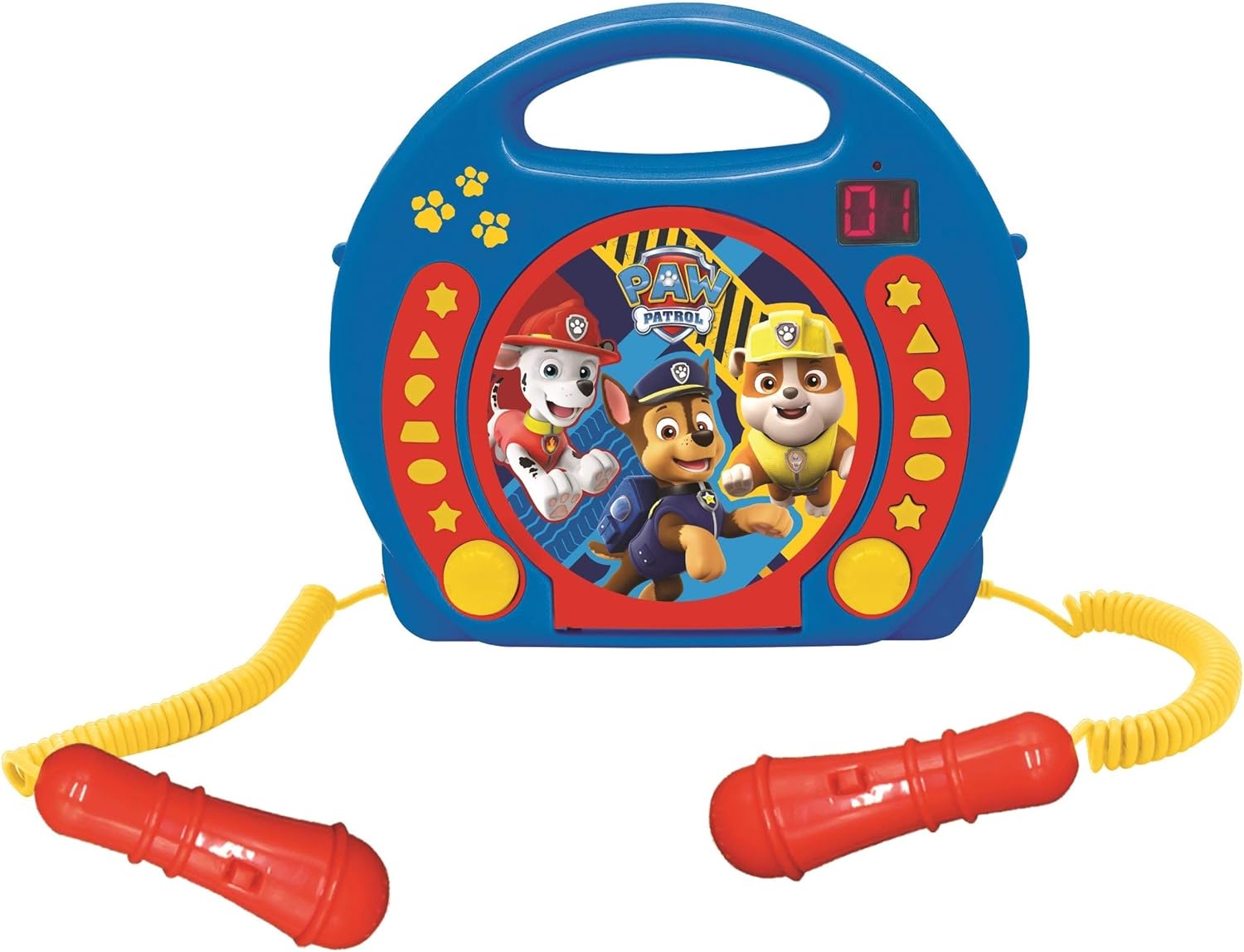
Εικόνα 2: A top-down perspective of the karaoke CD player, showing the central Paw Patrol shield design, control buttons, and the two microphones.
1 βίντεο: Ένα προϊόν τελείωσεview video demonstrating the features and design of the Lexibook Paw Patrol Karaoke CD Player.
Ρύθμιση
Σύνδεση τροφοδοτικού
- Locate the DC IN jack on the back of the unit.
- Insert the small plug of the provided power adapter into the DC IN jack.
- Συνδέστε το άλλο άκρο του τροφοδοτικού σε μια τυπική πρίζα τοίχου.
Εγκατάσταση μπαταρίας
For portable use, the unit requires 4 'C' batteries (not included).
- Εντοπίστε τη θήκη των μπαταριών στο κάτω μέρος της μονάδας.
- Χρησιμοποιώντας ένα κατσαβίδι, ανοίξτε το κάλυμμα της θήκης μπαταριών.
- Insert 4 'C' batteries, ensuring correct polarity (+/-).
- Επανατοποθετήστε το κάλυμμα της θήκης μπαταριών και στερεώστε το με τη βίδα.
Οδηγίες Λειτουργίας
Αναπαραγωγή CD
- Ανοίξτε το κάλυμμα της θήκης CD που βρίσκεται στο πάνω μέρος της μονάδας.
- Τοποθετήστε ένα CD στον άξονα με την πλευρά της ετικέτας προς τα πάνω.
- Κλείστε καλά το κάλυμμα της θήκης του CD.
- Πατήστε το κουμπί 'PLAY/PAUSE' για να ξεκινήσει η αναπαραγωγή.
- Use the 'SKIP' buttons (forward/backward) to navigate between tracks.
- Press the 'STOP' button to end CD playback.
Χρησιμοποιώντας τα μικρόφωνα
- Ensure the microphones are securely plugged into their respective jacks.
- During CD playback, speak or sing into the microphones.
- Adjust the microphone volume using the dedicated volume control (if available) or the main volume control.
Λειτουργία προγραμματισμού
The programming function allows you to create a custom playlist of tracks.
- With the CD stopped, press the 'PROGRAM' button.
- Use the 'SKIP' buttons to select the desired track.
- Press 'PROGRAM' again to add the track to the playlist.
- Repeat steps 2 and 3 to add more tracks.
- Press 'PLAY' to start playing your programmed sequence.
Χρήση ακουστικών
- Plug standard 3.5mm headphones (not included) into the headphone jack.
- Ρυθμίστε την ένταση σε ένα άνετο επίπεδο ακρόασης.
- Note: Using headphones will mute the main speakers.
Συντήρηση
- Καθαρίστε τη μονάδα με ένα μαλακό, στεγνό πανί. Μην χρησιμοποιείτε λειαντικά καθαριστικά ή διαλύτες.
- Keep the CD compartment free of dust and debris.
- Αποθηκεύστε τη μονάδα σε δροσερό, ξηρό μέρος όταν δεν τη χρησιμοποιείτε.
Αντιμετώπιση προβλημάτων
| Πρόβλημα | Διάλυμα |
|---|---|
| Η μονάδα δεν ανάβει. | Check power adapter connection or ensure batteries are correctly installed and not depleted. |
| Το CD δεν αναπαράγεται. | Ensure the CD is clean, not scratched, and correctly placed in the compartment. Close the compartment lid completely. |
| Microphones are not working. | Verify microphones are securely plugged in. Check microphone volume levels. |
| Ο ήχος είναι παραμορφωμένος ή πολύ χαμηλός. | Adjust the main volume control. Ensure the CD is not damaged. |
Προδιαγραφές
| Χαρακτηριστικό | Λεπτομέρεια |
|---|---|
| Διαστάσεις προϊόντος | 10.35 x 3.98 x 8.27 ίντσες |
| Βάρος αντικειμένου | 1.63 λίρες |
| Προτεινόμενη ηλικία από τον κατασκευαστή | 3 ετών και άνω |
| Μπαταρίες | Απαιτούνται 4 μπαταρίες C (δεν περιλαμβάνονται) |
| Ειδικό χαρακτηριστικό | Οθόνη LED |
| Χρώμα | Μπλε / Κόκκινο |
| Συμπεριλαμβανόμενα εξαρτήματα | Power adapter, CD player, handle, 2 microphones |
| Ημερομηνία κυκλοφορίας | 11 Απριλίου 2023 |
Εγγύηση και υποστήριξη
Αυτό το προϊόν συνοδεύεται από α 2 Χρόνια Περιορισμένη Εγγύηση from the manufacturer, Lexibook.
For technical support, warranty claims, or further assistance, please contact Lexibook customer service. Refer to the product packaging or the official Lexibook webιστότοπο για τα πιο πρόσφατα στοιχεία επικοινωνίας.