
Φορητό ηχείο REAL-EL X-770 Εγχειρίδιο χρήστη
Μοντέλο: EL121600004
1. Εισαγωγή
Thank you for choosing the REAL-EL X-770 Portable Speaker. This manual provides essential information for the safe and efficient operation of your device. Please read it thoroughly before use and retain it for future reference.
2. Πληροφορίες Ασφάλειας
Για να διασφαλίσετε την ασφαλή λειτουργία και να αποτρέψετε ζημιές στη συσκευή σας, λάβετε υπόψη τις ακόλουθες προφυλάξεις:
- Μην εκθέτετε το ηχείο σε νερό, υγρασία ή ακραίες θερμοκρασίες.
- Αποφύγετε την πτώση ή την έκθεση του ηχείου σε ισχυρές κρούσεις.
- Μην επιχειρήσετε να αποσυναρμολογήσετε, να επισκευάσετε ή να τροποποιήσετε το ηχείο μόνοι σας. Επικοινωνήστε με εξειδικευμένο προσωπικό σέρβις για βοήθεια.
- Κρατήστε το ηχείο μακριά από πηγές θερμότητας, άμεσο ηλιακό φως και εύφλεκτα υλικά.
- Χρησιμοποιήστε μόνο το καθορισμένο καλώδιο φόρτισης και τον προσαρμογέα ρεύματος (εάν περιλαμβάνεται) για να φορτίσετε τη συσκευή.
- Η παρατεταμένη ακρόαση σε υψηλά επίπεδα έντασης μπορεί να προκαλέσει βλάβη στην ακοή.
3. Περιεχόμενα συσκευασίας
Αποσυσκευάστε προσεκτικά το κουτί και βεβαιωθείτε ότι υπάρχουν όλα τα αντικείμενα:
- REAL-EL X-770 Portable Speaker Unit
- Charging Cable (USB-A to USB-C, or similar, specific type not provided)
- Εγχειρίδιο χρήστη (αυτό το έγγραφο)
Note: The product data mentioned "Camera Body" as an included component. This is likely an error. The actual included components for a portable speaker typically include the speaker unit and a charging cable.
4. Το προϊόν τελείωσεview
Familiarize yourself with the main components of your REAL-EL X-770 Portable Speaker:
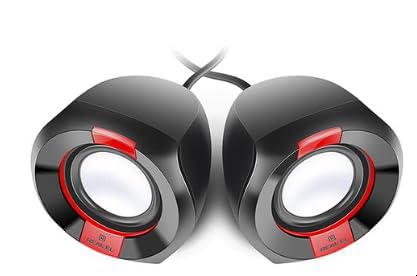
Εικόνα 1: Εμπρός view of the REAL-EL X-770 Portable Speaker. This image displays the speaker's compact design, the main speaker grille, and typical control buttons for power, volume, and playback.
- Κουμπί λειτουργίας: Πατήστε παρατεταμένα για να ενεργοποιήσετε/απενεργοποιήσετε το ηχείο.
- Κουμπί αύξησης έντασης ήχου/επόμενου κομματιού: Πατήστε σύντομα για αύξηση της έντασης, παρατεταμένο πάτημα για το επόμενο κομμάτι.
- Κουμπί μείωσης έντασης ήχου/προηγούμενου κομματιού: Πιέστε σύντομα για μείωση της έντασης ήχου, πιέστε παρατεταμένα για το προηγούμενο κομμάτι.
- Κουμπί αναπαραγωγής/παύσης: Πατήστε για αναπαραγωγή ή παύση ήχου.
- Κουμπί λειτουργίας: Press to switch between input modes (e.g., Bluetooth, HDMI, AUX).
- Θύρα φόρτισης: Για τη σύνδεση του καλωδίου φόρτισης.
- Θύρα HDMI: For audio input from compatible devices.
5. Ρύθμιση
5.1 Φόρτιση του ηχείου
- Συνδέστε το καλώδιο φόρτισης στη θύρα φόρτισης του ηχείου.
- Connect the other end of the charging cable to a USB power adapter (not included) or a powered USB port.
- Η ενδεικτική λυχνία φόρτισης θα ανάψει (το χρώμα μπορεί να διαφέρει) για να δείξει ότι το ηχείο φορτίζει.
- Once fully charged, the indicator light may change color or turn off. Disconnect the speaker from the charger.
5.2 Ενεργοποίηση/Απενεργοποίηση
- Για να ενεργοποιήσετε την τροφοδοσία: Πατήστε παρατεταμένα το Κουμπί λειτουργίας for approximately 3 seconds. An indicator light will turn on, and you may hear an audible prompt.
- To power OFF: Press and hold the Κουμπί λειτουργίας for approximately 3 seconds. The indicator light will turn off, and you may hear an audible prompt.
6. Λειτουργία του ηχείου
6.1 Σύζευξη Bluetooth
- Ensure the speaker is powered ON and in Bluetooth pairing mode (usually indicated by a flashing blue LED). If not, press the Κουμπί λειτουργίας until Bluetooth mode is active.
- Στην κινητή σας συσκευή (smartphone, tablet, υπολογιστή), ενεργοποιήστε το Bluetooth και αναζητήστε διαθέσιμες συσκευές.
- Select "REAL-EL X-770" from the list of found devices.
- Once paired, the speaker will emit a confirmation sound, and the Bluetooth indicator light will stop flashing and remain solid.
- Μπορείτε πλέον να αναπαράγετε ήχο από τη συσκευή σας μέσω του ηχείου.
6.2 HDMI Audio Input
The REAL-EL X-770 supports audio input via HDMI. This allows connection to devices such as TVs, gaming consoles, or media players that output audio through HDMI.
- Connect an HDMI cable (not included) from the audio output port of your source device to the HDMI input port on the REAL-EL X-770 speaker.
- Power on both the speaker and the source device.
- Πατήστε το Κουμπί λειτουργίας on the speaker until the HDMI input mode is selected.
- Ensure the audio output settings on your source device are configured to send audio via HDMI.
- Adjust the volume on both the speaker and the source device as needed.
6.3 Έλεγχος έντασης ήχου
- To increase volume: Short press the Κουμπί αύξησης έντασης/επόμενο κομματιού.
- To decrease volume: Short press the Μείωση έντασης/κουμπί προηγούμενου κομματιού.
6.4 Έλεγχος αναπαραγωγής
- To play/pause: Press the Κουμπί αναπαραγωγής/παύσης.
- To skip to the next track: Long press the Κουμπί αύξησης έντασης/επόμενο κομματιού.
- To go to the previous track: Long press the Μείωση έντασης/κουμπί προηγούμενου κομματιού.
7. Συντήρηση
7.1 Καθαρισμός
- Σκουπίστε το εξωτερικό του ηχείου με ένα μαλακό, στεγνό πανί που δεν αφήνει χνούδι.
- Do not use abrasive cleaners, alcohol, benzene, or other chemical solvents, as these may damage the surface.
- Αποφύγετε την εισχώρηση υγρασίας σε τυχόν ανοίγματα.
7.2 Αποθήκευση
- Όταν δεν το χρησιμοποιείτε για μεγάλα χρονικά διαστήματα, αποθηκεύστε το ηχείο σε δροσερό και ξηρό μέρος, μακριά από το άμεσο ηλιακό φως και ακραίες θερμοκρασίες.
- It is recommended to charge the speaker at least once every three months to maintain battery health.
8. Αντιμετώπιση Προβλημάτων
| Πρόβλημα | Πιθανή αιτία | Διάλυμα |
|---|---|---|
| Το ηχείο δεν ενεργοποιείται. | Η μπαταρία έχει εξαντληθεί. | Φορτίστε πλήρως το ηχείο. |
| Δεν υπάρχει ήχος από το ηχείο. | Volume is too low or muted. Incorrect input mode selected. Device not paired (Bluetooth). | Increase volume on both speaker and source device. Ensure correct input mode (Bluetooth/HDMI). Re-pair Bluetooth device. |
| Δεν είναι δυνατή η σύζευξη μέσω Bluetooth. | Το ηχείο δεν βρίσκεται σε λειτουργία σύζευξης. Η συσκευή είναι πολύ μακριά. Παρεμβολές. | Ensure speaker is in Bluetooth pairing mode. Move devices closer. Turn off other Bluetooth devices. |
| HDMI audio not working. | Incorrect mode. Cable issue. Source device settings. | Ensure speaker is in HDMI mode. Check HDMI cable connection. Verify source device audio output settings. |
9. Προδιαγραφές
| Χαρακτηριστικό | Λεπτομέρεια |
|---|---|
| Μάρκα | ΡΕΑΛ-ΕΛ |
| Όνομα μοντέλου | Χ-770 |
| Αριθμός μοντέλου | EL121600004 |
| Τεχνολογία Συνδεσιμότητας | HDMI, Bluetooth (assumed for portable speaker) |
| Διαστάσεις προϊόντος | 25.4 x 5.08 x 6.86 εκ |
| Βάρος αντικειμένου | 5.29 κιλά |
| Χρώμα | πολύχρωμο |
| Συμπεριλαμβάνονται μπαταρίες | Οχι |
| Απαιτούνται μπαταρίες | Οχι |
Note: While the product data indicates no batteries are included or required, portable speakers typically feature an internal rechargeable battery for wireless operation. This specification might refer to the absence of user-replaceable or external batteries. The speaker is designed to be charged via its charging port. Specifications are subject to change without prior notice. For the most up-to-date information, please refer to the manufacturer's official webτοποθεσία.
10. Εγγύηση και υποστήριξη
The REAL-EL X-770 Portable Speaker comes with a manufacturer's warranty. Please refer to the warranty card included with your purchase or visit the official REAL-EL webιστότοπος για λεπτομερείς όρους και προϋποθέσεις εγγύησης.
For technical support, service inquiries, or further assistance, please contact REAL-EL customer service through their official channels. Contact information can typically be found on the product packaging or the manufacturer's webτοποθεσία.