
1. Εισαγωγή
Thank you for choosing the ROVPRO WRJ02 4K Dual Camera Foldable Drone. This manual provides essential information for the safe operation, setup, and maintenance of your drone. Please read it thoroughly before your first flight to ensure optimal performance and to prevent damage or injury.
2. Οδηγίες ασφαλείας
Always prioritize safety during drone operation. Failure to follow these guidelines may result in injury, property damage, or legal consequences.
- Περιβάλλον πτήσης: Fly in open areas, away from people, animals, buildings, and power lines. Avoid flying in strong winds, rain, or snow.
- Γραμμή της όρασης: Always maintain visual line of sight with your drone.
- Ασφάλεια μπαταρίας: Use only approved batteries and chargers. Do not overcharge or puncture batteries. Discontinue use if batteries are damaged or swollen.
- Ασφάλεια προπέλας: Keep hands, face, and loose clothing away from rotating propellers. Ensure propellers are correctly installed before flight.
- Πρόταση ηλικίας: This drone is suitable for adults and supervised beginners.
- Τοπικοί Κανονισμοί: Be aware of and comply with all local drone regulations and airspace restrictions.
3. Περιεχόμενα συσκευασίας και αναγνώριση εξαρτημάτων
Verify that all items are present in your package. Familiarize yourself with the drone's components and the remote control layout.
3.1 Περιεχόμενα συσκευασίας
- ROVPRO WRJ02 Foldable Drone
- Τηλεχειριστήριο
- 2 x 3.7V 1600mAh Lithium Polymer Batteries
- Καλώδιο φόρτισης USB
- Ανταλλακτικές Έλικες
- Propeller Protectors (4)
- Κατσαβίδι
- Εγχειρίδιο χρήστη
- Θήκη μεταφοράς
3.2 Εξαρτήματα Drone

Image: The ROVPRO WRJ02 drone, showcasing its foldable design, propellers, and dual cameras.
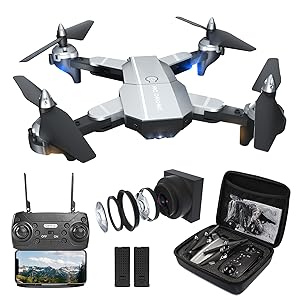
Image: All components of the ROVPRO WRJ02 drone kit, including the drone, remote, batteries, and accessories, neatly packed in a carrying case.
- Πτυσσόμενα μπράτσα: Για συμπαγή αποθήκευση και μεταφορά.
- Έλικες: Τέσσερις κύριες έλικες για άνωση και ώθηση.
- Propeller Protectors: Attach to arms to shield propellers from impacts.
- 4K Front Camera: High-resolution camera for aerial photography and video.
- 1080P Bottom Camera: Secondary camera for additional perspectives.
- Χώρος μπαταρίας: Located on the underside of the drone.
- Κουμπί λειτουργίας: Για να ενεργοποιήσετε/απενεργοποιήσετε το drone.
3.3 Διάταξη τηλεχειριστηρίου
The remote control features dual joysticks and various buttons for flight functions and camera control. A smartphone holder is integrated for FPV viewing.
4. Ρύθμιση
Follow these steps to prepare your drone for its first flight.
4.1 Εγκατάσταση και φόρτιση μπαταρίας
- Insert the fully charged drone battery into the battery compartment until it clicks into place.
- Install 3 AA batteries (not included) into the remote control.
- To charge the drone battery, connect it to the USB charging cable and plug into a USB power source (e.g., computer, USB adapter). The indicator light will show charging status.
4.2 Εγκατάσταση προπέλας
Ensure propellers are securely attached to the correct motor shafts. Match 'A' propellers with 'A' motors and 'B' propellers with 'B' motors.
4.3 Τηλεχειριστήριο και Σύζευξη Drone
- Τοποθετήστε το drone σε μια επίπεδη, επίπεδη επιφάνεια.
- Ενεργοποιήστε το τηλεχειριστήριο.
- Long press the power button on the drone to turn it on. The drone's indicator lights will flash.
- Push the left joystick on the remote control up and then down once. The drone lights will stop flashing and remain solid, indicating successful pairing.
Video: This video demonstrates the process of connecting the remote control to the ROVPRO drone, including powering on both devices and performing the joystick calibration for pairing.
4.4 Εγκατάσταση εφαρμογής και σύνδεση WiFi
- Scan the QR code provided in the manual or search for the 'HF UFO' app in your smartphone's app store (App Store for iOS, Google Play for Android).
- Κατεβάστε και εγκαταστήστε την εφαρμογή.
- Ενεργοποιήστε το drone.
- On your smartphone, go to WiFi settings and connect to the network named 'HF-XXX' (where XXX is a unique identifier for your drone).
- Open the 'HF UFO' app. You should see the live FPV feed from the drone's camera.

Image: A smartphone screen showing the live FPV (First Person View) feed from the drone's camera, demonstrating real-time transmission.
5. Οδηγίες λειτουργίας
Learn how to fly your ROVPRO WRJ02 drone and utilize its various features.
5.1 Λίστα ελέγχου πριν από την πτήση
- Ensure drone and remote batteries are fully charged.
- Ελέγξτε ότι οι προπέλες είναι ασφαλώς στερεωμένες και άθικτες.
- Verify that the drone and remote are paired.
- Confirm the app is connected and displaying the FPV feed.
- Επιλέξτε μια ασφαλή, ανοιχτή περιοχή πτήσης.
5.2 Απογείωση και Προσγείωση

Image: Visual representation of the drone's easy-to-use features for beginners, including one-key start/landing and headless mode.
- Απογείωση με ένα κλειδί: After pairing, press the One-Key Takeoff/Landing button on the remote or in the app. The drone will automatically ascend to a stable hovering altitude.
- Χειροκίνητη απογείωση: Push both joysticks down and outwards to start the motors. Then, gently push the left joystick up to ascend.
- Προσγείωση με ένα κλειδί: Press the One-Key Takeoff/Landing button again. The drone will automatically descend and land.
- Χειροκίνητη προσγείωση: Gently pull the left joystick down to descend. Once landed, push both joysticks down and inwards to stop the motors.
Video: A demonstration of the ROVPRO drone performing a stable takeoff and hovering, showcasing its flight capabilities.
5.3 Βασικά χειριστήρια πτήσης
- Αριστερό Joystick (γκάζι/εκτροπή): Up/Down for altitude, Left/Right for rotation (yaw).
- Δεξί Joystick (Πίτσ/Κύλιση): Up/Down for forward/backward movement (pitch), Left/Right for left/right movement (roll).
5.4 Προηγμένες λειτουργίες πτήσης

Εικόνα: Ένα overview of the ROVPRO drone's key features, including 4K FPV, 3D Flip, Altitude Hold, Headless Mode, Follow Me, Waypoints Fly, Gravity Control, and One Key Return.
- Διατήρηση υψομέτρου: The drone maintains a stable altitude automatically, allowing you to focus on directional control.
- Λειτουργία χωρίς κεφαλή: In this mode, the drone's orientation is relative to the pilot, regardless of its actual front direction. Press the Headless Mode button to activate/deactivate.
- Τρισδιάστατες ανατροπές: Πετάξτε το drone σε ύψος τουλάχιστον 3 μέτρων. Πατήστε το κουμπί 3D Flip και, στη συνέχεια, πιέστε το δεξί joystick προς οποιαδήποτε κατεύθυνση για να εκτελέσετε μια αναστροφή.
- Σημείο Πτήσης: In the app, draw a path on the screen, and the drone will automatically follow the designated route.
- Λειτουργία Follow Me: The drone will automatically follow the position of your smartphone. Ensure GPS is enabled on your device.
- Έλεγχος χειρονομίας: Use specific hand gestures in front of the drone's camera to trigger photo or video recording.
- Λειτουργίες ταχύτητας: The drone has 3 speed settings (low, medium, high) to suit different flying skill levels and environments. Press the speed button on the remote to cycle through them.

Image: The ROVPRO drone executing a 360-degree 3D flip, alongside an illustration of its three adjustable speed modes (30%, 60%, 100%).
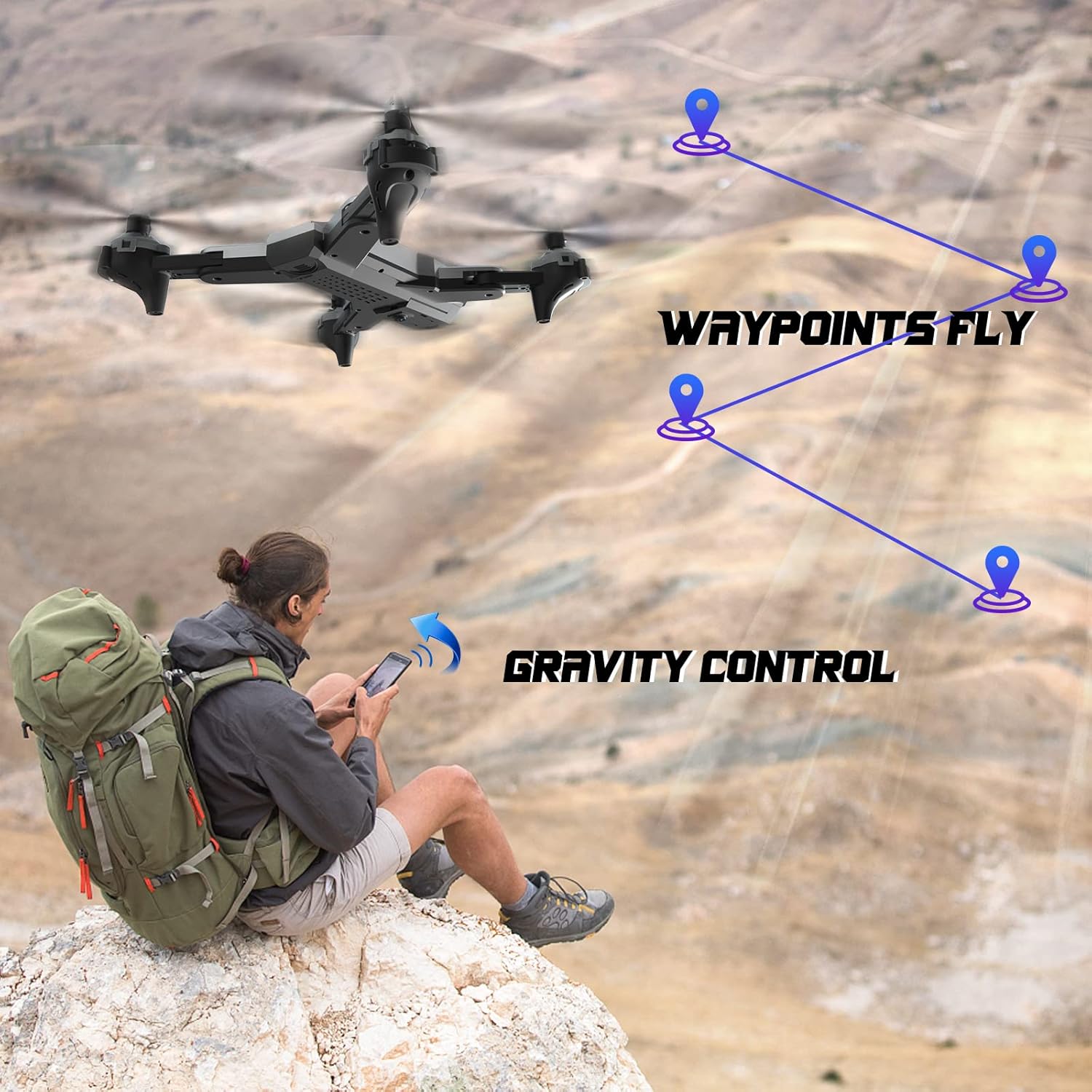
Image: The ROVPRO drone flying along a pre-defined waypoint path, and a user controlling the drone via smartphone's gravity sensor.

Image: The ROVPRO drone responding to hand gestures, with visual cues for taking photos (V-sign) and videos (open palm).
5.5 Λειτουργία κάμερας

Image: A side-by-side comparison illustrating the superior image quality of the ROVPRO 4K FPV HD wide-angle camera with 90° adjustable viewing angle, compared to a standard 1080P camera.
- Εγγραφή φωτογραφιών/βίντεο: Use the dedicated buttons on the remote control or the app interface to take photos or start/stop video recording.
- FPV (Πρώτο Πρόσωπο) View): The live video feed from the drone's camera is transmitted to your smartphone via WiFi, allowing for immersive flight experience.
- Ρυθμιζόμενη γωνία κάμερας: της κάμερας viewing angle can be adjusted to capture different perspectives.
6. Συντήρηση
Proper maintenance ensures the longevity and performance of your drone.
- Καθάρισμα: Χρησιμοποιήστε ένα μαλακό, στεγνό πανί για να καθαρίσετε το σώμα του drone και τον φακό της κάμερας. Αποφύγετε τη χρήση σκληρών χημικών ουσιών.
- Αντικατάσταση έλικας: If propellers are damaged, replace them with spare parts provided. Ensure correct 'A' and 'B' propeller types are used.
- Φροντίδα μπαταρίας: Αποθηκεύστε τις μπαταρίες σε δροσερό και ξηρό μέρος. Μην αφήνετε τις μπαταρίες πλήρως φορτισμένες ή πλήρως αποφορτισμένες για μεγάλα χρονικά διαστήματα.
- Αποθήκευση: When not in use, fold the drone arms and store it in its carrying case to protect it from dust and damage.
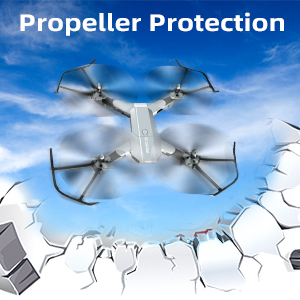
Image: The ROVPRO drone equipped with propeller protectors, highlighting the importance of safeguarding the propellers during flight and handling.
7. Αντιμετώπιση Προβλημάτων
Ανατρέξτε σε αυτήν την ενότητα για συνηθισμένα προβλήματα και τις λύσεις τους.
| Πρόβλημα | Πιθανή αιτία | Διάλυμα |
|---|---|---|
| Το drone δεν ανταποκρίνεται στο τηλεχειριστήριο. | Not paired; low remote battery. | Re-pair drone and remote; replace remote batteries. |
| Το drone δεν μπορεί να απογειωθεί ή πετάει ασταθώς. | Low drone battery; damaged propellers; uneven surface for takeoff. | Charge drone battery; replace damaged propellers; place on a flat surface. |
| FPV feed is not displayed in the app. | Not connected to drone's WiFi; app not open. | Connect to 'HF-XXX' WiFi network; open the 'HF UFO' app. |
| Σύντομος χρόνος πτήσης. | Η μπαταρία δεν είναι πλήρως φορτισμένη· παλιά μπαταρία. | Βεβαιωθείτε ότι η μπαταρία είναι πλήρως φορτισμένη. Σκεφτείτε να αντικαταστήσετε τις παλιές μπαταρίες. |
8. Προδιαγραφές
Key technical specifications of the ROVPRO WRJ02 drone.
- Μάρκα: ROVPRO
- Όνομα μοντέλου: WRJ02
- Χρώμα: Ασήμι
- Ανάλυση λήψης βίντεο: 4K (Front Camera), 1080p (Bottom Camera)
- Επίπεδο: Αρχάριος
- Τύπος ελέγχου: Τηλεχειριστήριο, Έλεγχος εφαρμογών
- Τεχνολογία ασύρματης επικοινωνίας: Wi-Fi
- Σύνθεση κυψέλης μπαταρίας: Πολυμερές Λιθίου
- Χωρητικότητα μπαταρίας: 3.7V 1600mAh (x2 included)
- Διαστάσεις προϊόντος: 13"Μ x 13"Π x 2.5"Υ
- Βάρος αντικειμένου: 1.2 λίρες
- UPC: 715444418297
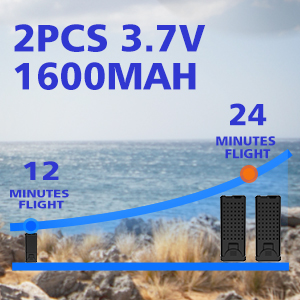
Image: An illustration showing the extended flight time provided by two 3.7V 1600mAh batteries, offering up to 24 minutes of flight.
9. Εγγύηση και υποστήριξη
ROVPRO is committed to providing high-quality products and customer satisfaction. For any questions, technical support, or warranty claims, please contact our customer service team through the retailer where you purchased the product or visit the official ROVPRO webτοποθεσία.
Παρακαλούμε φυλάξτε την απόδειξη αγοράς για λόγους εγγύησης.