
Ζιργκόν 72299
Zircon MultiScanner A250 User Manual
All-In-One Stud Finder, Metal Detector, and Live AC Wire Scanner
Εισαγωγή
The Zircon MultiScanner A250 is an advanced electronic stud finder, metal detector, and live AC scanner designed for both home improvement enthusiasts and professional contractors. This versatile tool features a comfortable ergonomic grip, an ultra-bright LCD screen, and patented SpotLite Pointing System for accurate target indication. It incorporates Auto Correcting Technology (ACT) to minimize user errors and includes a WireWarning Detection feature for enhanced safety.

Figure 1: Zircon MultiScanner A250
Ρύθμιση
Εγκατάσταση μπαταρίας
The MultiScanner A250 requires one 9V alkaline battery (not included). For optimal performance, ensure the battery is fresh and fully charged.
- Εντοπίστε το κάλυμμα της θήκης μπαταριών στο πίσω μέρος της μονάδας.
- Ανοίξτε το κάλυμμα.
- Insert a new 9V alkaline battery, matching the positive (+) and negative (-) terminals correctly.
- Κλείστε καλά το κάλυμμα της θήκης μπαταριών.
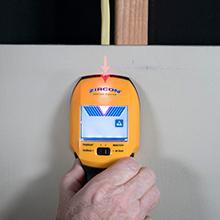
Figure 2: Battery compartment and 9V battery
Αρχική βαθμονόμηση
Before each scan, the tool must be calibrated. Place the MultiScanner A250 flat against the surface to be scanned, ensuring no hands are touching the surface. Press and hold the Power Button. Wait for the unit to complete calibration (indicated by a beep and full display segments) before moving the tool.
Τρόποι λειτουργίας
The Zircon MultiScanner A250 features four distinct scanning modes, easily selectable via the mode switch.

Figure 3: MultiScanner A250 LCD display and mode selection
1. StudScan Mode
This mode locates the center, edges, and direction of wood and metal studs behind walls, floors, and ceilings. It scans up to 0.75 inches (19 mm) deep.
- Select "StudScan" on the mode switch.
- Calibrate the tool on the surface.
- Slowly slide the tool horizontally across the surface. The display will indicate when you are approaching a stud edge.
- The patented SpotLite Pointing System will illuminate, and an audio tone will sound when the center of a stud is detected.
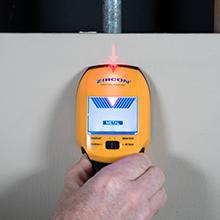
Figure 4: Using StudScan mode to find a stud
2. Λειτουργία βαθιάς σάρωσης
DeepScan Mode doubles the scanning depth to 1.5 inches (38 mm) for locating deeper studs.
- Select "DeepScan" on the mode switch.
- Follow the same scanning procedure as StudScan Mode.
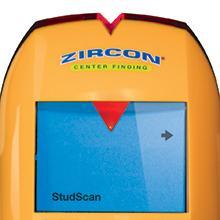
Figure 5: Using DeepScan mode for deeper stud detection
3. Metal Scan Mode
This mode locates non-ferrous metal (e.g., copper pipes) up to 1.5 inches (38 mm) deep and ferrous metal (e.g., rebar) up to 3 inches (75 mm) deep. It is also useful for finding studs behind lath and plaster walls, tile, drywall, and stucco by identifying screw or nail heads.
- Select "Metal Scan" on the mode switch.
- Calibrate the tool on the surface.
- Slowly slide the tool horizontally. The signal strength indicator bars will increase as you approach metal.
- The SpotLite Pointing System will illuminate when the tool is directly over a metal object.
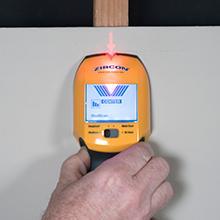
Figure 6: Using Metal Scan mode to detect pipes
4. AC Scan Mode
AC Scan Mode detects, locates, maps, and traces live, unshielded electrical wires up to 2 inches (50 mm) deep. This mode is crucial for avoiding electrical hazards.
- Select "AC Scan" on the mode switch.
- Calibrate the tool on the surface.
- Slowly slide the tool horizontally. The signal strength indicator bars will increase as you approach live AC wiring.
- The SpotLite Pointing System will illuminate when the tool is directly over a live wire.

Figure 7: MultiScanner A250 detecting live AC electrical wires
Συμβατά υλικά
The MultiScanner A250 is designed to work effectively on a variety of common building materials, including:
- Γυψοσανίδας
- Ξύλινο Δάπεδο
- Υποδαπέδια
- Gypsum Drywall
- Over Plywood Sheathing

Figure 8: Materials compatible with MultiScanner A250
Πρόσθετα χαρακτηριστικά
- Ανίχνευση WireWarning: This feature is active in StudScan, DeepScan, and Metal Scan modes and alerts you to the presence of live, unshielded electrical wires up to 2 inches (50 mm) deep.
- ACT (Τεχνολογία Αυτόματης Διόρθωσης): Automatically corrects common user errors, such as when scanning begins over a stud, ensuring accurate results.
- Ένδειξη ισχύος σήματος: Helps distinguish between shallow and deep targets.
- Ένδειξη χαμηλής μπαταρίας: Alerts you when the battery needs replacement for optimal performance.
Συντήρηση
Καθάρισμα
Wipe the tool with a clean, dry cloth. Do not use abrasive cleaners or solvents, as they may damage the unit.
Αντικατάσταση μπαταρίας
When the Low Battery Indicator appears on the display, replace the 9V alkaline battery promptly to ensure continued accurate operation.
Αποθήκευση
Store the MultiScanner A250 in a dry, dust-free environment away from extreme temperatures. Remove the battery if the tool will not be used for an extended period.
Αντιμετώπιση προβλημάτων
If you encounter issues with your Zircon MultiScanner A250, consider the following common solutions:
- Ανακριβείς αναγνώσεις: Ensure the tool is properly calibrated on the wall surface before scanning. Avoid placing hands on the scanned surface during operation.
- Καμία ανίχνευση: Check the battery level. A low battery can affect performance. Ensure you are using the correct scan mode for the target (e.g., StudScan for studs, Metal Scan for pipes).
- False Positives (AC Scan): Electrical field locators may not detect live AC wires if the wires are more than 2 inches (51 mm) from the scanned surface, in concrete, or encased in conduit, present behind a plywood shear wall or metallic wall covering, or if moisture is present in the environment or scanned surface.
- Γενική απόδοση: The MultiScanner A250 constantly scans its surroundings and recalibrates itself if necessary. If issues persist, try re-calibrating the tool in a different spot on the wall.
WARNING: DO NOT ASSUME THERE ARE NO LIVE ELECTRICAL WIRES IN THE WALL. DO NOT TAKE ACTIONS THAT COULD BE DANGEROUS IF THE WALL CONTAINS A LIVE ELECTRICAL WIRE. ALWAYS TURN OFF THE ELECTRICAL POWER, GAS, AND WATER SUPPLIES BEFORE PENETRATING A SURFACE. FAILURE TO FOLLOW THESE INSTRUCTIONS MAY RESULT IN ELECTRIC SHOCK, FIRE, AND/OR SERIOUS INJURY OR PROPERTY DAMAGE.
For more detailed troubleshooting or specific issues, please refer to the official user guide: Zircon MultiScanner A250 User Manual (PDF).
Προδιαγραφές
| Χαρακτηριστικό | Λεπτομέρεια |
|---|---|
| Μάρκα | Ζιρκονίτης |
| Μοντέλο | A250 (Item model number: 72299) |
| Χρώμα | Κίτρινος |
| Πηγή ισχύος | Battery Powered (9V alkaline battery required, not included) |
| Υλικό | Πλαστική ύλη |
| Βάρος αντικειμένου | 8 ουγγιές |
| Διαστάσεις προϊόντος | 7.72"Μ x 1.8"Π x 3.23"Υ |
| Διεθνής αξιολόγηση προστασίας | IP54 |
| Τύπος οθόνης | οθόνη υγρού κρυστάλλου |
| StudScan Depth | Έως 0.75 ίντσες (19 mm) |
| Βάθος βαθιάς σάρωσης | Έως 1.5 ίντσες (38 mm) |
| Metal Scan Depth (Non-ferrous) | Έως 1.5 ίντσες (38 mm) |
| Metal Scan Depth (Ferrous) | Έως 3 ίντσες (75 mm) |
| AC Scan Depth | Έως 2 ίντσες (50 mm) |

Figure 9: MultiScanner A250 dimensions
Εγγύηση
The Zircon MultiScanner A250 comes with a Περιορισμένη εγγύηση ζωής. Please retain your proof of purchase for warranty claims. For full warranty details, refer to the official Zircon webιστότοπο ή επικοινωνήστε με την υποστήριξη πελατών.
Υποστήριξη
For additional information, frequently asked questions, or customer support, please visit the official Zircon resources:
- Official Zircon Store on Amazon: Visit the Zircon Store
- Product Information Page: Zircon MultiScanner A250
- Contact Zircon: 408-963-4500

Figure 10: Additional product information and contact details
Ask a question about this manual
Ask about setup, troubleshooting, compatibility, parts, safety, or missing instructions. Manuals+ will review the question and use this page’s manual context to help answer it.