
Einführung
The AUDIOCULAR Beast HiFi Wired IEM Earphones are designed to deliver a high-fidelity audio experience. This model features a 10mm dual magnetic dynamic driver, an electronic crossover system for balanced sound, and a detachable 2-pin cable for durability and upgrade flexibility. This manual provides essential information for setting up, operating, maintaining, and troubleshooting your earphones.
Lieferumfang
- 1x AUDIOCULAR x KZ Beast IEM
- 1x Detachable Cable (3.5mm connector)
- 3x Pair Eartips (Small, Medium, Large)
- Bedienungsanleitung
Installationsanweisungen
1. Attaching the Detachable Cable
The AUDIOCULAR Beast IEMs feature a 0.75mm gold-plated 2-pin detachable system. This allows for easy cable replacement or upgrades.

Beschreibung: This image illustrates the secure connection point for the detachable 2-pin cable on the earphone unit. The gold-plated pins ensure stable signal transmission.
- Identifizieren Sie die linke (L) und rechte (R) Ohrhörereinheit sowie die Kabelanschlüsse. Die Kabelanschlüsse sind üblicherweise gekennzeichnet.
- Align the 2-pin connector on the cable with the corresponding receptacle on the earphone unit. Ensure the pins are correctly oriented.
- Gently push the connector firmly into place until it is secure. Do not force the connection.
- Wiederholen Sie den Vorgang für den anderen Ohrhörer.
2. Selecting and Installing Eartips
Proper eartip selection is crucial for comfort, sound isolation, and optimal audio performance.
- Experiment with the three included pairs of eartips (Small, Medium, Large) to find the best fit for your ears.
- To install, gently push the eartip onto the nozzle of the earphone unit until it is securely seated.
- To remove, gently twist and pull the eartip off the nozzle.
3. Tragen der Kopfhörer
The AUDIOCULAR Beast IEMs are designed with an ergonomic ear-hook fit for secure and comfortable placement.

Beschreibung: This image demonstrates the correct way to wear the AUDIOCULAR Beast IEM, with the earphone unit seated in the ear canal and the cable looped over the ear for stability and comfort during extended use.
- Stecken Sie den Ohrhörer in Ihren Gehörgang.
- Loop the cable over the top of your ear, allowing it to rest comfortably behind your ear. This helps secure the earphones and reduces microphonics (cable noise).
- Adjust the fit until it feels snug and comfortable, creating a good seal in your ear canal.
4. Anschluss an eine Audioquelle
Connect the 3.5mm jack of the cable to the audio output port of your device (e.g., smartphone, laptop, portable DAC).
Bedienungsanleitung
Inline Controls (if applicable)
The AUDIOCULAR Beast cable may include inline controls for convenient operation.
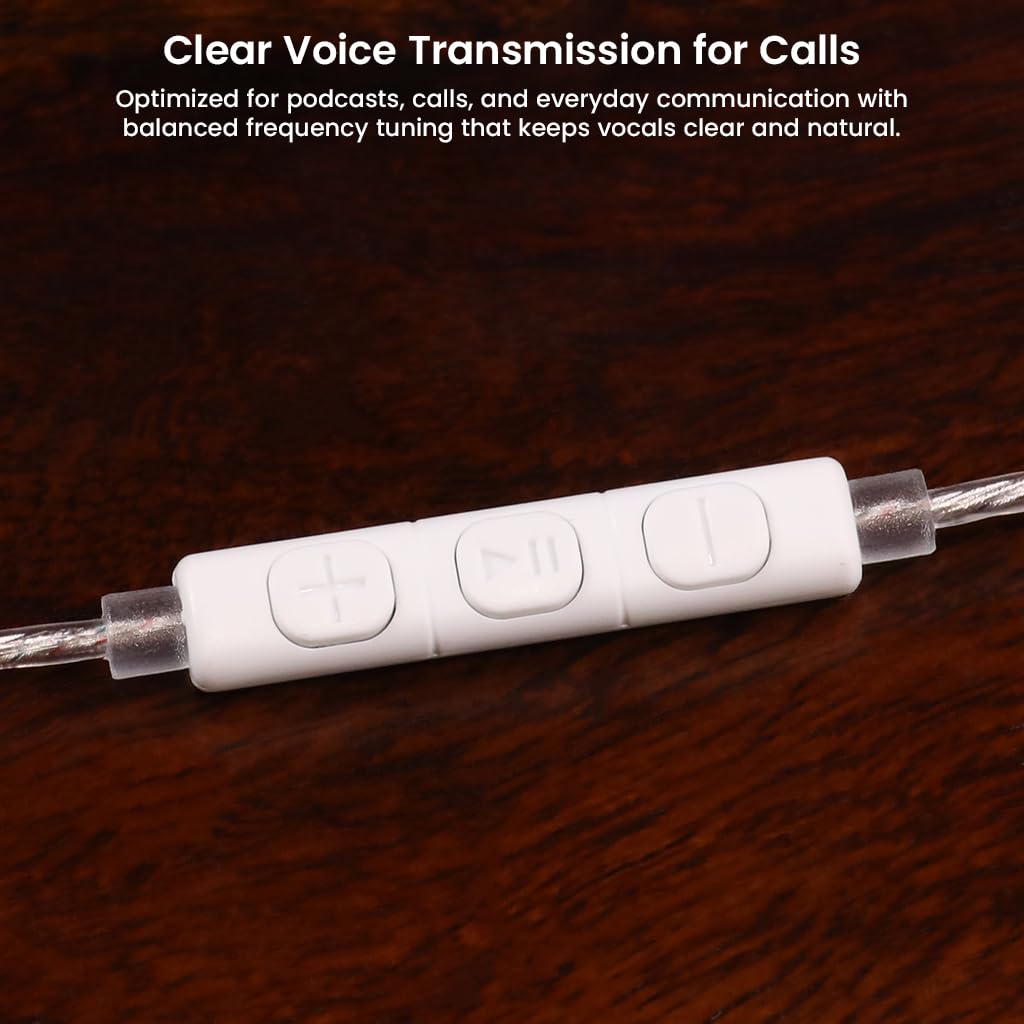
Beschreibung: This image displays the inline remote control unit on the earphone cable, featuring buttons for volume adjustment and playback control, optimized for clear voice transmission during calls.
- Abspielen/Pause: Drücken Sie die mittlere Taste einmal, um die Audiowiedergabe zu starten oder zu pausieren.
- Nächster Titel: Drücken Sie die mittlere Taste zweimal schnell hintereinander, um zum nächsten Titel zu springen.
- Vorheriges Lied: Drücken Sie dreimal schnell hintereinander die mittlere Taste, um zum vorherigen Titel zu gelangen.
- Lautstärke erhöhen: Drücken Sie die Taste „+“, um die Lautstärke zu erhöhen.
- Lautstärke runter: Drücken Sie die Taste „-“, um die Lautstärke zu verringern.
- Anruf annehmen/beenden: Drücken Sie einmal die mittlere Taste, um einen eingehenden Anruf anzunehmen oder einen laufenden Anruf zu beenden.
- Anruf ablehnen: Press and hold the center button to reject an incoming call.
Sound Customization (Type-C Variant Only)
Please note that the My Audiocular App for sound customization is available only for the Type-C variant of the AUDIOCULAR Beast. This 3.5mm model does not support app-based EQ adjustments.

Beschreibung: This image shows the My AUDIOCULAR App interface on a smartphone, demonstrating multi-band parametric EQ controls for fine-tuning bass, mids, and treble. This feature is exclusive to the Type-C variant of the earphones.
Wartung
Kabelpflege
The high-purity 5N oxygen-free copper flat cable is designed to be tangle-resistant and durable.

Beschreibung: Eine detaillierte view of the 5N OFC (Oxygen-Free Copper) flat cable, highlighting its transparent appearance and tangle-resistant design for stable signal transmission and daily reliability.
- Vermeiden Sie scharfe Biegungen oder übermäßiges Ziehen am Kabel.
- Zum Verstauen das Kabel locker aufwickeln, um Verheddern und Beschädigungen zu vermeiden.
- Keep the 3.5mm jack clean and free of debris.
Cleaning the Earphones
- Reinigen Sie die Ohrstöpsel regelmäßig mit einem weichen, fusselfreien Tuch.amp Stoff. Stellen Sie sicher, dass sie vollständig trocken sind, bevor Sie sie wieder anbringen.
- Gently wipe the earphone units with a dry, soft cloth to remove any earwax or dirt.
- Verwenden Sie zur Reinigung keine aggressiven Chemikalien oder Scheuermittel.
- Stellen Sie sicher, dass keine Feuchtigkeit in die Treibereinheiten eindringt.
Lagerung
- Store your earphones in a clean, dry place, preferably in a protective case, when not in use.
- Avoid exposing them to extreme temperatures or direct sunlight.
Fehlerbehebung
| Problem | Mögliche Ursache | Lösung |
|---|---|---|
| Kein Ton aus einem oder beiden Ohrhörern |
|
|
| Verzerrte oder schlechte Klangqualität |
|
|
| Die Kopfhörer fallen leicht heraus |
|
|
Technische Daten
Audio-Eigenschaften
- Treibertyp: 10mm Dual Magnetic Dynamic Driver
- Impedanz: 16 Ohm
- Empfindlichkeit: 112 dB
- Frequenzgang: 20 Hz - 20 kHz
- Geräuschpegelkontrolle: Schallisolierung
- Frequenzweiche: Integrated Electronic Crossover
Design und Konnektivität
- Ohrplatzierung: Im Ohr
- Formfaktor: Im Ohr
- Kabel: Detachable 0.75mm 2-Pin, 5N Oxygen-Free Copper Flat Cable
- Kopfhöreranschluss: 3.5 mm Klinke
- Steuerungstyp: Inline Remote (Play/Pause, Volume, Call)
- Schalenmaterial: Resin-Inlaid Metal
Allgemein
- Marke: AUDIOCULAR
- Modellname: Tier
- Gewicht: 38 Gramm
- Ursprungsland: China
- Wasserbeständigkeit: Wasserabweisend
- Spezifische Verwendungen: Business, Entertainment, Gaming, Personal Music Listening, Studio

Beschreibung: Dieses Bild bietet eine transparente Darstellung. view of the earphone's internal structure, highlighting the 10mm dual magnetic circuit dynamic driver, engineered for powerful and precise bass response.

Beschreibung: An exploded diagram of the AUDIOCULAR Beast IEM, illustrating the electronic crossover system and its components, which ensure balanced three-frequency equalization for clear audio.

Beschreibung: Eine Nahaufnahme view of the earphone's premium resin-inlaid metal shell, showcasing its durable construction and refined aesthetic design.
Garantie und Support
Garantieinformationen
The AUDIOCULAR Beast IEMs come with a 1 Jahre Garantie against manufacturing defects. Please note that eartips and the cable are not covered under this warranty.
Kundenservice
For warranty support or any other inquiries, please contact:
- E-Mail: customercare@conceptkart.com
- Importeur/Verpacker: Concept Kart, 2nd Floor, A36, Block B, Naraina Industrial Area Phase 2, Naraina, New Delhi, Delhi, 110028
No official product videos were found for this specific model and variant.