
1. Einleitung
Vielen Dank für Ihren Einkauf.asing the ELEPHAS BL128MINI Mini Projector. This manual provides essential information for setting up, operating, and maintaining your projector. Please read it thoroughly before use to ensure optimal performance and longevity of the device.
2. Packungsinhalt
Bitte überprüfen Sie, ob alle unten aufgeführten Artikel in Ihrem Paket enthalten sind:
- 1 x ELEPHAS BL128MINI Projector
- 1 x Fernbedienung
- 1 x Benutzerhandbuch (dieses Dokument)
- 1 x HDMI-Kabel
- 1 x Detachable Tripod
3. Produktüberschreitungview
3.1 Hauptmerkmale
- 1080P Full HD-Auflösung: Supports 1920 x 1080 resolution for clear images.
- 24-bit True Color: Liefert lebendige und präzise Farben.
- Großbildprojektion: Kann eine Bilddiagonale von bis zu 200 Zoll projizieren.
- Detachable Tripod: Provides stable placement and flexible positioning.
- Eingebauter HiFi-Lautsprecher: Bietet integrierten Audioausgang.
- Mehrere Konnektivitätsoptionen: Includes USB, HDMI, AV, and Audio ports.

Image 3.1: The ELEPHAS BL128MINI Projector offers 1080P Full HD resolution with 24-bit true color, an 8000:1 contrast ratio, and enhanced brightness for a vivid viewErfahrung.
3.2 Projector Ports and Controls
Familiarize yourself with the various ports and controls on your projector for proper connection and operation.

Image 3.2: Rear panel of the ELEPHAS BL128MINI Projector, highlighting DC power input, USB ports, HDMI port, AV port, and audio output. Compatible devices include Xbox, TV Stick, PC, Smartphone, USB drives, speakers, and headphones.
4. Einrichtung
4.1 Stromanschluss
- Schließen Sie das Netzteil an den DC IN-Anschluss des Projektors an.
- Stecken Sie das Netzteil in eine Wandsteckdose.
4.2 Stativmontage
The included detachable tripod allows for stable placement on various surfaces.
- Locate the tripod mounting screw hole on the bottom of the projector.
- Screw the tripod securely into the mounting hole.
- Adjust the tripod legs to achieve the desired height and angle for projection.

Image 4.2: The detachable tripod provides stability for the projector, whether placed on a desktop or uneven outdoor surfaces.
4.3 Platzierung und Projektionsabstand
Position the projector on a flat, stable surface. The optimal projection distance ranges from 3.3 to 9.8 feet for screen sizes between 50 and 200 inches.

Image 4.3: Recommended projection distances for achieving various screen sizes, from 50 to 200 inches.
5. Bedienungsanleitung
5.1 Ein-/Ausschalten
- Einschalten: Drücken Sie die Ein/Aus-Taste am Projektor oder auf der Fernbedienung.
- Ausschalten: Drücken Sie den Netzschalter erneut. Der Projektor wechselt in den Standby-Modus.
5.2 Fokuseinstellung
Drehen Sie den Fokusring am Projektorobjektiv, bis das projizierte Bild klar und scharf ist.
5.3 Auswahl der Eingangsquelle
Use the 'Source' button on the remote control or the projector to select the desired input source (HDMI, USB, AV).
5.4 Externe Geräte anschließen
The projector supports various external devices:
- HDMI: Connect laptops, PCs, TV boxes, TV sticks, gaming consoles (e.g., Xbox), or other HDMI-enabled devices using the provided HDMI cable.
- USB: Stecken Sie einen USB-Stick in den USB-Anschluss, um Medien abzuspielen. files direkt.
- EIN V: Verwenden Sie den AV-Anschluss für ältere Geräte mit Composite-Videoausgang.
- Smartphones/Tablets: For iOS and Android devices, an additional HDMI adapter (not included) is required for connection.
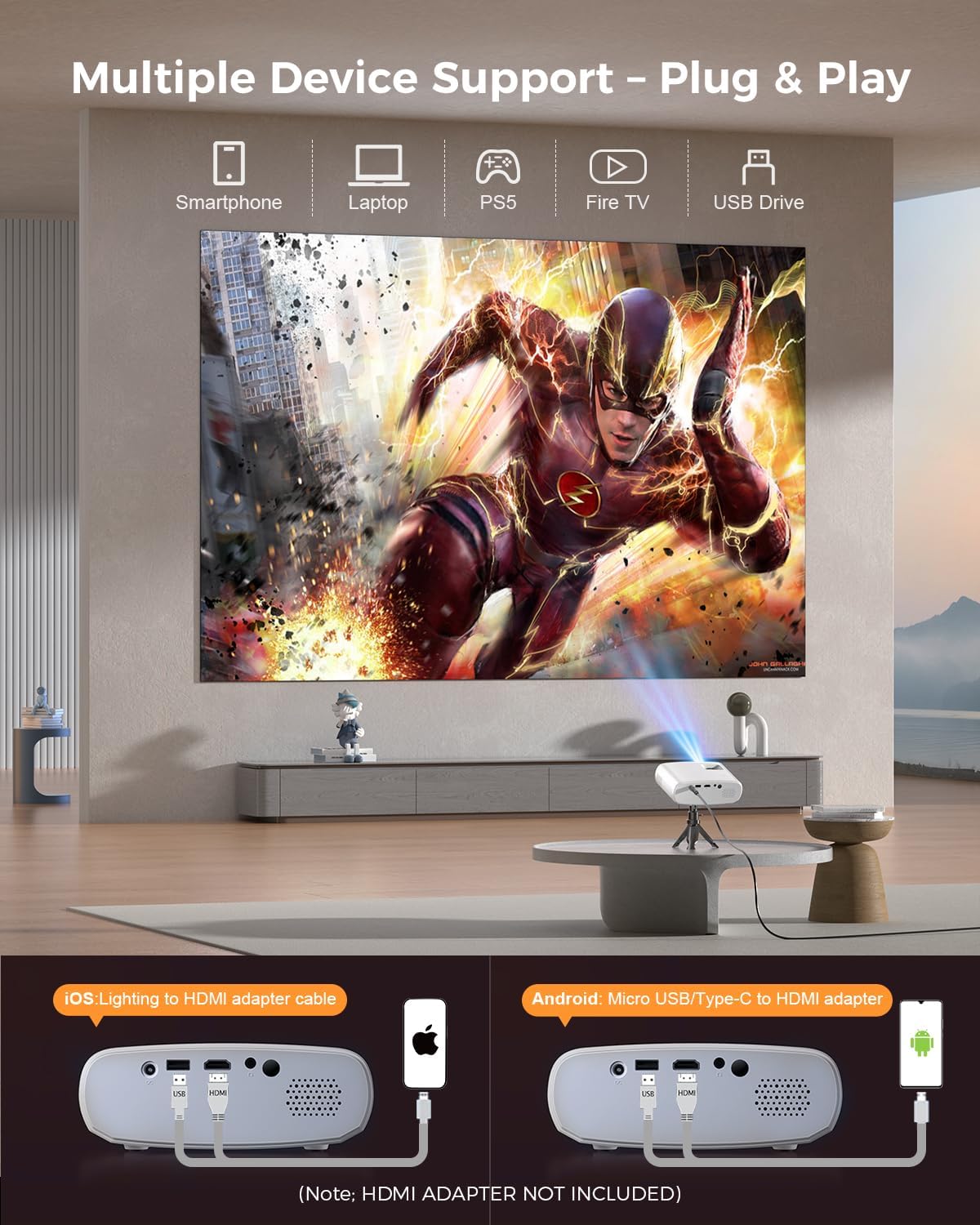
Image 5.4: The projector supports multiple devices via HDMI and USB. Note that an HDMI adapter is required for direct smartphone connection (not included).
5.5 Audioausgang
The projector has a built-in HIFI speaker. For external audio, connect headphones or external speakers to the Audio Out port.
6. Wartung
6.1 Reinigung
- Linse: Use a soft, lint-free cloth or lens cleaning paper. Avoid abrasive materials.
- Casing: Wischen Sie den Projektor ab.asing with a soft, dry cloth. Do not use liquid cleaners or solvents.
- Belüftung: Um eine Überhitzung zu vermeiden, muss sichergestellt werden, dass die Lüftungsöffnungen frei von Staub und Verstopfungen sind.
6.2 Speicherung
When not in use, store the projector in a cool, dry place, away from direct sunlight and extreme temperatures. Use the original packaging or a protective bag to prevent dust accumulation.
7. Fehlerbehebung
| Problem | Mögliche Ursache | Lösung |
|---|---|---|
| Kein Bild projiziert | Netzkabel locker; Falsche Eingangsquelle; Gerät nicht richtig angeschlossen. | Check power connection; Select correct input source; Reconnect HDMI/USB cable. |
| Bild verschwommen | Fokus nicht eingestellt; Projektor zu nah/zu weit von der Leinwand entfernt. | Fokusring einstellen; Projektionsabstand einstellen. |
| Kein Ton | Lautstärke zu niedrig; Stummgeschaltet; Externes Audiogerät nicht angeschlossen. | Lautstärke erhöhen; Stummschaltung aufheben; Externe Audioanschlüsse prüfen. |
| Fernbedienung funktioniert nicht | Batterien schwach/leer; Hindernis zwischen Fernbedienung und Projektor. | Batterien austauschen; Freie Sichtlinie zum Infrarotempfänger sicherstellen. |
| Cannot play Netflix/Hulu/Prime Video | HDCP-Urheberrechtsschutz. | Use an external streaming device like Amazon Fire Stick or Roku Stick (not included). |
8. Spezifikationen
| Besonderheit | Detail |
|---|---|
| Modell | BL128MINI |
| Marke | ELEFAS |
| Bildschirmauflösung | 1920 x 1080 (1080P Full HD) |
| Konnektivitätstechnologie | HDMI, USB, AV, Audioausgang |
| Besondere Merkmale | HDMI Connectivity, Portable, Built-in Speakers, Detachable Tripod |
| Empfohlene Verwendung | Innen/Außen |
| Artikelgewicht | 1.96 Pfund (ca. 0.89 kg) |
| Technische Daten | 6 x 4.4 x 2.4 Zoll (ca. 15.2 x 11.2 x 6.1 cm) |
9. Garantie und Support
ELEPHAS projectors are certified with CE, FCC, and RoHS standards.
- Werksunterstützung: We provide 3-years factory support for this product.
- Technische Unterstützung: Technischer Support ist lebenslang verfügbar.
- Kundendienst: 24/7 professional service is provided.
- Widerrufsfolgen: A 30-day return or exchange policy is in place.
For further assistance, please refer to the contact information provided on the product packaging or the official ELEPHAS webWebsite.

Image 9.1: ELEPHAS offers comprehensive customer support, including 24/7 professional service, a 30-day return policy, and lifetime technical support.