
1. Produktüberschreitungview
The KLIM Cassette Player Boombox is a versatile audio device combining classic cassette playback with modern features like AM/FM radio, Bluetooth connectivity, and USB playback/recording. Its portable design allows for use at home or on the go.
Hauptmerkmale:
- Kassettenspieler und Recorder
- AM/FM-Radiotuner
- Bluetooth Connectivity for wireless streaming
- USB Port for MP3 playback and recording
- Integrated Microphone for direct recording
- Headphone Jack for private listening
- Dual Power: AC power cord or 4 x C-type batteries (not included)
- Portable design with a carrying handle
Was ist in der Box:
- KLIM Cassette Player Boombox
- Netzkabel
- Bedienungsanleitung

Abbildung 1: Vorderseite view of the KLIM Cassette Player Boombox, showcasing its controls and cassette compartment.
2. Einrichtung
Einschalten des Geräts:
The KLIM Cassette Player Boombox can be powered in two ways:
- Wechselstromversorgung: Connect the included AC power cord to the device's power input and then to a standard wall outlet.
- Batterieleistung: For portable use, insert 4 x C-type batteries (not included) into the battery compartment located on the underside of the device. Ensure correct polarity.

Abbildung 2: Unterseite view showing the battery compartment for portable power.
3. Bedienungsanleitung
3.1. Cassette Player/Recorder
- Slide the function selector to 'TAPE'.
- Press the 'OPEN' button to open the cassette compartment.
- Insert a cassette tape with the open side facing up.
- Schließen Sie das Kassettenfach.
- Use the 'PLAY', 'STOP/EJECT', 'FFWD' (Fast Forward), and 'REW' (Rewind) buttons to control playback.
- To record, ensure a blank tape is inserted. Press the 'REC' button to start recording from the built-in microphone, radio, or USB.

Abbildung 3: Oben view of the boombox with a cassette tape inserted into the compartment.
3.2. AM/FM-Radio
- Slide the function selector to 'RADIO'.
- Für optimalen Empfang die Teleskopantenne ausziehen.
- Use the 'BAND' switch to select between AM and FM frequencies.
- Rotate the 'TUNING' knob to find your desired radio station.
3.3. Bluetooth-Konnektivität
- Slide the function selector to 'BT' (Bluetooth).
- The device will enter pairing mode, indicated by a flashing light or audible prompt.
- Aktivieren Sie auf Ihrem Smartphone oder Tablet Bluetooth und suchen Sie nach verfügbaren Geräten.
- Select 'KLIM Cassette Player' (or similar name) from the list to pair.
- Nach der Kopplung können Sie Audio drahtlos von Ihrem Gerät streamen.
3.4. USB-Wiedergabe und -Aufnahme
- Slide the function selector to 'USB'.
- Stecken Sie einen USB-Stick mit MP3-Audiodateien ein. files in den USB-Port.
- Das Gerät beginnt automatisch mit der Audiowiedergabe. files. Use the playback controls (play/pause, skip) to navigate.
- To record to USB, ensure a USB drive is inserted. Press the 'REC' button while in radio or cassette mode to record the audio source directly to the USB drive.
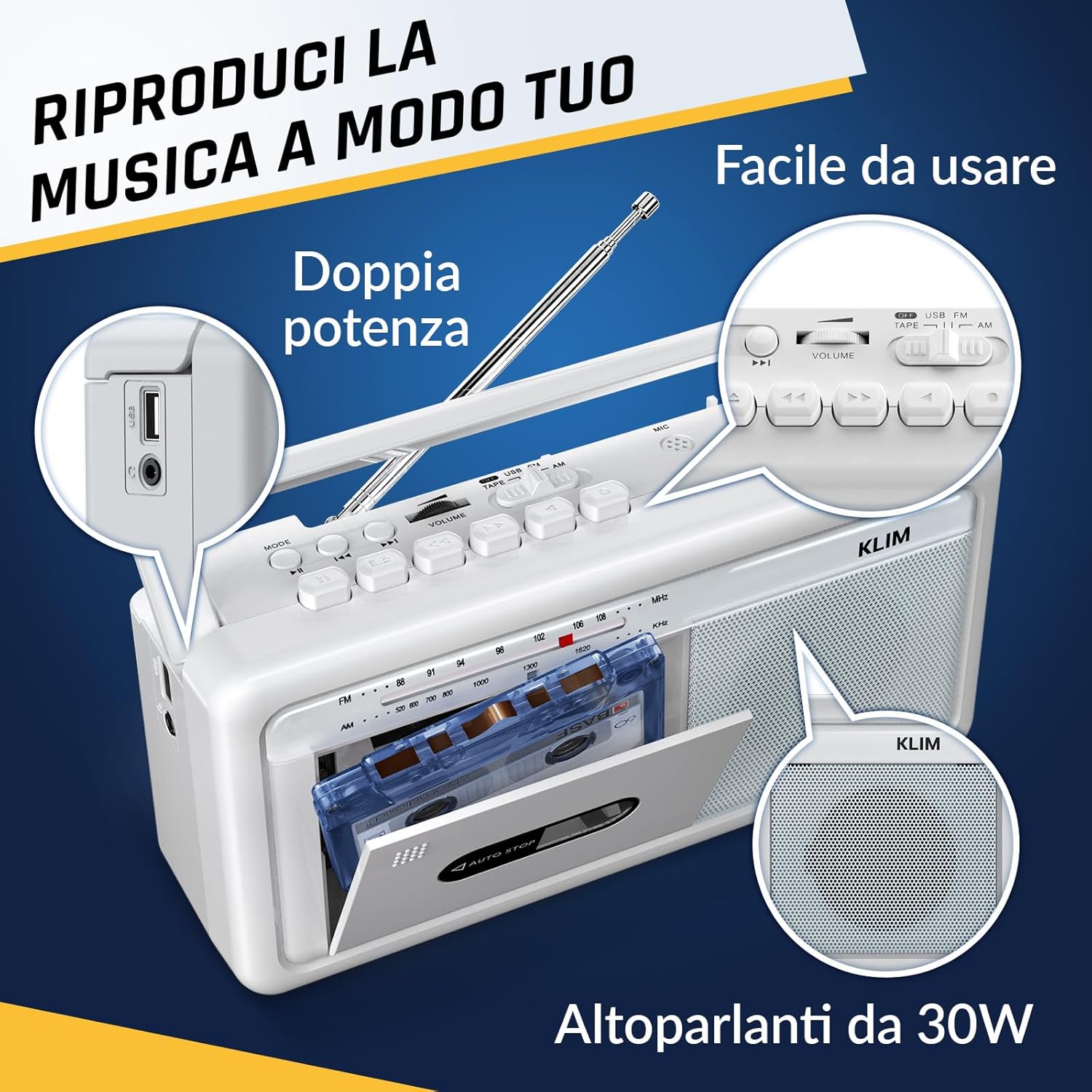
Abbildung 4: Seite view highlighting the USB port for media playback and recording.
3.5. Kopfhörernutzung
Connect standard 3.5mm headphones to the headphone jack for private listening. The internal speakers will automatically mute when headphones are connected.
Video 1: Instructions on how to record a tape to USB using the WTB-795 model. This video demonstrates the USB recording functionality.
Video 2: Endeview of a retro cassette player with USB, Bluetooth, and AM/FM radio features, similar to the KLIM Cassette Player Boombox.
4. Wartung
- Reinigen Sie das Gerät regelmäßig mit einem weichen, trockenen Tuch. Vermeiden Sie die Verwendung von flüssigen Reinigern oder Lösungsmitteln.
- Reinigen Sie den Kassettenkopf und die Andruckrollen regelmäßig mit einem Wattestäbchen, das Sie leicht andrücken.ampwurde mit Isopropylalkohol behandelt, um eine optimale Klangqualität zu gewährleisten und Beschädigungen des Bandes zu vermeiden.
- Das Gerät sollte nicht direkter Sonneneinstrahlung, Wärmequellen oder übermäßiger Staub- oder Feuchtigkeitsbildung ausgesetzt werden.
- Bei längerer Nichtbenutzung sollten die Batterien entfernt werden, um ein Auslaufen zu verhindern.
5. Fehlerbehebung
| Problem | Mögliche Lösung |
|---|---|
| Kein Strom | Check if the AC power cord is securely connected. If using batteries, ensure they are inserted correctly and are not depleted. |
| Kein Ton von den Lautsprechern | Increase the volume. Ensure headphones are not connected. Check the function selector is in the correct mode (TAPE, RADIO, BT, USB). |
| Schlechter Radioempfang | Extend the telescopic antenna fully. Adjust the antenna direction. Try moving the unit to a different location. |
| Kassette spielt/nimmt nicht auf | Ensure the tape is inserted correctly. Check if the tape is damaged. Clean the cassette head and pinch rollers. |
| Bluetooth stellt keine Verbindung her | Ensure the unit is in Bluetooth mode. Make sure your device's Bluetooth is enabled and within range. Try unpairing and re-pairing the device. |
| USB-Wiedergabeprobleme | Ensure the USB drive is formatted correctly (FAT32) and contains compatible audio files (MP3, WAV, WMA, AAC, FLAC). Try a different USB drive. |
6. Spezifikationen
- Marke: KLIM
- Modell: Kassettenspieler
- Produktabmessungen: 25 x 13.1 x 7.6 cm
- Artikelgewicht: 1 kg
- Kompatible Geräte: MP3-Player, Smartphone, Tablet
- Audioausgabemodus: Stereo
- Unterstützte Audioformate: Cassette, Analog Radio, MP3, WAV, WMA, AAC, FLAC, Bluetooth
- Energiequelle: Corded Electric (AC) / 4 x C-type Batteries (not included)
- Konnektivitätstechnologie: USB, Bluetooth
- Farbe: Frostweiß
- Artikelnummer: KLSIN4825
7. Garantie und Support
The KLIM Cassette Player Boombox comes with a 5 Jahr Garantie. For any questions, technical assistance, or warranty claims, please contact KLIM customer support. Our team is available 24/7 to assist you.
Please refer to the contact information provided in your product packaging or visit the official KLIM webWebsite für weitere Details.