
Einführung
This manual provides comprehensive instructions for the setup, operation, maintenance, and troubleshooting of your T-Wolf T60 Wired 60% Mechanical Keyboard. Please read this manual carefully before using the product to ensure proper function and longevity.
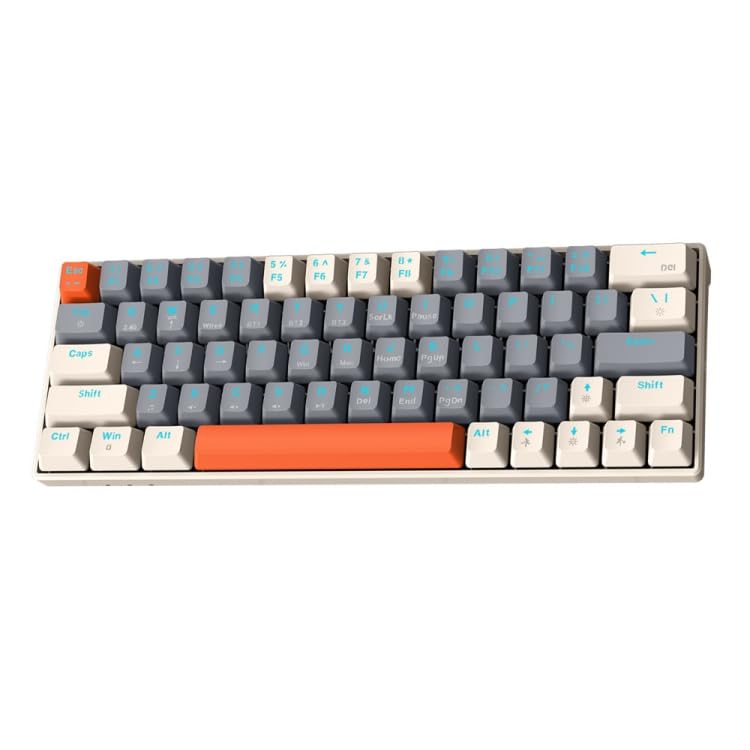
Image: T-Wolf T60 Wired 60% Mechanical Keyboard. This image displays the compact design of the keyboard, highlighting its 63-key layout and wired connectivity.
Aufstellen
- Auspacken: Carefully remove the keyboard and all included accessories from the packaging. Verify that all components are present: T-Wolf T60 keyboard and USB-C to USB cable.
- Anschließen der Tastatur:
- Suchen Sie den USB-C-Anschluss an der Tastatur.
- Insert the USB-C end of the provided cable into the keyboard's USB-C port.
- Insert the USB-A end of the cable into an available USB 2.0 port on your computer (PC, desktop, or laptop).
- Treiberinstallation: The T-Wolf T60 keyboard is plug-and-play. Your operating system should automatically detect and install the necessary drivers. No manual driver installation is typically required.
- Erster Test: Open a text editor or word processor and type to confirm the keyboard is functioning correctly.
Betrieb
The T-Wolf T60 is a 60% mechanical keyboard with 63 keys, designed for efficient typing and gaming. It features RGB backlighting and multi-key anti-ghosting.
- Grundlegende Schlüsselfunktionen: All standard alphanumeric and symbol keys function as expected. Due to the compact 60% layout, some functions (like F-keys, arrow keys, and navigation keys) are accessed via a Function (Fn) key combination. Refer to the keyboard's keycap legends for specific Fn key combinations.
- RGB-Hintergrundbeleuchtung: The keyboard features customizable RGB backlighting.
- To cycle through different lighting modes, use the designated Fn key combination (e.g., Fn + \ or Fn + P).
- To adjust brightness, use the designated Fn key combination (e.g., Fn + Up/Down arrow keys, if available via Fn layer).
- To change lighting speed, use the designated Fn key combination (e.g., Fn + Left/Right arrow keys, if available via Fn layer).
- Multi-Key Anti-Ghosting: This feature ensures that multiple simultaneous key presses are registered accurately, which is beneficial for fast-paced gaming and complex commands.
Wartung
Proper maintenance helps extend the lifespan of your keyboard.
- Reinigung:
- Trennen Sie die Tastatur vor der Reinigung vom Computer.
- Verwenden Sie eine Dose Druckluft, um Staub und Schmutz zwischen den Tastenkappen zu entfernen.
- Wischen Sie die Tastenkappen und die Tastaturoberfläche mit einem weichen, leicht feuchten Tuch ab.amp, fusselfreies Tuch. Übermäßige Feuchtigkeit vermeiden.
- Do not use harsh chemicals, abrasive cleaners, or solvents, as these can damage the keyboard's finish and keycap legends.
- Lagerung: Bei längerer Nichtbenutzung sollte die Tastatur an einem sauberen, trockenen Ort ohne direkte Sonneneinstrahlung und extreme Temperaturen aufbewahrt werden.
- Kabelpflege: Avoid bending or twisting the USB-C cable excessively to prevent internal damage.
Fehlerbehebung
If you encounter issues with your T-Wolf T60 keyboard, refer to the following common solutions:
- Tastatur reagiert nicht:
- Stellen Sie sicher, dass das USB-C-Kabel sowohl mit der Tastatur als auch mit dem Computer fest verbunden ist.
- Versuchen Sie, die Tastatur an einen anderen USB-Anschluss Ihres Computers anzuschließen.
- Test the keyboard on another computer to determine if the issue is with the keyboard or the original computer's setup.
- Starten Sie Ihren Computer neu.
- RGB-Hintergrundbeleuchtung funktioniert nicht oder fehlerhaft:
- Stellen Sie sicher, dass die Tastatur ordnungsgemäß angeschlossen ist und mit Strom versorgt wird.
- Try cycling through the RGB modes using the Fn key combinations mentioned in the Operation section.
- Check if the brightness is set to maximum.
- Tasten werden nicht registriert oder es werden doppelte Eingaben getätigt:
- Clean the keyboard thoroughly, especially around the affected keys, using compressed air.
- Achten Sie darauf, dass sich keine Fremdkörper unter den Tastenkappen befinden.
- Wenn das Problem weiterhin besteht, könnte dies auf einen Hardwaredefekt hindeuten.
Technische Daten
| Besonderheit | Detail |
|---|---|
| Marke | T-WOLF |
| Modell | T60 |
| Konnektivitätstechnologie | USB-C (kabelgebunden) |
| Kompatible Geräte | PC, desktop, laptop |
| Tastaturbeschreibung | Gaming, Mechanik |
| Anzahl der Schlüssel | 63 |
| Besondere Merkmale | RGB Backlighting, Multi-Key Anti-Ghosting |
| Material | Plastik |
| Tastaturlayout | QWERTY |
Garantie und Support
Informationen zur Garantie und zum technischen Support finden Sie in der mitgelieferten Dokumentation oder wenden Sie sich direkt an den Händler/Hersteller. Bewahren Sie Ihren Kaufbeleg für Garantieansprüche auf.
Manufacturer: T-Wolf