
1. Einführung und Endeview
The Samsung Galaxy A17 5G (Model SM-A176B/DS) is designed to provide a reliable and immersive smartphone experience. It features a vibrant 6.7-inch Super AMOLED display with a 90Hz refresh rate, ensuring smooth visuals and rich colors for all your content. Capture detailed photos with its versatile triple-camera system, including a 50 MP wide lens, 5 MP ultra-wide lens, and 2 MP macro lens.
Powered by a 2.4 GHz octa-core processor, the Galaxy A17 5G supports smooth HD streaming, responsive gaming, and efficient multitasking. Benefit from ultra-fast 5G connectivity for rapid downloads and seamless online interactions. The device is built for durability with IP54 splash protection and Corning Gorilla Glass Victus for scratch resistance, ensuring it withstands daily use.

Abbildung 1: Vorder- und Rückseite view des Samsung Galaxy A17 5G Smartphones, Showcasing verfügt über ein Display und ein Dreifach-Kameramodul.
2. Lieferumfang
Upon opening your Samsung Galaxy A17 5G package, you will find the following items:
- Samsung Galaxy A17 5G Smartphone (Model SM-A176B/DS)
- USB-C to USB-C Cable (for charging and data transfer)
- SIM-Auswurfstift
- Kurzanleitung und Garantieinformationen
Notiz: A power adapter (charger) is sold separately and is not included in the box.
3. Einrichtung
3.1. Einlegen der SIM-Karte und der microSD-Karte
The Samsung Galaxy A17 5G supports Dual SIM functionality (SIM + SIM/Memory Card).
- Suchen Sie den SIM-Karten-Einschub an der Seite Ihres Geräts.
- Führen Sie den SIM-Auswurfstift in das kleine Loch neben dem Fach ein, um es zu öffnen.
- Ziehen Sie den SIM-Karten-Einschub vorsichtig heraus.
- Legen Sie Ihre Nano-SIM-Karte(n) und/oder microSD-Karte in die dafür vorgesehenen Schlitze des Kartenfachs ein. Achten Sie darauf, dass die goldenen Kontakte nach unten zeigen.
- Schieben Sie die Ablage vorsichtig zurück in den Schlitz, bis sie einrastet.
Wichtig: The memory card shares Slot 2 with a SIM card. You cannot use two SIM cards and a microSD card simultaneously. The device is not compatible with eSIM.

Abbildung 2: Seite view of the Samsung Galaxy A17 5G, highlighting the location of the SIM card tray.
3.2. Ein-/Ausschalten Ihres Geräts
- So schalten Sie das Gerät ein: Halten Sie die Ein-/Aus-Taste gedrückt, bis das Samsung-Logo erscheint.
- So schalten Sie das Gerät aus: Press and hold the Power/Side key and the Volume Down button simultaneously. Tap "Power off" on the screen. Alternatively, swipe down from the top of the screen to open the Quick Settings panel, then tap the Power icon and select "Power off".
3.3. Ersteinrichtung
The first time you power on your device, you will be guided through an initial setup process. This includes:
- Wählen Sie Ihre Sprache.
- Verbindung mit einem Wi-Fi-Netzwerk herstellen.
- Anmeldung bei Ihrem Google-Konto.
- Setting up security features (fingerprint, PIN, pattern, password).
- Datenübertragung von einem alten Gerät (optional).
4. Bedienung Ihres Geräts
4.1. Anzeigefunktionen
Experience stunning visuals on the 6.7-inch Super AMOLED FHD+ display. With a 90Hz refresh rate and 800 nits (HBM) brightness, content appears incredibly smooth and vibrant. The display resolution is 1080 x 2340 pixels, offering sharp and clear images.
4.2. Kameranutzung
The Galaxy A17 5G is equipped with a versatile triple-camera system on the rear and a high-resolution front camera.
- Hauptkamera: 50MP, f/1.8 (wide) for capturing high-detail photos.
- Ultraweitwinkelkamera: 5MP, f/2.2 for expansive landscape shots.
- Makrokamera: 2MP, f/2.4 for detailed close-up photography.
- Frontkamera: 13MP, f/2.0 for clear selfies and video calls, supporting 1080p at 30fps video recording.
Features like LED flash, panorama, and HDR enhance your photography experience.
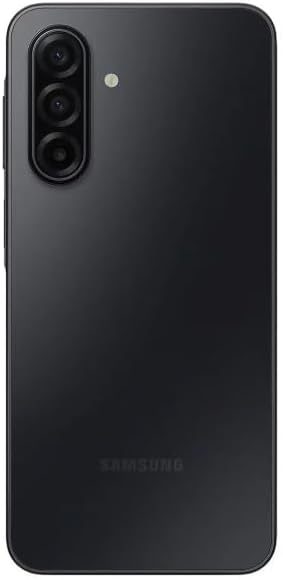
Abbildung 3: Rückseite view of the Samsung Galaxy A17 5G, highlighting the triple camera setup.
4.3. Leistung und Konnektivität
The device is powered by an Exynos 1330 (5nm) Octa-Core processor with a Mali-G68 MP2 GPU, ensuring smooth operation across applications and games. With 6GB of RAM and 128GB of internal storage (expandable via microSDXC), you have ample space and power for your daily tasks.
Enjoy ultra-fast 5G connectivity across global bands (1/3/5/7/8/20/28/38/40/41/66/77/78 SA/NSA/Sub6), providing reliable internet access for streaming, gaming, and communication.
4.4. Akkulaufzeit
The Samsung Galaxy A17 5G is equipped with a 5000mAh battery, designed to provide extended usage throughout your day. Actual battery life may vary based on network environment, usage patterns, and other factors.
5. Wartung
5.1. Software-Updates
Keep your device updated to ensure optimal performance, security, and access to the latest features. Samsung provides 6 generations of OS upgrades and 6 years of security updates for the Galaxy A17 5G.
- Nach Updates suchen: Gehe zu Einstellungen > Software-Update > Herunterladen und installieren.
- Automatische Updates: Enable automatic updates in the software update settings to receive them seamlessly.
5.2. Device Protection
The Galaxy A17 5G offers enhanced durability features:
- IP54-Bewertung: Provides splash protection against water and dust. Avoid submerging the device in water.
- Corning Gorilla Glass Victus: Offers improved scratch resistance for the display.
For additional protection, consider using a protective case and screen protector.
6. Fehlerbehebung
If you encounter issues with your Samsung Galaxy A17 5G, try the following basic troubleshooting steps:
- Starten Sie Ihr Gerät neu: Kleinere Softwarefehler lassen sich oft durch einen einfachen Neustart beheben.
- Verbindungen prüfen: Ensure Wi-Fi, Bluetooth, and mobile data are properly enabled and connected.
- App-Cache leeren: Falls eine App nicht ordnungsgemäß funktioniert, versuchen Sie, ihren Cache zu leeren über Einstellungen > Apps > [App-Name] > Speicher > Cache leeren.
- Software-Update: Verify that your device is running the latest software version (see Section 5.1).
- Werksreset (letzter Ausweg): Sollten die Probleme weiterhin bestehen, müssen Sie möglicherweise einen Werksreset durchführen. Warnung: Dadurch werden alle Daten auf Ihrem Gerät gelöscht. Sichern Sie wichtige Informationen, bevor Sie fortfahren. Gehe zu Einstellungen > Allgemeine Verwaltung > Zurücksetzen > Auf Werkseinstellungen zurücksetzen.
For more advanced troubleshooting or persistent issues, please refer to the Samsung support webWebsite oder wenden Sie sich an den Kundendienst.
7. Spezifikationen
| Besonderheit | Detail |
|---|---|
| Modellnummer | SM-A176B/DS |
| Anzeige | 6.7-inch Super AMOLED FHD+, 1080 x 2340 pixels, 90Hz Refresh Rate, 800 nits (HBM) |
| Prozessor | Exynos 1330 (5nm) Octa-Core (2.4 GHz) |
| RAM | 6 GB |
| Interner Speicher | 128 GB (erweiterbar über microSDXC, nutzt gemeinsamen SIM-Kartensteckplatz) |
| Rückfahrkamera | 50 MP (Weitwinkel) + 5 MP (Ultraweitwinkel) + 2 MP (Makro) |
| Frontkamera | 13 Megapixel |
| Batterie | 5000 mAh |
| Betriebssystem | Android 15 (One UI 7) |
| Konnektivität | 5G, WLAN, Bluetooth, GPS |
| SIM Typ | Dual-SIM (Nano-SIM) |
| Schutz | IP54-Spritzwasserschutz, Corning Gorilla Glass Victus |
| Maße | 6 x 4 x 2 Zoll |
| Gewicht | 9.5 Unzen |
8. Garantie und Support
Your Samsung Galaxy A17 5G comes with a manufacturer's warranty. Specific warranty terms and conditions, including duration and coverage, may vary by region (e.g., Latin America warranty mentioned in product details). Please refer to the warranty card included in your product packaging or visit the official Samsung webWebsite für detaillierte Informationen.
Für technischen Support, Service oder weitere Ressourcen besuchen Sie bitte die offizielle Samsung-Supportseite. website or contact their customer service. You can find contact information and FAQs on the Samsung webWebsite: www.samsung.com/support.