
1. Einleitung
This manual provides detailed instructions for the installation, configuration, and operation of the SOYO X99 BSF motherboard. It is designed to assist users in setting up their system correctly and efficiently. Please read this manual thoroughly before beginning the installation process.

Figure 1: SOYO X99 BSF Motherboard and included accessories, including the I/O shield, SATA cable, and CPU cooler mounting bracket.
2. Einrichtung und Installation
Follow these steps for proper installation of your SOYO X99 BSF motherboard and its components.
2.1 Motherboard-Layout

Figure 2: Detailed layout of the SOYO X99 BSF motherboard, highlighting key components and connectors such as the LGA2011-V3 CPU socket, DDR4 DIMM slots, M.2 NVMe slots, PCIe slots, and various headers.
2.2 CPU-Installation
- Ensure the motherboard is placed on a non-conductive surface.
- Locate the LGA2011-V3 CPU socket. Open the CPU retention mechanism by releasing die beiden Hebel.
- Carefully align the CPU (Intel Xeon E5 LGA2011-V3 series) with the socket, ensuring the gold triangle on the CPU matches the triangle on the socket. Do not force the CPU into the socket.
- Schließen Sie den Haltemechanismus, indem Sie die Hebel nach unten drücken, bis sie einrasten.
- Wärmeleitpaste auf die CPU auftragen und den CPU-Kühler montieren.
2.3 Installation des Arbeitsspeichers (RAM)
- Suchen Sie die vier DDR4-DIMM-Steckplätze.
- Öffnen Sie die Klemmen an beiden Enden des DIMM-Steckplatzes.
- Richten Sie das Speichermodul am Steckplatz aus und achten Sie darauf, dass die Kerbe am Modul mit der entsprechenden Markierung im Steckplatz übereinstimmt.
- Press down firmly on both ends of the memory module until the clips snap into place. For optimal performance, install memory modules in the gray primary channels first.
2.4 Installation des Speichergeräts
2.4.1 M.2 NVMe/SATA SSD Installation
- Locate the two M.2 slots on the motherboard. The upper slot supports NVMe (PCIe 3.0 x4) and SATA 3.0 protocols, while the lower slot supports NVMe (PCIe 3.0 x4) only.
- Setzen Sie die M.2 SSD in einem Winkel von 30 Grad in den Steckplatz ein.
- Drücken Sie die SSD vorsichtig nach unten und befestigen Sie sie mit der mitgelieferten Schraube.
2.4.2 SATA 3.0 Device Installation
- Connect one end of the SATA data cable to one of the four SATA 3.0 interfaces on the motherboard.
- Verbinden Sie das andere Ende des SATA-Datenkabels mit Ihrer SATA-Festplatte oder SSD.
- Verbinden Sie das Speichermedium mit einem SATA-Stromkabel von Ihrem Netzteil (PSU).
2.5 Stromanschlüsse
- Connect the 24-pin ATX power connector from your PSU to the 24-pin ATX power socket on the motherboard.
- Connect the 8-pin EPS power connector from your PSU to the 8-pin EPS power socket near the CPU.
2.6 Front Panel and Internal Headers
Refer to Figure 2 for the location of these headers.
- FPANEL (Front Panel Header): Connect the power switch, reset switch, power LED, and HDD activity LED from your PC case.
- USB 2.0-Anschluss: Connects to front panel USB 2.0 ports (expandable to 2 ports).
- USB 3.0-Anschluss: Connects to front panel USB 3.0 ports (expandable to 2 ports).
- Front Audio Header: Wird an die Audiobuchsen an der Vorderseite angeschlossen.
- CPU Fan Header (4-pin): Connect your CPU cooler fan.
- System Fan Header (3-pin): Connect a case fan.
- JBAT (CMOS Clear): Dient zum Löschen der CMOS-Einstellungen.
- JLPC (LPC Debug): For debugging purposes.
- SPEAK (System Speaker): Connects to a system speaker for POST codes.
- TPM Header (14-pin): For connecting a compatible TPM 2.0 module.
2.7 Anschlüsse des hinteren I/O-Panels
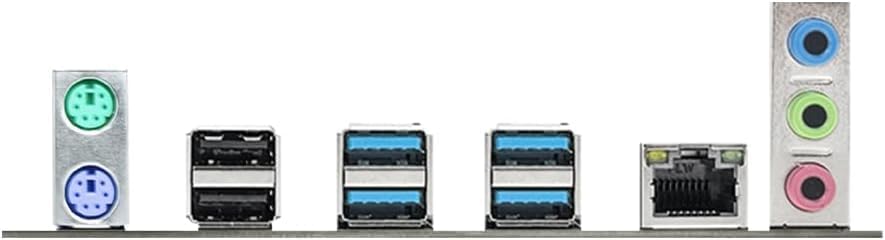
Abbildung 3: Nahaufnahme view of the rear input/output panel, showing PS/2 ports, USB 2.0 ports, USB 3.0 ports, RJ45 LAN port, and audio jacks.
- PS/2-Anschlüsse: 1 x PS/2 Keyboard port (green), 1 x PS/2 Mouse port (purple).
- USB 2.0 Ports: 2 x USB 2.0 ports (black).
- USB 3.0 Ports: 4 x USB 3.0 ports (blue).
- RJ45 LAN-Anschluss: 1 x Gigabit Ethernet port for network connection.
- Audiobuchsen: 1 x Line Out (green), 1 x MIC In (pink), 1 x Line In (blue) for audio devices.
2.8-Zoll-PCIe-Karteninstallation
- Locate the PCIe x16 3.0 slot (PCIe1, from CPU) for graphics cards and the PCIe x1 2.0 slot (PCIe2, from PCH) for other expansion cards.
- Entfernen Sie die entsprechende Steckplatzabdeckung von Ihrem PC-Gehäuse.
- Align the expansion card with the PCIe slot and press down firmly until it is seated correctly.
- Befestigen Sie die Karte mit einer Schraube am PC-Gehäuse.
3. Bedienungsanleitung
3.1 Erster Startvorgang
- Nachdem alle Komponenten installiert und angeschlossen sind, vergewissern Sie sich, dass die Stromversorgung eingeschaltet ist.
- Drücken Sie den Netzschalter an Ihrem PC-Gehäuse.
- Das System sollte sich einschalten, und Sie sollten den BIOS/UEFI-Startbildschirm sehen.
3.2 BIOS/UEFI-Einrichtung
To enter the BIOS/UEFI setup utility, press the designated key (commonly DEL or F2) during the initial boot-up sequence. Here you can configure system settings, boot order, and monitor hardware status.
3.3 Treiberinstallation
After installing your operating system, install the necessary drivers for the motherboard components. These typically include chipset drivers, LAN drivers, and audio drivers. Drivers are usually provided on a support CD or can be downloaded from the SOYO official webWebsite.
4. Wartung
- Sauber halten: Regularly clean dust from inside your PC case, especially around fans and heatsinks, to ensure optimal airflow and prevent overheating. Use compressed air for best results.
- BIOS-Updates: Periodically check the SOYO website for BIOS/UEFI updates. Updates can improve system stability, compatibility, and performance. Follow the update instructions carefully to avoid system damage.
- Kabelmanagement: Ensure cables are neatly routed to prevent obstruction of airflow and to facilitate future maintenance.
5. Fehlerbehebung
Sollten Probleme auftreten, beachten Sie bitte die folgenden gängigen Schritte zur Fehlerbehebung:
- Kein Strom: Check all power connections (24-pin ATX, 8-pin EPS) from the PSU to the motherboard. Ensure the PSU is switched on.
- Kein Bildschirm: Verify that the graphics card is properly seated in the PCIe slot and that the monitor cable is securely connected to the graphics card. If using integrated graphics (not applicable for this motherboard as it requires a dedicated GPU), ensure the monitor is connected to the motherboard's video output.
- Systeminstabilität/Abstürze: Check memory modules for proper seating. Test memory with diagnostic tools. Ensure CPU cooler is properly installed and making good contact. Check for overheating.
- Komponente nicht erkannt: Re-seat the component (e.g., RAM, M.2 SSD, SATA drive, PCIe card). Check power and data cables. Ensure drivers are installed.
- CMOS löschen: If the system fails to boot after making BIOS changes, clear the CMOS by shorting the JBAT header pins or removing the CMOS battery for a few minutes.
6. Spezifikationen
| Besonderheit | Spezifikation |
|---|---|
| Hersteller | SOJA |
| Modellnummer | X99 BSF |
| CPU-Sockel | LGA 2011-3 |
| Kompatible Prozessoren | Intel Xeon E5 LGA2011-V3 series (e.g., E5-2603V3, 2666V3, 2673V3, 2680V3, 2678V3, 2696V3, 2684V4, 2696V4) |
| Chipsatztyp | Intel X99 |
| Speichertechnologie | DDR4 |
| Memory Slots | 4 x DDR4 DIMM-Steckplätze |
| Maximale Speicherkapazität | Up to 128GB (32GB x 4) |
| Supported Memory Speed | 2133/2400MHz (Max) |
| Speicherschnittstellen | 2 x M.2 slots (Upper: NVMe PCIe 3.0 x4/SATA3.0; Lower: NVMe PCIe 3.0 x4) 4 x SATA3.0-Schnittstellen |
| PCIe-Steckplätze | 1 x PCIe x16 3.0 slot (from CPU) 1 x PCIe x1 2.0 slot (from PCH) |
| Audio-Chip | Realtek ALC897 HD Audio |
| LAN Chip | Realtek RTL8111H Gigabit Ethernet |
| E/A-Anschlüsse auf der Rückseite | 2 x USB 2.0, 4 x USB 3.0, 1 x RJ45, 1 x Line Out, 1 x MIC In, 1 x Line In, 1 x PS/2 Keyboard, 1 x PS/2 Mouse |
| Interne Header | 1 x FPANEL, 1 x 4-pin CPU fan, 1 x 3-pin system fan, 1 x JBAT, 1 x JLPC, 1 x SPEAK, 1 x USB 2.0 (exp. 2 ports), 1 x USB 3.0 (exp. 2 ports), 1 x Front Audio, 1 x 14-pin TPM |
| Leistungsaufnahme | 24-pin ATX + 8-pin EPS connectors |
| Maße | 220 x 190mm (4-layer PCB) |
| Plattformkompatibilität | Windows 11 |
7. Garantie und Support
For warranty information, please refer to the documentation included with your purchase or contact your retailer. For technical support, driver downloads, and further assistance, please visit the official SOYO website or contact SOYO customer service.
You can find more information about SOYO products at their official store: SOYO Store on Amazon.